本文逐步讲解如何使用 agent 客户端 API 为Power Pages网站生成完全自定义的聊天界面。 与标准聊天小组件不同,此方法可让你完全控制用户界面设计、样式设置和用户体验。
步骤 1:创建站点代理
登录到 Power Pages。
选择 “+ 编辑”。
转到 “设置 ”工作区,然后选择 “代理”。
使用切换开关来启用 站点代理。
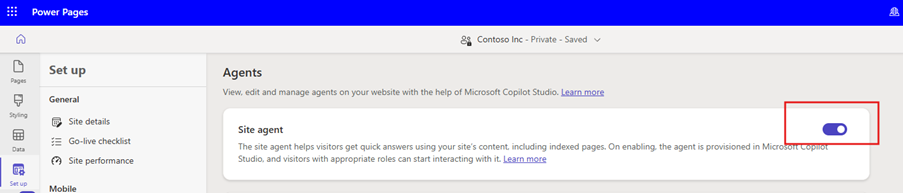
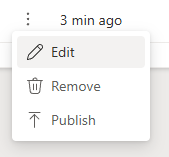
成功预配后,Power Pages 会添加一个新的代理,站点名称后附加“bot”。代理会显示在站点列表的 Agents 部分。 选择新预配代理旁边的三个垂直点,然后选择“ 编辑”。
将 “在聊天小组件中显示 ”切换设置为 “打开”。
注释
设置为 “关闭”时,代理不适用于任何用户。
为可以与代理交互的用户选择 管理员 角色。
复制架构名称以供以后使用。
选择“保存”。
步骤 2. 创建网页
启动Power Pages设计工作室。 有关详细信息,请参阅 “使用设计工作室”。
在 “页面 ”工作区中,选择“ + 页面”。
在 “描述页面以创建它 ”对话框中,选择 “添加页面的其他方法”。
在 “添加页面 ”对话框中,输入页面的详细信息,如下所示:
- 在Name字段中,输入虚拟助理,然后选择从空白开始布局。
- 选择 并添加。
选择右上角的 “编辑代码 ”选项。
在 用于 Web 的 Visual Studio Code 编辑 对话框中,选择 打开 Visual Studio Code。
将 HTML 页中找到的代码替换为以下内容:
<div class="row sectionBlockLayout text-start" style="min-height:auto;padding:8px">
<div class="container" style="display:flex;flex-wrap:wrap">
<div class="col-lg-12 columnBlockLayout" style="padding:0;margin:0;min-height:200px">
<style>
#va-shell {
--accent: #0f6cbd;
--accent-dk: #0c57a8;
--bg: #f5f7fa;
--bot-bg: #f0f4f9;
--fg: #1b2333;
--border: #e2e8f0;
display: flex;
flex-direction: column;
max-width: 860px;
height: calc(100vh - 150px);
min-height: 480px;
margin: 20px auto;
background: #fff;
border-radius: 16px;
box-shadow: 0 4px 24px rgba(0, 0, 0, .10);
border: 1px solid var(--border);
overflow: hidden;
font: 15px/1.55 -apple-system, BlinkMacSystemFont, "Segoe UI", sans-serif;
color: var(--fg);
}
/* Transcript */
#va-transcript {
flex: 1;
min-height: 0;
overflow-y: auto;
padding: 20px;
background: var(--bg);
display: flex;
flex-direction: column;
gap: 4px;
scroll-behavior: smooth;
}
#va-transcript::-webkit-scrollbar {
width: 6px;
}
#va-transcript::-webkit-scrollbar-thumb {
background: #c8d0db;
border-radius: 3px;
}
/* Message rows */
.msg {
display: flex;
align-items: flex-end;
gap: 8px;
max-width: 78%;
animation: fadeUp .18s ease-out;
}
.msg.user {
flex-direction: row-reverse;
align-self: flex-end;
}
.msg.bot,
.msg.error {
align-self: flex-start;
}
@keyframes fadeUp {
from {
opacity: 0;
transform: translateY(6px);
}
to {
opacity: 1;
transform: none;
}
}
.bot-icon {
width: 28px;
height: 28px;
border-radius: 50%;
background: var(--accent);
color: #fff;
display: grid;
place-items: center;
flex-shrink: 0;
}
.bot-icon svg {
width: 14px;
height: 14px;
}
.bubble {
padding: 10px 14px;
border-radius: 10px;
word-break: break-word;
}
.user .bubble {
background: var(--accent);
color: #fff;
border-bottom-right-radius: 3px;
}
.bot .bubble {
background: var(--bot-bg);
border-bottom-left-radius: 3px;
}
.error .bubble {
background: #fef2f2;
color: #b91c1c;
border: 1px solid #fca5a5;
border-bottom-left-radius: 3px;
}
.bubble p {
margin: 0 0 .5em;
}
.bubble p:last-child {
margin: 0;
}
.bubble strong {
font-weight: 600;
}
.bubble code {
font-family: Consolas, monospace;
font-size: .88em;
background: rgba(0, 0, 0, .08);
padding: 1px 5px;
border-radius: 4px;
}
.user .bubble code {
background: rgba(255, 255, 255, .2);
}
.bubble pre {
background: #1e293b;
color: #e2e8f0;
padding: 12px;
border-radius: 8px;
overflow-x: auto;
margin: 8px 0;
font-size: .85em;
}
.bubble pre code {
background: none;
padding: 0;
}
.bubble a {
color: inherit;
text-decoration: underline;
text-underline-offset: 2px;
}
.bubble ul,
.bubble ol {
margin: 6px 0;
padding-left: 20px;
}
.ts {
font-size: 11px;
opacity: .5;
margin-top: 4px;
display: block;
}
.user .ts {
text-align: right;
}
/* Typing indicator */
#va-typing {
display: none;
align-items: flex-end;
gap: 8px;
align-self: flex-start;
padding-bottom: 4px;
}
#va-typing.show {
display: flex;
animation: fadeUp .18s ease-out;
}
#va-dots {
background: var(--bot-bg);
border-radius: 10px;
border-bottom-left-radius: 3px;
padding: 12px 16px;
display: flex;
gap: 5px;
}
.dot {
width: 7px;
height: 7px;
border-radius: 50%;
background: #94a3b8;
animation: bounce 1.2s infinite;
}
.dot:nth-child(2) {
animation-delay: .2s;
}
.dot:nth-child(3) {
animation-delay: .4s;
}
@keyframes bounce {
0%,
60%,
100% {
transform: translateY(0);
opacity: .5;
}
30% {
transform: translateY(-5px);
opacity: 1;
}
}
/* Date divider */
.divider {
display: flex;
align-items: center;
gap: 10px;
color: #94a3b8;
font-size: 12px;
margin: 10px 0 6px;
user-select: none;
}
.divider::before,
.divider::after {
content: '';
flex: 1;
height: 1px;
background: var(--border);
}
/* Composer */
#va-composer {
padding: 12px 16px 10px;
background: #fff;
border-top: 1px solid var(--border);
flex-shrink: 0;
}
#va-wrap {
display: flex;
align-items: flex-end;
gap: 8px;
background: var(--bg);
border: 1.5px solid var(--border);
border-radius: 12px;
padding: 8px 8px 8px 14px;
transition: border-color .15s, box-shadow .15s;
}
#va-wrap:focus-within {
border-color: var(--accent);
box-shadow: 0 0 0 3px rgba(15, 108, 189, .12);
}
#va-input {
flex: 1;
border: none;
background: none;
outline: none;
resize: none;
font: inherit;
color: inherit;
max-height: 160px;
overflow-y: auto;
}
#va-input::placeholder {
color: #94a3b8;
}
#va-input:disabled {
opacity: .55;
}
#va-send {
width: 38px;
height: 38px;
border-radius: 9px;
border: none;
background: var(--accent);
color: #fff;
cursor: pointer;
display: grid;
place-items: center;
flex-shrink: 0;
transition: background .15s, transform .1s, opacity .15s;
}
#va-send:hover:not(:disabled) {
background: var(--accent-dk);
transform: scale(1.05);
}
#va-send:disabled {
opacity: .4;
cursor: not-allowed;
}
#va-hint {
margin: 6px 0 0;
font-size: 12px;
color: #94a3b8;
text-align: center;
}
#va-hint kbd {
background: #f1f5f9;
border: 1px solid #cbd5e1;
border-radius: 4px;
padding: 1px 5px;
font-size: 11px;
font-family: inherit;
color: #475569;
}
@media (max-width: 640px) {
#va-shell {
height: 100svh;
min-height: unset;
margin: 0;
border-radius: 0;
border-inline: none;
}
.msg {
max-width: 92%;
}
#va-hint {
display: none;
}
}
</style>
<div id="va-shell">
<main id="va-transcript" role="log" aria-live="polite" aria-label="Chat transcript">
<div id="va-typing" role="status" aria-label="Assistant is typing">
<div class="bot-icon" aria-hidden="true">
<svg viewBox="0 0 24 24" fill="currentColor">
<path d="M12 2C6.48 2 2 6.48 2 12s4.48 10 10 10 10-4.48 10-10S17.52 2 12 2zm-1 15v-4H7l5-8v4h4l-5 8z" />
</svg>
</div>
<div id="va-dots" aria-hidden="true">
<span class="dot"></span><span class="dot"></span><span class="dot"></span>
</div>
</div>
</main>
<footer id="va-composer">
<div id="va-wrap">
<textarea id="va-input" placeholder="Ask me anything…" rows="1" maxlength="4000" spellcheck="true"
aria-label="Message input"></textarea>
<button id="va-send" type="button" aria-label="Send message" disabled>
<svg viewBox="0 0 24 24" width="20" height="20" fill="currentColor">
<path d="M2.01 21L23 12 2.01 3 2 10l15 2-15 2z" />
</svg>
</button>
</div>
<p id="va-hint">Press <kbd>Enter</kbd> to send · <kbd>Shift</kbd>+<kbd>Enter</kbd> for new line
· <kbd>Ctrl</kbd>+<kbd>N</kbd> for new conversation</p>
</footer>
</div>
<script>
(function () {
'use strict';
const AGENT_SCHEMA = '<Replace agent schema name>';
const WELCOME = "Hello! I'm your Virtual Assistant. How can I help you today?";
let msgs = [], busy = false;
const el = id => document.getElementById(id);
const transcript = el('va-transcript');
const input = el('va-input');
const sendBtn = el('va-send');
const typing = el('va-typing');
/* ── Safe markdown renderer ── */
const md = (() => {
const esc = s => s.replace(/&/g, '&').replace(/</g, '<').replace(/>/g, '>').replace(/"/g, '"');
const href = u => { try { return /^https?:|mailto:/.test(new URL(u).protocol) ? esc(u) : '#'; } catch { return '#'; } };
const span = s => s
.replace(/`([^`]+)`/g, (_, c) => `<code>${c}</code>`)
.replace(/\*\*(.+?)\*\*/g, (_, t) => `<strong>${t}</strong>`)
.replace(/\*(.+?)\*/g, (_, t) => `<em>${t}</em>`)
.replace(/\[([^\]]+)\]\(([^)]+)\)/g, (_, l, u) => `<a href="${href(u)}" target="_blank" rel="noopener">${l}</a>`);
return {
esc, render: raw => {
if (!raw) return '';
const blocks = [];
const src = raw.replace(/\r\n/g, '\n')
.replace(/```(\w*)\n?([\s\S]*?)```/g, (_, l, c) => (blocks.push({ l, c }), `\x00${blocks.length - 1}\x00`));
let html = '', list = [], lt = '';
const flush = () => {
if (!list.length) return;
html += `<${lt}>${list.map(i => `<li>${span(i)}</li>`).join('')}</${lt}>`;
list = []; lt = '';
};
src.split('\n').forEach(line => {
if (/^\x00\d+\x00$/.test(line)) {
flush();
const { l, c } = blocks[+line.replace(/\x00/g, '')];
html += `<pre><code${l ? ` class="language-${esc(l)}"` : ''}>${esc(c)}</code></pre>`;
return;
}
const ul = line.match(/^[*-] (.+)/);
const ol = line.match(/^\d+\. (.+)/);
if (ul) { if (lt && lt !== 'ul') flush(); lt = 'ul'; list.push(ul[1]); return; }
if (ol) { if (lt && lt !== 'ol') flush(); lt = 'ol'; list.push(ol[1]); return; }
flush();
const h = line.match(/^(#{1,3}) (.+)/);
if (h) { const n = h[1].length + 2; html += `<h${n}>${span(h[2])}</h${n}>`; return; }
if (/^(-{3,}|\*{3,})$/.test(line.trim())) { html += '<hr>'; return; }
html += line.trim() ? `<p>${span(line)}</p>` : '<br>';
});
flush();
return html.replace(/(<br>){2,}/g, '<br>');
}
};
})();
/* ── Render a message bubble ── */
function bubble(msg) {
const row = document.createElement('div');
row.className = `msg ${msg.role}`;
const plain = msg.role === 'user' || msg.role === 'error' || msg.format === 'plain';
const content = plain
? `<p>${md.esc(msg.text).replace(/\n/g, '<br>')}</p>`
: md.render(msg.text);
const icon = `<div class="bot-icon" aria-hidden="true"><svg viewBox="0 0 24 24" fill="currentColor"><path d="M12 2C6.48 2 2 6.48 2 12s4.48 10 10 10 10-4.48 10-10S17.52 2 12 2zm-1 15v-4H7l5-8v4h4l-5 8z"/></svg></div>`;
const d = new Date(msg.time);
const h = d.getHours() % 12 || 12;
const ts = `${h}:${String(d.getMinutes()).padStart(2, '0')} ${d.getHours() < 12 ? 'AM' : 'PM'}`;
row.innerHTML = `${msg.role !== 'user' ? icon : ''}<div class="bubble">${content}<time class="ts">${ts}</time></div>`;
transcript.insertBefore(row, typing);
transcript.scrollTop = transcript.scrollHeight;
}
function addDivider() {
const d = document.createElement('div');
d.className = 'divider';
d.textContent = new Date().toLocaleDateString([], { weekday: 'long', month: 'long', day: 'numeric' });
transcript.insertBefore(d, typing);
}
/* ── State helpers ── */
const setBusy = b => { busy = b; input.disabled = b; sendBtn.disabled = b || !input.value.trim(); };
const showTyping = () => { typing.classList.add('show'); transcript.scrollTop = transcript.scrollHeight; };
const hideTyping = () => { typing.classList.remove('show'); };
/* ── Send ── */
function send() {
const text = input.value.trim();
if (!text || busy) return;
msgs.push({ role: 'user', text, format: 'plain', time: new Date() });
bubble(msgs[msgs.length - 1]);
input.value = ''; resize(); setBusy(true); showTyping();
if (typeof window.$pages?.agent?.SendActivity !== 'function') {
console.error('[VA] $pages.agent.SendActivity not available. Add the Agent component to this page in Power Pages Studio.');
return onError({ message: '$pages.agent not available' });
}
try {
window.$pages.agent.SendActivity(AGENT_SCHEMA, { text }, onResponse, onError);
} catch (e) { console.error('[VA]', e); onError(e); }
}
function onResponse(r) {
hideTyping(); setBusy(false);
if (!r || r.type !== 'message' || !r.text) return;
const m = { role: 'bot', text: r.text, format: (r.textFormat || 'markdown').toLowerCase(), time: new Date() };
msgs.push(m); bubble(m); input.focus();
}
function onError(e) {
console.error('[VA] Agent error:', e);
hideTyping(); setBusy(false);
const text = e?.message?.includes('$pages.agent')
? 'The Virtual Assistant integration isn\'t available here. Ensure the Agent component is configured in Power Pages Studio for this page.'
: 'Sorry \u2014 I couldn\'t reach the assistant. Please try again.';
const m = { role: 'error', text, format: 'plain', time: new Date() };
msgs.push(m); bubble(m); input.focus();
}
/* ── Clear chat ── */
function clearChat() {
msgs = [];
Array.from(transcript.children).forEach(c => { if (c !== typing) transcript.removeChild(c); });
addDivider();
const w = { role: 'bot', text: WELCOME, format: 'plain', time: new Date() };
msgs.push(w); bubble(w); input.focus();
}
/* ── Auto-resize textarea ── */
function resize() {
input.style.height = 'auto';
input.style.height = Math.min(input.scrollHeight, 160) + 'px';
}
/* ── Init ── */
sendBtn.addEventListener('click', send);
input.addEventListener('keydown', e => { if (e.key === 'Enter' && !e.shiftKey) { e.preventDefault(); send(); } });
input.addEventListener('input', () => { resize(); sendBtn.disabled = busy || !input.value.trim(); });
document.addEventListener('keydown', e => { if ((e.ctrlKey || e.metaKey) && e.key === 'n') { e.preventDefault(); clearChat(); } });
addDivider();
const w = { role: 'bot', text: WELCOME, format: 'plain', time: new Date() };
msgs.push(w); bubble(w); input.focus();
})();
</script>
</div>
</div>
</div>
- 使用之前复制的值更新 AGENT_SCHEMA 变量。
- 保存文件。
- 返回到Power Pages设计器。
- 在 在 Web 版 Visual Studio Code 中编辑代码 对话框中,请按照说明进行操作,然后选择 Sync 按钮。
步骤 3:隐藏默认聊天小组件
重写样式,如以下代码所示,在页眉模板中隐藏默认小组件,以避免页面出现两个聊天界面。
  /* Hide the default floating bot widget */
  .pva-floating-style { display: none !important; }
步骤 4:开始与代理对话
测试代理功能:
- 选择 “预览”,然后选择 “桌面”。
- 使用已分配的用户帐户登录到站点。 在上一步中选择 “管理员” 角色时,在本示例中,以管理员身份登录。
- 转到之前创建的 虚拟助理 网页。
- 验证操作