使用ConnectToGit和DisconnectFromGitAPI,以编程方式将您的 Microsoft Dataverse 环境与 Git 版本控制集成。 使用这些 API,可以将单个解决方案或整个环境连接到受支持的 Git 存储库,并通过代码管理这些连接。
先决条件
使用这些 API 之前,请确保具备:
- 访问 Microsoft Dataverse 环境
- 系统管理员权限
- 对 Git 存储库的读取和写入访问权限
ConnectToGit API
在 Dataverse 解决方案或环境与 Git 存储库之间创建连接。 使用此连接,可以管理 Dataverse 组件的源代码管理。
Parameters
API ConnectToGit 接受以下参数:
| 参数 | 类型 | 必选 | Description |
|---|---|---|---|
GitFolder |
String | Yes | 要将解决方案或环境绑定到的文件夹的名称。 |
Branch |
String | Yes | 要连接到的分支的名称。 |
ConnectionType |
Integer | No | 指定要连接的目标。 请参阅 ConnectionType 参数。 |
GitProvider |
Integer | No | Git 提供商。 请参阅 GitProvider 参数。 |
Organization |
String | No | 要连接到的组织的名称。 |
Project |
String | No | 要连接到的项目的名称。 |
Repository |
String | No | 要连接到的存储库的名称。 |
RootFolder |
String | No | 在解决方案范围内,所有解决方案所在的根文件夹名称。 |
SolutionUniqueName |
String | No | 要连接到 git 的解决方案的唯一名称。 |
UpstreamBranch |
String | No | 要连接到的上游分支的名称。 默认为存储库的默认分支。 |
GitHubConnectionId |
String | No | Power Platform GitHub连接的连接 ID。 当 GitProvider 为 1 时,为必填项,除非您提供 GitHubPAT。 为 Dataverse 环境启用虚拟网络(VNET)支持时,不能使用。 |
GitHubPAT |
String | No | 具有目标仓库访问权限的 GitHub 个人访问令牌。 当 GitProvider 为 1 时,此项为必填,除非提供了 GitHubConnectionId。 为 Dataverse 环境启用虚拟网络(VNET)支持时需要。 |
GitHubAppConfigId |
String | No | 对GitHub应用配置记录的引用。 当 GitProvider 是 1 时为必需项。 使用 githubappconfigs(<recordId>) 格式。 |
ConnectionType 参数
参数 ConnectionType 控制是连接到整个 Dataverse 环境还是特定解决方案。
| Value | 标签 | Description |
|---|---|---|
| 0 | 解决方案 | 将特定的 Dataverse 解决方案连接到 Git。 |
| 1 | 环境 | 将整个 Dataverse 环境连接到 Git。 |
GitProvider 参数
使用 GitProvider 参数指定正在使用的 Git 提供程序的类型,即 Azure DevOps 或 GitHub。
| Value | 标签 | Description |
|---|---|---|
| 0 | Azure DevOps | 适用于 Azure DevOps 上托管的存储库 |
| 1 | GitHub | 用于托管在 GitHub 上的存储库 |
DisconnectFromGit API
从 Dataverse 解决方案或环境中删除 Git 连接,并禁用源代码管理集成。
参数
DisconnectFromGit API 只有一个参数。
| 参数 | 类型 | 必选 | Description |
|---|---|---|---|
SolutionUniqueName |
String | No | 要从 Git 断开连接的解决方案的唯一名称。 若省略此项,将断开所有解决方案或该环境的连接。 |
其他信息
下面是在调用 DisconnectFromGit时要指定的几个参数值选项。
-
断开某一解决方案的连接:提供
SolutionUniqueName方法以断开特定解决方案的连接。 - 断开所有解决方案:不提供参数以断开所有解决方案级别的连接。
- 断开环境连接:不提供任何参数以断开环境级别的连接。
例子
以下示例介绍使用 ConnectToGit 和 DisconnectFromGit API 的方案:
- 将整个 Dataverse 环境连接到 Azure DevOps 存储库
- 连接到GitHub存储库
- 使用 PowerShell 连接到GitHub存储库
- 断开整个 Dataverse 环境与 Git 源代码管理的连接
- 将第一个解决方案连接到 Git 存储库
- 连接初始解决方案后,将额外解决方案连接到同一 Git 存储库
- 断开特定解决方案与 Git 源代码管理的连接,同时使其他解决方案保持连接
将整个 Dataverse 环境连接到 Azure DevOps 存储库
此连接为所有环境级配置和组件启用源代码管理。
不要与此连接使用这些参数:
RootFolderSolutionUniqueNameUpstreamBranch
此示例演示如何使用 ConnectToGit 操作 将整个 Dataverse 环境连接到 Azure DevOps 存储库。
请求
POST [Organization URI]/api/data/v9.2/ConnectToGit HTTP/1.1
Accept: application/json
Content-Type: application/json; charset=utf-8
OData-MaxVersion: 4.0
OData-Version: 4.0

{
   "GitFolder": "yourGitfolderName",
   "Branch": "yourBranchName",
   "ConnectionType": 1,
   "GitProvider": 0,
   "Organization": "yourOrganizationName",
   "Project": "yourProjectName",
   "Repository": "yourRepositoryName"
}
响应
HTTP/1.1 204 No Content
OData-Version: 4.0
连接到GitHub存储库
在使用 API 连接到GitHub之前,请完成创建GitHub应用的设置步骤,将其安装在目标存储库上,将其私钥导入Azure 密钥保管库,并创建 Power Platform GitHub连接。 有关详细信息,请参阅“连接到GitHub”。
使用 Web API 创建GitHub应用配置记录
使用 Dataverse OData Web API 创建记录 githubappconfig 。 使用GitHub应用客户端 ID、密钥保管库 URI 和密钥名称发送 POST 请求。
可以使用任何 HTTP 客户端(如失眠、Visual Studio Code REST 客户端或 curl)进行这些调用。 需要持有者令牌进行身份验证。 有关详细信息,请参阅使用 Microsoft Dataverse Web API。
POST {{DataverseOrgUrl}}/api/data/v9.2/githubappconfigs
Authorization: Bearer {{token}}
Content-Type: application/json

{
    "githubappid": "Iv23liBWoH9sf7xDrRe6",
    "keyvaulturi": "{{KeyVaultUri}}",
    "keyname": "demoGitHubKey"
}
Important
请注意响应标头中返回的记录 ID。 需要此值来标识托管标识、配置 RBAC 和调用 ConnectToGit。 记录 ID 采用如 13d565bb-4c22-f111-a546-7ced8d6e3e85 所示的格式。
创建 GitHub 应用配置记录后,如 配置 密钥保管库 基于角色的访问控制 (RBAC) 中所述,将 密钥保管库 Crypto User 角色分配给 Dataverse 托管标识。
调用 ConnectToGit API
创建githubappconfig记录并配置 密钥保管库 RBAC 后,请使用 Dataverse Web API 通过调用ConnectToGit操作建立源代码管理连接。
POST {{DataverseOrgUrl}}/api/data/v9.2/ConnectToGit
Authorization: Bearer {{token}}
Content-Type: application/json

{
    "GitProvider": 1,
    "ConnectionType": 1,
    "Organization": "YourGitHubOrg",
    "Repository": "YourRepo",
    "Project": "placeholder",
    "Branch": "yourBranch",
    "UpstreamBranch": "main",
    "GitFolder": "YourFolder",
    "GitHubConnectionId": "<connectionId>",
    "GitHubAppConfigId": "githubappconfigs(<recordId>)"
}
Important
分支必须已存在于存储库中。 如果需要,请先在GitHub中创建它。 该值 GitHubAppConfigId 必须使用格式 githubappconfigs(<recordId>)。
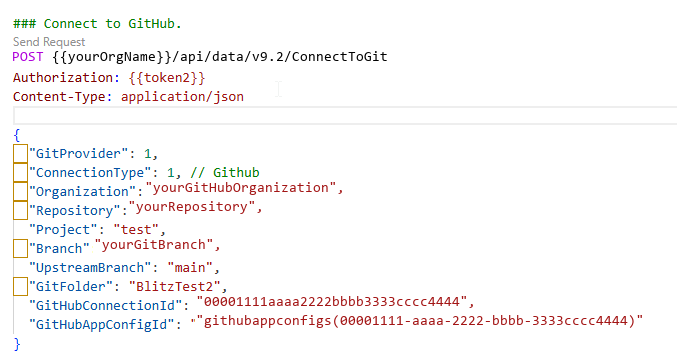
如果收到成功的响应,则环境将连接到GitHub。
使用 PowerShell 连接到GitHub存储库
以下 PowerShell 示例创建GitHub应用配置记录,等待 Dataverse 托管标识显示在Microsoft Entra ID中,将 密钥保管库 Crypto User 角色分配给托管标识,并调用该ConnectToGit操作。 如果已有GitHub应用配置记录,请提供GitHubAppConfigId以跳过配置并密钥保管库角色分配步骤。
在运行该示例之前,请先安装并导入 Az.Accounts、Az.KeyVault 和 Az.Resources PowerShell 模块。 请使用具有 Dataverse 环境访问权限且有权分配 密钥保管库 角色的帐户登录 Connect-AzAccount。
如果为 Dataverse 环境启用了虚拟网络(VNET)支持,请提供 GitHubPAT。 GitHub连接不能用于虚拟网络支持。
[CmdletBinding()]
param(
    [Parameter(Mandatory)]
    [string]$DataverseOrgUrl,

    [Parameter(Mandatory)]
    [string]$GitHubOrg,

    [Parameter(Mandatory)]
    [string]$GitHubRepo,

    [Parameter(Mandatory)]
    [string]$Branch,

    [Parameter(Mandatory)]
    [string]$GitFolder,

    [string]$GitHubAppClientId,

    [string]$KeyVaultName,

    [string]$KeyVaultKeyName,

    [string]$GitHubAppConfigId,

    [string]$GitHubConnectionId,

    [string]$GitHubPAT,

    [ValidateSet(0, 1)]
    [int]$ConnectionType = 1,

    [string]$UpstreamBranch,

    [string]$RootFolder,

    [string]$SolutionUniqueName
)

Set-StrictMode -Version 3.0
$ErrorActionPreference = "Stop"

if (($GitHubConnectionId -and $GitHubPAT) -or (-not $GitHubConnectionId -and -not $GitHubPAT)) {
    throw "Specify either -GitHubConnectionId or -GitHubPAT, but not both."
}

if (-not $GitHubAppConfigId) {
    foreach ($name in @('GitHubAppClientId', 'KeyVaultName', 'KeyVaultKeyName')) {
        if ([string]::IsNullOrWhiteSpace((Get-Variable -Name $name -ValueOnly))) {
            throw "Specify -$name when -GitHubAppConfigId is not provided."
        }
    }
}

$dataverseResource = $DataverseOrgUrl.TrimEnd('/')
$tokenResult = Get-AzAccessToken -ResourceUrl $dataverseResource -AsSecureString
$dataverseToken = [System.Net.NetworkCredential]::new('', $tokenResult.Token).Password

function Invoke-DataverseApi {
    param(
        [Parameter(Mandatory)]
        [string]$Method,

        [Parameter(Mandatory)]
        [string]$Endpoint,

        [object]$Body,

        [switch]$ReturnHeaders
    )

    $headers = @{
        Authorization      = "Bearer $dataverseToken"
        "OData-MaxVersion" = "4.0"
        "OData-Version"    = "4.0"
    }

    $request = @{
        Method      = $Method
        Uri         = "$dataverseResource/api/data/v9.2/$Endpoint"
        Headers     = $headers
        ContentType = "application/json; charset=utf-8"
    }

    if ($Body) {
        $request.Body = $Body | ConvertTo-Json -Depth 10
    }

    if ($ReturnHeaders) {
        return (Invoke-WebRequest @request).Headers
    }

    Invoke-RestMethod @request
}

$appConfigRecordId = $GitHubAppConfigId

if (-not $appConfigRecordId) {
    $keyVault = Get-AzKeyVault -VaultName $KeyVaultName
    $keyVaultUri = 'https://' + $KeyVaultName + '.vault.azure.net/'

    $appConfigBody = @{
        githubappid = $GitHubAppClientId
        keyvaulturi = $keyVaultUri
        keyname     = $KeyVaultKeyName
    }

    $responseHeaders = Invoke-DataverseApi `
        -Method POST `
        -Endpoint "githubappconfigs" `
        -Body $appConfigBody `
        -ReturnHeaders

    $entityIdHeader = [string]$responseHeaders["OData-EntityId"]
    if ($entityIdHeader -notmatch '\(([0-9a-f-]+)\)') {
        throw "Could not read the GitHub App configuration record ID from the Dataverse response."
    }

    $appConfigRecordId = $Matches[1]
    $managedIdentityName = "PPMI-githubappconfigmanagedidentity-$appConfigRecordId"

    $servicePrincipal = $null
    for ($attempt = 1; $attempt -le 60; $attempt++) {
        $servicePrincipal = Get-AzADServicePrincipal -DisplayName $managedIdentityName -ErrorAction SilentlyContinue
        if ($servicePrincipal) {
            break
        }

        Start-Sleep -Seconds 1
    }

    if (-not $servicePrincipal) {
        throw "The Dataverse managed identity was not found in Microsoft Entra ID. Check Dataverse System Jobs for GitHub App configuration errors."
    }

    $keyVaultScope = $keyVault.ResourceId
    if (-not $keyVaultScope) {
        $subscriptionId = (Get-AzContext).Subscription.Id
        $keyVaultScope = "/subscriptions/$subscriptionId/resourceGroups/$($keyVault.ResourceGroupName)/providers/Microsoft.KeyVault/vaults/$KeyVaultName"
    }

    $keyVaultCryptoUserRoleId = "12338af0-0e69-4776-bea7-57ae8d297424"
    $existingAssignment = Get-AzRoleAssignment `
        -ObjectId $servicePrincipal.Id `
        -RoleDefinitionId $keyVaultCryptoUserRoleId `
        -Scope $keyVaultScope `
        -ErrorAction SilentlyContinue

    if (-not $existingAssignment) {
        New-AzRoleAssignment `
            -ObjectId $servicePrincipal.Id `
            -RoleDefinitionId $keyVaultCryptoUserRoleId `
            -Scope $keyVaultScope | Out-Null
    }
}

$connectBody = @{
    GitProvider          = 1
    ConnectionType       = $ConnectionType
    Organization         = $GitHubOrg
    Repository           = $GitHubRepo
    Project              = "placeholder"
    Branch               = $Branch
    GitFolder            = $GitFolder
    GitHubAppConfigId    = "githubappconfigs($appConfigRecordId)"
}

if ($GitHubConnectionId) { $connectBody.GitHubConnectionId = $GitHubConnectionId }
if ($GitHubPAT)          { $connectBody.GitHubPAT          = $GitHubPAT }
if ($UpstreamBranch)     { $connectBody.UpstreamBranch     = $UpstreamBranch }
if ($RootFolder)         { $connectBody.RootFolder         = $RootFolder }
if ($SolutionUniqueName) { $connectBody.SolutionUniqueName = $SolutionUniqueName }

Invoke-DataverseApi -Method POST -Endpoint "ConnectToGit" -Body $connectBody
Write-Host "Connected Dataverse Git integration to GitHub."
断开整个 Dataverse 环境与 Git 源代码管理的连接
此操作将删除环境级 Git 连接。 请勿在此操作中使用SolutionUniqueName参数。 Dataverse 会自动标识和删除环境级 Git 连接。
此示例演示如何使用 DisconnectFromGit 操作 断开整个 Dataverse 环境与 Git 源代码管理的连接。
请求
POST [Organization URI]/api/data/v9.2/DisconnectFromGit HTTP/1.1
Accept: application/json
Content-Type: application/json; charset=utf-8
OData-MaxVersion: 4.0
OData-Version: 4.0
响应
HTTP/1.1 204 No Content
OData-Version: 4.0
将第一个解决方案连接到 Git 存储库
此连接会为环境中的第一个解决方案建立存储库链接及文件夹结构,用于解决方案级别的源代码控制。
需要包括这些参数的值才能指定解决方案:
RootFolderSolutionUniqueName
此示例演示如何使用 ConnectToGit 操作 将第一个解决方案连接到 Git 存储库。
请求
POST [Organization URI]/api/data/v9.2/ConnectToGit HTTP/1.1
Accept: application/json
Content-Type: application/json; charset=utf-8
OData-MaxVersion: 4.0
OData-Version: 4.0

{
   "GitFolder": "yourGitfolderName",
   "Branch": "yourBranchName",
   "ConnectionType": 1,
   "GitProvider": 0,
   "Organization": "yourOrganizationName",
   "Project": "yourProjectName",
   "Repository": "yourRepositoryName",
   "RootFolder": "yourRootFolderName",
   "SolutionUniqueName": "yourSolutionUniqueName"
}
响应
HTTP/1.1 204 No Content
OData-Version: 4.0
连接初始解决方案后,将额外解决方案连接到同一 Git 存储库
连接第一个解决方案后,只需要该解决方案的特定参数。 从初始连接继承了存储库连接信息。
仅设置以下参数:
SolutionUniqueNameBranchGitFolder
Important
您必须先连接第一个方案,然后此功能才能正常工作。 请参阅 将第一个解决方案连接到 Git 存储库。
此示例演示如何使用 ConnectToGit 操作 将后续解决方案连接到 Git 存储库。
请求
POST [Organization URI]/api/data/v9.2/ConnectToGit HTTP/1.1
Accept: application/json
Content-Type: application/json; charset=utf-8
OData-MaxVersion: 4.0
OData-Version: 4.0

{
   "GitFolder": "yourGitfolderName",
   "Branch": "yourBranchName",
   "SolutionUniqueName": "yourSolutionUniqueName"
}
响应
HTTP/1.1 204 No Content
OData-Version: 4.0
断开特定解决方案与 Git 源代码管理的连接,同时使其他解决方案保持连接
使用此方法可删除一个解决方案的源代码管理,而不会影响其他解决方案。
此示例演示如何使用 DisconnectFromGit 操作 删除一个解决方案的源代码管理,而不会影响其他解决方案。
请求
POST [Organization URI]/api/data/v9.2/DisconnectFromGit HTTP/1.1
Accept: application/json
Content-Type: application/json; charset=utf-8
OData-MaxVersion: 4.0
OData-Version: 4.0

{
   "SolutionUniqueName": "yourSolutionUniqueName"
}
响应
HTTP/1.1 204 No Content
OData-Version: 4.0
错误处理
ConnectToGit 和 DisconnectFromGit API 在成功完成后都不会返回一个值。 API 失败时,将返回错误。
常见错误场景包括:
- 无效凭据:请确保您对 Git 提供商的身份验证是有效的。
- 找不到存储库:验证组织、项目和存储库名称。
- 权限被拒绝:确保 Dataverse 帐户具有源代码管理权限。
-
找不到解决方案:验证
SolutionUniqueName环境中是否存在。 - 分支不存在:确认存储库中存在指定的分支。
支持和其他资源
有关源代码管理与 Dataverse 的集成的详细信息,请参阅: