PowerShell 7.4 引入了反馈提供程序的概念。 反馈提供程序是一个 PowerShell 模块,它实现 IFeedbackProvider 接口,以基于用户命令执行尝试提供命令建议。 当执行成功或失败时,将触发提供程序。 反馈提供程序使用成功或失败中的信息来提供反馈。
先决条件
若要创建反馈提供程序,必须满足以下先决条件:
- 安装 PowerShell 7.4 或更高版本
- 必须启用
PSFeedbackProvider实验功能才能支持反馈提供程序和预测器。 有关详细信息,请参阅使用实验性功能。
- 必须启用
- 安装 .NET 8 SDK - 8.0.0 或更高版本
- 请参阅 下载 .NET 8.0 页以获取最新版本的 SDK。
反馈提供商概述
反馈提供程序是实现 System.Management.Automation.Subsystem.Feedback.IFeedbackProvider 接口的 PowerShell 二进制模块。 此接口声明基于命令行输入获取反馈的方法。 反馈界面可以根据用户调用的命令的成功或失败提供建议。 建议可以是你想要的任何内容。 例如,可以建议解决错误或更好的做法,例如避免使用别名。 有关详细信息,请参阅 什么是反馈提供程序? 博客文章。
下图显示了反馈提供程序的体系结构:
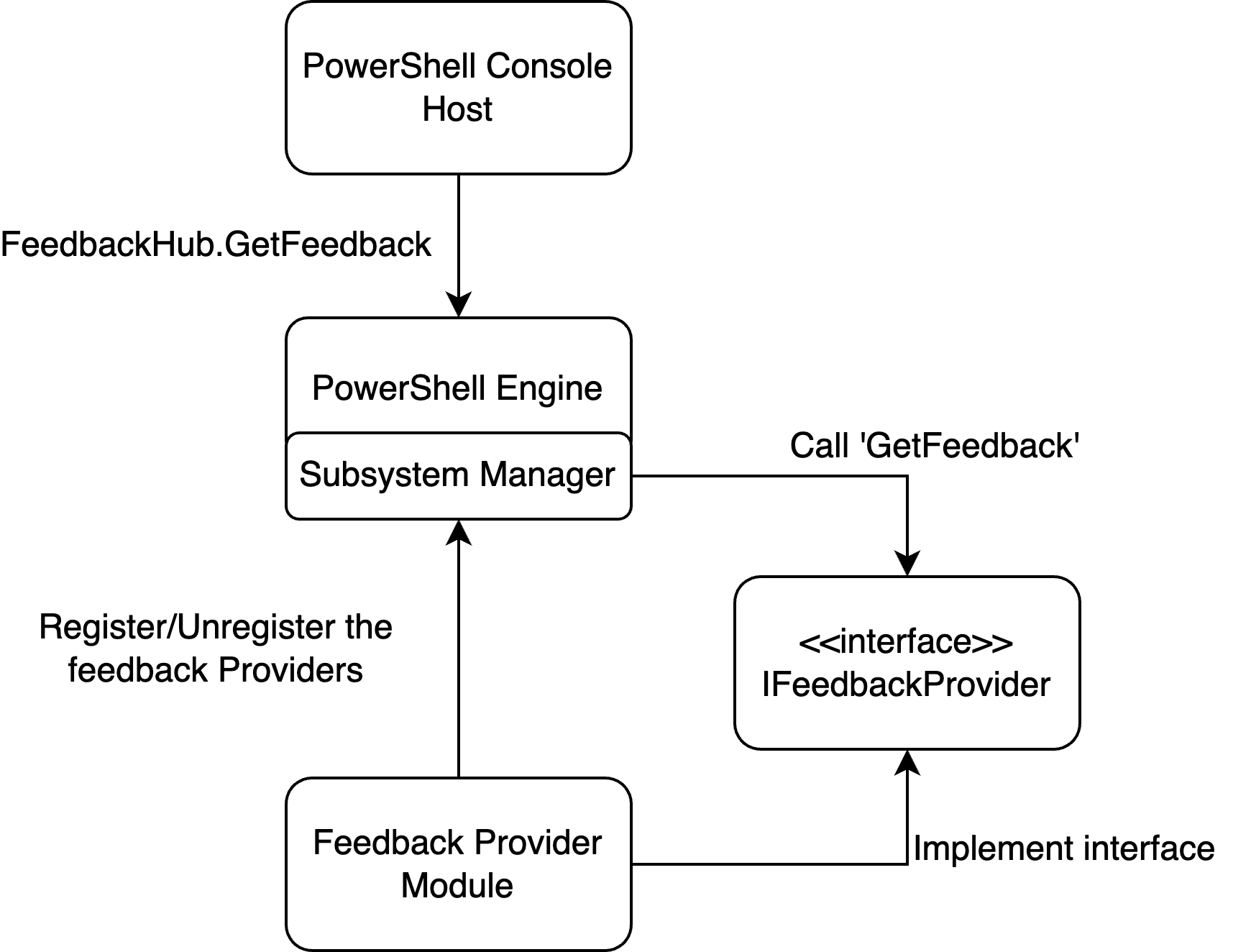
以下示例将引导你完成创建简单的反馈提供程序的过程。 此外,你可以将提供程序注册到命令预测器接口,以向命令行预测器体验添加反馈建议。 有关预测器的详细信息,请参阅 在 PSReadLine 中使用预测器 如何创建命令行预测器。
步骤 1 - 创建新的类库项目
使用以下命令在项目目录中创建新项目:
dotnet new classlib --name MyFeedbackProvider
将 System.Management.Automation 包的包引用添加到 .csproj 文件中。 以下示例显示了更新的 .csproj 文件:
<Project Sdk="Microsoft.NET.Sdk">

  <PropertyGroup>
    <TargetFramework>net8.0</TargetFramework>
    <ImplicitUsings>enable</ImplicitUsings>
    <Nullable>enable</Nullable>
  </PropertyGroup>

  <ItemGroup>
    <PackageReference Include="System.Management.Automation" Version="7.4.0-preview.3">
        <ExcludeAssets>contentFiles</ExcludeAssets>
        <PrivateAssets>All</PrivateAssets>
    </PackageReference>
  </ItemGroup>
</Project>
注意
应更改 System.Management.Automation 程序集的版本,以匹配所针对的 PowerShell 预览版的版本。 最低版本为 7.4.0-preview.3。
步骤 2 - 为提供程序添加类定义
更改 Class1.cs 文件的名称以匹配提供程序的名称。 此示例使用 myFeedbackProvider.cs。 此文件包含定义反馈提供程序的两个主要类。
以下示例显示了类定义的基本模板。
using System.Management.Automation;
using System.Management.Automation.Subsystem;
using System.Management.Automation.Subsystem.Feedback;
using System.Management.Automation.Subsystem.Prediction;
using System.Management.Automation.Language;

namespace myFeedbackProvider;

public sealed class myFeedbackProvider : IFeedbackProvider, ICommandPredictor
{

}

public class Init : IModuleAssemblyInitializer, IModuleAssemblyCleanup
{

}
步骤 3 - 实现 Init 类
Init 类向子系统管理器注册和注销反馈提供程序。 加载二进制模块时,OnImport() 方法将运行。 删除二进制模块时,OnRemove() 方法运行。 此示例同时注册反馈提供程序和命令预测器子系统。
public class Init : IModuleAssemblyInitializer, IModuleAssemblyCleanup
{
    private const string Id = "<ADD YOUR GUID HERE>";

    public void OnImport()
    {
        var feedback = new myFeedbackProvider(Id);
        SubsystemManager.RegisterSubsystem(SubsystemKind.FeedbackProvider, feedback);
        SubsystemManager.RegisterSubsystem(SubsystemKind.CommandPredictor, feedback);
    }

    public void OnRemove(PSModuleInfo psModuleInfo)
    {
        SubsystemManager.UnregisterSubsystem<ICommandPredictor>(new Guid(Id));
        SubsystemManager.UnregisterSubsystem<IFeedbackProvider>(new Guid(Id));
    }
}
将 <ADD YOUR GUID HERE> 占位符值替换为唯一 Guid。 可以使用 New-Guid cmdlet 生成 Guid。
New-Guid
Guid 是提供程序的唯一标识符。 提供者必须具有唯一的 ID 才能注册到子系统。
步骤 4 - 添加类成员并定义构造函数
以下代码实现接口中定义的属性,添加所需的类成员,并为 myFeedbackProvider 类创建构造函数。
/// <summary>
/// Gets the global unique identifier for the subsystem implementation.
/// </summary>
private readonly Guid _guid;
public Guid Id => _guid;

/// <summary>
/// Gets the name of a subsystem implementation, this will be the name displayed when triggered
/// </summary>
public string Name => "myFeedbackProvider";

/// <summary>
/// Gets the description of a subsystem implementation.
/// </summary>
public string Description => "This is very simple feedback provider";

/// <summary>
/// Default implementation. No function is required for a feedback provider.
/// </summary>
Dictionary<string, string>? ISubsystem.FunctionsToDefine => null;

/// <summary>
/// Gets the types of trigger for this feedback provider.
/// </summary>
/// <remarks>
/// The default implementation triggers a feedback provider by <see cref="FeedbackTrigger.CommandNotFound"/> only.
/// </remarks>
public FeedbackTrigger Trigger => FeedbackTrigger.All;

/// <summary>
/// List of candidates from the feedback provider to be passed as predictor results
/// </summary>
private List<string>? _candidates;

/// <summary>
/// PowerShell session used to run PowerShell commands that help create suggestions.
/// </summary>
private PowerShell _powershell;

internal myFeedbackProvider(string guid)
{
    _guid = new Guid(guid); // Save guid
    _powershell = PowerShell.Create(); // Create PowerShell instance
}
步骤 5 - 创建 GetFeedback() 方法
GetFeedback 方法采用两个参数,context 和 token。
context 参数接收有关触发器的信息,以便你可以决定如何响应建议。
token 参数用于取消。 此函数返回包含建议的 FeedbackItem。
/// <summary>
/// Gets feedback based on the given commandline and error record.
/// </summary>
/// <param name="context">The context for the feedback call.</param>
/// <param name="token">The cancellation token to cancel the operation.</param>
/// <returns>The feedback item.</returns>
public FeedbackItem? GetFeedback(FeedbackContext context, CancellationToken token)
{
    // Target describes the different kinds of triggers to activate on,
    var target = context.Trigger;
    var commandLine = context.CommandLine;
    var ast = context.CommandLineAst;

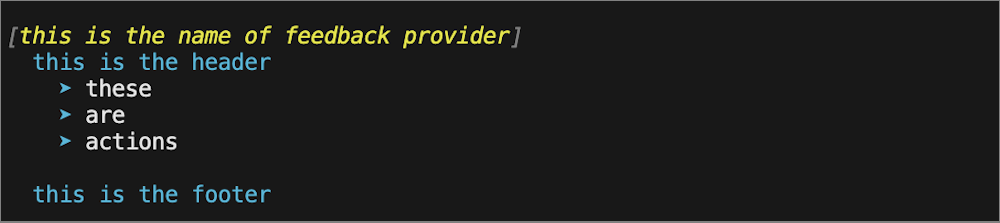
    // defining the header and footer variables
    string header;
    string footer;

    // List of the actions
    List<string>? actions = new List<string>();

    // Trigger on success code goes here

    // Trigger on error code goes here

    return null;
}
下图显示了如何在向用户显示的建议中使用这些字段。
为成功触发器创建建议
为了成功调用,我们希望扩展上次执行中使用的任何别名。 使用 CommandLineAst,我们识别出所有别名命令,并建议使用完全限定的命令名称。
// Trigger on success
if (target == FeedbackTrigger.Success)
{
    // Getting the commands from the AST and only finding those that are Commands
    var astCmds = ast.FindAll((cAst) => cAst is CommandAst, true);

    // Inspect each of the commands
    foreach(var command in astCmds)
    {

        // Get the command name
        var aliasedCmd = ((CommandAst) command).GetCommandName();

        // Check if its an alias or not, if so then add it to the list of actions
        if(TryGetAlias(aliasedCmd, out string commandString))
        {
            actions.Add($"{aliasedCmd} --> {commandString}");
        }
    }

    // If no alias was found return null
    if(actions.Count == 0)
    {
        return null;
    }

    // If aliases are found, set the header to a description and return a new FeedbackItem.
    header = "You have used an aliased command:";
    // Copy actions to _candidates for the predictor
    _candidates = actions;

    return new FeedbackItem(header, actions);
}
实现 TryGetAlias() 方法
TryGetAlias() 方法是一个私有帮助程序函数,它返回布尔值以指示命令是否为别名。 在类构造函数中,我们创建了一个 PowerShell 实例,可用于运行 PowerShell 命令。
TryGetAlias() 方法使用此 PowerShell 实例调用 GetCommand 方法来确定命令是否为别名。
AliasInfo 返回的 GetCommand 对象包含该别名命令的完整名称。
/// <summary>
/// Checks if a command is an alias.
/// </summary>
/// <param name="command">The command to check if alias</param>
/// <param name="targetCommand">The referenced command by the aliased command</param>
/// <returns>True if an alias and false if not</returns>
private bool TryGetAlias(string command, out string targetCommand)
{
    // Create PowerShell runspace as a session state proxy to run GetCommand and check
    // if its an alias
    AliasInfo? pwshAliasInfo =
        _powershell.Runspace.SessionStateProxy.InvokeCommand.GetCommand(command, CommandTypes.Alias) as AliasInfo;

    // if its null then it is not an aliased command so just return false
    if(pwshAliasInfo is null)
    {
        targetCommand = String.Empty;
        return false;
    }

    // Set targetCommand to referenced command name
    targetCommand = pwshAliasInfo.ReferencedCommand.Name;
    return true;
}
为失败触发器创建建议
命令执行失败时,我们希望建议用户 Get-Help 获取有关如何使用该命令的详细信息。
// Trigger on error
if (target == FeedbackTrigger.Error)
{
    // Gets the command that caused the error.
    var erroredCommand = context.LastError?.InvocationInfo.MyCommand;
    if (erroredCommand is null)
    {
        return null;
    }

    header = $"You have triggered an error with the command {erroredCommand}. Try using the following command to get help:";

    actions.Add($"Get-Help {erroredCommand}");
    footer = $"You can also check online documentation at https://learn.microsoft.com/en-us/powershell/module/?term={erroredCommand}";

    // Copy actions to _candidates for the predictor
    _candidates = actions;
    return new FeedbackItem(header, actions, footer, FeedbackDisplayLayout.Portrait);
}
步骤 6 - 将建议发送到命令行预测器
反馈提供商可以增强用户体验的另一种方法是向 ICommandPredictor 界面提供命令建议。 有关创建命令行预测器的详细信息,请参阅 如何创建命令行预测器。
以下代码实现 ICommandPredictor 接口中所需的方法,以便向反馈提供程序添加预测器行为。
-
CanAcceptFeedback()- 此方法返回一个布尔值,该值指示预测器是否接受特定类型的反馈。 -
GetSuggestion()- 此方法返回一个SuggestionPackage对象,该对象包含预测器要显示的建议。 -
OnCommandLineAccepted()- 接受命令行执行时调用此方法。
/// <summary>
/// Gets a value indicating whether the predictor accepts a specific kind of feedback.
/// </summary>
/// <param name="client">Represents the client that initiates the call.</param>
/// <param name="feedback">A specific type of feedback.</param>
/// <returns>True or false, to indicate whether the specific feedback is accepted.</returns>
public bool CanAcceptFeedback(PredictionClient client, PredictorFeedbackKind feedback)
{
    return feedback switch
    {
        PredictorFeedbackKind.CommandLineAccepted => true,
        _ => false,
    };
}

/// <summary>
/// Get the predictive suggestions. It indicates the start of a suggestion rendering session.
/// </summary>
/// <param name="client">Represents the client that initiates the call.</param>
/// <param name="context">The <see cref="PredictionContext"/> object to be used for prediction.</param>
/// <param name="cancellationToken">The cancellation token to cancel the prediction.</param>
/// <returns>An instance of <see cref="SuggestionPackage"/>.</returns>
public SuggestionPackage GetSuggestion(
    PredictionClient client,
    PredictionContext context,
    CancellationToken cancellationToken)
{
    if (_candidates is not null)
    {
        string input = context.InputAst.Extent.Text;
        List<PredictiveSuggestion>? result = null;

        foreach (string c in _candidates)
        {
            if (c.StartsWith(input, StringComparison.OrdinalIgnoreCase))
            {
                result ??= new List<PredictiveSuggestion>(_candidates.Count);
                result.Add(new PredictiveSuggestion(c));
            }
        }

        if (result is not null)
        {
            return new SuggestionPackage(result);
        }
    }

    return default;
}

/// <summary>
/// A command line was accepted to execute.
/// The predictor can start processing early as needed with the latest history.
/// </summary>
/// <param name="client">Represents the client that initiates the call.</param>
/// <param name="history">History command lines provided as references for prediction.</param>
public void OnCommandLineAccepted(PredictionClient client, IReadOnlyList<string> history)
{
    // Reset the candidate state once the command is accepted.
    _candidates = null;
}
步骤 7 - 生成反馈提供程序
现在,你已准备好生成并开始使用反馈提供商! 若要生成项目,请运行以下命令:
dotnet build
此命令在项目文件夹的以下路径中创建 PowerShell 模块作为 DLL 文件:bin/Debug/net8.0/myFeedbackProvider
在 Windows 计算机上构建时,可能会遇到错误 error NU1101: Unable to find package System.Management.Automation.。 若要解决此问题,请将 nuget.config 文件添加到项目目录并添加以下内容:
<?xml version="1.0" encoding="utf-8"?>
<configuration>
  <packageSources>
    <clear />
    <add key="nuget.org" value="https://api.nuget.org/v3/index.json" />
  </packageSources>
  <disabledPackageSources>
    <clear />
  </disabledPackageSources>
</configuration>
使用反馈提供程序
若要测试新的反馈提供程序,请将编译的模块导入到 PowerShell 会话中。 通过导入在构建成功后所描述的文件夹可以完成此操作。
Import-Module ./bin/Debug/net8.0/myFeedbackProvider
对模块感到满意后,应创建模块清单,将其发布到 PowerShell 库,并将其安装在 $Env:PSModulePath中。 有关详细信息,请参阅 如何创建模块清单。 可以将 Import-Module 命令添加到 $PROFILE 脚本,以便模块在 PowerShell 会话中可用。
可以使用以下命令获取已安装的反馈提供程序的列表:
Get-PSSubsystem -Kind FeedbackProvider
Kind              SubsystemType      IsRegistered Implementations
----              -------------      ------------ ---------------
FeedbackProvider  IFeedbackProvider          True {general}
注意
Get-PSSubsystem 是 PowerShell 7.1 中引入的实验性 cmdlet,必须启用 PSSubsystemPluginModel 实验性功能才能使用此 cmdlet。 有关详细信息,请参阅使用实验性功能。
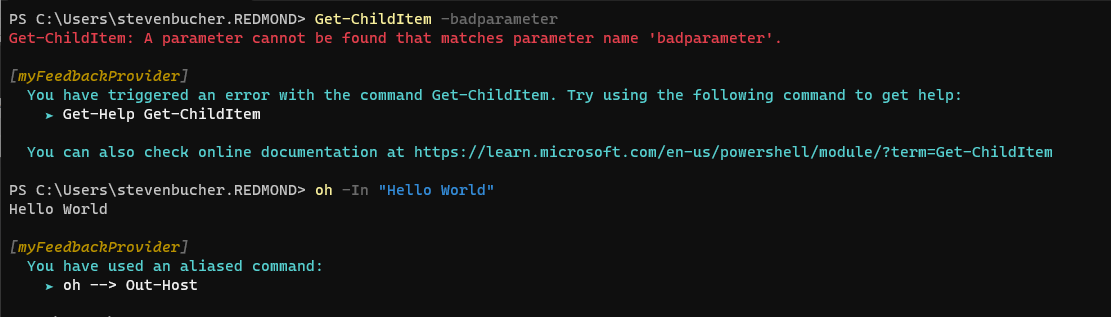
以下屏幕截图显示了来自新提供程序的一些示例建议。
下面是一个 GIF,显示预测器集成如何在新的提供方中运作。
预测器系统与反馈提供程序配合工作的 GIF 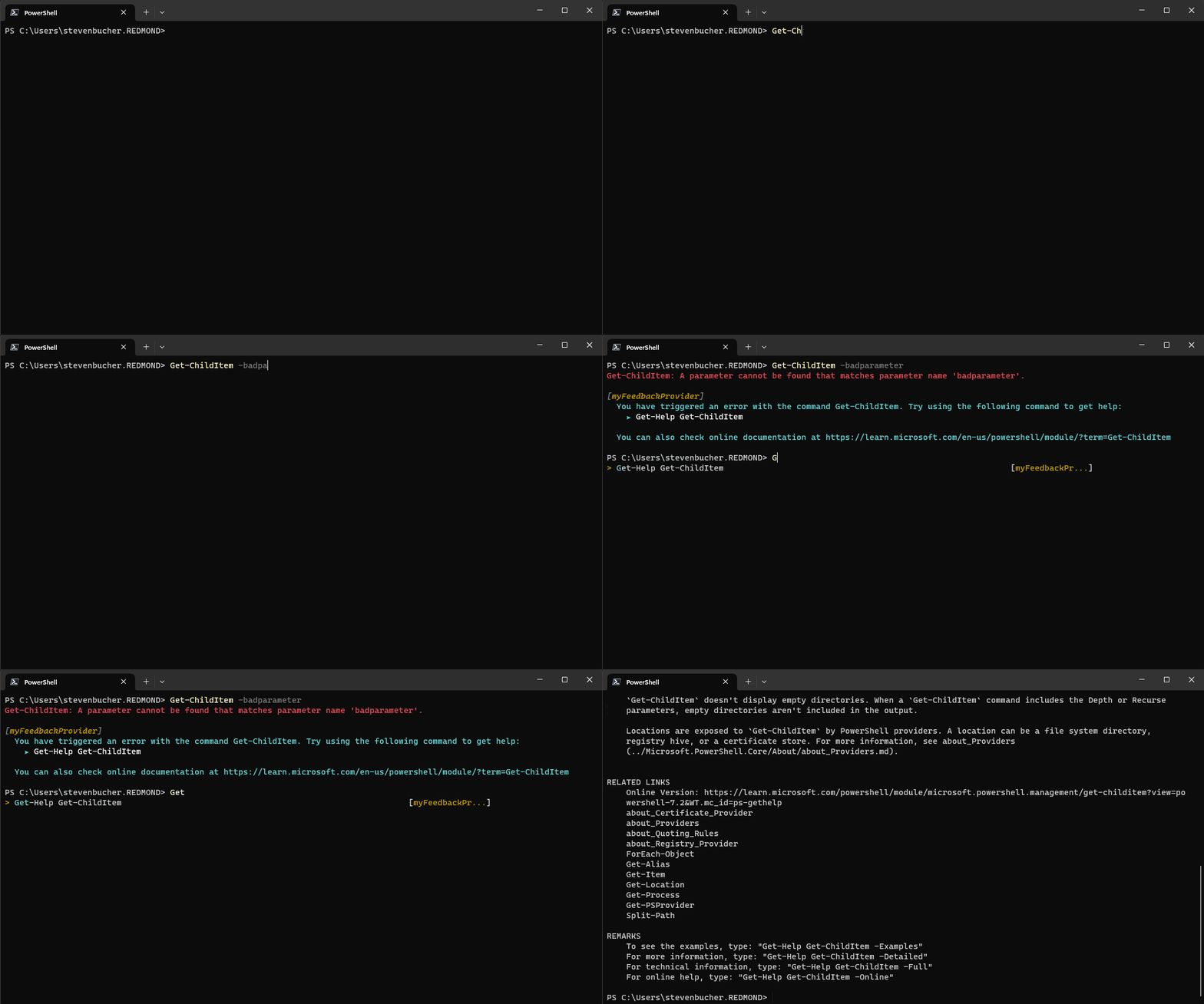
其他反馈提供者
我们创建了其他反馈来源,可以作为更深入例子的良好参考。
命令未找到
command-not-found 反馈提供程序利用 Linux 系统上的 command-not-found 实用工具工具,在尝试运行本机命令但缺少时提供建议。 可以在 GitHub 存储库 中找到代码,也可以自行下载到 PowerShell 库。
PowerShell 适配器
Microsoft.PowerShell.PowerShellAdapter 是一个反馈提供程序,可帮助你将本机命令中的文本输出转换为 PowerShell 对象。 它会检测系统上的“适配器”,并建议在使用本机命令时使用它们。 可以从 PowerShell 适配器反馈提供程序 博客文章了解有关 PowerShell 适配器的详细信息。 还可以在 GitHub 存储库 中找到代码,也可以自行下载到 PowerShell 库。
附录 - 完整实现代码
以下代码将前面的示例合并为提供程序类的完整实现。
using System.Management.Automation;
using System.Management.Automation.Subsystem;
using System.Management.Automation.Subsystem.Feedback;
using System.Management.Automation.Subsystem.Prediction;
using System.Management.Automation.Language;

namespace myFeedbackProvider;

public sealed class myFeedbackProvider : IFeedbackProvider, ICommandPredictor
{
    /// <summary>
    /// Gets the global unique identifier for the subsystem implementation.
    /// </summary>
    private readonly Guid _guid;
    public Guid Id => _guid;

    /// <summary>
    /// Gets the name of a subsystem implementation, this will be the name displayed when triggered
    /// </summary>
    public string Name => "myFeedbackProvider";

    /// <summary>
    /// Gets the description of a subsystem implementation.
    /// </summary>
    public string Description => "This is very simple feedback provider";

    /// <summary>
    /// Default implementation. No function is required for a feedback provider.
    /// </summary>
    Dictionary<string, string>? ISubsystem.FunctionsToDefine => null;

    /// <summary>
    /// Gets the types of trigger for this feedback provider.
    /// </summary>
    /// <remarks>
    /// The default implementation triggers a feedback provider by <see cref="FeedbackTrigger.CommandNotFound"/> only.
    /// </remarks>
    public FeedbackTrigger Trigger => FeedbackTrigger.All;

    /// <summary>
    /// List of candidates from the feedback provider to be passed as predictor results
    /// </summary>
    private List<string>? _candidates;

    /// <summary>
    /// PowerShell session used to run PowerShell commands that help create suggestions.
    /// </summary>
    private PowerShell _powershell;

    // Constructor
    internal myFeedbackProvider(string guid)
    {
        _guid = new Guid(guid); // Save guid
        _powershell = PowerShell.Create(); // Create PowerShell instance
    }

    #region IFeedbackProvider
    /// <summary>
    /// Gets feedback based on the given commandline and error record.
    /// </summary>
    /// <param name="context">The context for the feedback call.</param>
    /// <param name="token">The cancellation token to cancel the operation.</param>
    /// <returns>The feedback item.</returns>
    public FeedbackItem? GetFeedback(FeedbackContext context, CancellationToken token)
    {
        // Target describes the different kinds of triggers to activate on,
        var target = context.Trigger;
        var commandLine = context.CommandLine;
        var ast = context.CommandLineAst;

        // defining the header and footer variables
        string header;
        string footer;

        // List of the actions
        List<string>? actions = new List<string>();

        // Trigger on success
        if (target == FeedbackTrigger.Success)
        {
            // Getting the commands from the AST and only finding those that are Commands
            var astCmds = ast.FindAll((cAst) => cAst is CommandAst, true);

            // Inspect each of the commands
            foreach(var command in astCmds)
            {

                // Get the command name
                var aliasedCmd = ((CommandAst) command).GetCommandName();

                // Check if its an alias or not, if so then add it to the list of actions
                if(TryGetAlias(aliasedCmd, out string commandString))
                {
                    actions.Add($"{aliasedCmd} --> {commandString}");
                }
            }

            // If no alias was found return null
            if(actions.Count == 0)
            {
                return null;
            }

            // If aliases are found, set the header to a description and return a new FeedbackItem.
            header = "You have used an aliased command:";
            // Copy actions to _candidates for the predictor
            _candidates = actions;

            return new FeedbackItem(header, actions);
        }

        // Trigger on error
        if (target == FeedbackTrigger.Error)
        {
            // Gets the command that caused the error.
            var erroredCommand = context.LastError?.InvocationInfo.MyCommand;
            if (erroredCommand is null)
            {
                return null;
            }

            header = $"You have triggered an error with the command {erroredCommand}. Try using the following command to get help:";

            actions.Add($"Get-Help {erroredCommand}");
            footer = $"You can also check online documentation at https://learn.microsoft.com/en-us/powershell/module/?term={erroredCommand}";

            // Copy actions to _candidates for the predictor
            _candidates = actions;
            return new FeedbackItem(header, actions, footer, FeedbackDisplayLayout.Portrait);
        }
        return null;
    }

    /// <summary>
    /// Checks if a command is an alias.
    /// </summary>
    /// <param name="command">The command to check if alias</param>
    /// <param name="targetCommand">The referenced command by the aliased command</param>
    /// <returns>True if an alias and false if not</returns>
    private bool TryGetAlias(string command, out string targetCommand)
    {
        // Create PowerShell runspace as a session state proxy to run GetCommand and check
        // if its an alias
        AliasInfo? pwshAliasInfo =
            _powershell.Runspace.SessionStateProxy.InvokeCommand.GetCommand(command, CommandTypes.Alias) as AliasInfo;

        // if its null then it is not an aliased command so just return false
        if(pwshAliasInfo is null)
        {
            targetCommand = String.Empty;
            return false;
        }

        // Set targetCommand to referenced command name
        targetCommand = pwshAliasInfo.ReferencedCommand.Name;
        return true;
    }
    #endregion IFeedbackProvider

    #region ICommandPredictor

    /// <summary>
    /// Gets a value indicating whether the predictor accepts a specific kind of feedback.
    /// </summary>
    /// <param name="client">Represents the client that initiates the call.</param>
    /// <param name="feedback">A specific type of feedback.</param>
    /// <returns>True or false, to indicate whether the specific feedback is accepted.</returns>
    public bool CanAcceptFeedback(PredictionClient client, PredictorFeedbackKind feedback)
    {
        return feedback switch
        {
            PredictorFeedbackKind.CommandLineAccepted => true,
            _ => false,
        };
    }

    /// <summary>
    /// Get the predictive suggestions. It indicates the start of a suggestion rendering session.
    /// </summary>
    /// <param name="client">Represents the client that initiates the call.</param>
    /// <param name="context">The <see cref="PredictionContext"/> object to be used for prediction.</param>
    /// <param name="cancellationToken">The cancellation token to cancel the prediction.</param>
    /// <returns>An instance of <see cref="SuggestionPackage"/>.</returns>
    public SuggestionPackage GetSuggestion(
        PredictionClient client,
        PredictionContext context,
        CancellationToken cancellationToken)
    {
        if (_candidates is not null)
        {
            string input = context.InputAst.Extent.Text;
            List<PredictiveSuggestion>? result = null;

            foreach (string c in _candidates)
            {
                if (c.StartsWith(input, StringComparison.OrdinalIgnoreCase))
                {
                    result ??= new List<PredictiveSuggestion>(_candidates.Count);
                    result.Add(new PredictiveSuggestion(c));
                }
            }

            if (result is not null)
            {
                return new SuggestionPackage(result);
            }
        }

        return default;
    }

    /// <summary>
    /// A command line was accepted to execute.
    /// The predictor can start processing early as needed with the latest history.
    /// </summary>
    /// <param name="client">Represents the client that initiates the call.</param>
    /// <param name="history">History command lines provided as references for prediction.</param>
    public void OnCommandLineAccepted(PredictionClient client, IReadOnlyList<string> history)
    {
        // Reset the candidate state once the command is accepted.
        _candidates = null;
    }

    #endregion;
}

public class Init : IModuleAssemblyInitializer, IModuleAssemblyCleanup
{
    private const string Id = "<ADD YOUR GUID HERE>";

    public void OnImport()
    {
        var feedback = new myFeedbackProvider(Id);
        SubsystemManager.RegisterSubsystem(SubsystemKind.FeedbackProvider, feedback);
        SubsystemManager.RegisterSubsystem(SubsystemKind.CommandPredictor, feedback);
    }

    public void OnRemove(PSModuleInfo psModuleInfo)
    {
        SubsystemManager.UnregisterSubsystem<ICommandPredictor>(new Guid(Id));
        SubsystemManager.UnregisterSubsystem<IFeedbackProvider>(new Guid(Id));
    }
}
