后续数据库功能允许将位于不同群集中的数据库附加到 Azure 数据资源管理器群集。
跟随者数据库以只读模式附加,因此可以查看数据并对导入到主数据库的数据进行查询。 后继数据库会同步先导数据库中的更改。 由于同步的缘故,数据可用性方面会存在几秒钟到几分钟的数据延迟。 具体的延迟时长取决于先导数据库元数据的总体大小。 先导数据库和后继数据库使用相同的存储帐户来提取数据。 存储由先导数据库拥有。 后继数据库无需引入数据即可查看数据。 由于附加数据库是只读数据库,因此不能修改数据库中的数据、表和策略,除非 缓存策略、 主体和 权限。 无法删除附加的数据库。 它们必须由领导者或追随者分离,然后才能将其删除。
使用关注器功能将数据库附加到其他群集用作基础结构,用于在组织和团队之间共享数据。 此功能可用于隔离计算资源,以保护生产环境免受非生产用例的防护。 Follower 还可以用于将 Azure 数据浏览器群集的成本与在数据上运行查询的参与方相关联。
遵循哪些数据库?
- 群集可以遵循一个数据库、多个数据库或一个领导者群集的所有数据库。
- 单个群集可以遵循多个领导者群集中的数据库。
- 群集可以同时包含后继数据库和领导者数据库。
- EngineV3 群集只能遵循 EngineV3 群集;类似地,EngineV2 群集只能遵循 V2 群集。
先决条件
附加数据库
可以使用各种方法来附加数据库。 本文介绍如何使用 C#、Python、PowerShell 或 Azure 资源管理器模板附加数据库。
若要附加数据库,您必须在主群集和从属群集上具有至少贡献者角色的用户、组、服务主体或托管标识。 使用 Azure 门户、 PowerShell、 Azure CLI 和 ARM 模板添加或删除角色分配。 详细了解 Azure 基于角色的访问控制(Azure RBAC) 和 不同的角色。
表级共享
附加数据库时,所有表、外部表和具体化视图也会随之附加。 可以通过配置“TableLevelSharingProperties”来共享特定的表/外部表/具体化视图。
“TableLevelSharingProperties”包含八个字符串数组:tablesToInclude、、tablesToExclude、、externalTablesToInclude、externalTablesToExcludematerializedViewsToInclude、materializedViewsToExclude、 functionsToInclude和functionsToExclude。 所有数组中的最大条目数为 100。
注释
使用“*”所有数据库表示法时,不支持表级别共享。
注释
当具体化视图被包含时,其源表也将同时被包含。
例子
包括所有表格。 不需要“*”,因为默认情况下所有表都跟在后面:
tablesToInclude = []
包括名称以“Logs”开头的所有表:
tablesToInclude = ["Logs*"]
排除所有外部表:
externalTablesToExclude = ["*"]
排除掉所有具体化视图。
materializedViewsToExclude=["*"]
数据库名称替代
可以选择将后继群集中的数据库名称与前导群集不同。 例如,可能需要将多个领导者群集中的相同数据库名称附加到后续群集。 若要指定其他数据库名称,请配置“DatabaseNameOverride”或“DatabaseNamePrefix”属性。
使用 C# 附加数据库
所需的 NuGet 包
C# 示例
var tenantId = "xxxxxxxx-xxxxx-xxxx-xxxx-xxxxxxxxx"; //Directory (tenant) ID
var clientId = "xxxxxxxx-xxxxx-xxxx-xxxx-xxxxxxxxx"; //Application ID
var clientSecret = "PlaceholderClientSecret"; //Client Secret
var followerSubscriptionId = "xxxxxxxx-xxxxx-xxxx-xxxx-xxxxxxxxx";
var credentials = await ApplicationTokenProvider.LoginSilentAsync(tenantId, clientId, clientSecret);
var resourceManagementClient = new KustoManagementClient(credentials) { SubscriptionId = followerSubscriptionId };
var followerResourceGroupName = "followerResourceGroup";
var followerClusterName = "follower";
var attachedDatabaseConfigurationName = "attachedDatabaseConfiguration"
var leaderSubscriptionId = "xxxxxxxx-xxxxx-xxxx-xxxx-xxxxxxxxx";
var leaderResourceGroup = "leaderResourceGroup";
var leaderClusterName = "leader";
var attachedDatabaseConfigurationData = new AttachedDatabaseConfiguration
{
    ClusterResourceId = $"/subscriptions/{leaderSubscriptionId}/resourceGroups/{leaderResourceGroup}/providers/Microsoft.Kusto/Clusters/{leaderClusterName}",
    DatabaseName = "<databaseName>", // Can be specific database name or * for all databases
    DefaultPrincipalsModificationKind = "Union",
    Location = "North Central US"
};
// Table level sharing properties are not supported when using '*' all databases notation.
if (attachedDatabaseConfigurationData.DatabaseName != "*")
{
    // Set up the table level sharing properties - the following is just an example.
    attachedDatabaseConfigurationData.TableLevelSharingProperties = new TableLevelSharingProperties(
        tablesToInclude:new List<string> { "table1" },
        tablesToExclude:new List<string> { "table2" },
        externalTablesToInclude:new List<string> { "exTable1" },
        externalTablesToExclude:new List<string> { "exTable2" },
        materializedViewsToInclude:new List<string> { "matTable1" },
        materializedViewsToExclude:new List<string> { "matTable2" }
    );
}
await resourceManagementClient.AttachedDatabaseConfigurations.CreateOrUpdateAsync(
    followerResourceGroupName, followerClusterName, attachedDatabaseConfigurationName, attachedDatabaseConfigurationData
);
使用 Python 附加数据库
必备模块
pip install azure-common
pip install azure-mgmt-kusto
Python 示例
from azure.mgmt.kusto import KustoManagementClient
from azure.mgmt.kusto.models import AttachedDatabaseConfiguration
from azure.common.credentials import ServicePrincipalCredentials
import datetime

#Directory (tenant) ID
tenant_id = "xxxxxxxx-xxxxx-xxxx-xxxx-xxxxxxxxx"
#Application ID
client_id = "xxxxxxxx-xxxxx-xxxx-xxxx-xxxxxxxxx"
#Client Secret
client_secret = "xxxxxxxxxxxxxx"
follower_subscription_id = "xxxxxxxx-xxxxx-xxxx-xxxx-xxxxxxxxx"
leader_subscription_id = "xxxxxxxx-xxxxx-xxxx-xxxx-xxxxxxxxx"
credentials = ServicePrincipalCredentials(
        client_id=client_id,
        secret=client_secret,
        tenant=tenant_id
    )
kusto_management_client = KustoManagementClient(credentials, follower_subscription_id)

follower_resource_group_name = "followerResourceGroup"
leader_resource_group_name = "leaderResourceGroup"
follower_cluster_name = "follower"
leader_cluster_name = "leader"
attached_database_Configuration_name = "uniqueNameForAttachedDatabaseConfiguration"
database_name  = "db" # Can be specific database name or * for all databases
default_principals_modification_kind  = "Union"
location = "North Central US"
cluster_resource_id = "/subscriptions/" + leader_subscription_id + "/resourceGroups/" + leader_resource_group_name + "/providers/Microsoft.Kusto/Clusters/" + leader_cluster_name
table_level_sharing_properties = None
if (database_name != "*"):
    #Set up the table level sharing properties - the following is just an example.
    tables_to_include = ["table1", "table2", "table3"]
    external_tables_to_exclude =  ["Logs*"]
    table_level_sharing_properties = TableLevelSharingProperties(tables_to_include = tables_to_include, external_tables_to_exclude = external_tables_to_exclude)


attached_database_configuration_properties = AttachedDatabaseConfiguration(cluster_resource_id = cluster_resource_id, database_name = database_name, default_principals_modification_kind = default_principals_modification_kind, location = location, table_level_sharing_properties = table_level_sharing_properties)

#Returns an instance of LROPoller, see https://learn.microsoft.com/python/api/msrest/msrest.polling.lropoller?view=azure-python
poller = kusto_management_client.attached_database_configurations.create_or_update(follower_resource_group_name, follower_cluster_name, attached_database_Configuration_name, attached_database_configuration_properties)
使用 PowerShell 附加数据库
先决条件模块
Install : Az.Kusto
PowerShell 示例
$FollowerClustername = 'follower'
$FollowerClusterSubscriptionID = 'xxxxxxxx-xxxxx-xxxx-xxxx-xxxxxxxxx'
$FollowerResourceGroupName = 'followerResourceGroup'
$DatabaseName = "db"  ## Can be specific database name or * for all databases
$LeaderClustername = 'leader'
$LeaderClusterSubscriptionID = 'xxxxxxxx-xxxxx-xxxx-xxxx-xxxxxxxxx'
$LeaderClusterResourceGroup = 'leaderResourceGroup'
$DefaultPrincipalsModificationKind = 'Union'
##Construct the LeaderClusterResourceId and Location
$getleadercluster = Get-AzKustoCluster -Name $LeaderClustername -ResourceGroupName $LeaderClusterResourceGroup -SubscriptionId $LeaderClusterSubscriptionID -ErrorAction Stop
$LeaderClusterResourceid = $getleadercluster.Id
$Location = $getleadercluster.Location
##Handle the config name if all databases needs to be followed
if($DatabaseName -eq '*')  {
        $configname = $FollowerClustername + 'config'
       }
else {
        $configname = $DatabaseName
     }
##Table level sharing is not supported when using '*' all databases notation. If you use the all database notation please remove all table level sharing lines from the powershell command.
New-AzKustoAttachedDatabaseConfiguration -ClusterName $FollowerClustername `
    -Name $configname `
    -ResourceGroupName $FollowerResourceGroupName `
    -SubscriptionId $FollowerClusterSubscriptionID `
    -DatabaseName $DatabaseName `
    -ClusterResourceId $LeaderClusterResourceid `
    -DefaultPrincipalsModificationKind $DefaultPrincipalsModificationKind `
    -Location $Location `
    -TableLevelSharingPropertyTablesToInclude "table1", "table2", "table3" `
    -TableLevelSharingPropertyExternalTablesToExclude "Logs*" `
    -ErrorAction Stop
使用 Azure 资源管理器模板附加数据库
可以使用 Azure 资源管理器模板 将数据库附加到现有群集。
使用以下步骤附加数据库:
使用下表中的信息创建模板,以帮助对其进行配置。
|
参数 |
说明 |
示例 |
|
followerClusterName |
后继群集的名称;将在其中部署模板。 |
|
|
附加数据库配置名称 |
附加的数据库配置对象的名称。 该名称可以是群集级别唯一的任何字符串。 |
|
|
databaseName |
要关注的数据库的名称。 若要跟踪所有领导者的数据库,请使用“*”。 |
|
|
leaderClusterResourceId |
主群集的资源 ID。 |
|
|
defaultPrincipalsModificationKind |
默认主要修改类型。 |
可以是 Union、Replace 或 None。 有关默认主体修改类型的详细信息,请参阅 主体修改类型控制命令。 |
|
tablesToInclude |
需要包括的表格列表。 若要包括以“Logs”开头的所有表,请使用 [“Logs*”]。 |
["table1ToInclude", "table2ToInclude"] |
|
tablesToExclude |
要排除的表的列表。 若要排除所有表,请使用 [“*”]。 |
["table1ToExclude", "table2ToExclude"] |
|
需包含的外部表 |
要包含的表格列表。 若要包括以“Logs”开头的所有外部表,请使用 [“Logs*”]。 |
["ExternalTable1ToInclude", "ExternalTable2ToInclude"] |
|
要排除的外部表 |
要排除的表的列表。 若要排除所有外部表,请使用 [“*”]。 |
["ExternalTable1ToExclude", "ExternalTable2ToExclude"] |
|
物化视图包含 |
要包含的具体化视图的列表。 若要包括以“Logs”开头的所有具体化视图,请使用 [“Logs*”]。 |
["Mv1ToInclude", "Mv2ToInclude"] |
|
排除的物化视图 |
要排除的具体化视图的列表。 若要排除所有具体化视图,请使用 [“*”]。 |
["Mv11ToExclude", "Mv22ToExclude"] |
|
要包含的功能 |
要包括的函数的列表。 |
["FunctionToInclude"] |
|
排除的函数 |
要排除的函数列表。 |
["FunctionToExclude"] |
|
位置 |
所有资源的位置。 领导者和追随者必须位于同一位置。 |
|
{
    "$schema": "https://schema.management.azure.com/schemas/2015-01-01/deploymentTemplate.json#",
    "contentVersion": "1.0.0.0",
    "parameters": {
        "followerClusterName": {
            "type": "string",
            "defaultValue": "",
            "metadata": {
                "description": "Name of the cluster to which the database will be attached."
            }
        },
        "attachedDatabaseConfigurationsName": {
            "type": "string",
            "defaultValue": "",
            "metadata": {
                "description": "Name of the attached database configurations to create."
            }
        },
        "databaseName": {
            "type": "string",
            "defaultValue": "",
            "metadata": {
                "description": "The name of the database to follow. You can follow all databases by using '*'."
            }
        },
        "leaderClusterResourceId": {
            "type": "string",
            "defaultValue": "",
            "metadata": {
                "description": "The resource ID of the leader cluster."
            }
        },
        "defaultPrincipalsModificationKind": {
            "type": "string",
            "defaultValue": "Union",
            "metadata": {
                "description": "The default principal modification kind."
            }
        },
        "tablesToInclude": {
            "type": "array",
            "defaultValue": [],
            "metadata": {
                "description": "The list of tables to include. Not supported when following all databases."
            }
        },
        "tablesToExclude": {
            "type": "array",
            "defaultValue": [],
            "metadata": {
                "description": "The list of tables to exclude. Not supported when following all databases."
            }
        },
        "externalTablesToInclude": {
            "type": "array",
            "defaultValue": [],
            "metadata": {
                "description": "The list of external tables to include. Not supported when following all databases."
            }
        },
        "externalTablesToExclude": {
            "type": "array",
            "defaultValue": [],
            "metadata": {
                "description": "The list of external tables to exclude. Not supported when following all databases."
            }
        },
        "materializedViewsToInclude": {
            "type": "array",
            "defaultValue": [],
            "metadata": {
                "description": "The list of materialized views to include. Not supported when following all databases."
            }
        },
        "materializedViewsToExclude": {
            "type": "array",
            "defaultValue": [],
            "metadata": {
                "description": "The list of materialized views to exclude. Not supported when following all databases."
            }
        },
        "functionsToInclude": {
            "type": "array",
            "defaultValue": [],
            "metadata": {
                "description": "The list of functions to include."
            }
        },
        "functionsToExclude": {
            "type": "array",
            "defaultValue": [],
            "metadata": {
                "description": "The list of functions to exclude."
            }
        },
        "location": {
            "type": "string",
            "defaultValue": "",
            "metadata": {
                "description": "Location for all resources."
            }
        }
    },
    "variables": {},
    "resources": [
        {
            "name": "[concat(parameters('followerClusterName'), '/', parameters('attachedDatabaseConfigurationsName'))]",
            "type": "Microsoft.Kusto/clusters/attachedDatabaseConfigurations",
            "apiVersion": "2021-01-01",
            "location": "[parameters('location')]",
            "properties": {
                "databaseName": "[parameters('databaseName')]",
                "clusterResourceId": "[parameters('leaderClusterResourceId')]",
                "defaultPrincipalsModificationKind": "[parameters('defaultPrincipalsModificationKind')]",
                "tableLevelSharingProperties":{
                    "tablesToInclude": "[parameters('tablesToInclude')]",
                    "tablesToExclude": "[parameters('tablesToExclude')]",
                    "externalTablesToInclude": "[parameters('externalTablesToInclude')]",
                    "externalTablesToExclude": "[parameters('externalTablesToExclude')]",
                    "materializedViewsToInclude": "[parameters('materializedViewsToInclude')]",
                    "materializedViewsToExclude": "[parameters('materializedViewsToExclude')]",
                    "functionsToInclude": "[parameters('functionsToInclude')]",
                    "functionsToExclude": "[parameters('functionsToExclude')]"
                }
            }
        }
    ]
}
使用 Azure 门户 或 PowerShell 部署 Azure 资源管理器模板。
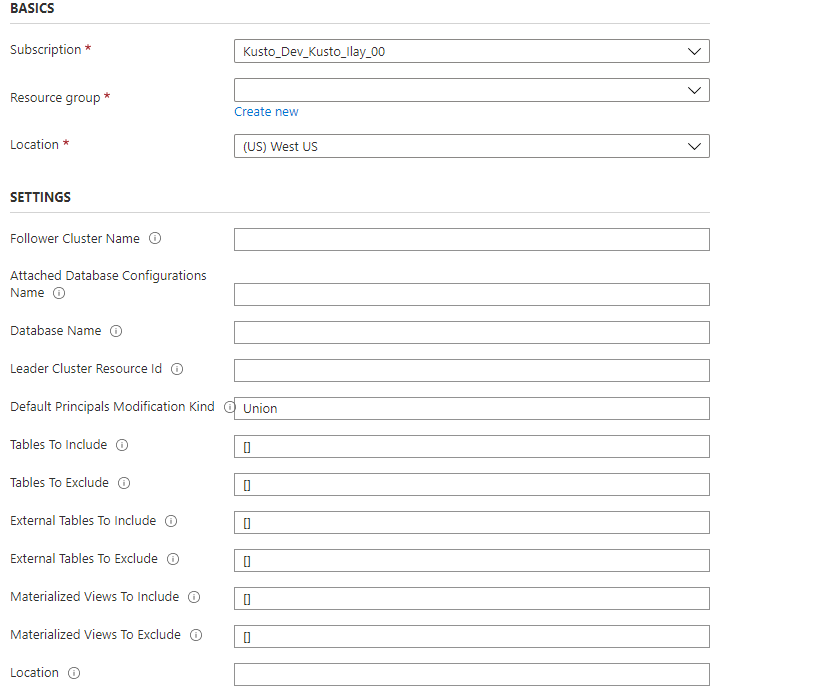
验证数据库是否已成功附加
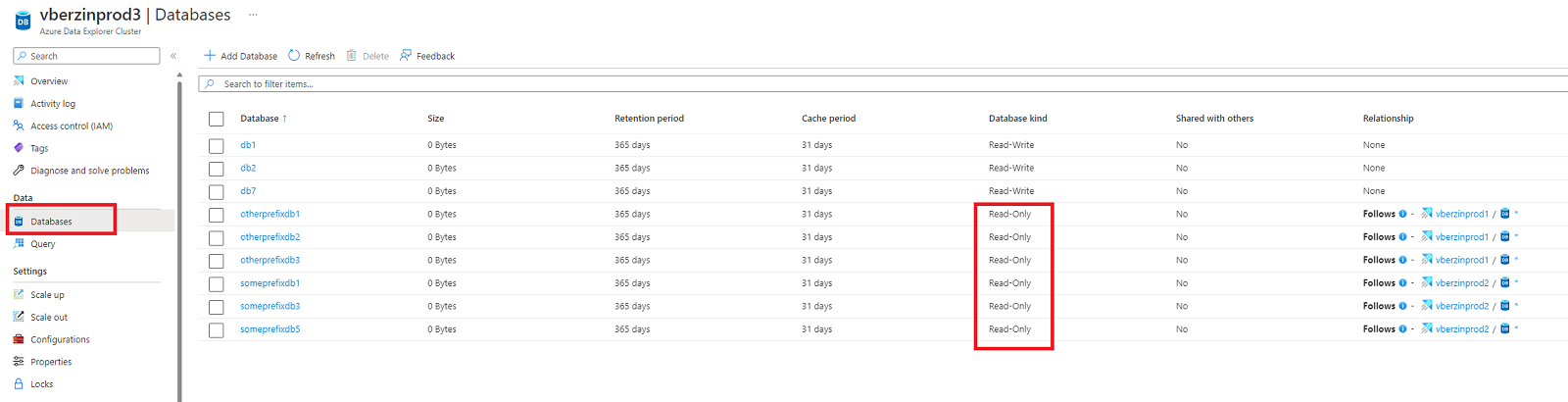
若要验证数据库是否已成功附加,请在 Azure 门户中找到附加的数据库。 可以验证数据库是否已在 从属 群集或 主 群集中成功附加。
检查关注者群集
浏览到后续群集并选择 “数据库”。
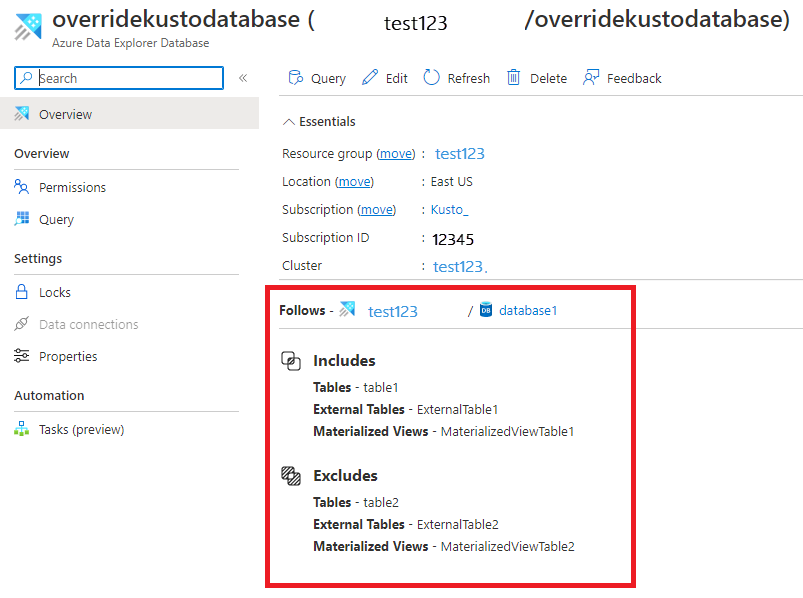
在数据库列表中,搜索新的只读数据库。
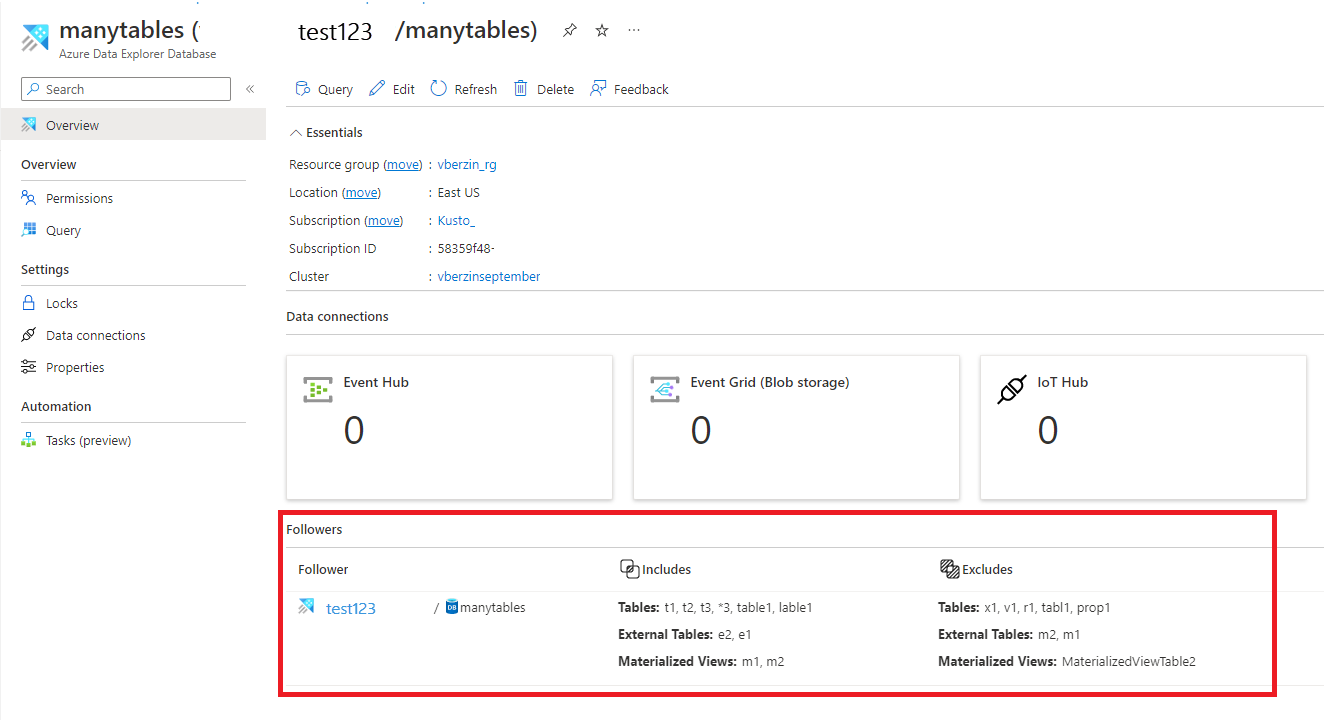
还可以在数据库概述页中查看此列表:
检查领导者群集
浏览到领导群集并选择“数据库”
检查相关数据库是否标记为“与其他人>共享”是
切换关系链接以查看详细信息。
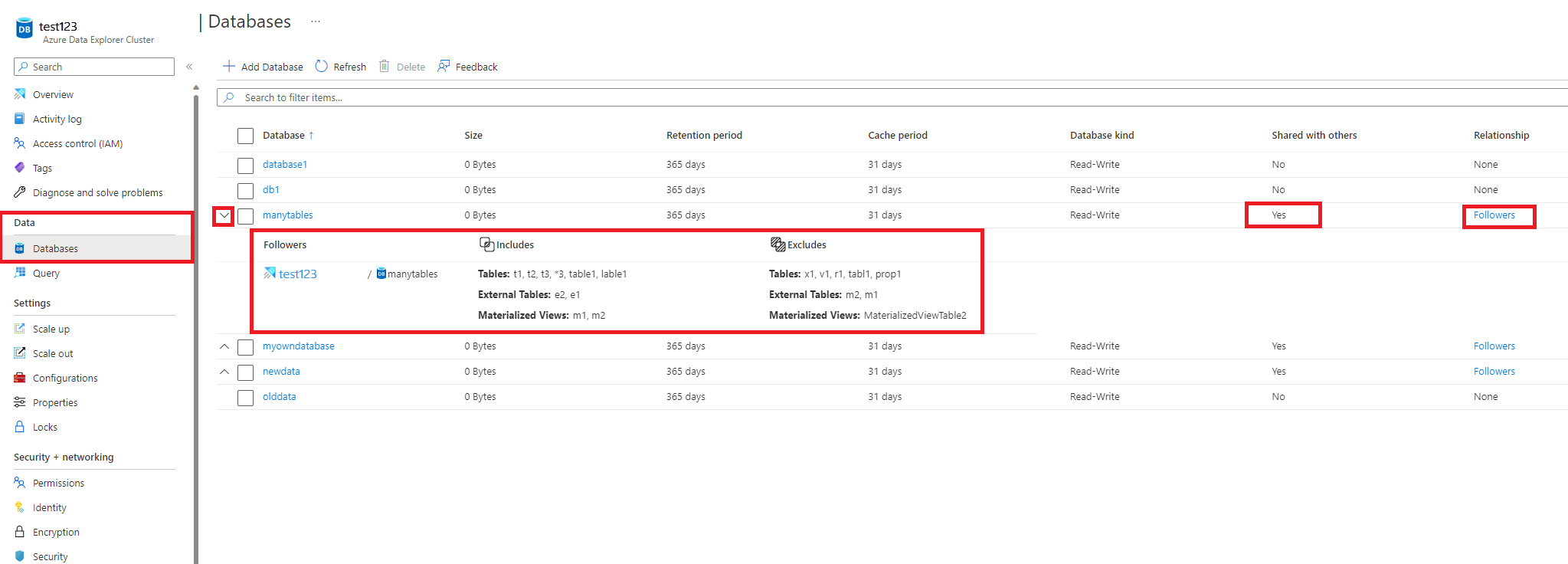
还可以在数据库概述页中查看此信息:
分离从属数据库
注释
若要从关注方或领导者端分离数据库,必须在要从中分离数据库的群集上具有至少具有参与者角色的用户、组、服务主体或托管标识。 在下面的示例中,我们使用服务主体。
使用 C# 从从属集群分离附加的从属数据库
从属群集可以分离任何附加的从属数据库,如下所示:
var tenantId = "xxxxxxxx-xxxxx-xxxx-xxxx-xxxxxxxxx"; //Directory (tenant) ID
var clientId = "xxxxxxxx-xxxxx-xxxx-xxxx-xxxxxxxxx"; //Application ID
var clientSecret = "PlaceholderClientSecret"; //Client Secret
var followerSubscriptionId = "xxxxxxxx-xxxxx-xxxx-xxxx-xxxxxxxxx";
var credentials = await ApplicationTokenProvider.LoginSilentAsync(tenantId, clientId, clientSecret);
var resourceManagementClient = new KustoManagementClient(credentials) { SubscriptionId = followerSubscriptionId };
var followerResourceGroupName = "testrg";
//The cluster and database attached database configuration are created as part of the prerequisites
var followerClusterName = "follower";
var attachedDatabaseConfigurationsName = "attachedDatabaseConfiguration";
await resourceManagementClient.AttachedDatabaseConfigurations.DeleteAsync(
    followerResourceGroupName, followerClusterName, attachedDatabaseConfigurationsName
);
使用 C# 从主群集分离附加的从属数据库
领导者群集可以分离任何附加的数据库,如下所示:
var tenantId = "xxxxxxxx-xxxxx-xxxx-xxxx-xxxxxxxxx"; //Directory (tenant) ID
var clientId = "xxxxxxxx-xxxxx-xxxx-xxxx-xxxxxxxxx"; //Application ID
var clientSecret = "PlaceholderClientSecret"; //Client Secret
var leaderSubscriptionId = "xxxxxxxx-xxxxx-xxxx-xxxx-xxxxxxxxx";
var credentials = await ApplicationTokenProvider.LoginSilentAsync(tenantId, clientId, clientSecret);
var resourceManagementClient = new KustoManagementClient(credentials) { SubscriptionId = leaderSubscriptionId };
var leaderResourceGroupName = "testrg";
var leaderClusterName = "leader";
var followerSubscriptionId = "xxxxxxxx-xxxxx-xxxx-xxxx-xxxxxxxxx";
var followerResourceGroupName = "followerResourceGroup";
//The cluster and attached database configuration that are created as part of the Prerequisites
var followerClusterName = "follower";
var attachedDatabaseConfigurationsName = "attachedDatabaseConfiguration";
var followerDatabaseDefinition = new FollowerDatabaseDefinition
{
    ClusterResourceId = $"/subscriptions/{followerSubscriptionId}/resourceGroups/{followerResourceGroupName}/providers/Microsoft.Kusto/Clusters/{followerClusterName}",
    AttachedDatabaseConfigurationName = attachedDatabaseConfigurationsName
};
await resourceManagementClient.Clusters.DetachFollowerDatabasesAsync(
    leaderResourceGroupName, leaderClusterName, followerDatabaseDefinition
);
使用 Python 从从属集群分离附加的从属数据库
后续群集可以分离任何附加的数据库,如下所示:
from azure.mgmt.kusto import KustoManagementClient
from azure.common.credentials import ServicePrincipalCredentials
import datetime

#Directory (tenant) ID
tenant_id = "xxxxxxxx-xxxxx-xxxx-xxxx-xxxxxxxxx"
#Application ID
client_id = "xxxxxxxx-xxxxx-xxxx-xxxx-xxxxxxxxx"
#Client Secret
client_secret = "xxxxxxxxxxxxxx"
follower_subscription_id = "xxxxxxxx-xxxxx-xxxx-xxxx-xxxxxxxxx"
credentials = ServicePrincipalCredentials(
        client_id=client_id,
        secret=client_secret,
        tenant=tenant_id
    )
kusto_management_client = KustoManagementClient(credentials, follower_subscription_id)

follower_resource_group_name = "followerResourceGroup"
follower_cluster_name = "follower"
attached_database_configurationName = "uniqueName"

#Returns an instance of LROPoller, see https://learn.microsoft.com/python/api/msrest/msrest.polling.lropoller?view=azure-python
poller = kusto_management_client.attached_database_configurations.delete(follower_resource_group_name, follower_cluster_name, attached_database_configurationName)
使用 Python 从先导群集分离附加的后继数据库
领导者群集可以分离任何附加的数据库,如下所示:
from azure.mgmt.kusto import KustoManagementClient
from azure.mgmt.kusto.models import FollowerDatabaseDefinition
from azure.common.credentials import ServicePrincipalCredentials
import datetime

#Directory (tenant) ID
tenant_id = "xxxxxxxx-xxxxx-xxxx-xxxx-xxxxxxxxx"
#Application ID
client_id = "xxxxxxxx-xxxxx-xxxx-xxxx-xxxxxxxxx"
#Client Secret
client_secret = "xxxxxxxxxxxxxx"
follower_subscription_id = "xxxxxxxx-xxxxx-xxxx-xxxx-xxxxxxxxx"
leader_subscription_id = "xxxxxxxx-xxxxx-xxxx-xxxx-xxxxxxxxx"
credentials = ServicePrincipalCredentials(
        client_id=client_id,
        secret=client_secret,
        tenant=tenant_id
    )
kusto_management_client = KustoManagementClient(credentials, follower_subscription_id)

follower_resource_group_name = "followerResourceGroup"
leader_resource_group_name = "leaderResourceGroup"
follower_cluster_name = "follower"
leader_cluster_name = "leader"
attached_database_configuration_name = "uniqueName"
location = "North Central US"
cluster_resource_id = "/subscriptions/" + follower_subscription_id + "/resourceGroups/" + follower_resource_group_name + "/providers/Microsoft.Kusto/Clusters/" + follower_cluster_name

#Returns an instance of LROPoller, see https://learn.microsoft.com/python/api/msrest/msrest.polling.lropoller?view=azure-python
poller = kusto_management_client.clusters.detach_follower_databases(resource_group_name = leader_resource_group_name, cluster_name = leader_cluster_name, cluster_resource_id = cluster_resource_id, attached_database_configuration_name = attached_database_configuration_name)
使用 PowerShell 分离数据库
先决条件模块
Install : Az.Kusto
示例
$FollowerClustername = 'follower'
$FollowerClusterSubscriptionID = 'xxxxxxxx-xxxxx-xxxx-xxxx-xxxxxxxxx'
$FollowerResourceGroupName = 'followerResourceGroup'
$DatabaseName = "sanjn"  ## Can be specific database name or * for all databases

##Construct the Configuration name
$confignameraw = (Get-AzKustoAttachedDatabaseConfiguration -ClusterName $FollowerClustername -ResourceGroupName $FollowerResourceGroupName -SubscriptionId $FollowerClusterSubscriptionID) | Where-Object {$_.DatabaseName -eq $DatabaseName }
$configname =$confignameraw.Name.Split("/")[1]

Remove-AzKustoAttachedDatabaseConfiguration -ClusterName $FollowerClustername -Name $configname -ResourceGroupName $FollowerResourceGroupName -SubscriptionId $FollowerClusterSubscriptionID
管理主体、权限和缓存策略
管理主体
附加数据库时,请指定“默认主体修改类型”。 默认设置是将重写权限授权主体与主管数据库集合中的已授权主体组合在一起。
|
种类 |
说明 |
|
联盟 |
附加的数据库主体将始终包含原始数据库主体以及添加到后继数据库的其他新主体。 |
|
替换 |
原始数据库中没有主体对象的继承关系。 必须为附加数据库创建新主体。 |
|
无 |
附加的数据库主体仅包含原始数据库的主体,没有其他主体。 |
有关使用控制命令配置授权主体的详细信息,请参阅 用于管理后续群集的控制命令。
管理权限
管理只读数据库权限与所有数据库类型的权限相同。 请参阅 Azure 门户中的管理权限。
后续数据库管理员可以修改附加数据库的 缓存策略 或其托管群集上的任何表。 默认值是将前导群集数据库和表级缓存策略中的源数据库与数据库和表级重写策略中定义的策略组合在一起。 例如,可以对领导数据库使用 30 天的缓存策略来运行每月报告,对后续数据库使用三天的缓存策略,以便仅查询最近的数据进行故障排除。 有关使用控制命令在关注器数据库或表上配置缓存策略的详细信息,请参阅 用于管理关注者群集的控制命令。
注释
- 如果领导者/从属群集的数据库之间存在冲突,当所有数据库的状态与从属群集一致时,它们将按如下方式解决:
- 在后继群集 上创建的数据库 优先于在前导群集上创建的名称相同的数据库。 这就是为什么需要删除或重命名后继群集中的数据库 DB ,以便让后继群集包含领导者的数据库 DB。
- 从两个或更多领导群集中的一个随机选择一个名为 DB 的数据库,并且不会被重复选择。
- 用于在从属群集上显示 群集活动日志和历史记录 的命令将会显示该从属群集的活动和历史记录结果集,而不会包含主导群集或其他群集的结果。
- 例如:在后继群集上运行的
.show queries 命令只会显示在后跟群集的数据库上运行的查询,而不是针对前导群集中的同一数据库运行的查询。
局限性
- 后续群集和领导者群集必须位于同一区域。
- 如果在正在关注的数据库上使用 流式引入 ,则应为流式引入启用后继群集以允许关注流式引入数据。
- 领导者群集和关注者群集不支持使用 客户托管密钥 的数据加密。
- 在分离数据库之前,无法删除附加到其他群集的数据库。
- 在将数据库从其他群集中分离之前,您无法删除该群集。
- 在使用所有数据库时,不支持表级共享属性。
后续步骤
