注释
从 Visual Studio 2022 版本 17.0 开始,已弃用 C++ AMP 标头。
包含任何 AMP 标头都会引发构建错误。 应在包含任何 AMP 标头之前定义 _SILENCE_AMP_DEPRECATION_WARNINGS,以使警告静音。
C++ 加速大规模并行(C++ AMP)利用离散图形处理单元(GPU)等数据并行硬件,加速执行 C++ 代码。 通过使用 C++ AMP,可以编码多维数据算法,以便通过在异类硬件上使用并行度来加速执行。 C++ AMP 编程模型包括多维数组、索引、内存传输、平铺和数学函数库。 可以使用 C++ AMP 语言扩展来控制将数据从 CPU 移动到 GPU 和返回的方式,以便提高性能。
系统要求
Windows 7 或更高版本
Windows Server 2008 R2 到 Visual Studio 2019。
DirectX 11 功能级别 11.0 或更高版本的硬件
若要在软件模拟器上进行调试,需要 Windows 8 或 Windows Server 2012。 若要在硬件上进行调试,必须安装图形卡的驱动程序。 有关详细信息,请参阅 调试 GPU 代码。
注意:ARM64 目前不支持 AMP。
介绍
以下两个示例说明了 C++ AMP 的主要组件。 假设要添加两个一维数组的相应元素。 例如,你可能想要添加 {1, 2, 3, 4, 5} 和 {6, 7, 8, 9, 10} 获取 {7, 9, 11, 13, 15}。 如果不使用 C++ AMP,可以编写以下代码来添加数字并显示结果。
#include <iostream>

void StandardMethod() {

    int aCPP[] = {1, 2, 3, 4, 5};
    int bCPP[] = {6, 7, 8, 9, 10};
    int sumCPP[5];

    for (int idx = 0; idx < 5; idx++)
    {
        sumCPP[idx] = aCPP[idx] + bCPP[idx];
    }

    for (int idx = 0; idx < 5; idx++)
    {
        std::cout << sumCPP[idx] << "\n";
    }
}
代码的重要部分如下所示:
数据:数据由三个数组组成。 所有项目都具有相同的等级(一)和长度(五)。
迭代:第一
for个循环提供循环访问数组中的元素的机制。 要执行以计算总和的代码包含在第一个for块中。索引:变量
idx访问数组的各个元素。
使用 C++ AMP,可以改为编写以下代码。
#include <amp.h>
#include <iostream>
using namespace concurrency;

const int size = 5;

void CppAmpMethod() {
    int aCPP[] = {1, 2, 3, 4, 5};
    int bCPP[] = {6, 7, 8, 9, 10};
    int sumCPP[size];

    // Create C++ AMP objects.
    array_view<const int, 1> a(size, aCPP);
    array_view<const int, 1> b(size, bCPP);
    array_view<int, 1> sum(size, sumCPP);
    sum.discard_data();

    parallel_for_each(
        // Define the compute domain, which is the set of threads that are created.
        sum.extent,
        // Define the code to run on each thread on the accelerator.
        [=](index<1> idx) restrict(amp) {
            sum[idx] = a[idx] + b[idx];
        }
    );

    // Print the results. The expected output is "7, 9, 11, 13, 15".
    for (int i = 0; i < size; i++) {
        std::cout << sum[i] << "\n";
    }
}
存在相同的基本元素,但使用了 C++ AMP 构造:
数据:使用 C++ 数组构造三个 C++ AMP array_view 对象。 提供四个值来构造对象
array_view:数据值、排名、元素类型和每个维度中对象的长度array_view。 等级和类型作为类型参数传递。 数据和长度作为构造函数参数传递。 在此示例中,传递给构造函数的 C++ 数组为一维。 排名和长度用于构造对象中array_view数据的矩形形状,并且数据值用于填充数组。 运行时库还包括 数组类,该数组类具有类似于该类的array_view接口,本文稍后将对此进行讨论。迭代: parallel_for_each函数(C++ AMP) 提供了一种循环访问数据元素或 计算域的机制。 在此示例中,计算域由
sum.extent指定。 要执行的代码包含在 lambda 表达式或 内核函数中。restrict(amp)表示仅使用 C++ AMP 能加速的 C++ 语言子集。索引: 索引类 变量,
idx用一个排名声明,以匹配对象的排名array_view。 通过使用索引,可以访问对象的单个元素array_view。
调整和索引数据:索引和盘区
必须先定义数据值并声明数据的形状,然后才能运行内核代码。 所有数据定义为数组(矩形),你可以定义数组以具有任何排名(维度数)。 数据可以是任何维度中的任何大小。
Index 类
索引类通过将每个维度与原点的偏移量封装到一个对象中,明确指定array或array_view对象中的某个位置。 访问数组中的某个位置时,将对象 index 传递给索引运算符, []而不是整数索引列表。 可以使用 array::operator() 运算符 或 array_view::operator() 运算符访问每个维度中的元素。
以下示例创建一维索引,该索引指定一维 array_view 对象中的第三个元素。 索引用于打印 array_view 对象中的第三个元素。 输出为 3。
int aCPP[] = {1, 2, 3, 4, 5};
array_view<int, 1> a(5, aCPP);

index<1> idx(2);

std::cout << a[idx] << "\n";
// Output: 3
下面的示例创建一个二维索引,该索引指定二维 array_view 对象中的行 = 1 和列 = 2 的元素。 构造函数中的 index 第一个参数是行组件,第二个参数是列组件。 输出为 6。
int aCPP[] = {1, 2, 3, 4, 5, 6};
array_view<int, 2> a(2, 3, aCPP);

index<2> idx(1, 2);

std::cout <<a[idx] << "\n";
// Output: 6
以下示例创建一个三维索引,该索引指定深度 = 0、行 = 1 和三维 array_view 对象中的列 = 3 的元素。 请注意,第一个参数是深度组件,第二个参数是行组件,第三个参数是列组件。 输出为 8。
int aCPP[] = {
    1, 2, 3, 4, 5, 6, 7, 8, 9, 10, 11, 12,
    1, 2, 3, 4, 5, 6, 7, 8, 9, 10, 11, 12};

array_view<int, 3> a(2, 3, 4, aCPP);

// Specifies the element at 3, 1, 0.
index<3> idx(0, 1, 3);

std::cout << a[idx] << "\n";
// Output: 8
extent 类
Extent 类指定array或array_view对象每个维度中的数据长度。 可以创建一个盘区,并使用它来创建array对象或array_view对象。 还可以检索现有 array 或 array_view 对象的范围。 下面的示例打印array_view对象每个维度的范围长度。
int aCPP[] = {
    1, 2, 3, 4, 5, 6, 7, 8, 9, 10, 11, 12,
    1, 2, 3, 4, 5, 6, 7, 8, 9, 10, 11, 12};
// There are 3 rows and 4 columns, and the depth is two.
array_view<int, 3> a(2, 3, 4, aCPP);

std::cout << "The number of columns is " << a.extent[2] << "\n";
std::cout << "The number of rows is " << a.extent[1] << "\n";
std::cout << "The depth is " << a.extent[0] << "\n";
std::cout << "Length in most significant dimension is " << a.extent[0] << "\n";
以下示例创建一个对象,该对象与上一 array_view 示例中的对象具有相同维度,但此示例使用 extent 对象而不是在 array_view 构造函数中使用显式参数。
int aCPP[] = {1, 2, 3, 4, 5, 6, 7, 8, 9, 10, 11, 12, 13, 14, 15, 16, 17, 18, 19, 20, 21, 22, 23, 24};
extent<3> e(2, 3, 4);

array_view<int, 3> a(e, aCPP);

std::cout << "The number of columns is " << a.extent[2] << "\n";
std::cout << "The number of rows is " << a.extent[1] << "\n";
std::cout << "The depth is " << a.extent[0] << "\n";
将数据移动到加速器:数组和array_view
用于将数据移动到加速器的两个数据容器在运行时库中定义。 它们是 数组类 和 array_view类。 该 array 类是一个容器类,用于在构造对象时创建数据的深层副本。 类 array_view 是一个包装类,在内核函数访问数据时复制数据。 当源设备上需要数据时,数据将复制回。
array 类
array构造对象时,如果使用包含指向数据集的指针的构造函数,则会在加速器上创建数据的深层副本。 内核函数修改加速器上的副本。 完成内核函数的执行后,必须将数据复制回源数据结构。 以下示例将向量中的每个元素乘以 10。 内核函数完成后, vector conversion operator 该函数用于将数据复制回向量对象。
std::vector<int> data(5);

for (int count = 0; count <5; count++)
{
    data[count] = count;
}

array<int, 1> a(5, data.begin(), data.end());

parallel_for_each(
    a.extent,
    [=, &a](index<1> idx) restrict(amp) {
        a[idx] = a[idx]* 10;
    });

data = a;
for (int i = 0; i < 5; i++)
{
    std::cout << data[i] << "\n";
}
array_view 类
array_view 几乎具有与 array 类相同的成员,但其底层行为不同。 传递给 array_view 构造函数的数据不会像传递给 array 构造函数的数据那样在 GPU 上被复制。 而是在执行内核函数时将数据复制到加速器。 因此,如果创建两个使用相同的数据的对象,则这两 array_view 个 array_view 对象都引用相同的内存空间。 执行此操作时,必须同步任何多线程访问。 使用 array_view 类的主要优点是仅在必要时移动数据。
数组和数组视图的比较
下表总结了两个类之间的arrayarray_view相似性和差异。
| 说明 | array 类 | array_view 类 |
|---|---|---|
| 确定排名时 | 编译时。 | 编译时。 |
| 范围确定时 | 在运行时刻。 | 运行时。 |
| 形状 | 矩形。 | 矩形。 |
| 数据存储 | 数据容器。 | 数据封装器。 |
| Copy | 在定义时进行显式和深度复制。 | 内核函数进行访问时会隐式复制。 |
| 数据检索 | 通过将数组数据复制回 CPU 线程上的对象。 | 通过直接访问 array_view 对象或调用 array_view::synchronize 方法 继续访问原始容器上的数据。 |
具有数组和array_view的共享内存
共享内存是 CPU 和加速器可以访问的内存。 使用共享内存可以消除或显著减少在 CPU 和加速器之间复制数据的开销。 尽管内存是共享的,但 CPU 和加速器不能同时访问内存,这样做会导致未定义的行为。
array 如果关联的加速器支持共享内存,则可以使用对象来指定精细控制。 加速器是否支持共享内存取决于加速器的 supports_cpu_shared_memory 属性,该属性在支持共享内存时返回 true 。 如果支持共享内存,则加速器上的内存分配的默认的access_type 枚举由该属性default_cpu_access_type决定。 默认情况下,array和array_view对象具有与主要关联的accelerator相同的access_type。
通过显式设置array::cpu_access_type 数据成员属性array,可以对共享内存的使用进行精细控制,以便根据计算内核的内存访问模式和硬件的性能特征优化应用。 一个array_view反映与它关联的相同cpu_access_type,如同array;或者,如果array_view是在没有数据源的情况下构造的,那么它的access_type反映了首先导致其分配存储的环境。 也就是说,如果首次由主机(CPU)访问,那么它的行为就像是通过 CPU 数据源创建的,并共享捕获关联的access_typeaccelerator_view;然而,如果首次由accelerator_view访问,它的行为就像是在该accelerator_view上创建的array中创建的,并共享array的access_type。
下面的代码示例演示如何确定默认加速器是否支持共享内存,然后创建多个具有不同cpu_access_type配置的数组。
#include <amp.h>
#include <iostream>

using namespace Concurrency;

int main()
{
    accelerator acc = accelerator(accelerator::default_accelerator);

    // Early out if the default accelerator doesn't support shared memory.
    if (!acc.supports_cpu_shared_memory)
    {
        std::cout << "The default accelerator does not support shared memory" << std::endl;
        return 1;
    }

    // Override the default CPU access type.
    acc.default_cpu_access_type = access_type_read_write

    // Create an accelerator_view from the default accelerator. The
    // accelerator_view inherits its default_cpu_access_type from acc.
    accelerator_view acc_v = acc.default_view;

    // Create an extent object to size the arrays.
    extent<1> ex(10);

    // Input array that can be written on the CPU.
    array<int, 1> arr_w(ex, acc_v, access_type_write);

    // Output array that can be read on the CPU.
    array<int, 1> arr_r(ex, acc_v, access_type_read);

    // Read-write array that can be both written to and read from on the CPU.
    array<int, 1> arr_rw(ex, acc_v, access_type_read_write);
}
在数据上执行代码:parallel_for_each
parallel_for_each函数定义了在加速器上针对array或array_view对象中的数据运行的代码。 请考虑本主题简介中的以下代码。
#include <amp.h>
#include <iostream>
using namespace concurrency;

void AddArrays() {
    int aCPP[] = {1, 2, 3, 4, 5};
    int bCPP[] = {6, 7, 8, 9, 10};
    int sumCPP[5] = {0, 0, 0, 0, 0};

    array_view<int, 1> a(5, aCPP);
    array_view<int, 1> b(5, bCPP);
    array_view<int, 1> sum(5, sumCPP);

    parallel_for_each(
        sum.extent,
        [=](index<1> idx) restrict(amp)
        {
            sum[idx] = a[idx] + b[idx];
        }
    );

    for (int i = 0; i < 5; i++) {
        std::cout << sum[i] << "\n";
    }
}
该方法 parallel_for_each 采用两个参数:一个计算域和一个 lambda 表达式。
计算域是一个extent对象或一个tiled_extent对象,用于定义为并行执行创建的线程集。 为计算域中的每个元素生成一个线程。 在本例中,该 extent 对象为一维且具有五个元素。 因此,启动五个线程。
lambda 表达式定义要在每个线程上运行的代码。 capture 子句 [=]指定 lambda 表达式的正文按值访问所有捕获的变量,在本例中为 a, b以及 sum。 在此示例中,参数列表创建了一个一维 index 变量,名为 idx。 第一个线程中的值 idx[0] 为 0,并在每个后续线程中增加一个。 指示 restrict(amp) 仅使用 C++ AMP 能够加速的 C++ 语言子集。 带有限制修饰符的函数的限制在 restrict(C++ AMP) 中有描述。 有关详细信息,请参阅 Lambda 表达式语法。
lambda 表达式可以包含要执行的代码,也可以调用单独的内核函数。 内核函数必须包含 restrict(amp) 修饰符。 以下示例等效于前面的示例,但它调用单独的内核函数。
#include <amp.h>
#include <iostream>
using namespace concurrency;

void AddElements(
    index<1> idx,
    array_view<int, 1> sum,
    array_view<int, 1> a,
    array_view<int, 1> b) restrict(amp) {
    sum[idx] = a[idx] + b[idx];
}

void AddArraysWithFunction() {

    int aCPP[] = {1, 2, 3, 4, 5};
    int bCPP[] = {6, 7, 8, 9, 10};
    int sumCPP[5] = {0, 0, 0, 0, 0};

    array_view<int, 1> a(5, aCPP);
    array_view<int, 1> b(5, bCPP);
    array_view<int, 1> sum(5, sumCPP);

    parallel_for_each(
        sum.extent,
        [=](index<1> idx) restrict(amp) {
            AddElements(idx, sum, a, b);
        }
    );

    for (int i = 0; i < 5; i++) {
        std::cout << sum[i] << "\n";
    }
}
加速代码:磁贴和屏障
可以通过使用平铺技术来获得额外的加速。 平铺将线程划分为相等的矩形子集或 磁贴。 根据数据集和要编码的算法确定适当的磁贴大小。 对于每个线程,你都可以访问数据元素相对于整个的array位置,或者array_view有权访问相对于磁贴的本地位置。 使用本地索引值简化了代码,因为无需编写代码来将索引值从全局转换为本地。 若要使用平铺,请对方法中的计算域调用 parallel_for_each,并在 lambda 表达式中使用tiled_index对象。
在典型应用程序中,磁贴中的元素以某种方式相关,代码必须访问并跟踪磁贴中的值。 使用 tile_static Keyword 关键字和 tile_barrier::wait 方法 来完成此操作。 具有 tile_static 关键字的变量具有整个磁贴的范围,并且会为每个磁贴创建变量的实例。 必须处理对变量的磁贴线程访问的同步。
tile_barrier::wait 方法 会停止当前线程的执行,直到图元中的所有线程都调用 tile_barrier::wait 为止。 因此,可以使用 tile_static 变量在磁贴中累积值。 然后,可以完成任何需要访问所有值的计算。
下图表示在磁贴中排列的二维采样数据数组。
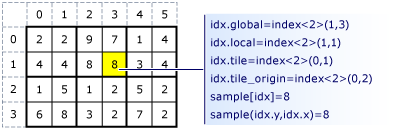
下面的代码示例使用上图中的采样数据。 代码将磁贴中的每个值替换为磁贴中值的平均值。
// Sample data:
int sampledata[] = {
    2, 2, 9, 7, 1, 4,
    4, 4, 8, 8, 3, 4,
    1, 5, 1, 2, 5, 2,
    6, 8, 3, 2, 7, 2};

// The tiles:
// 2 2    9 7    1 4
// 4 4    8 8    3 4
//
// 1 5    1 2    5 2
// 6 8    3 2    7 2

// Averages:
int averagedata[] = {
    0, 0, 0, 0, 0, 0,
    0, 0, 0, 0, 0, 0,
    0, 0, 0, 0, 0, 0,
    0, 0, 0, 0, 0, 0,
};

array_view<int, 2> sample(4, 6, sampledata);

array_view<int, 2> average(4, 6, averagedata);

parallel_for_each(
    // Create threads for sample.extent and divide the extent into 2 x 2 tiles.
    sample.extent.tile<2,2>(),
        [=](tiled_index<2,2> idx) restrict(amp) {
        // Create a 2 x 2 array to hold the values in this tile.
        tile_static int nums[2][2];

        // Copy the values for the tile into the 2 x 2 array.
        nums[idx.local[1]][idx.local[0]] = sample[idx.global];

        // When all the threads have executed and the 2 x 2 array is complete, find the average.
        idx.barrier.wait();
        int sum = nums[0][0] + nums[0][1] + nums[1][0] + nums[1][1];

        // Copy the average into the array_view.
        average[idx.global] = sum / 4;
    });

for (int i = 0; i <4; i++) {
    for (int j = 0; j <6; j++) {
        std::cout << average(i,j) << " ";
    }
    std::cout << "\n";
}

// Output:
// 3 3 8 8 3 3
// 3 3 8 8 3 3
// 5 5 2 2 4 4
// 5 5 2 2 4 4
数学库
C++ AMP 包括两个数学库。
Concurrency::precise_math 命名空间中的双精度库提供对双精度函数的支持。 它还支持单精度函数,尽管硬件上的双精度支持仍是必需的。 它符合 C99 规范(ISO/IEC 9899)。 加速器必须支持完全双精度。 可以通过检查 加速器::supports_double_precision 数据成员 的值来确定它是否这样做。 并发::fast_math 命名空间中的快速数学库包含另外一组数学函数。 这些函数仅支持 float 操作数,执行速度更快,但不如双精度数学库中的函数那样精确。 这些函数包含在 <amp_math.h> 头文件中,所有函数都使用 restrict(amp).
<cmath> 头文件中的函数将导入到fast_math和precise_math命名空间中。 关键字 restrict 用于区分 <cmath> 版本和 C++ AMP 版本。 以下代码使用快速方法计算计算域中每个值的 base-10 对数。
#include <amp.h>
#include <amp_math.h>
#include <iostream>
using namespace concurrency;

void MathExample() {

    double numbers[] = { 1.0, 10.0, 60.0, 100.0, 600.0, 1000.0 };
    array_view<double, 1> logs(6, numbers);

    parallel_for_each(
        logs.extent,
        [=] (index<1> idx) restrict(amp) {
            logs[idx] = concurrency::fast_math::log10(numbers[idx]);
        }
    );

    for (int i = 0; i < 6; i++) {
        std::cout << logs[i] << "\n";
    }
}
图形库
C++ AMP 包含专为加速图形编程设计的图形库。 此库仅在支持本机图形功能的设备上使用。 这些方法位于 并发::graphics 命名空间 中,并包含在 <amp_graphics.h> 头文件中。 图形库的关键组件包括:
纹理类:可以使用纹理类从内存或文件创建纹理。 纹理类似于数组,因为它们包含数据,它们类似于 C++ 标准库中的容器,与赋值和复制构造有关。 有关详细信息,请参阅 C++ 标准库容器。 类的
texture模板参数是元素类型和排名。 排名可以是 1、2 或 3。 元素类型可以是本文后面介绍的短向量类型之一。writeonly_texture_view类:提供对任何纹理的仅写访问权限。
短向量库:定义一组长度为 2、3 和 4 的短向量类型,这些类型基于
int、uint、、float、doublenorm 或 unorm。
通用 Windows 平台 (UWP) 应用
与其他 C++ 库一样,可以在 UWP 应用中使用 C++ AMP。 这些文章介绍如何在使用 C++、C#、Visual Basic 或 JavaScript 创建的应用中包括 C++ AMP 代码:
C++ AMP 和并发可视化工具
并发可视化工具支持分析 C++ AMP 代码的性能。 这些文章介绍了这些功能:
性能建议
无符号整数的取模和除法的性能明显好于有符号整数的模数和除法。 建议尽可能使用无符号整数。