本指南演示了如何使用 UISwipeActionsConfiguration 或 UITableViewRowAction 为表行创建自定义轻扫操作
iOS 提供了两种对表执行操作的方法:UISwipeActionsConfiguration 和 UITableViewRowAction。
iOS 11 引入了 UISwipeActionsConfiguration,用于定义用户在表视图中的某一行向任一方向轻扫时应执行的一组操作。 此行为类似于本机 Mail.app 的行为
UITableViewRowAction 类用于定义当用户在表视图中水平向左轻扫一行时的操作。
例如,在编辑表时,向左轻扫一行默认会显示“删除”按钮。 通过将 UITableViewRowAction 类的多个实例附加到 UITableView,可以定义多个自定义操作,每个操作都有自己的文本、格式和行为。
UISwipeActionsConfiguration
使用 UISwipeActionsConfiguration 实现轻扫操作需要执行三个步骤:
- 替代
GetLeadingSwipeActionsConfiguration和/或GetTrailingSwipeActionsConfiguration方法。 这些方法返回一个UISwipeActionsConfiguration。 - 实例化要返回的
UISwipeActionsConfiguration。 此类采用UIContextualAction数组。 - 创建
UIContextualAction。
以下各节将对此进行更详细地描述。
1.实现 SwipeActionsConfigurations 方法
UITableViewController(以及 UITableViewSource 和 UITableViewDelegate)包含两个方法:GetLeadingSwipeActionsConfiguration 和 GetTrailingSwipeActionsConfiguration,用于在表视图行上实现一系列轻扫操作。 前导轻扫操作是指在从左到右的语言中从屏幕左侧轻扫,在从右到左的语言中从屏幕右侧轻扫。
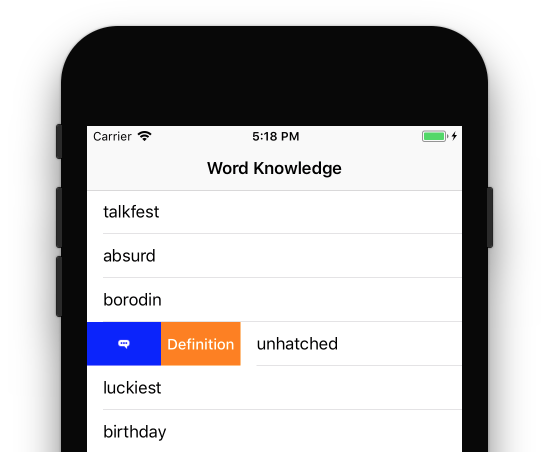
以下示例演示如何实现前导轻扫配置。 从上下文操作中创建了两个操作,具体解释如下。 然后,这些操作会被传入新初始化的 UISwipeActionsConfiguration,作为返回值。
public override UISwipeActionsConfiguration GetLeadingSwipeActionsConfiguration(UITableView tableView, NSIndexPath indexPath)
{
    //UIContextualActions
    var definitionAction = ContextualDefinitionAction(indexPath.Row);
    var flagAction = ContextualFlagAction(indexPath.Row);

    //UISwipeActionsConfiguration
    var leadingSwipe = UISwipeActionsConfiguration.FromActions(new UIContextualAction[] { flagAction, definitionAction });

    leadingSwipe.PerformsFirstActionWithFullSwipe = false;

    return leadingSwipe;
}
2.实例化 UISwipeActionsConfiguration
通过使用 FromActions 方法添加一个新的 UIContextualAction 数组来实例化 UISwipeActionsConfiguration,如以下代码片段所示:
var leadingSwipe = UISwipeActionsConfiguration.FromActions(new UIContextualAction[] { flagAction, definitionAction })

leadingSwipe.PerformsFirstActionWithFullSwipe = false;
需要注意的是,操作的显示顺序取决于将它们传入数组的方式。 例如,上述用于前导轻扫的代码是这样显示操作的:

对于尾部轻扫,将显示如下图所示的操作:

此代码片段还使用新的 PerformsFirstActionWithFullSwipe 属性。 默认情况下,该属性设置为 true,这意味着当用户完全轻扫某一行时,数组中的第一个操作将发生。 如果你有一个非破坏性的操作(例如“删除”),这可能不是理想的行为,因此应将其设置为 false。
创建 UIContextualAction
在上下文操作中,可以创建用户轻扫表行时将显示的操作。
若要初始化操作,必须提供 UIContextualActionStyle、标题和 UIContextualActionHandler。 UIContextualActionHandler 包含三个参数:操作、显示操作的视图和完成事件处理器:
public UIContextualAction ContextualFlagAction(int row)
{
    var action = UIContextualAction.FromContextualActionStyle
                    (UIContextualActionStyle.Normal,
                        "Flag",
                        (FlagAction, view, success) => {
                            var alertController = UIAlertController.Create($"Report {words[row]}?", "", UIAlertControllerStyle.Alert);
                            alertController.AddAction(UIAlertAction.Create("Cancel", UIAlertActionStyle.Cancel, null));
                            alertController.AddAction(UIAlertAction.Create("Yes", UIAlertActionStyle.Destructive, null));
                            PresentViewController(alertController, true, null);

                            success(true);
                        });

    action.Image = UIImage.FromFile("feedback.png");
    action.BackgroundColor = UIColor.Blue;

    return action;
}
可以编辑各种视觉属性,例如操作的背景色或图像。 上面的代码片段演示了在操作中添加图像并将其背景色设置为蓝色。
创建上下文操作后,可以使用它们初始化 GetLeadingSwipeActionsConfiguration 方法中的 UISwipeActionsConfiguration。
UITableViewRowAction
要为 UITableView 定义一个或多个自定义行操作,需要创建一个 UITableViewDelegate 类实例并替代 EditActionsForRow 方法。 例如:
using System;
using System.Collections.Generic;
using System.IO;
using Foundation;
using UIKit;

namespace BasicTable
{
    public class TableDelegate : UITableViewDelegate
    {
        #region Constructors
        public TableDelegate ()
        {
        }

        public TableDelegate (IntPtr handle) : base (handle)
        {
        }

        public TableDelegate (NSObjectFlag t) : base (t)
        {
        }

        #endregion

        #region Override Methods
        public override UITableViewRowAction[] EditActionsForRow (UITableView tableView, NSIndexPath indexPath)
        {
            UITableViewRowAction hiButton = UITableViewRowAction.Create (
                UITableViewRowActionStyle.Default,
                "Hi",
                delegate {
                    Console.WriteLine ("Hello World!");
                });
            return new UITableViewRowAction[] { hiButton };
        }
        #endregion
    }
}
静态 UITableViewRowAction.Create 方法用于创建一个新的 UITableViewRowAction,当用户水平向左轻扫表中的一行时,它将显示“Hi”按钮。 之后会创建一个新的 TableDelegate 实例,并将其附加到 UITableView。 例如:
TableDelegate tableDelegate;
...

// Replace the standard delete button with a "Hi" button
tableDelegate = new TableDelegate ();
table.Delegate = tableDelegate;
当上述代码运行且用户向左轻扫表行时,将显示“Hi”按钮,而不是默认显示的“删除”按钮:
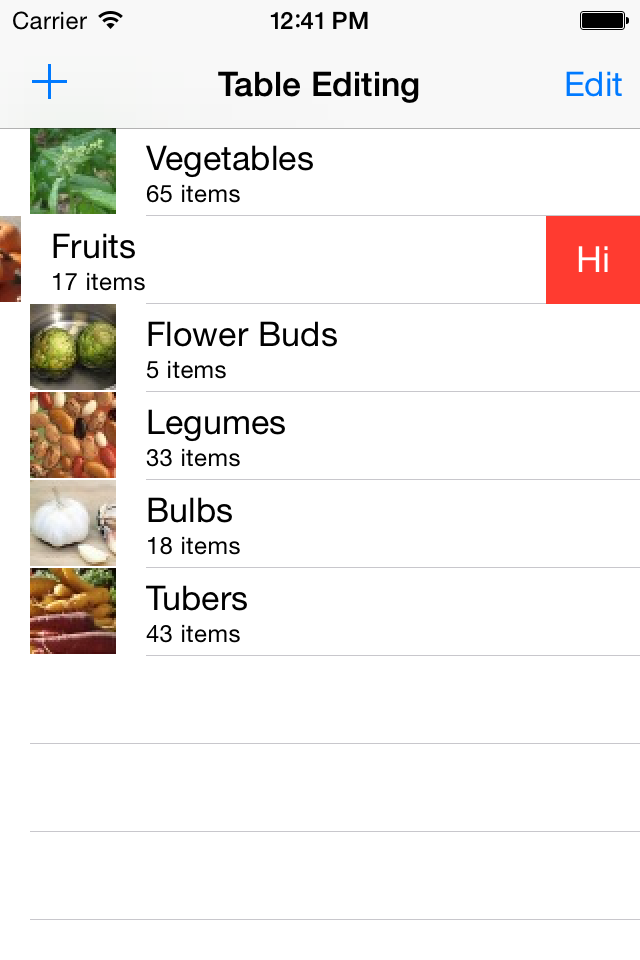
如果用户点击“Hi”按钮,当应用程序在调试模式下运行时,Hello World! 将被写入 Visual Studio for Mac 或 Visual Studio 的控制台。