本文中的脚本允许电子数据展示管理员和电子数据展示管理员生成一个报告,其中包含有关Microsoft Purview 门户中与电子数据展示案例关联的所有保留的信息。 报表包含与保留关联的事例的名称、保留的内容位置以及保留是否基于查询的信息。 如果有些事例没有任何保留,则脚本会创建一个附加报表,其中包含没有保留的事例列表。
提示
开始使用智能 Microsoft Security Copilot 副驾驶®,探索使用 AI 功能更智能、更快速地工作的新方法。 详细了解 Microsoft Purview 中的智能 Microsoft Security Copilot 副驾驶®。
报告信息
本文中创建的脚本的案例保留报告包含有关每个保留的以下信息:
- 保留的名称和与之关联的电子数据展示事例的名称。
- 保留是否与电子数据展示案例相关联。
- 电子数据展示事例是活动还是已关闭。
- 是启用还是禁用保留。
- 与保留关联的电子数据展示事例的成员。 案例成员可以查看或管理案例,具体取决于分配的电子数据展示权限。
- 创建事例的时间和日期。
- 如果案件已结案,则关闭该案件的人员及其关闭的时间和日期。
- 保留的 Exchange 邮箱和 SharePoint 网站位置。
- 如果保留是基于查询的,则为查询语法。
- 创建保留的时间和日期以及创建保留的人员。
- 上次更改保留的时间和日期以及更改该保留的人员。
管理员要求和脚本信息
- 若要生成有关组织中所有电子数据展示案例的报告,你需要是组织中的电子数据展示管理员。 如果你是电子数据展示管理员,则报表仅包含有关可以访问的事例的信息。 有关电子数据展示权限的详细信息,请参阅 分配电子数据展示权限。
- 本文中的脚本具有最少的错误处理。 它的主要用途是快速创建与组织中的电子数据展示案例关联的保留的报表。
重要
本文中提供的示例脚本在任意 Microsoft 标准支持程序或服务下都不受支持。 示例脚本“原样”提供,不提供任何形式的保证。 Microsoft 进一步拒绝所有默示保证,包括但不限于针对特定用途的适销性或适用性的任何默示保证。 由于示例脚本及文档的使用或性能所引起的全部风险均由您承担。 在任何情况下,对于由于使用或者无法使用示例脚本或文档所引起的任何损失(包括但不限于商业利润损失、业务中断、商业信息丢失或者其他经济损失),Microsoft、其作者或者参与创建、制作或交付脚本的任何人概不负责,即使 Microsoft 已被告知可能会出现此类损失。
步骤 1:连接到安全与合规 PowerShell
首先,连接到组织的安全性 & 合规性 PowerShell。 有关分步说明,请参阅连接到安全与合规 PowerShell。
步骤 2:运行脚本以报告与电子数据展示事例关联的保留
连接到 Security & Compliance PowerShell 后,创建并运行脚本,用于收集有关组织中电子数据展示案例的信息。
使用文件名后缀
.ps1将以下文本保存到Windows PowerShell脚本文件,CaseHoldsReport.ps1例如 。#script begin " " write-host "***********************************************" write-host "Security & Compliance Center " -foregroundColor yellow -backgroundcolor darkgreen write-host "eDiscovery cases - Holds report " -foregroundColor yellow -backgroundcolor darkgreen write-host "***********************************************" " " #prompt users to specify a path to store the output files $time = get-date -Format dd-MM-yyyy_hh.mm $Path = Read-Host 'Enter a folder path to save the report to a .csv file (filename is created automatically)' $outputpath = $Path + '\' + 'CaseHoldsReport' + ' ' + $time + '.csv' $noholdsfilepath = $Path + '\' + 'CaseswithNoHolds' + $time + '.csv' #add case details to the csv file function add-tocasereport { Param([string]$casename, [String]$casetype, [String]$casestatus, [datetime]$casecreatedtime, [string]$casemembers, [datetime]$caseClosedDateTime, [string]$caseclosedby, [string]$holdname, [String]$Holdenabled, [string]$holdcreatedby, [string]$holdlastmodifiedby, [string]$ExchangeLocation, [string]$sharePointlocation, [string]$ContentMatchQuery, [datetime]$holdcreatedtime, [datetime]$holdchangedtime, [string]$holdstatus, [string]$holderror ) $addRow = New-Object PSObject Add-Member -InputObject $addRow -MemberType NoteProperty -Name "Case name" -Value $casename Add-Member -InputObject $addRow -MemberType NoteProperty -Name "Case type" -Value $casetype Add-Member -InputObject $addRow -MemberType NoteProperty -Name "Case status" -Value $casestatus Add-Member -InputObject $addRow -MemberType NoteProperty -Name "Case members" -Value $casemembers Add-Member -InputObject $addRow -MemberType NoteProperty -Name "Case created time" -Value $casecreatedtime Add-Member -InputObject $addRow -MemberType NoteProperty -Name "Case closed time" -Value $caseClosedDateTime Add-Member -InputObject $addRow -MemberType NoteProperty -Name "Case closed by" -Value $caseclosedby Add-Member -InputObject $addRow -MemberType NoteProperty -Name "Hold name" -Value $holdname Add-Member -InputObject $addRow -MemberType NoteProperty -Name "Hold enabled" -Value $Holdenabled Add-Member -InputObject $addRow -MemberType NoteProperty -Name "Hold created by" -Value $holdcreatedby Add-Member -InputObject $addRow -MemberType NoteProperty -Name "Hold last changed by" -Value $holdlastmodifiedby Add-Member -InputObject $addRow -MemberType NoteProperty -Name "Exchange locations" -Value $ExchangeLocation Add-Member -InputObject $addRow -MemberType NoteProperty -Name "SharePoint locations" -Value $sharePointlocation Add-Member -InputObject $addRow -MemberType NoteProperty -Name "Hold query" -Value $ContentMatchQuery Add-Member -InputObject $addRow -MemberType NoteProperty -Name "Hold created time (UTC)" -Value $holdcreatedtime Add-Member -InputObject $addRow -MemberType NoteProperty -Name "Hold changed time (UTC)" -Value $holdchangedtime Add-Member -InputObject $addrow -MemberType NoteProperty -Name "Hold Status" -Value $holdstatus Add-Member -InputObject $addrow -MemberType NoteProperty -Name "Hold Error" -Value $holderror $allholdreport = $addRow | Select-Object "Case name", "Case type", "Case status", "Hold name", "Hold enabled", "Case members", "Case created time", "Case closed time", "Case closed by", "Exchange locations", "SharePoint locations", "Hold query", "Hold created by", "Hold created time (UTC)", "Hold last changed by", "Hold changed time (UTC)", "Hold Status", "Hold Error" $allholdreport | export-csv -path $outputPath -notypeinfo -append -Encoding ascii } #get information on the cases and pass values to the case report function " " write-host "Gathering a list of eDiscovery cases and holds..." " " $edc = Get-ComplianceCase -ErrorAction SilentlyContinue foreach ($cc in $edc) { write-host "Working on case :" $cc.name if ($cc.status -eq 'Closed') { $cmembers = ((Get-ComplianceCaseMember -Case $cc.name).windowsLiveID) -join ';' add-tocasereport -casename $cc.name -casetype $cc.casetype -casestatus $cc.Status -caseclosedby $cc.closedby -caseClosedDateTime $cc.ClosedDateTime -casemembers $cmembers } else { $cmembers = ((Get-ComplianceCaseMember -Case $cc.name).windowsLiveID) -join ';' $policies = Get-CaseHoldPolicy -Case $cc.Name | % { Get-CaseHoldPolicy $_.Name -Case $_.CaseId -DistributionDetail } if ($policies -ne $NULL) { foreach ($policy in $policies) { $rule = Get-CaseHoldRule -Policy $policy.name add-tocasereport -casename $cc.name -casetype $cc.casetype -casemembers $cmembers -casestatus $cc.Status -casecreatedtime $cc.CreatedDateTime -holdname $policy.name -holdenabled $policy.enabled -holdcreatedby $policy.CreatedBy -holdlastmodifiedby $policy.LastModifiedBy -ExchangeLocation (($policy.exchangelocation.name) -join ';') -SharePointLocation (($policy.sharePointlocation.name) -join ';') -ContentMatchQuery $rule.ContentMatchQuery -holdcreatedtime $policy.WhenCreatedUTC -holdchangedtime $policy.WhenChangedUTC -holdstatus $policy.DistributionStatus -holderror $policy.DistributionResults } } else { Write-Host "No hold policies found in case:" $cc.name -foregroundColor 'Yellow' " " [string]$cc.name | out-file -filepath $noholdsfilepath -append } } } #get information on the cases and pass values to the case report function " " write-host "Gathering a list of eDiscovery cases and holds..." " " $edc = Get-ComplianceCase -CaseType Advanced -ErrorAction SilentlyContinue foreach ($cc in $edc) { write-host "Working on case :" $cc.name if ($cc.status -eq 'Closed') { $cmembers = ((Get-ComplianceCaseMember -Case $cc.name).windowsLiveID) -join ';' add-tocasereport -casename $cc.name -casestatus $cc.Status -casetype $cc.casetype -caseclosedby $cc.closedby -caseClosedDateTime $cc.ClosedDateTime -casemembers $cmembers } else { $cmembers = ((Get-ComplianceCaseMember -Case $cc.name).windowsLiveID) -join ';' $policies = Get-CaseHoldPolicy -Case $cc.Name | % { Get-CaseHoldPolicy $_.Name -Case $_.CaseId -DistributionDetail } if ($policies -ne $NULL) { foreach ($policy in $policies) { $rule = Get-CaseHoldRule -Policy $policy.name add-tocasereport -casename $cc.name -casetype $cc.casetype -casemembers $cmembers -casestatus $cc.Status -casecreatedtime $cc.CreatedDateTime -holdname $policy.name -holdenabled $policy.enabled -holdcreatedby $policy.CreatedBy -holdlastmodifiedby $policy.LastModifiedBy -ExchangeLocation (($policy.exchangelocation.name) -join ';') -SharePointLocation (($policy.sharePointlocation.name) -join ';') -ContentMatchQuery $rule.ContentMatchQuery -holdcreatedtime $policy.WhenCreatedUTC -holdchangedtime $policy.WhenChangedUTC -holdstatus $policy.DistributionStatus -holderror $policy.DistributionResults } } else { write-host "No hold policies found in case:" $cc.name -foregroundColor 'Yellow' " " [string]$cc.name | out-file -filepath $noholdsfilepath -append } } } " " Write-host "Script complete! Report files saved to this folder: '$Path'" " " #script end在步骤 1 中打开的Windows PowerShell会话中,转到保存脚本的文件夹。
运行脚本;例如:
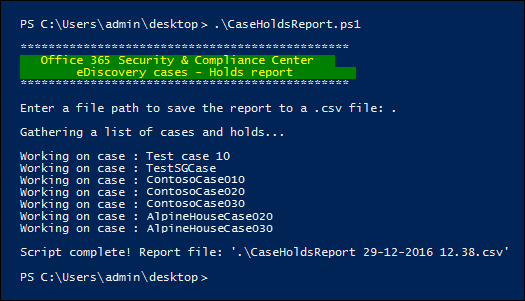
.\CaseHoldsReport.ps1脚本会提示输入要将报表保存到的目标文件夹。
键入要将报表保存到的文件夹的完整路径名称,然后按 Enter。
提示
若要将报表保存在脚本所在的同一文件夹中,请键入句点“ (”。当系统提示输入目标文件夹时 ) 。 若要将报表保存在脚本所在的文件夹中的子文件夹中,只需键入子文件夹的名称即可。
该脚本开始收集有关组织中所有电子数据展示案例的信息。 运行脚本时,请勿访问报表文件。 脚本完成后,Windows PowerShell会话中会显示一条确认消息。 显示此邮件后,可以访问在步骤 4 中指定的文件夹中的报表。 报表的文件名为
CaseHoldsReport<DateTimeStamp>.csv。此外,该脚本会创建一个报表,其中包含没有任何保留项的事例列表。 此报表的文件名为
CaseswithNoHolds<DateTimeStamp>.csv。下面是运行脚本的示例
CaseHoldsReport.ps1。