警告
语义内核进程框架 是实验性的,仍在开发中,并且可能会更改。
概述
在前面的部分中,我们构建了一个流程,帮助我们自动创建新产品的文档。 我们的流程现在可以生成特定于我们产品的文档,并通过进行校对和编辑流程来确保其符合我们的质量标准。 在本部分中,我们将再次改进该过程,要求人工批准或拒绝文档,然后再发布文档。 流程框架的灵活性意味着我们可以采取多种方法来执行此作,但在此示例中,我们将演示与外部 pubsub 系统的集成,以便请求批准。
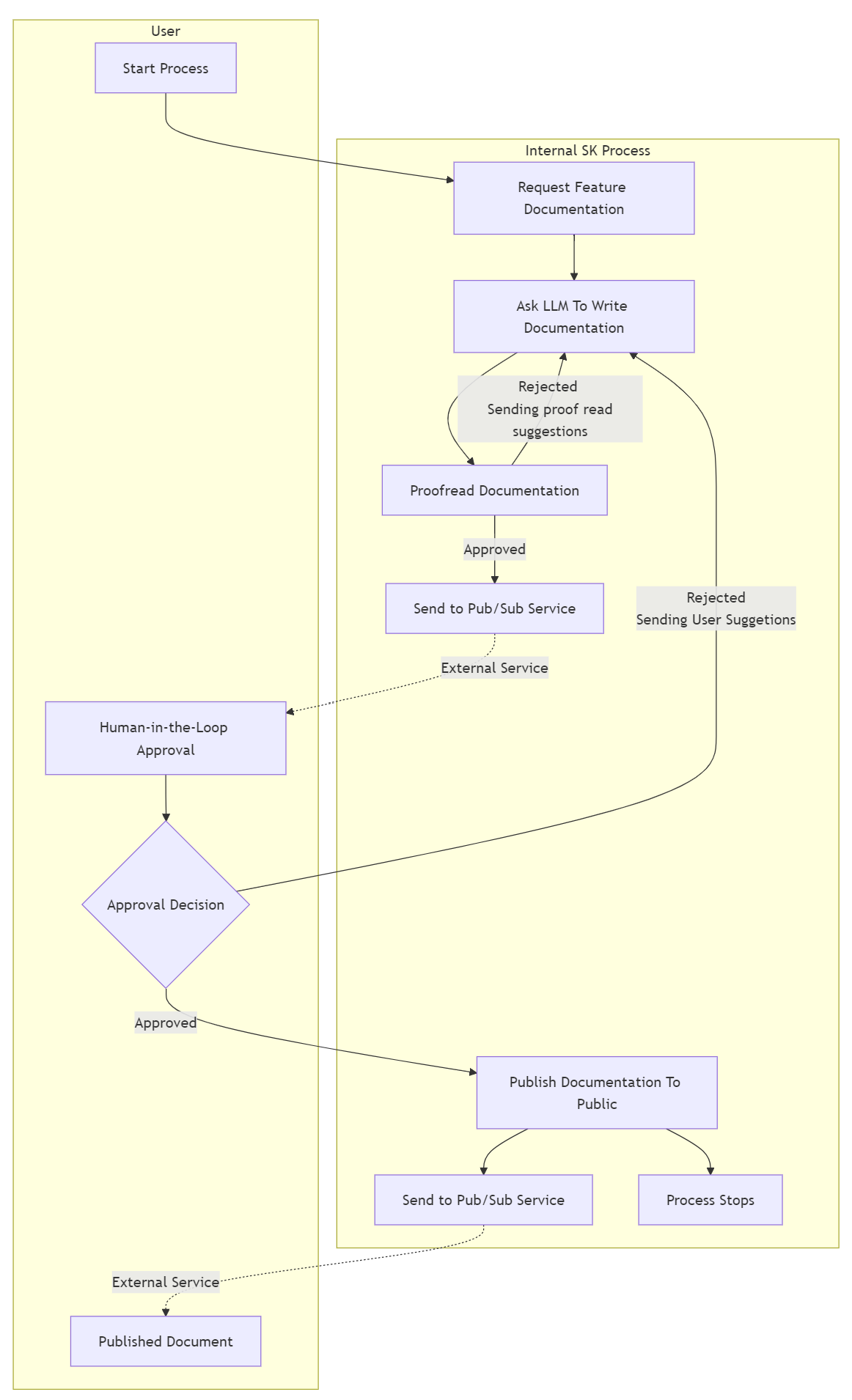
需等待审批后发布
我们需要对流程进行的第一个更改是让发布步骤等待审批,然后再发布文档。 一个选项是只向 PublishDocumentation中的 PublishDocumentationStep 函数添加第二个参数以供审批。 这有效,因为仅当提供所有必需的参数时,才会调用步骤中的 KernelFunction。
// A process step to publish documentation
public class PublishDocumentationStep : KernelProcessStep
{
    [KernelFunction]
    public DocumentInfo PublishDocumentation(DocumentInfo document, bool userApproval) // added the userApproval parameter
    {
        // Only publish the documentation if it has been approved
        if (userApproval)
        {
            // For example purposes we just write the generated docs to the console
            Console.WriteLine($"[{nameof(PublishDocumentationStep)}]:\tPublishing product documentation approved by user: \n{document.Title}\n{document.Content}");
        }
        return document;
    }
}
即将推出对 Python 人工干预过程行为的支持。
使用上述代码时,仅当生成的文档发送到 PublishDocumentation 参数并且审批结果已发送到 PublishDocumentationStep 参数时,才会调用 document 中的 userApproval 函数。
现在,我们可以重用ProofreadStep步骤的现有逻辑,另外向我们的外部 pubsub 系统发出事件,以通知人工审批者有新的请求。
// A process step to publish documentation
public class ProofReadDocumentationStep : KernelProcessStep
{
    ...

    if (formattedResponse.MeetsExpectations)
    {
        // Events that are getting piped to steps that will be resumed, like PublishDocumentationStep.OnPublishDocumentation
        // require events to be marked as public so they are persisted and restored correctly
        await context.EmitEventAsync("DocumentationApproved", data: document, visibility: KernelProcessEventVisibility.Public);
    }
    ...
}
因为我们希望在文档获得校对人员批准后发布新生成的文档,因此已批准的文档将在发布阶段排队。 此外,用户将通过外部 pubsub 系统收到通知,其中包含最新文档的更新。 让我们更新流程以匹配此新设计。
即将推出对 Python 人工干预过程行为的支持。
// Create the process builder
ProcessBuilder processBuilder = new("DocumentationGeneration");

// Add the steps
var infoGatheringStep = processBuilder.AddStepFromType<GatherProductInfoStep>();
var docsGenerationStep = processBuilder.AddStepFromType<GenerateDocumentationStepV2>();
var docsProofreadStep = processBuilder.AddStepFromType<ProofreadStep>();
var docsPublishStep = processBuilder.AddStepFromType<PublishDocumentationStep>();

// internal component that allows emitting SK events externally, a list of topic names
// is needed to link them to existing SK events
var proxyStep = processBuilder.AddProxyStep(["RequestUserReview", "PublishDocumentation"]);

// Orchestrate the events
processBuilder
    .OnInputEvent("StartDocumentGeneration")
    .SendEventTo(new(infoGatheringStep));

processBuilder
    .OnInputEvent("UserRejectedDocument")
    .SendEventTo(new(docsGenerationStep, functionName: "ApplySuggestions"));

// When external human approval event comes in, route it to the 'isApproved' parameter of the docsPublishStep
processBuilder
    .OnInputEvent("UserApprovedDocument")
    .SendEventTo(new(docsPublishStep, parameterName: "userApproval"));

// Hooking up the rest of the process steps
infoGatheringStep
    .OnFunctionResult()
    .SendEventTo(new(docsGenerationStep, functionName: "GenerateDocumentation"));

docsGenerationStep
    .OnEvent("DocumentationGenerated")
    .SendEventTo(new(docsProofreadStep));

docsProofreadStep
    .OnEvent("DocumentationRejected")
    .SendEventTo(new(docsGenerationStep, functionName: "ApplySuggestions"));

// When the proofreader approves the documentation, send it to the 'document' parameter of the docsPublishStep
// Additionally, the generated document is emitted externally for user approval using the pre-configured proxyStep
docsProofreadStep
    .OnEvent("DocumentationApproved")
    // [NEW] addition to emit messages externally
    .EmitExternalEvent(proxyStep, "RequestUserReview") // Hooking up existing "DocumentationApproved" to external topic "RequestUserReview"
    .SendEventTo(new(docsPublishStep, parameterName: "document"));

// When event is approved by user, it gets published externally too
docsPublishStep
    .OnFunctionResult()
    // [NEW] addition to emit messages externally
    .EmitExternalEvent(proxyStep, "PublishDocumentation");

var process = processBuilder.Build();
return process;
最后,应提供接口 IExternalKernelProcessMessageChannel 的实现,因为它由新 ProxyStep接口在内部使用。 此接口用于在外部发出消息。 此接口的实现将取决于所使用的外部系统。 在此示例中,我们将使用已创建的自定义客户端将消息发送到外部 pubsub 系统。
// Example of potential custom IExternalKernelProcessMessageChannel implementation
public class MyCloudEventClient : IExternalKernelProcessMessageChannel
{
    private MyCustomClient? _customClient;

    // Example of an implementation for the process
    public async Task EmitExternalEventAsync(string externalTopicEvent, KernelProcessProxyMessage message)
    {
        // logic used for emitting messages externally.
        // Since all topics are received here potentially
        // some if else/switch logic is needed to map correctly topics with external APIs/endpoints.
        if (this._customClient != null)
        {
            switch (externalTopicEvent)
            {
                case "RequestUserReview":
                    var requestDocument = message.EventData.ToObject() as DocumentInfo;
                    // As an example only invoking a sample of a custom client with a different endpoint/api route
                    this._customClient.InvokeAsync("REQUEST_USER_REVIEW", requestDocument);
                    return;

                case "PublishDocumentation":
                    var publishedDocument = message.EventData.ToObject() as DocumentInfo;
                    // As an example only invoking a sample of a custom client with a different endpoint/api route
                    this._customClient.InvokeAsync("PUBLISH_DOC_EXTERNALLY", publishedDocument);
                    return;
            }
        }
    }

    public async ValueTask Initialize()
    {
        // logic needed to initialize proxy step, can be used to initialize custom client
        this._customClient = new MyCustomClient("http://localhost:8080");
        this._customClient.Initialize();
    }

    public async ValueTask Uninitialize()
    {
        // Cleanup to be executed when proxy step is uninitialized
        if (this._customClient != null)
        {
            await this._customClient.ShutdownAsync();
        }
    }
}
最后,为了允许进程 ProxyStep 在这种情况下应用 IExternalKernelProcessMessageChannel 的 MyCloudEventClient 实现,我们需要正确地配置管道。
使用本地运行时时,可以在调用 StartAsync 类时传递实现的 KernelProcess 类。
KernelProcess process;
IExternalKernelProcessMessageChannel myExternalMessageChannel = new MyCloudEventClient();
// Start the process with the external message channel
await process.StartAsync(kernel, new KernelProcessEvent
    {
        Id = inputEvent,
        Data = input,
    },
    myExternalMessageChannel)
使用 Dapr 运行时时,必须在项目的 Program 安装程序中通过依赖项注入来完成管道。
var builder = WebApplication.CreateBuilder(args);
...
// depending on the application a singleton or scoped service can be used
// Injecting SK Process custom client IExternalKernelProcessMessageChannel implementation
builder.Services.AddSingleton<IExternalKernelProcessMessageChannel, MyCloudEventClient>();
即将推出对 Python 人工干预过程行为的支持。
对流程进行了两项更改:
- 添加了一个名为
HumanApprovalResponse的输入事件,该事件将路由到userApproval步骤的docsPublishStep参数。 - 由于
docsPublishStep中的 KernelFunction 现在有两个参数,因此我们需要更新现有路由以指定document的参数名称。
像之前一样运行该过程并注意到,当校对程序批准生成的文档并将其发送到 document 步骤的 docPublishStep 参数时,该步骤不再被调用,因为它正在等待 userApproval 参数。 此时,进程变为空闲状态,因为没有准备好要调用的步骤,而我们之前发起的启动进程的调用返回。 此过程将保持此空闲状态,直到我们的人机协作进行操作以批准或拒绝发布请求。 一旦发生这种情况,并且结果已经传达回我们的程序,我们就可以用该结果重新启动流程。
// Restart the process with approval for publishing the documentation.
await process.StartAsync(kernel, new KernelProcessEvent { Id = "UserApprovedDocument", Data = true });
即将推出对 Python 人工干预过程行为的支持。
当进程再次启动时,UserApprovedDocument 将从上次中断的位置继续,调用 docsPublishStep 并将 userApproval 设置为 true,然后我们的文档将被发布。 如果再次通过UserRejectedDocument事件启动,流程将在ApplySuggestions步骤启动docsGenerationStep函数,过程将像以前一样继续。
该步骤现已完成,我们已成功地将人为干预步骤添加到我们的流程中。 现在,该过程可用于为产品生成文档,对其进行校对,并在人工批准后发布它。