在 Power Apps 组件中使用格式化 API
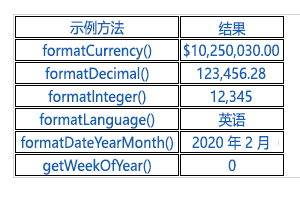
Power Apps component framework 显示一种格式化 API,当您需要为应用程序中的各种值设置格式时,它尤其有用。 本单元介绍如何通过生成 HTML 表来使用本 API,以说明如何使用各种方法。
初始化组件的项目
要初始化组件的项目,请按照以下步骤操作:
启动 Visual Studio Code。
选择终端并选择新建终端。
将目录更改为您的源文件夹。
cd source从您的源目录创建名为 Formatting-API 的目录。
md Formatting-API运行以下命令,切换到新目录。
cd Formatting-API通过运行以下命令初始化项目。
pac pcf init --namespace SampleNamespace --name FormattingAPI --template fieldRun npm install 可将相关库加载到您的项目中。
npm install通过运行以下命令在 Visual Studio Code 中打开项目。
code -a .
实现代码组件的逻辑
要实现代码组件的逻辑,请按照以下步骤操作:
展开 FormattingAPI 文件夹并打开 ControlManifest.Input.xml 文件。
将整个清单替换为以下 XML。
<?xml version="1.0" encoding="utf-8" ?>
<manifest>
  <control namespace="SampleNamespace" constructor="FormattingAPI" version="1.1.0" display-name-key="TS_FormattingAPI_Display_Key" description-key="TS_FormattingAPI_Desc_Key" control-type="standard">
    <property name="controlValue" display-name-key="controlValue_Display_Key" description-key="controlValue_Desc_Key" of-type="SingleLine.Text" usage="bound" required="true" />
    <resources>
      <code path="index.ts" order="1" />
      <css path="css/TS_FormattingAPI.css" order="2" />
    </resources>
  </control>
</manifest>
稍后可添加在本清单中找到的支持文件。
打开 Index.ts 文件。
在 constructor 方法上方,插入以下专用变量。
// PCF framework delegate that will be assigned to this object that would be called whenever any update happens.
private _notifyOutputChanged: () => void;

// Reference to the div element that holds together all the HTML elements that you are creating as part of this control
private divElement: HTMLDivElement;

// Reference to HTMLTableElement rendered by control
private _tableElement: HTMLTableElement;

// Reference to the control container HTMLDivElement
// This element contains all elements of your custom control example
private _container: HTMLDivElement;

// Reference to ComponentFramework Context object
private _context: ComponentFramework.Context<IInputs>;

// Flag if control view has been rendered
private _controlViewRendered: Boolean;
在 init 方法内部放置以下逻辑。
this._notifyOutputChanged = notifyOutputChanged;
this._controlViewRendered = false;
this._context = context;

this._container = document.createElement("div");
this._container.classList.add("TSFormatting_Container");
container.appendChild(this._container);
将以下逻辑添加到 updateView 方法:
if (!this._controlViewRendered)
{
    // Render and add HTMLTable to the custom control container element
    let tableElement: HTMLTableElement = this.createHTMLTableElement();
    this._container.appendChild(tableElement);

    this._controlViewRendered = true;
}
添加以下帮助程序方法,生成 HTML 表,在 destroy 方法之后显示格式化值。
/**
* Helper method to create an HTML Table Row Element
* @param key : string value to show in left column cell
* @param value : string value to show in right column cell
* @param isHeaderRow : true if method should generate a header row
*/
private createHTMLTableRowElement(key: string, value: string, isHeaderRow: boolean): HTMLTableRowElement
{
    let keyCell: HTMLTableCellElement = this.createHTMLTableCellElement(key, "FormattingControlSampleHtmlTable_HtmlCell_Key", isHeaderRow);
    let valueCell: HTMLTableCellElement = this.createHTMLTableCellElement(value, "FormattingControlSampleHtmlTable_HtmlCell_Value", isHeaderRow);

    let rowElement: HTMLTableRowElement = document.createElement("tr");
    rowElement.setAttribute("class", "FormattingControlSampleHtmlTable_HtmlRow");
    rowElement.appendChild(keyCell);
    rowElement.appendChild(valueCell);

    return rowElement;
}

/**
* Helper method to create an HTML Table Cell Element
* @param cellValue : string value to inject in the cell
* @param className : class name for the cell
* @param isHeaderRow : true if method should generate a header row cell
*/
private createHTMLTableCellElement(cellValue: string, className: string, isHeaderRow: boolean): HTMLTableCellElement
{
    let cellElement: HTMLTableCellElement;

    if (isHeaderRow)
    {
        cellElement = document.createElement("th");
        cellElement.setAttribute("class", "FormattingControlSampleHtmlTable_HtmlHeaderCell " + className);
        let textElement: Text = document.createTextNode(cellValue);
        cellElement.appendChild(textElement);
    }
    else
    {
        cellElement = document.createElement("td");
        cellElement.setAttribute("class", "FormattingControlSampleHtmlTable_HtmlCell " + className);
        let textElement: Text = document.createTextNode(cellValue);
        cellElement.appendChild(textElement);
    }
    return cellElement;
}
添加以下方法(其中包含格式化 API 的示例用法),方法是在帮助程序方法之后将它们另存为表单元格。
/** * Creates an HTML Table that showcases examples of basic methods available to the custom control * The left column of the table shows the method name or property that is being used * The right column of the table shows the result of that method name or property */ private createHTMLTableElement(): HTMLTableElement { // Create HTML Table Element let tableElement: HTMLTableElement = document.createElement("table"); tableElement.setAttribute("class", "FormattingControlSampleHtmlTable_HtmlTable"); // Create header row for table let key: string = "Example Method"; let value: string = "Result"; tableElement.appendChild(this.createHTMLTableRowElement(key, value, true)); // Example use of formatCurrency() method // Change the default currency and the precision or pass in the precision and currency as additional parameters. key = "formatCurrency()"; value = this._context.formatting.formatCurrency(10250030); tableElement.appendChild(this.createHTMLTableRowElement(key, value, false)); // Example use of formatDecimal() method // Change the settings from user settings to see the output change its format accordingly key = "formatDecimal()"; value = this._context.formatting.formatDecimal(123456.2782); tableElement.appendChild(this.createHTMLTableRowElement(key, value, false)); // Example use of formatInteger() method // change the settings from user settings to see the output change its format accordingly. key = "formatInteger()"; value = this._context.formatting.formatInteger(12345); tableElement.appendChild(this.createHTMLTableRowElement(key, value, false)); // Example use of formatLanguage() method // Install additional languages and pass in the corresponding language code to see its string value key = "formatLanguage()"; value = this._context.formatting.formatLanguage(1033); tableElement.appendChild(this.createHTMLTableRowElement(key, value, false)); // Example of formatDateYearMonth() method // Pass a JavaScript Data object set to the current time into formatDateYearMonth method to format the data // and get the return in Year, Month format key = "formatDateYearMonth()"; value = this._context.formatting.formatDateYearMonth(new Date()); tableElement.appendChild(this.createHTMLTableRowElement(key, value, false)); // Example of getWeekOfYear() method // Pass a JavaScript Data object set to the current time into getWeekOfYear method to get the value for week of the year key = "getWeekOfYear()"; value = this._context.formatting.getWeekOfYear(new Date()).toString(); tableElement.appendChild(this.createHTMLTableRowElement(key, value, false)); return tableElement; }选择文件并全部保存您所做的更改。
进行更新后,完成的类应该如以下示例所示。
import {IInputs, IOutputs} from "./generated/ManifestTypes";

export class FormattingAPI implements ComponentFramework.StandardControl<IInputs, IOutputs> {

    // PCF framework delegate that will be assigned to this object that would be called whenever any update happens.
    private _notifyOutputChanged: () => void;

    // Reference to the div element that holds together all the HTML elements that you are creating as part of this control
    private divElement: HTMLDivElement;

    // Reference to HTMLTableElement rendered by control
    private _tableElement: HTMLTableElement;

    // Reference to the control container HTMLDivElement
    // This element contains all elements of your custom control example
    private _container: HTMLDivElement;

    // Reference to ComponentFramework Context object
    private _context: ComponentFramework.Context<IInputs>;

    // Flag if control view has been rendered
    private _controlViewRendered: Boolean;

    /**
    * Used to initialize the control instance. Controls can kick off remote server calls and other initialization actions here.
    * Dataset values are not initialized here, use updateView.
    * @param context The entire property bag is available to control through the Context Object; It contains values as set up by the customizer and mapped to property names that are defined in the manifest and to utility functions.
    * @param notifyOutputChanged A callback method to alert the framework that the control has new outputs ready to be retrieved asynchronously.
    * @param state A piece of data that persists in one session for a single user. Can be set at any point in a control's life cycle by calling 'setControlState' in the Mode interface.
    * @param container If a control is marked control-type='starndard', it will receive an empty div element within which it can render its content.
    */
    public init(context: ComponentFramework.Context<IInputs>, notifyOutputChanged: () => void, state: ComponentFramework.Dictionary, container:HTMLDivElement)
    {
        this._notifyOutputChanged = notifyOutputChanged;
        this._controlViewRendered = false;
        this._context = context;

        this._container = document.createElement("div");
        this._container.classList.add("TSFormatting_Container");
        container.appendChild(this._container);
    }

    /**
    * Called when any value in the property bag has changed. This includes field values, datasets, global values such as container height and width, offline status, control metadata values such as label, visible, and so on.
    * @param context The entire property bag that is available to control through the Context Object; It contains values as set up by the customizer that are mapped to names defined in the manifest and to utility functions
    */
    public updateView(context: ComponentFramework.Context<IInputs>): void
    {
        if (!this._controlViewRendered)
        {
            // Render and add HTMLTable to the custom control container element
            let tableElement: HTMLTableElement = this.createHTMLTableElement();
            this._container.appendChild(tableElement);

            this._controlViewRendered = true;
        }
    }

    /**
    * It is called by the framework prior to a control receiving new data.
    * @returns an object based on nomenclature that is defined in the manifest, expecting object[s] for property marked as "bound" or "output"
    */
    public getOutputs(): IOutputs
    {
        return { };
    }

    /**
    * Called when the control is to be removed from the DOM tree. Controls should use this call for cleanup,
    * such as canceling any pending remote calls, removing listeners, and so on.
    */
    public destroy()
    {

    }

    /**
    * Helper method to create an HTML Table Row Element
    * @param key : string value to show in left column cell
    * @param value : string value to show in right column cell
    * @param isHeaderRow : true if method should generate a header row
    */
    private createHTMLTableRowElement(key: string, value: string, isHeaderRow: boolean): HTMLTableRowElement
    {
        let keyCell: HTMLTableCellElement = this.createHTMLTableCellElement(key, "FormattingControlSampleHtmlTable_HtmlCell_Key", isHeaderRow);
        let valueCell: HTMLTableCellElement = this.createHTMLTableCellElement(value, "FormattingControlSampleHtmlTable_HtmlCell_Value", isHeaderRow);

        let rowElement: HTMLTableRowElement = document.createElement("tr");
        rowElement.setAttribute("class", "FormattingControlSampleHtmlTable_HtmlRow");
        rowElement.appendChild(keyCell);
        rowElement.appendChild(valueCell);

        return rowElement;
    }

    /**
    * Helper method to create an HTML Table Cell Element
    * @param cellValue : string value to inject in the cell
    * @param className : class name for the cell
    * @param isHeaderRow : true if method should generate a header row cell
    */
    private createHTMLTableCellElement(cellValue: string, className: string, isHeaderRow: boolean): HTMLTableCellElement
    {
        let cellElement: HTMLTableCellElement;

        if (isHeaderRow)
        {
            cellElement = document.createElement("th");
            cellElement.setAttribute("class", "FormattingControlSampleHtmlTable_HtmlHeaderCell " + className);
            let textElement: Text = document.createTextNode(cellValue);
            cellElement.appendChild(textElement);
        }
        else
        {
            cellElement = document.createElement("td");
            cellElement.setAttribute("class", "FormattingControlSampleHtmlTable_HtmlCell " + className);
            let textElement: Text = document.createTextNode(cellValue);
            cellElement.appendChild(textElement);
        }
        return cellElement;
    }

    /**
    * Creates an HTML Table that showcases examples of basic methods that are available to the custom control
    * The left column of the table shows the method name or property that is being used
    * The right column of the table shows the result of that method name or property
    */
    private createHTMLTableElement(): HTMLTableElement
    {
        // Create HTML Table Element
        let tableElement: HTMLTableElement = document.createElement("table");
        tableElement.setAttribute("class", "FormattingControlSampleHtmlTable_HtmlTable");

        // Create header row for table
        let key: string = "Example Method";
        let value: string = "Result";
        tableElement.appendChild(this.createHTMLTableRowElement(key, value, true));

        // Example use of formatCurrency() method
        // Change the default currency and the precision or pass in the precision and currency as additional parameters.
        key = "formatCurrency()";
        value = this._context.formatting.formatCurrency(10250030);
        tableElement.appendChild(this.createHTMLTableRowElement(key, value, false));

        // Example use of formatDecimal() method
        // Change the settings from user settings to see the output change its format accordingly
        key = "formatDecimal()";
        value = this._context.formatting.formatDecimal(123456.2782);
        tableElement.appendChild(this.createHTMLTableRowElement(key, value, false));

        // Example use of formatInteger() method
        // change the settings from user settings to see the output change its format accordingly.
        key = "formatInteger()";
        value = this._context.formatting.formatInteger(12345);
        tableElement.appendChild(this.createHTMLTableRowElement(key, value, false));

        // Example use of formatLanguage() method
        // Install additional languages and pass in the corresponding language code to see its string value
        key = "formatLanguage()";
        value = this._context.formatting.formatLanguage(1033);
        tableElement.appendChild(this.createHTMLTableRowElement(key, value, false));

        // Example of formatDateYearMonth() method
        // Pass a JavaScript Data object set to the current time into formatDateYearMonth method to format the data
        // and get the return in Year, Month format
        key = "formatDateYearMonth()";
        value = this._context.formatting.formatDateYearMonth(new Date());
        tableElement.appendChild(this.createHTMLTableRowElement(key, value, false));

        // Example of getWeekOfYear() method
        // Pass a JavaScript Data object set to the current time into getWeekOfYear method to get the value for week of the year
        key = "getWeekOfYear()";
        value = this._context.formatting.getWeekOfYear(new Date()).toString();
        tableElement.appendChild(this.createHTMLTableRowElement(key, value, false));

        return tableElement;
    }

}
将样式添加到代码组件
要将样式添加到您的代码组件,请按照以下步骤操作:
在 FormattingAPI 文件夹下创建新的 css 子文件夹。
在 CSS 子文件夹内创建新的 TS_FormattingAPI.css 文件。
将以下样式内容添加到 TS_FormattingAPI.css 文件。
.SampleNamespace\.FormattingAPI { font-family: 'SegoeUI-Semibold', 'Segoe UI Semibold', 'Segoe UI Regular', 'Segoe UI'; } .SampleNamespace\.FormattingAPI .TSFormatting_Container { overflow-x: auto; } .SampleNamespace\.FormattingAPI .FormattingControlSampleHtmlTable_HtmlRow { background-color: #FFFFFF; } .SampleNamespace\.FormattingAPI .FormattingControlSampleHtmlTable_HtmlHeaderCell { text-align: center; } .SampleNamespace\.FormattingAPI .FormattingControlSampleHtmlTable_HtmlCell, .SampleNamespace\.FormattingAPI .FormattingControlSampleHtmlTable_HtmlHeaderCell { border: 1px solid black; padding-left: 3px; padding-right: 3px; } .SampleNamespace\.FormattingAPI .FormattingControlSampleHtmlTable_HtmlInputTextCell { border: 1px solid black; padding: 0px; } .SampleNamespace\.FormattingAPI .FormattingControlSampleHtmlTable_HtmlHeaderCell { font-weight: bold; font-size: 16px; } .SampleNamespace\.FormattingAPI .FormattingControlSampleHtmlTable_HtmlCell_Key { color: #1160B7; } .SampleNamespace\.FormattingAPI .FormattingControlSampleHtmlTable_HtmlCell_Value { color: #1160B7; text-align: center; }选择文件并全部保存您所做的更改。
生成并运行您的组件
要生成并运行您的组件,请按照以下步骤操作:
通过运行以下命令生成您的解决方案。
npm run build成功生成后,您可以运行 npm start 来测试您的新格式化 API 组件。
npm start关闭测试工具浏览器窗口。
返回终端,并按住 [CONTROL] + C,以阻止观察程序。
键入 Y,然后键入 [ENTER]。
有关详细信息,请参阅实施格式化 API 组件。