开发基于视觉的聊天应用
若要开发使用多模式模型进行基于视觉的聊天的客户端应用,可以使用用于基于文本的聊天的相同基本技术。 需要连接到部署模型的终结点,并使用该终结点将包含消息的提示提交到模型并处理响应。
主要区别在于,基于视觉的聊天提示包括包含 文本 内容项和 图像 内容项的多部分用户消息。
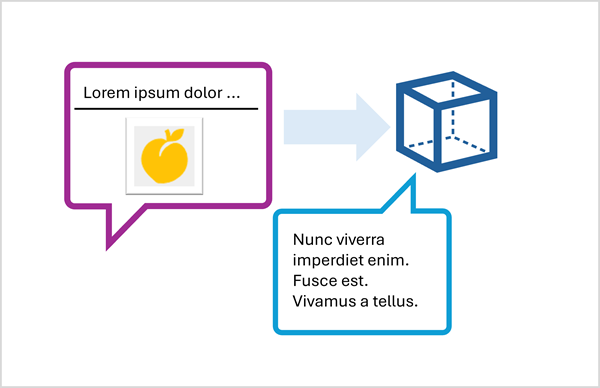
使用 响应 API 提交基于图像的提示
若要使用 响应 API 在提示中包含图像,请指定基于 Web 的图像文件的 URL,或加载本地图像,并使用 Base64 格式对数据进行编码,并按格式 data:image/jpeg;base64,{image_data} 提交 URL(将“jpeg”替换为“png”pr 其他格式( 根据需要) 。
以下 Python 示例演示如何使用 响应 API 在提示中提交图像:
# Read the image data from a local file
image_path = Path("dragon-fruit.jpeg")
image_format = "jpeg"
with open(image_path, "rb") as image_file:
    image_data = base64.b64encode(image_file.read()).decode("utf-8")

data_url = f"data:image/{image_format};base64,{image_data}" # You can also use a web URL

# Send the image data in a prompt to the model
response = client.responses.create(
    model="gpt-4.1",
    input=[
        {"role": "developer", "content": "You are an AI assistant for chefs planning recipes."},
        {"role": "user", "content": [
            { "type": "input_text", "text": "What desserts could I make with this?"},
            { "type": "input_image", "image_url": data_url}
        ] }
    ]
)
print(response.output_text)
使用 ChatCompletions API 提交基于图像的提示
使用 Azure OpenAI 终结点向不支持 响应 API 的模型提交提示时,可以使用 CatCompletions API,如下所示:
# Read the image data from a local file
image_path = Path("orange.jpeg")
image_format = "jpeg"
with open(image_path, "rb") as image_file:
    image_data = base64.b64encode(image_file.read()).decode("utf-8")

data_url = f"data:image/{image_format};base64,{image_data}" # You can also use a web URL

# Send the image data in a prompt to the model
response = client.chat.completions.create(
    model="Phi-4-multimodal-instruct",
    messages=[
        {"role": "system", "content": "You are an AI assistant for chefs planning recipes."},
        { "role": "user", "content": [
            { "type": "text", "text": "What can I make with this fruit?"},
            { "type": "image_url", "image_url": {"url": data_url}}
        ] }
    ]
)
print(response.choices[0].message.content)