来自 Accelerometer、Gyrometer 的传感器数据, Compass、Inclinometer 和 OrientationSensor 类由引用轴定义。 这些轴由设备的参考帧定义,并在用户旋转时随设备旋转。 如果你的应用支持自动旋转,并且会在用户旋转设备时相应调整自身方向,那么在使用传感器数据之前,你必须先根据设备的旋转情况对其进行调整。
显示方向与设备方向
若要了解传感器的参考轴,需要区分显示方向与设备方向。 显示方向是指文本和图像在屏幕上的显示方向,而设备方向是指设备的实际物理朝向。
注释
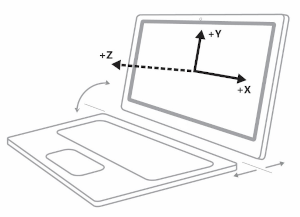
正 z 轴从设备屏幕延伸出来,如下图所示。
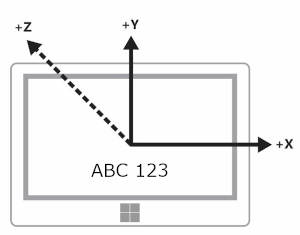
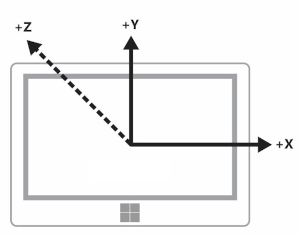
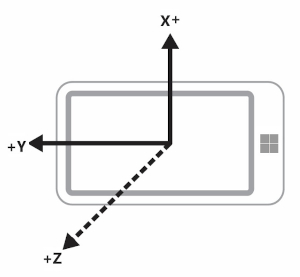
在以下图示中,设备方向和显示方向均为 Landscape(图中所示的传感器轴针对横向方向)。
此图显示了 Landscape 中的显示和设备方向。
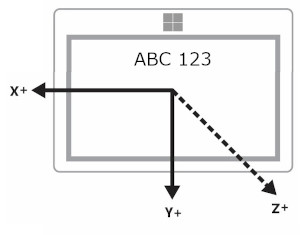
下图显示了 LandscapeFlipped 中的显示和设备方向。
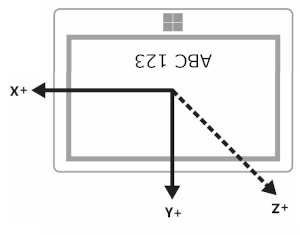
最后这张示意图显示,屏幕显示方向为横向,而设备方向则为 LandscapeFlipped。
可以通过具有
横屏优先与竖屏优先设备
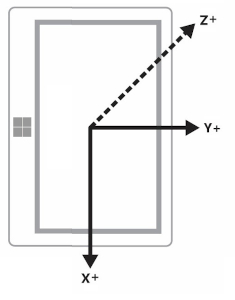
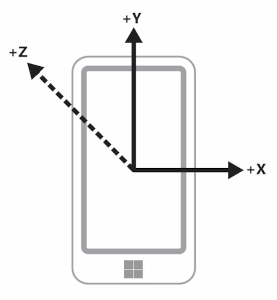
制造商既生产以横向为主的设备,也生产以纵向为主的设备。 参考帧因横向优先设备(如台式机和笔记本电脑)和纵向优先设备(如手机和某些平板电脑)而异。 下表显示了横向优先设备和纵向优先设备的传感器轴。
| 方向 | 横向优先 | 竖屏优先 |
|---|---|---|
| 景观 |
|
|
| Portrait |
|
|
| LandscapeFlipped |
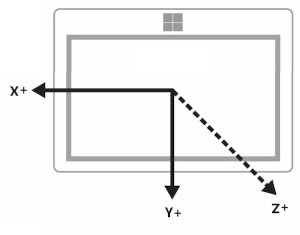
|
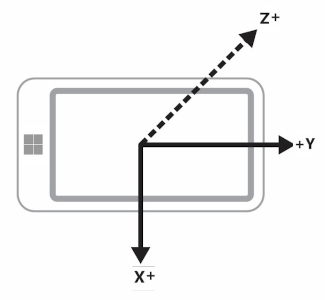
|
| PortraitFlipped |
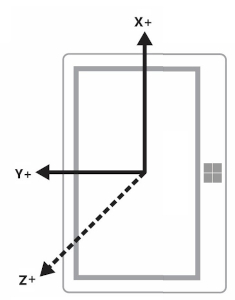
|
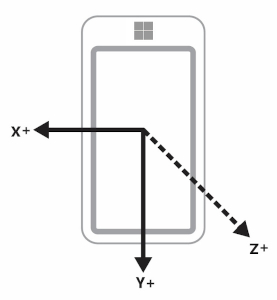
|
广播显示设备和无头设备
某些设备能够将显示器广播到另一台设备。 例如,您可以拿一台平板电脑,并将屏幕画面投射到处于横向模式的投影仪上。 在这种情况下,请务必记住,设备方向是以原始设备为准,而不是以呈现该显示内容的设备为准。 因此,加速度计会为这台平板电脑提供数据。
此外,某些设备没有显示器。 使用这些设备时,这些设备的默认方向为纵向。
显示方向和指南针航向
指南针标题取决于参考轴,因此它随设备方向变化。 根据此表进行补偿(假定用户正朝北)。
| 显示方向 | 罗盘航向的参考轴 | 面向北方时的 API 指南针航向(横向优先) | 朝北时的 API 指南针方向 (纵向优先) | 罗盘航向补偿(横向优先) | 指南针航向补偿(纵向优先) |
|---|---|---|---|---|---|
| 横向打印 | -Z | 0 | 270 | 标题 | (标题 + 90) % 360 |
| 纵向打印 | Y | 90 | 0 | (标题 + 270) % 360 | 标题 |
| LandscapeFlipped | Z | 180 | 90 | (标题 + 180) % 360 | (标题 + 270) % 360 |
| PortraitFlipped | Y | 270 | 180 | (标题 + 90) % 360 | (标题 + 180) % 360 |
根据表中所示修改指南针标题,以便正确显示标题。 以下代码片段演示如何执行此操作。
private void ReadingChanged(object sender, CompassReadingChangedEventArgs e)
{
    double heading = e.Reading.HeadingMagneticNorth;
    double displayOffset;

    // Calculate the compass heading offset based on
    // the current display orientation.
    // In WinUI 3 desktop apps, use interop to get DisplayInformation for the current window.
    var hWnd = WinRT.Interop.WindowNative.GetWindowHandle(App.Window);
    DisplayInformation displayInfo = DisplayInformation.CreateForWindowId(
        Microsoft.UI.Win32Interop.GetWindowIdFromWindow(hWnd));

    switch (displayInfo.CurrentOrientation)
    {
        case DisplayOrientations.Landscape:
            displayOffset = 0;
            break;
        case DisplayOrientations.Portrait:
            displayOffset = 270;
            break;
        case DisplayOrientations.LandscapeFlipped:
            displayOffset = 180;
            break;
        case DisplayOrientations.PortraitFlipped:
            displayOffset = 90;
            break;
     }

    double displayCompensatedHeading = (heading + displayOffset) % 360;

    // Update the UI...
}
使用加速计和陀螺仪显示方向
此表将加速计和陀螺仪数据转换为显示方向。
| 参考轴 | X | Y | Z |
|---|---|---|---|
| 景观 | X | Y | Z |
| Portrait | Y | -X | Z |
| LandscapeFlipped | -X | -Y | Z |
| PortraitFlipped | -Y | X | Z |
下面的代码示例将这些转换应用到陀螺仪。
private void ReadingChanged(object sender, GyrometerReadingChangedEventArgs e)
{
    double x_Axis;
    double y_Axis;
    double z_Axis;

    GyrometerReading reading = e.Reading;

    // Calculate the gyrometer axes based on
    // the current display orientation.
    // In WinUI 3 desktop apps, use interop to get DisplayInformation for the current window.
    var hWnd = WinRT.Interop.WindowNative.GetWindowHandle(App.Window);
    DisplayInformation displayInfo = DisplayInformation.CreateForWindowId(
        Microsoft.UI.Win32Interop.GetWindowIdFromWindow(hWnd));
    switch (displayInfo.CurrentOrientation)
    {
        case DisplayOrientations.Landscape:
            x_Axis = reading.AngularVelocityX;
            y_Axis = reading.AngularVelocityY;
            z_Axis = reading.AngularVelocityZ;
            break;
        case DisplayOrientations.Portrait:
            x_Axis = reading.AngularVelocityY;
            y_Axis = -1 * reading.AngularVelocityX;
            z_Axis = reading.AngularVelocityZ;
            break;
        case DisplayOrientations.LandscapeFlipped:
            x_Axis = -1 * reading.AngularVelocityX;
            y_Axis = -1 * reading.AngularVelocityY;
            z_Axis = reading.AngularVelocityZ;
            break;
        case DisplayOrientations.PortraitFlipped:
            x_Axis = -1 * reading.AngularVelocityY;
            y_Axis = reading.AngularVelocityX;
            z_Axis = reading.AngularVelocityZ;
            break;
     }

    // Update the UI...
}
显示方向和设备方向
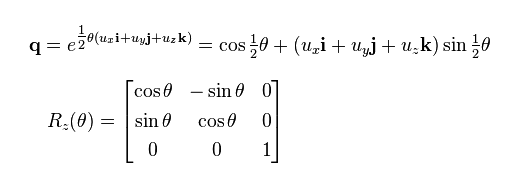
OrientationSensor 数据必须以不同的方式更改。 将这些不同的方向视为向 z 轴逆时针旋转,因此我们需要反转旋转才能恢复用户的方向。 对于四元数数据,可以使用 Euler 的公式通过引用四元数定义旋转,还可以使用引用旋转矩阵。
若要获取所需的相对方向,请将引用对象与绝对对象相乘。 请注意,这里的运算不满足交换律。
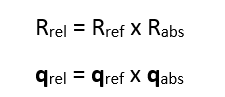
在前面的表达式中,绝对对象由传感器数据返回。
| 显示方向 | 绕 Z 轴逆时针旋转 | 参考四元数(反向旋转) | 参考旋转矩阵(反向旋转) |
|---|---|---|---|
| 景观 | 0 | 1 + 0i + 0j + 0k | [1 0 0 0 1 0 0 0 1] |
| Portrait | 90 | cos(-45⁰) + (i + j + k)*sin(-45⁰) | [0 1 0 -1 0 0 0 0 1] |
| LandscapeFlipped | 180 | 0 - i - j - k | [1 0 0 0 1 0 0 0 1] |
| PortraitFlipped | 270 | cos(-135⁰) + (i + j + k)*sin(-135⁰) | [0 -1 0 1 0 0 0 0 1] |
