本文介绍如何加速单实例 Windows 应用程序的热启动。 了解如何注册正在运行的进程实例,以在启动发生时直接收到通知,避免与完整启动流关联的开销。 此方法通过消除整合已运行实例的中介进程来降低整体延迟。
目前的典型流:

通过加速启动:
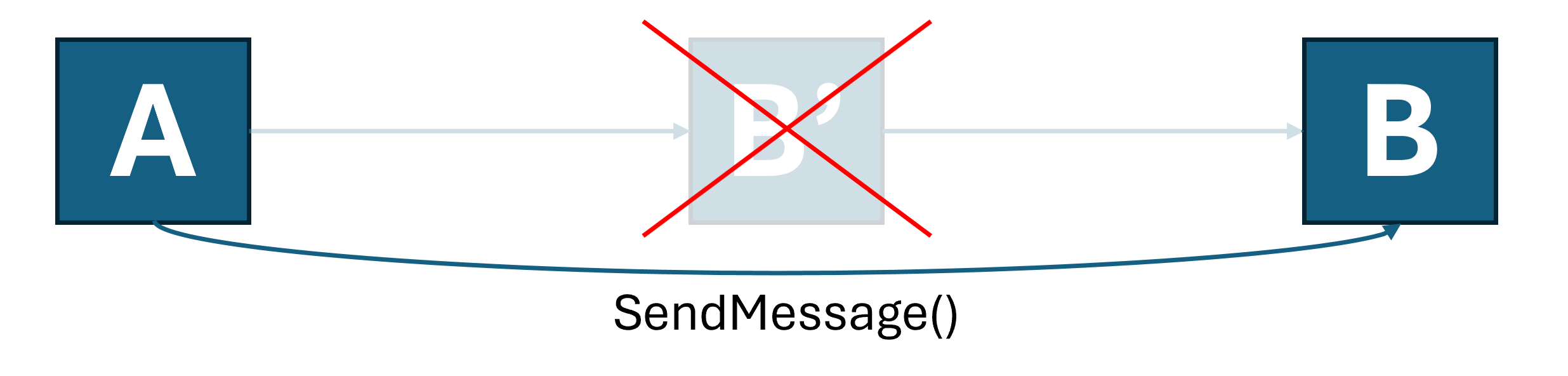
这种加速启动功能并不涵盖每个版本的 Windows 上每个源应用程序的每种启动。 因此,应用程序仍必须维护自身的单实例化实现(请参阅 使用应用生命周期 API 实现应用程序实例化的一种方法)。
本文的其余部分介绍如何创建支持加速暖启动菜单和协议启动的简单C++ WinUI 3 应用。
重要
加速启动 API 是有限访问功能的一部分(请参阅 LimitedAccessFeatures 类)。 有关详细信息或请求解锁令牌,请使用 LAF Access 令牌请求表单。
创建新项目
在Visual Studio中,创建新的project。 对于此示例,在 创建新的 project 对话框中,将语言筛选器设置为 C++ 并将project类型设置为 WinUI,然后选择 WinUI 空白应用(Packaged)。 如果未看到此模板,请确保在 Visual Studio Installer 中安装了 WinUI 应用程序开发工作负荷。
实现单实例化
您可以使用任何您选择的技术在应用程序中实现单实例化。 在此示例中,请使用 Windows App SDK 的应用生命周期 API。
void App::OnLaunched([[maybe_unused]] LaunchActivatedEventArgs const& e)
{
    AppInstance mainInstance = AppInstance::FindOrRegisterForKey(L"SingleInstance");
    if (mainInstance.IsCurrent())
    {
        // We're the main instance. Register to receive redirected launches.
        EventHandler<AppActivationArguments> handler(this, &App::OnRedirectedActivation);
        g_activatedRevoker = mainInstance.Activated(winrt::auto_revoke, handler);
        // Proceed with creating the main window.
        window = make<MainWindow>();
        window.Activate();

        window.SetMessage(L"Launched normally");
    }
    else
    {
        // We are a secondary instance. Redirect to the main instance and terminate when we're done.
        wil::unique_event redirectionComplete;
        redirectionComplete.create();

        auto redirectionOperation = mainInstance.RedirectActivationToAsync(mainInstance.GetActivatedEventArgs());
        redirectionOperation.Completed([&redirectionComplete](auto&&, auto&&)
        {
            redirectionComplete.SetEvent();
        });

        DWORD indexIgnored{};
        CoWaitForMultipleObjects(CWMO_DEFAULT, INFINITE, 1, redirectionComplete.addressof(), &indexIgnored);
        App::Exit();
    }
}

winrt::fire_and_forget App::OnRedirectedActivation(const IInspectable&, const AppActivationArguments& args)
{
    co_await wil::resume_foreground(window.DispatcherQueue());
    ::SwitchToThisWindow(GetWindowFromWindowId(window.AppWindow().Id()), TRUE);

    window.SetMessage(L"Launched via redirection");
}
为应用添加协议关联
若要接收加速协议启动,应用必须是协议注册的默认目标。 在此示例中,使用打包注册。 有关如何注册为 URI 方案的默认处理程序的详细信息,请参阅 “处理 URI 激活”。
在Package.appxmanifest中,添加协议关联的条目:
<Applications>
  <Application Id="App" … />
    …
    <Extensions>
      <uap:Extension Category="windows.protocol">
        <uap:Protocol Name="acceleratedlaunchsample"/>
      </uap:Extension>
    </Extensions>
  </Application>
</Applications>
现在,可以通过“开始”菜单中的磁贴或键入 acceleratedlaunchsample: “运行”对话框来启动你的应用。 在这两种情况下,中间进程启动并重定向到已运行的实例。
注册加速启动
现在,应用已准备好选择加入优化。
加速启动消息作为窗口消息传递到进程中的 HWND。 您需要告知系统哪些窗口应该接收消息,以及您希望使用哪些消息,并由IExperimentalAPIInvoker接口由CLSID_ExperimentalAPIInvoker实现。
IExperimentalAPIInvoker 和 CLSID_ExperimentalAPIInvoker 的定义如下:
[uuid("6fb3e48c-ba77-4f80-b9c9-77635a08a7f8")]
interface DECLSPEC_NOVTABLE IExperimentalAPIInvoker : public IUnknown
{
    IFACEMETHOD(IsSupported)(PCWSTR methodName, BOOL* isSupported) = 0;
    IFACEMETHOD(Invoke)(PCWSTR methodName, INamedPropertyStore* args, BOOL* isSupported) = 0;
};

DEFINE_GUID(CLSID_ExperimentalAPIInvoker, 0x81AF2611, 0xE262, 0x4090, 0xA1, 0x5B, 0xC0, 0x88, 0x95, 0xB1, 0xA0, 0xF0);
IExperimentalAPIInvoker 允许使用打包在命名属性存储中的参数按名称调用方法。 加速启动的方法包括:
方法:“RegisterAcceleratedUriLaunch”
注册协议启动器,其作为以 null 结尾的 UTF-16 字符串(PCWSTR),通过 WM_COPYDATA 传送到目标 HWND。
每个对象实例只能调用此方法一次 IExperimentalAPIInvoker 。 注册后,在注销之前不要释放对象。
| 参数名称 | 类型 | Description |
|---|---|---|
"targetWindow" |
VT_I8 |
将 HWND 转换为带符号的 LONGLONG,该 LONGLONG 在应用程序从“开始”菜单或其他位置启动其主磁贴时接收窗口消息。 |
"copyDataFormatId" |
VT_UI4 |
传递 URI 字符串时作为 COPYDATASTRUCT.dwData 传递的值。 |
"schemes" |
VT_LPWSTR \| VT_VECTOR |
要登记的 URI 方案列表。 只有调用进程是默认处理程序时,处理程序才会被加速。 |
方法:“UnregisterAcceleratedUriLaunch”
取消 URI 启动事件注册。 没有参数。 必须在以前注册到的同一对象上调用。
方法:“RegisterAcceleratedTileLaunch”
注册接收通过选定窗口消息传递的磁贴启动事件。 对于每个 IExperimentalAPIInvoker 对象实例,只能调用此方法一次。 注册后,在注销之前不要释放对象。
| 参数名称 | 类型 | Description |
|---|---|---|
"targetWindow" |
VT_I8 |
将 HWND 转换为带符号的 LONGLONG,该 LONGLONG 在应用程序从“开始”菜单或其他位置启动其主磁贴时接收窗口消息。 |
"messageId" |
VT_UI4 |
发送到指定目标窗口的窗口消息 ID。 |
方法:“UnregisterAcceleratedTileLaunch”
解除磁贴启动注册。 此方法不需要输入任何参数。 必须在之前注册到的同一对象上调用它。
总结
为了简化上述步骤,特别是针对那些无法轻松访问现有窗口过程的应用程序,此示例提供了一个独立的辅助工具,用于管理工作线程窗口并注册它以加速启动。 必须在具有活动消息泵的线程上创建此对象(例如 WinUI 应用的 UI 线程)。
首先,将以下代码复制到project中的头文件中:
#pragma once
#include <propsys.h>
#include <propvarutil.h>
#include <initguid.h>
#include <vector>
#include <functional>
#include <wil/result.h>
#include <wil/resource.h>

[uuid("6fb3e48c-ba77-4f80-b9c9-77635a08a7f8")]
interface DECLSPEC_NOVTABLE IExperimentalAPIInvoker : public IUnknown
{
    IFACEMETHOD(IsSupported)(PCWSTR methodName, BOOL* isSupported) = 0;
    IFACEMETHOD(Invoke)(PCWSTR methodName, INamedPropertyStore* args, BOOL* isSupported) = 0;
};

DEFINE_GUID(CLSID_ExperimentalAPIInvoker, 0x81AF2611, 0xE262, 0x4090, 0xA1, 0x5B, 0xC0, 0x88, 0x95, 0xB1, 0xA0, 0xF0);

class AcceleratedLaunchHelper
{
public:
    ~AcceleratedLaunchHelper()
    {
        if (m_hwnd != nullptr)
        {
            FAIL_FAST_IF(::GetWindowThreadProcessId(m_hwnd, nullptr) != ::GetCurrentThreadId());

            if (m_tileLaunchCallback)
            {
                BOOL isSupported;
                m_invoker->Invoke(L"UnregisterAcceleratedTileLaunch", nullptr, &isSupported);
            }

            if (m_uriLaunchCallback)
            {
                BOOL isSupported;
                m_invoker->Invoke(L"UnregisterAcceleratedUriLaunch", nullptr, &isSupported);
            }

            ::DestroyWindow(m_hwnd);
        }
    }

    inline bool TryRegisterForUris(
        const std::vector<PCWSTR>& uris, std::function<void(PCWSTR)> callback)
    {
        EnsureWorkerWindow();

        if (!m_invoker)
        {
            return false;
        }

        winrt::com_ptr<INamedPropertyStore> args;
        THROW_IF_FAILED(PSCreateMemoryPropertyStore(IID_PPV_ARGS(&args)));

        wil::unique_prop_variant targetWindowParam;
        THROW_IF_FAILED(InitPropVariantFromInt64(reinterpret_cast<LONGLONG>(m_hwnd), targetWindowParam.reset_and_addressof()));
        args->SetNamedValue(L"targetWindow", targetWindowParam);

        wil::unique_prop_variant copyDataFormatIdParam;
        THROW_IF_FAILED(InitPropVariantFromUInt32(0,
            copyDataFormatIdParam.reset_and_addressof()));
        args->SetNamedValue(L"copyDataFormatId", copyDataFormatIdParam);

        wil::unique_prop_variant schemesParam;
        THROW_IF_FAILED(InitPropVariantFromStringVector(
            const_cast<PCWSTR*>(uris.data()), uris.size(), schemesParam.reset_and_addressof()));
        THROW_IF_FAILED(args->SetNamedValue(L"schemes", schemesParam));

        BOOL isSupported{ FALSE };
        THROW_IF_FAILED(m_invoker->Invoke(L"RegisterAcceleratedUriLaunch", args.get(),
            &isSupported));

        if (isSupported)
        {
            m_uriLaunchCallback = callback;
            m_uriSchemes = uris;
        }

        return isSupported;
    }

    inline bool TryRegisterForTileLaunch(std::function<void()> callback)
    {
        EnsureWorkerWindow();

        if (!m_invoker)
        {
            return false;
        }

        winrt::com_ptr<INamedPropertyStore> args;
        THROW_IF_FAILED(PSCreateMemoryPropertyStore(IID_PPV_ARGS(&args)));

        wil::unique_prop_variant targetWindowParam;
        THROW_IF_FAILED(InitPropVariantFromInt64(reinterpret_cast<LONGLONG>(m_hwnd), targetWindowParam.reset_and_addressof()));
        args->SetNamedValue(L"targetWindow", targetWindowParam);

        wil::unique_prop_variant tileLaunchMessageIdParam;
        THROW_IF_FAILED(InitPropVariantFromUInt32(WM_USER,
            tileLaunchMessageIdParam.reset_and_addressof()));
        THROW_IF_FAILED(args->SetNamedValue(L"messageId", tileLaunchMessageIdParam));

        BOOL isSupported{ FALSE };
        THROW_IF_FAILED(m_invoker->Invoke(L"RegisterAcceleratedTileLaunch", args.get(),
            &isSupported));

        if (isSupported)
        {
            m_tileLaunchCallback = callback;
        }

        return isSupported;
    }

private:
    static inline LRESULT s_WorkerWndProc(HWND hwnd, UINT msg, WPARAM wParam, LPARAM lParam)
    {
        switch (msg)
        {
        case WM_NCCREATE:
        {
            auto pThis = reinterpret_cast<AcceleratedLaunchHelper*>(
                (reinterpret_cast<CREATESTRUCT*>(lParam))->lpCreateParams);
            if (pThis)
            {
                ::SetWindowLongPtr(hwnd, 0, reinterpret_cast<LONG_PTR>(pThis));
            }
            break;
        }
        }

        auto pThis = reinterpret_cast<AcceleratedLaunchHelper*>(GetWindowLongPtr(hwnd, 0));
        if (pThis)
        {
            return pThis->WorkerWndProc(hwnd, msg, wParam, lParam);
        }

        return 0;
    }

    inline LRESULT WorkerWndProc(HWND hwnd, UINT msg, WPARAM wParam, LPARAM lParam)
    {
        switch (msg)
        {
        case WM_COPYDATA:
        {
            const auto copyData = reinterpret_cast<COPYDATASTRUCT*>(lParam);
            if (copyData->dwData == 0)
            {
                const auto uri = reinterpret_cast<PCWSTR>(copyData->lpData);
                if (m_uriLaunchCallback)
                {
                    m_uriLaunchCallback(uri);
                }
            }
        }
        break;

        case WM_USER:
            if (m_tileLaunchCallback)
            {
                m_tileLaunchCallback();
            }
            break;
        }
        return DefWindowProc(hwnd, msg, wParam, lParam);
    }

    inline void EnsureWorkerWindow()
    {
        if (m_hwnd != nullptr)
        {
            return;
        }

        // Best-effort: Try to acquire the IExperimentalAPIInvoker.
        // If we can't, the OS does not currently support the feature.
        if (FAILED(CoCreateInstance(CLSID_ExperimentalAPIInvoker, nullptr, CLSCTX_INPROC_SERVER,
            IID_PPV_ARGS(&m_invoker)))
        {
            return;
        }

        WNDCLASSEX wcex{ sizeof(wcex) };
        wcex.lpszClassName = L"AcceleratedLaunchWorkerClass";
        wcex.cbWndExtra = sizeof(this);
        wcex.lpfnWndProc = s_WorkerWndProc;
        wcex.hInstance = GetModuleHandle(nullptr);
        ::RegisterClassEx(&wcex);

        m_hwnd = ::CreateWindowEx(0, wcex.lpszClassName, nullptr, 0, 0, 0, 0, 0,
            HWND_MESSAGE, 0, wcex.hInstance, this);

        FAIL_FAST_LAST_ERROR_IF_NULL(m_hwnd);
    }

    // Worker window for receiving notifications
    HWND m_hwnd{ nullptr };

    // Entry point for registration & unregistration
    winrt::com_ptr<IExperimentalAPIInvoker> m_invoker;

    // Callbacks
    std::function<void()> m_tileLaunchCallback;
    std::function<void(PCWSTR)> m_uriLaunchCallback;

    // Registered URI schemes
    std::vector<PCWSTR> m_uriSchemes;
};
现在,可以将此代码集成到应用中:
void App::OnLaunched([[maybe_unused]] LaunchActivatedEventArgs const& e)
{
    …
    if (mainInstance.IsCurrent())
    {
        …

        m_acceleratedLaunchHelper = std::make_unique<AcceleratedLaunchHelper>();
        m_acceleratedLaunchHelper->TryRegisterForTileLaunch(
            [this]() { OnAcceleratedTileLaunch(); });

        std::vector<PCWSTR> schemes = { L"acceleratedlaunchsample" };
        m_acceleratedLaunchHelper->TryRegisterForUris(schemes,
            [this](PCWSTR uri) { OnAcceleratedUriLaunch(uri); });
    }
    …
}

void App::OnAcceleratedTileLaunch()
{
    ::SwitchToThisWindow(GetWindowFromWindowId(window.AppWindow().Id()), TRUE);

    window.SetMessage(L"Launched via accelerated tile launch.");
}

void App::OnAcceleratedUriLaunch(PCWSTR uri)
{
    ::SwitchToThisWindow(GetWindowFromWindowId(window.AppWindow().Id()), TRUE);

    std::wstring message = L"Launched via accelerated URI launch: ";
    message += uri;
    window.SetMessage(message);
}
借助此代码,你的应用受益于支持此功能的 OS 版本上的加速启动。
