TextBox.TextDecorations 屬性
定義
重要
部分資訊涉及發行前產品,在發行之前可能會有大幅修改。 Microsoft 對此處提供的資訊,不做任何明確或隱含的瑕疵擔保。
讓文字裝飾套用到文字框上。
public:
 property System::Windows::TextDecorationCollection ^ TextDecorations { System::Windows::TextDecorationCollection ^ get(); void set(System::Windows::TextDecorationCollection ^ value); };
public System.Windows.TextDecorationCollection TextDecorations { get; set; }member this.TextDecorations : System.Windows.TextDecorationCollection with get, setPublic Property TextDecorations As TextDecorationCollection屬性值
一個 TextDecorationCollection 包含可用於文字框的文字裝飾的集合。 預設是 null (未施加文字裝飾)。
範例
下列示範以 Paragraph 做為範例元素,說明如何設定 Typography 屬性。
<FlowDocument ColumnWidth="200">
  <Paragraph>
    <Run TextDecorations="Strikethrough">
      This text will render with the strikethrough effect.
    </Run>
  </Paragraph>
</FlowDocument>
下圖顯示此範例的轉譯方式。
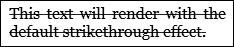
以下圖表分別展示了 、 Baseline和 Underline 裝飾的渲染方式OverLine。
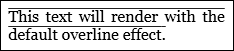
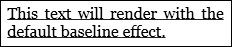
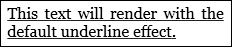
下列示範如何以程式設計的方式設定 Typography 屬性。
Run run1 = new Run("This text will render with the strikethrough effect.");
run1.TextDecorations = TextDecorations.Strikethrough;
Dim run1 As New Run("This text will render with the strikethrough effect.")
run1.TextDecorations = TextDecorations.Strikethrough
備註
物件 TextDecoration 是你可以加在文字上的視覺裝飾。 文字裝飾有四種類型:底線、底線、劃線和上線。 欲了解更多關於文字裝飾的資訊,請參閱 「如何製作文字裝飾」。
相依財產資訊
| 項目 | 價值 |
|---|---|
| 識別碼欄位 | TextDecorationsProperty |
元資料屬性設為 true |
AffectsRender |
