DataGridHyperlinkColumn 類別
定義
重要
部分資訊涉及發行前產品,在發行之前可能會有大幅修改。 Microsoft 對此處提供的資訊,不做任何明確或隱含的瑕疵擔保。
public ref class DataGridHyperlinkColumn : System::Windows::Controls::DataGridBoundColumnpublic class DataGridHyperlinkColumn : System.Windows.Controls.DataGridBoundColumntype DataGridHyperlinkColumn = class
inherit DataGridBoundColumnPublic Class DataGridHyperlinkColumn
Inherits DataGridBoundColumn- 繼承
範例
以下範例展示了DataGridHyperlinkColumn將 設定為 Binding 屬性的 ,Uri以及將超連結文字設定為 屬性ContentBinding。 Hyperlink.Click該事件會自動處理,因為NavigationWindow是 的父DataGrid節點。
<NavigationWindow x:Class="DataGrid_CustomColumns.Window1"
    xmlns="http://schemas.microsoft.com/winfx/2006/xaml/presentation"
    xmlns:x="http://schemas.microsoft.com/winfx/2006/xaml"
    xmlns:core="clr-namespace:System;assembly=mscorlib"
    xmlns:local="clr-namespace:DataGrid_CustomColumns"
    Title="Customers" Height="300" Width="300" ShowsNavigationUI="False"  >

<NavigationWindow.Resources>
    <!--Create an instance of the converter for Email-->
    <local:EmailConverter x:Key="EmailConverter" />
</NavigationWindow.Resources>
<NavigationWindow.Content>

<Grid>
    <DataGrid Name="DG1" ItemsSource="{Binding}" AutoGenerateColumns="False" >
        <DataGrid.Columns>
<!--The Email property contains a URI.  For example "mailto:lucy0@adventure-works.com"-->
<DataGridHyperlinkColumn Header="Email" Binding="{Binding Email}"  ContentBinding="{Binding Email, Converter={StaticResource EmailConverter}}" />
            </DataGrid.Columns>
        </DataGrid>
    </Grid>
    </NavigationWindow.Content>
</NavigationWindow>
public partial class Window1 : NavigationWindow
{
Class Window1
public Window1()
{
    InitializeComponent();

    //GetData() creates a collection of Customer data from a database
    ObservableCollection<Customer> custdata = GetData();

    //Bind the DataGrid to the customer data
    DG1.DataContext = custdata;
}
Public Sub New()
    ' This call is required by the Windows Form Designer.
    InitializeComponent()
    ' Add any initialization after the InitializeComponent() call.

    'GetData() creates a collection of Customer data from a database
    Dim custdata As ObservableCollection(Of Customer) = GetData()

    'Bind the DataGrid to the customer data
    DG1.DataContext = custdata

End Sub
//Defines the customer object
public class Customer
{
    public string FirstName { get; set; }
    public string LastName { get; set; }
    public Uri Email { get; set; }
    public bool IsMember { get; set; }
    public OrderStatus Status { get; set; }
}
'Defines the customer object
Public Class Customer
    Public Property FirstName() As String
    Public Property LastName() As String
    Public Property Email() As Uri
    Public Property IsMember() As Boolean
    Public Property Status() As OrderStatus
End Class
}
End Class
//Converts the mailto uri to a string with just the customer alias
public class EmailConverter : IValueConverter
{
    public object Convert(object value, Type targetType, object parameter, System.Globalization.CultureInfo culture)
    {
        if (value != null)
        {
            string email = value.ToString();
            int index = email.IndexOf("@");
            string alias = email.Substring(7, index-7);
            return alias;
        }
        else
        {
            string email = "";
            return email;
        }
    }

    public object ConvertBack(object value, Type targetType, object parameter, System.Globalization.CultureInfo culture)
    {
        Uri email = new Uri((string)value);
        return email;
    }
}
'Converts the mailto uri to a string with just the customer alias
Public Class EmailConverter
    Implements IValueConverter

    Public Function Convert(value As Object, targetType As System.Type, parameter As Object, culture As System.Globalization.CultureInfo) As Object Implements System.Windows.Data.IValueConverter.Convert
        If value IsNot Nothing Then
            Dim email As String = value.ToString()
            Dim index As Integer = email.IndexOf("@")
            Dim [alias] As String = email.Substring(7, index - 7)
            Return [alias]
        Else
            Dim email As String = ""
            Return email
        End If
    End Function

    Public Function ConvertBack(value As Object, targetType As System.Type, parameter As Object, culture As System.Globalization.CultureInfo) As Object Implements System.Windows.Data.IValueConverter.ConvertBack
        Dim email As New Uri(DirectCast(value, String))
        Return email
    End Function
End Class
備註
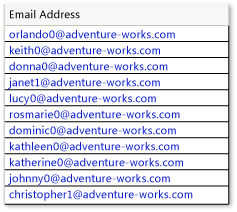
用於 DataGridHyperlinkColumn 顯示包含 Uri的資料,例如 HTTP 位址或電子郵件地址。 下圖顯示 DataGridHyperlinkColumn 範例。
備註
Hyperlink 只有當 A Hyperlink 的直接或間接父節點是導航主機時,才能進行導航。 導航主機的例子包括 NavigationWindow、 Frame,或任何能承載 XBAP 的瀏覽器。 更多資訊請參閱「導航主機」條目中的 導航概覽。
欲了解更多關於 XBAP 支援的資訊,請參閱 關於 WPF 瀏覽器託管應用程式(XBAP)的常見問題。
要填充欄位,請使用 屬性Binding將欄位綁定到資料。Uri 若要顯示與 URI 字串不同的超連結文字,請將文字值綁定到屬性 ContentBinding 上。 該 Binding 屬性會套用到 Hyperlink 欄位中所建立的 or TextBox 元素。 每個儲存格中的元素 是 DataContext 該儲存格所在資料列的資料項目。 因此,要設定綁定,你只需要設定 Binding.Path。 如果你想轉換資料,也可以選擇指定 a Binding.Converter 。 欲了解更多資料綁定資訊,請參閱資料綁定(WPF)。
備註
DataGridHyperlinkColumn 在非編輯模式下建立一個 Hyperlink 元素,在編輯模式下建立一個 TextBox 元素。
若您想顯示其他類型的資料, DataGrid 提供以下欄位類型:
| 欄位類型 | 資料顯示 |
|---|---|
| DataGridCheckBoxColumn | 用來顯示布林資料。 |
| DataGridComboBoxColumn | 用來顯示列舉資料。 |
| DataGridTextColumn | 用來顯示文字。 |
如果你想在 中使用其他控制項, DataGrid可以透過使用 DataGridTemplateColumn。
建構函式
| 名稱 | Description |
|---|---|
| DataGridHyperlinkColumn() |
初始化 DataGridHyperlinkColumn 類別的新執行個體。 |
欄位
| 名稱 | Description |
|---|---|
| TargetNameProperty |
識別 TargetName 依賴性質。 |
屬性
| 名稱 | Description |
|---|---|
| ActualWidth |
取得該柱目前的寬度,單位與裝置無關(每單位1/96英吋)。 (繼承來源 DataGridColumn) |
| Binding |
取得或設定將欄位與資料來源屬性關聯的綁定。 (繼承來源 DataGridBoundColumn) |
| CanUserReorder |
取得或設定一個值,指示使用者是否可以透過拖動欄位標頭來改變欄位顯示位置。 (繼承來源 DataGridColumn) |
| CanUserResize |
取得或設定一個值,指示使用者是否能透過滑鼠調整欄位寬度。 (繼承來源 DataGridColumn) |
| CanUserSort |
取得或設定一個值,指示使用者是否能透過點擊欄位標頭來排序該欄位。 (繼承來源 DataGridColumn) |
| CellStyle |
取得或設定用於渲染欄位中儲存格的樣式。 (繼承來源 DataGridColumn) |
| ClipboardContentBinding |
取得或設定綁定物件,以便在取得或設定剪貼簿的儲存格內容時使用。 (繼承來源 DataGridBoundColumn) |
| ContentBinding |
取得或設定綁定到超連結的文字上。 |
| DataGridOwner |
取得 DataGrid 包含此欄位的控制項。 (繼承來源 DataGridColumn) |
| DefaultEditingElementStyle |
房產的預設價值 EditingElementStyle 。 |
| DefaultElementStyle |
房產的預設價值 ElementStyle 。 |
| DependencyObjectType |
會取得 DependencyObjectType 包裹此實例 CLR 類型的 。 (繼承來源 DependencyObject) |
| Dispatcher |
了解 Dispatcher 這與此 DispatcherObject 有關。 (繼承來源 DispatcherObject) |
| DisplayIndex |
取得或設定該欄位相對於其他欄位 DataGrid的顯示位置。 (繼承來源 DataGridColumn) |
| DragIndicatorStyle |
在拖曳操作中取得或設定樣式物件套用到欄位標頭。 (繼承來源 DataGridColumn) |
| EditingElementStyle |
取得或設定在渲染欄位中儲存格時所使用的樣式。 (繼承來源 DataGridBoundColumn) |
| ElementStyle |
取得或設定在渲染欄位中顯示元素時所使用的樣式,該欄位顯示的儲存格並非處於編輯模式。 (繼承來源 DataGridBoundColumn) |
| Header |
取得或設定欄位標頭的內容。 (繼承來源 DataGridColumn) |
| HeaderStringFormat |
取得或設定格式模式,以套用到欄位標頭的內容。 (繼承來源 DataGridColumn) |
| HeaderStyle |
取得或設定在渲染欄位標頭時所使用的樣式。 (繼承來源 DataGridColumn) |
| HeaderTemplate |
取得或設定定義欄位標頭視覺表示的範本。 (繼承來源 DataGridColumn) |
| HeaderTemplateSelector |
取得或設定物件,選擇欄位標頭使用哪個範本。 (繼承來源 DataGridColumn) |
| IsAutoGenerated |
會得到一個值,表示欄位是否自動產生。 (繼承來源 DataGridColumn) |
| IsFrozen |
會得到一個值,表示欄位是否被阻止橫向捲動。 (繼承來源 DataGridColumn) |
| IsReadOnly |
取得或設定一個值,指示欄位中是否可以編輯儲存格。 (繼承來源 DataGridColumn) |
| IsSealed |
會獲得一個值,表示該實例目前是否封存(唯讀)。 (繼承來源 DependencyObject) |
| MaxWidth |
取得或設定欄位的最大寬度限制。 (繼承來源 DataGridColumn) |
| MinWidth |
取得或設定欄位的最小寬度限制。 (繼承來源 DataGridColumn) |
| SortDirection |
取得或設定欄位的排序方向(向上或向下)。 (繼承來源 DataGridColumn) |
| SortMemberPath |
取得或設定一個屬性名稱,或一個以時間劃分的屬性名稱階層,指示要排序的成員。 (繼承來源 DataGridColumn) |
| TargetName |
取得或設定超連結的目標視窗或框架名稱。 |
| Visibility |
取得或設定欄位的可見性。 (繼承來源 DataGridColumn) |
| Width |
可以設定欄位寬度或自動尺寸模式。 (繼承來源 DataGridColumn) |
方法
事件
| 名稱 | Description |
|---|---|
| CopyingCellClipboardContent |
發生在儲存區剪貼板內容準備完成後。 (繼承來源 DataGridColumn) |
| PastingCellClipboardContent |
發生在剪貼簿內容移動到儲存格之前。 (繼承來源 DataGridColumn) |
