FlowDocument.IsColumnWidthFlexible 屬性
定義
重要
部分資訊涉及發行前產品,在發行之前可能會有大幅修改。 Microsoft 對此處提供的資訊,不做任何明確或隱含的瑕疵擔保。
取得或設定一個值,表示該 ColumnWidth 值是彈性還是固定。
public:
 property bool IsColumnWidthFlexible { bool get(); void set(bool value); };
public bool IsColumnWidthFlexible { get; set; }member this.IsColumnWidthFlexible : bool with get, setPublic Property IsColumnWidthFlexible As Boolean屬性值
true 若欄寬是彈性的; false 如果欄寬是固定的。 預設值為 true。
範例
以下範例說明如何設定 IsColumnWidthFlexible 元素 FlowDocument 的屬性。
<FlowDocumentReader>
  <FlowDocument
    IsColumnWidthFlexible="True"
    PageWidth="400"
    ColumnWidth="100"
    PagePadding="0"
  >
    <Paragraph>
      If <Bold>IsColumnWidthFlexible</Bold> is false, this FlowDocument will always
      have 4 columns of width 100.  Because <Bold>IsColumnWidthFlexible</Bold> is true,
      this FlowDocument may be laid out such that the width of the is more than 100, resluting in
      fewer than 4 columns.
    </Paragraph>
  </FlowDocument>
</FlowDocumentReader>
下列示範如何以程式設計的方式設定 Typography 屬性。
FlowDocument flowDoc = new FlowDocument(new Paragraph(new Run("A bit of text content...")));
// Set minimum column width to 140 pixels.
flowDoc.IsColumnWidthFlexible = true;
Dim flowDocColFlex As New FlowDocument(New Paragraph(New Run("A bit of text content...")))
    ' Set minimum column width to 140 pixels.
flowDocColFlex.IsColumnWidthFlexible = True
備註
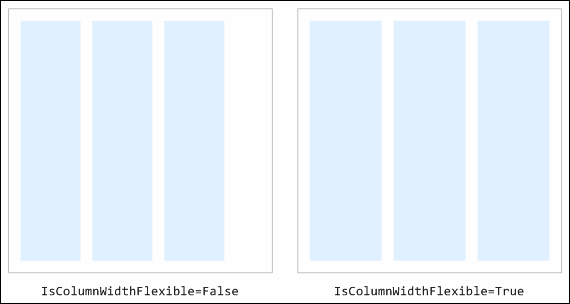
該 IsColumnWidthFlexible 性質決定了任何多餘的內容區域寬度(即頁面寬度與內容排版後寬度的差值)如何分配到欄位間。 設定 表示 true 多餘的空間平均分配到每一欄;此時欄位的寬度可能超過屬性 ColumnWidth 所指定的寬度。 設定 表示 false 多餘空間分配到頁面右側的填充區域;此時,欄位大小必定為屬性指定的 ColumnWidth 寬度(只要該寬度小於頁面寬度減去任意 PagePadding)。
下圖說明當此屬性為 true 或 false時,佈局的差異。 淺藍色代表 FlowDocument.
 截
截
相依財產資訊
| 項目 | 價值 |
|---|---|
| 識別碼欄位 | IsColumnWidthFlexibleProperty |
元資料屬性設為 true |
AffectsMeasure |
