FlowDocument.IsHyphenationEnabled 屬性
定義
重要
部分資訊涉及發行前產品,在發行之前可能會有大幅修改。 Microsoft 對此處提供的資訊,不做任何明確或隱含的瑕疵擔保。
取得或設定一個值,指示字詞的自動連字是否啟用或停用。
public:
 property bool IsHyphenationEnabled { bool get(); void set(bool value); };
public bool IsHyphenationEnabled { get; set; }member this.IsHyphenationEnabled : bool with get, setPublic Property IsHyphenationEnabled As Boolean屬性值
true若啟用自動斷字與連字號;否則,。 false 預設值為 false。
範例
以下範例說明如何設定 IsHyphenationEnabled 元素 FlowDocument 的屬性。
<FlowDocumentReader>
  <FlowDocument
    TextAlignment="Justify"
    IsHyphenationEnabled="True"
    IsOptimalParagraphEnabled="True"
    Background="LightGray"
    PageWidth="400" PageHeight="480"
  >
    <Paragraph>
      <Hyperlink NavigateUri="http://www.xbox.com/en-US/games/p/perfectdarkzero/default.htm">
        Perfect Dark Zero
      </Hyperlink>
    </Paragraph>
    <Paragraph>
      Joanna Dark returns in the Xbox 360 exclusive <Bold><Italic>Perfect Dark Zero</Italic></Bold>, the
      prequel to the internationally award-winning and multi-million selling first-person shooter
      <Italic>Perfect Dark</Italic> from famed game developer Rare.
    </Paragraph>
    <Paragraph>
      A secret war has begun between shadowy corporations bent on world domination. Joanna Dark and her father
      Jack are caught up in the fight for the future of the planet. A routine bounty hunting mission rips open
      a global conspiracy that will change Joanna's destiny—forever.
    </Paragraph>
    <Paragraph>
      Guide Joanna Dark on her journey to become the perfect agent. Featuring a compelling and captivating story,
      <Italic>Perfect Dark Zero</Italic> plunges you into a world of corporate espionage and conspiracy. The title
      merges the excitement and intrigue of its predecessor with revolutionary game design, cutting-edge online play,
      and amazing graphics to deliver an experience that defines next-generation gaming and entertainment...
    </Paragraph>
  </FlowDocument>
</FlowDocumentReader>
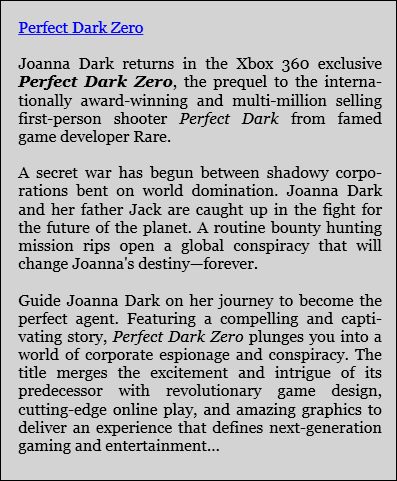
下圖展示了前述 FlowDocument 的渲染方式。
 字號 截
字號 截
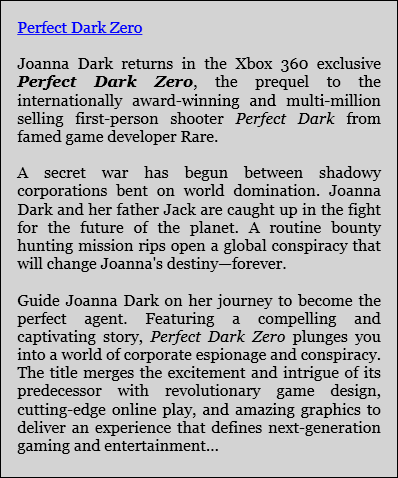
下圖展示了相同的FlowDocument渲染方式,預設設定為=IsHyphenationEnabledfalse 。
 號 截
號 截
下列示範如何以程式設計的方式設定 Typography 屬性。
FlowDocument flowDoc = new FlowDocument(new Paragraph(new Run("A bit of text content...")));

// Enable automatic hyphenation.
flowDoc.IsHyphenationEnabled = true;
// Enable optimal paragraph layout.
flowDoc.IsOptimalParagraphEnabled = true;
Dim flowDoc As New FlowDocument(New Paragraph(New Run("A bit of text content...")))

' Enable automatic hyphenation.
flowDoc.IsHyphenationEnabled = True
' Enable optimal paragraph layout.
flowDoc.IsOptimalParagraphEnabled = True
備註
自動字連字功能能根據 FlowDocument 當前版面條件自動斷開與連字號。 這使得長字能從一行開始,接著在下一行繼續,並傾向於在對齊文字中實現更均勻的空白分布。 單字依標準文法規則斷開並連字號排列。 自動連字號在搭配最佳段落佈局(由屬性表示) IsOptimalParagraphEnabled 時特別有效。
相依財產資訊
| 項目 | 價值 |
|---|---|
| 識別碼欄位 | IsHyphenationEnabledProperty |
元資料屬性設為 true |
AffectsMeasure、AffectsRender、Inherits |
