FlowDocument.LineHeight 屬性
定義
重要
部分資訊涉及發行前產品,在發行之前可能會有大幅修改。 Microsoft 對此處提供的資訊,不做任何明確或隱含的瑕疵擔保。
取得或設定每行內容的高度。
public:
 property double LineHeight { double get(); void set(double value); };
[System.ComponentModel.TypeConverter(typeof(System.Windows.LengthConverter))]
public double LineHeight { get; set; }[<System.ComponentModel.TypeConverter(typeof(System.Windows.LengthConverter))>]
member this.LineHeight : double with get, setPublic Property LineHeight As Double屬性值
每條線的高度(以裝置獨立像素計)範圍為 0.0034 至 160000。 值 NaN 為(相當於屬性值「Auto」)會自動根據當前字型特性決定行高。 預設值為 NaN。
- 屬性
例外狀況
LineHeight 設定為非正值。
範例
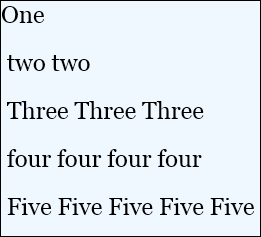
以下範例說明如何設定 LineHeight 元素 FlowDocument 的屬性。
<FlowDocumentReader>
  <FlowDocument
    FontSize="24"
    LineHeight="48"
  >
    <Paragraph TextAlignment="Left" Background="AliceBlue">
      One<LineBreak/>
      two two<LineBreak/>
      Three Three Three<LineBreak/>
      four four four four<LineBreak/>
      Five Five Five Five Five
    </Paragraph>
  </FlowDocument>
</FlowDocumentReader>
下圖展示了前述 FlowDocument 的渲染方式。
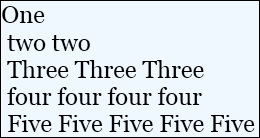
下圖展示了相同的FlowDocument渲染方式,預設設定為=LineHeightDouble.NaN 。
 截
截
下列示範如何以程式設計的方式設定 Typography 屬性。
FlowDocument flowDoc = new FlowDocument(new Paragraph(new Run("A bit of text content...")));
// Set the content flow direction to left-to-right.
flowDoc.LineHeight = 48;
Dim flowDoc As New FlowDocument(New Paragraph(New Run("A bit of text content...")))
' Set the content flow direction to left-to-right.
flowDoc.LineHeight = 48
備註
改變此值不會改變相關文字的高度;而是改變包含該文字的行高度。 要改變文字大小,請使用屬性。FontSize
除了這個性質外,a FlowDocument 中線條的佈局也會受到其 LineStackingStrategy 性質的影響。
XAML 屬性使用方式
<object LineHeight="double"/>
- or -
<object LineHeight="qualifiedDouble"/>
- or -
<object LineHeight="Auto"/>
XAML 值
雙重Double
一個等於或大0.0034於且等於或小於160000的值的字串表示Double。 未限定值以裝置獨立像素為單位。 字串不必明確包含小數點。
取得雙重資格如上所述的雙重值(不含 Auto),後接以下單位指定符之一:px, in, cmpt, 。
px (預設)為裝置無關單位(每單位 1/96 吋)
in 是英吋;1in==96px
cm 是公分;1cm==(96/2.54) px
pt 是分數;1pt==(96/72) px
自動 會自動根據目前字型特性決定行高。 等價於財產價值為 Double.NaN。
相依財產資訊
| 項目 | 價值 |
|---|---|
| 識別碼欄位 | LineHeightProperty |
元資料屬性設為 true |
AffectsMeasure、AffectsRender、Inherits |
