適用於: Azure Data Factory Azure Synapse Analytics
提示
關於 Microsoft Fabric 中 Data Factory 中的等效活動,請參閱 Azure HDInsight activity。
Azure Data Factory 或 Synapse Analytics 管線中的 HDInsight Streaming 活動,會在您自己的或隨選 HDInsight 叢集上執行 Hadoop Streaming 程式。 本文是以資料轉換活動一文為基礎,該文提供了資料轉換和系統支援的轉換活動的一般概覽。
想了解更多,請閱讀
透過使用者介面將 HDInsight Streaming 活動加入到管道
若要對管道使用 HDInsight 資料流活動,請完成下列步驟:
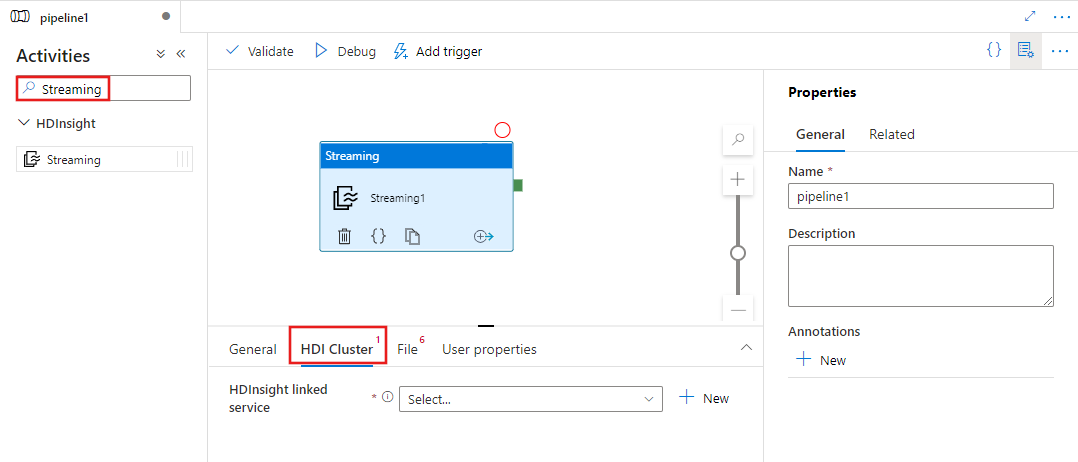
在管道 [活動] 窗格中搜尋Streaming,然後將 Streaming 活動拖曳至管線畫布。
如果尚未選取,請在畫布上選取新的 Streaming 活動。
選取HDI 叢集索引標籤,以選取或建立新的連結服務至可用來執行資料流活動的 HDInsight 叢集。
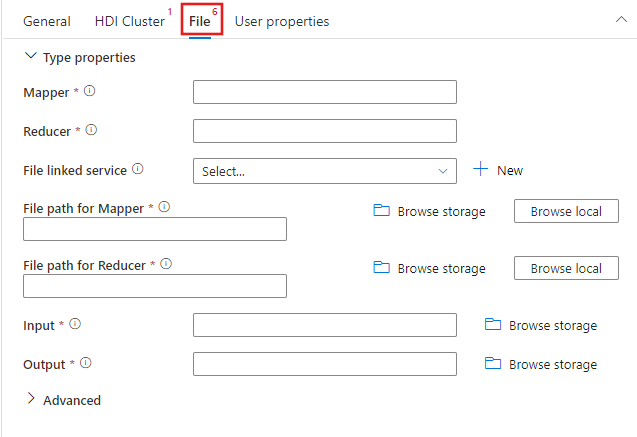
選取檔案索引標籤,以指定串流作業的 Mapper 和 Reducer 名稱,並選取或建立 Azure 儲存體 帳戶的新連結服務,該帳戶將用於此作業的 Mapper、Reducer、輸入和輸出檔案。 您也可以設定進階詳細資料,包含偵錯設定、引數,以及要傳遞至作業的參數。
JSON 範例
{
    "name": "Streaming Activity",
    "description": "Description",
    "type": "HDInsightStreaming",
    "linkedServiceName": {
        "referenceName": "MyHDInsightLinkedService",
        "type": "LinkedServiceReference"
    },
    "typeProperties": {
        "mapper": "MyMapper.exe",
        "reducer": "MyReducer.exe",
        "combiner": "MyCombiner.exe",
        "fileLinkedService": {
            "referenceName": "MyAzureStorageLinkedService",
            "type": "LinkedServiceReference"
        },
        "filePaths": [
            "<containername>/example/apps/MyMapper.exe",
            "<containername>/example/apps/MyReducer.exe",
            "<containername>/example/apps/MyCombiner.exe"
        ],
        "input": "wasb://<containername>@<accountname>.blob.core.windows.net/example/input/MapperInput.txt",
        "output": "wasb://<containername>@<accountname>.blob.core.windows.net/example/output/ReducerOutput.txt",
        "commandEnvironment": [
            "CmdEnvVarName=CmdEnvVarValue"
        ],
        "getDebugInfo": "Failure",
        "arguments": [
            "SampleHadoopJobArgument1"
        ],
        "defines": {
            "param1": "param1Value"
        }
    }
}
語法詳細資料
| 屬性 | 描述 | 必要 |
|---|---|---|
| 名稱 | 活動的名稱 | Yes |
| 說明 | 說明活動用途的文字 | No |
| 型別 | 針對 Hadoop 資料流活動,活動類型是 HDInsightStreaming | Yes |
| linkedServiceName | 參考已註冊為連結服務的 HDInsight 叢集。 若要深入了解此已連結的服務,請參閱計算已連結的服務一文。 | Yes |
| 對應工具 | 指定映射程式可執行檔的名稱 | Yes |
| 減速工具 | 指定化簡器可執行檔的名稱 | Yes |
| combiner | 指定結合子可執行檔的名稱 | No |
| fileLinkedService | 參考 Azure 儲存體 連結服務,用於儲存要執行的 Mapper、Combiner 和 Reducer 程式。 此處僅支援 Azure Blob 儲存體 及 ADLS Gen2 連接的服務。 如果您未指定此連結服務,則使用 HDInsight 連結服務中定義的 Azure 儲存體 Linked Service。 | No |
| 檔案路徑 | 提供一個路徑陣列,指向 FileLinkedService 所引用的 Azure 儲存體 中儲存的 Mapper、Combiner 和 Reducer 程式。 路徑會區分大小寫。 | Yes |
| 輸入 | 指定 Mapper 輸入檔案的 WASB 路徑。 | Yes |
| 輸出 | 指定減壓器輸出檔案的 WASB 路徑。 | Yes |
| getDebugInfo | 指定何時將日誌檔案複製到 HDInsight 叢集所使用的 Azure 儲存體(或由 scriptLinkedService 指定)。 允許的值:無、總是或失敗。 預設值:無。 | No |
| 引數 | 指定 Hadoop 作業的引數陣列。 引數會以命令列引數的方式傳遞給每項工作。 | No |
| 定義 | 指定參數作為機碼/值組,以供在 Hive 指令碼內參考。 | No |
相關內容
請參閱下列文章,其說明如何以其他方式轉換資料: