群組聊天協調模擬多位代理間的協作對話,由協調器協調,決定發言者選擇與對話流程。 此模式非常適合需要迭代細化、協作問題解決或多視角分析的場景。
在內部,群組聊天協調流程會以星形拓撲組合代理程式,中間有一個協調器。 編排器可實施多種策略來選擇下一位代理,例如輪詢、提示選擇,或根據對話情境自訂邏輯,使其成為多代理協作的靈活且強大模式。
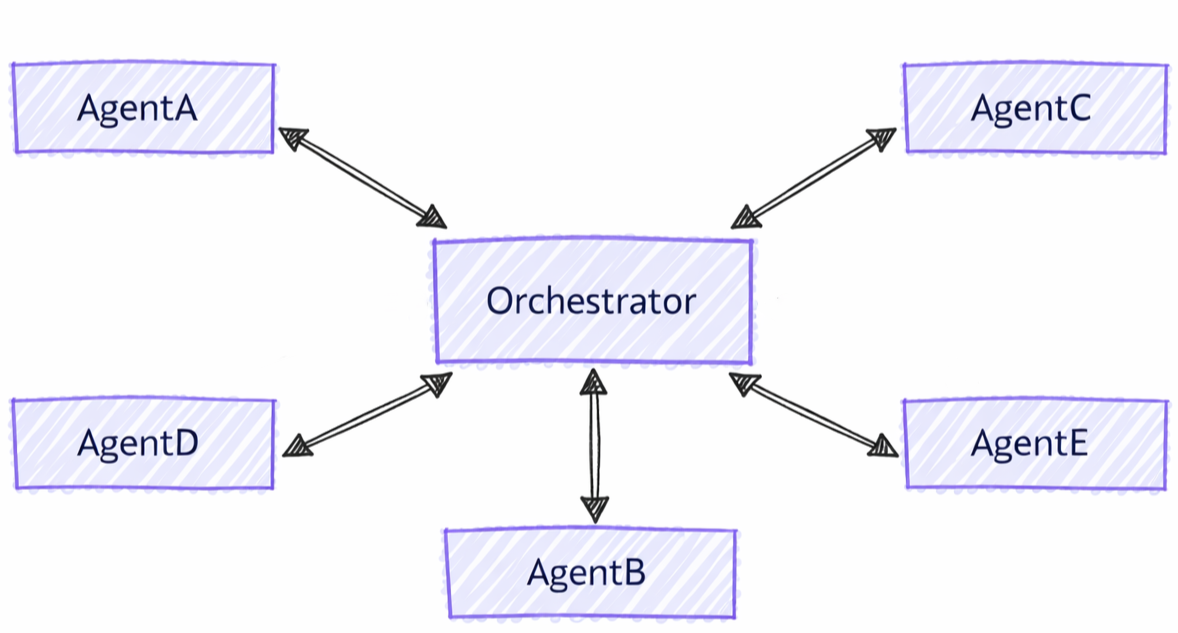
群聊與其他模式的區別
與其他多代理模式相比,群聊編排具有明顯的特徵:
- 集中協調:與代理直接交接控制的模式不同,群組聊天使用協調器來協調下一個發言者
- 迭代細化: 智能代理可以在多輪中審查和改進彼此的回應
- 靈活的喇叭選擇:配器師可採用多種策略(輪詢、提示、自訂邏輯)來選擇喇叭
- 共享上下文:所有代理都可以看到完整的對話歷史記錄,從而實現協作改進
您將學到的內容
- 如何建立群組協作的專用代理程式
- 如何設定演講者選擇策略
- 如何利用迭代代理優化來建立工作流程
- 如何用自訂編排器自訂對話流程
設定 Azure OpenAI 用戶端
using System;
using System.Collections.Generic;
using System.Threading.Tasks;
using Azure.AI.Projects;
using Azure.Identity;
using Microsoft.Agents.AI.Workflows;
using Microsoft.Extensions.AI;
using Microsoft.Agents.AI;

// Set up the Azure OpenAI client
var endpoint = Environment.GetEnvironmentVariable("AZURE_OPENAI_ENDPOINT") ??
    throw new InvalidOperationException("AZURE_OPENAI_ENDPOINT is not set.");
var deploymentName = Environment.GetEnvironmentVariable("AZURE_OPENAI_DEPLOYMENT_NAME") ?? "gpt-4o-mini";
var client = new AIProjectClient(new Uri(endpoint), new DefaultAzureCredential())
    .GetProjectOpenAIClient()
    .GetProjectResponsesClient()
    .AsIChatClient(deploymentName);
Warning
DefaultAzureCredential 開發方便,但在生產過程中需謹慎考量。 在生產環境中,建議使用特定的憑證(例如 ManagedIdentityCredential),以避免延遲問題、意外的憑證探測,以及備援機制帶來的安全風險。
定義您的客服專員
為群組交談中的不同角色建立專用客服專員:
// Create a copywriter agent
ChatClientAgent writer = new(client,
    "You are a creative copywriter. Generate catchy slogans and marketing copy. Be concise and impactful.",
    "CopyWriter",
    "A creative copywriter agent");

// Create a reviewer agent
ChatClientAgent reviewer = new(client,
    "You are a marketing reviewer. Evaluate slogans for clarity, impact, and brand alignment. " +
    "Provide constructive feedback or approval.",
    "Reviewer",
    "A marketing review agent");
使用 Round-Robin Orchestrator 設定群組聊天
使用以下方式 AgentWorkflowBuilder建立群組聊天工作流程:
// Build group chat with round-robin speaker selection
// The manager factory receives the list of agents and returns a configured manager
var workflow = AgentWorkflowBuilder
    .CreateGroupChatBuilderWith(agents =>
        new RoundRobinGroupChatManager(agents)
        {
            MaximumIterationCount = 5  // Maximum number of turns
        })
    .AddParticipants(writer, reviewer)
    .Build();
執行群組聊天工作流程
執行工作流程並觀察反覆交談:
// Start the group chat
var messages = new List<ChatMessage> {
    new(ChatRole.User, "Create a slogan for an eco-friendly electric vehicle.")
};

await using StreamingRun run = await InProcessExecution.RunStreamingAsync(workflow, messages);
await run.TrySendMessageAsync(new TurnToken(emitEvents: true));

await foreach (WorkflowEvent evt in run.WatchStreamAsync().ConfigureAwait(false))
{
    if (evt is AgentResponseUpdateEvent update)
    {
        // Process streaming agent responses
        AgentResponse response = update.AsResponse();
        foreach (ChatMessage message in response.Messages)
        {
            Console.WriteLine($"[{update.ExecutorId}]: {message.Text}");
        }
    }
    else if (evt is WorkflowOutputEvent output)
    {
        // Workflow completed
        var conversationHistory = output.As<List<ChatMessage>>();
        Console.WriteLine("\n=== Final Conversation ===");
        foreach (var message in conversationHistory)
        {
            Console.WriteLine($"{message.AuthorName}: {message.Text}");
        }
        break;
    }
}
範例互動
[CopyWriter]: "Green Dreams, Zero Emissions" - Drive the future with style and sustainability.

[Reviewer]: The slogan is good, but "Green Dreams" might be a bit abstract. Consider something
more direct like "Pure Power, Zero Impact" to emphasize both performance and environmental benefit.

[CopyWriter]: "Pure Power, Zero Impact" - Experience electric excellence without compromise.

[Reviewer]: Excellent! This slogan is clear, impactful, and directly communicates the key benefits.
The tagline reinforces the message perfectly. Approved for use.

[CopyWriter]: Thank you! The final slogan is: "Pure Power, Zero Impact" - Experience electric
excellence without compromise.
設定聊天用戶端
import os

from agent_framework.foundry import FoundryChatClient
from azure.identity import AzureCliCredential

# Initialize the Azure OpenAI client
client = FoundryChatClient(
    project_endpoint=os.environ["FOUNDRY_PROJECT_ENDPOINT"],
    model=os.environ["FOUNDRY_MODEL"],
    credential=AzureCliCredential(),
)
定義您的客服專員
建立具有不同角色的專業代理:
from agent_framework import Agent

# Create a researcher agent
researcher = Agent(
    client=client,
    name="Researcher",
    description="Collects relevant background information.",
    instructions="Gather concise facts that help answer the question. Be brief and factual.",
)

# Create a writer agent
writer = Agent(
    client=client,
    name="Writer",
    description="Synthesizes polished answers using gathered information.",
    instructions="Compose clear, structured answers using any notes provided. Be comprehensive.",
)
使用簡單選擇器配置群聊
使用自定義演講者選擇邏輯構建群聊:
from agent_framework.orchestrations import GroupChatBuilder, GroupChatState

def round_robin_selector(state: GroupChatState) -> str:
    """A round-robin selector function that picks the next speaker based on the current round index."""

    participant_names = list(state.participants.keys())
    return participant_names[state.current_round % len(participant_names)]


# Build the group chat workflow
workflow = GroupChatBuilder(
    participants=[researcher, writer],
    termination_condition=lambda conversation: len(conversation) >= 4,
    intermediate_output_from=[researcher, writer],
    selection_func=round_robin_selector,
).build()
使用 Agent-Based Orchestrator 設定群組聊天
或者,也可以使用代理式編排器來進行智慧喇叭選擇。 協調器是完整的 Agent,可存取工具、內容和可檢視性:
# Create orchestrator agent for speaker selection
orchestrator_agent = Agent(
    name="Orchestrator",
    description="Coordinates multi-agent collaboration by selecting speakers",
    instructions="""
You coordinate a team conversation to solve the user's task.

Guidelines:
- Start with Researcher to gather information
- Then have Writer synthesize the final answer
- Only finish after both have contributed meaningfully
""",
    client=client,
)

# Build group chat with agent-based orchestrator
workflow = GroupChatBuilder(
    participants=[researcher, writer],
    # Set a hard termination condition: stop after 4 assistant messages
    # The agent orchestrator will intelligently decide when to end before this limit but just in case
    termination_condition=lambda messages: sum(1 for msg in messages if msg.role == "assistant") >= 4,
    orchestrator_agent=orchestrator_agent,
    intermediate_output_from=[researcher, writer],
).build()
執行群組聊天工作流程
執行工作流程並處理串流參與者更新。 非串流終端輸出為 AgentResponse;串流終端輸出以 AgentResponseUpdate 區塊形式輸出。
from agent_framework import AgentResponseUpdate, Message

task = "What are the key benefits of async/await in Python?"

print(f"Task: {task}\n")
print("=" * 80)

last_author: str | None = None
# Run the workflow with streaming enabled
stream = workflow.run(task, stream=True)
async for event in stream:
    if event.type in ("intermediate", "output") and isinstance(event.data, AgentResponseUpdate):
        # Print streaming agent updates
        author = event.data.author_name
        if author != last_author:
            if last_author is not None:
                print()
            print(f"[{author}]:", end=" ", flush=True)
            last_author = author
        print(event.data.text, end="", flush=True)
result = await stream.get_final_response()
if outputs := result.get_outputs():
    print("\n\n" + "=" * 80)
    print("Final Response:")
    print(outputs[-1])

print("\nWorkflow completed.")
範例互動
Task: What are the key benefits of async/await in Python?

================================================================================

[Researcher]: Async/await in Python provides non-blocking I/O operations, enabling
concurrent execution without threading overhead. Key benefits include improved
performance for I/O-bound tasks, better resource utilization, and simplified
concurrent code structure using native coroutines.

[Writer]: The key benefits of async/await in Python are:

1. **Non-blocking Operations**: Allows I/O operations to run concurrently without
   blocking the main thread, significantly improving performance for network
   requests, file I/O, and database queries.

2. **Resource Efficiency**: Avoids the overhead of thread creation and context
   switching, making it more memory-efficient than traditional threading.

3. **Simplified Concurrency**: Provides a clean, synchronous-looking syntax for
   asynchronous code, making concurrent programs easier to write and maintain.

4. **Scalability**: Enables handling thousands of concurrent connections with
   minimal resource consumption, ideal for high-performance web servers and APIs.

--------------------------------------------------------------------------------

Workflow completed.
設定鑄造廠配置
endpoint := os.Getenv("FOUNDRY_PROJECT_ENDPOINT")
model := cmp.Or(os.Getenv("FOUNDRY_MODEL"), "gpt-4o-mini")

token, err := azidentity.NewDefaultAzureCredential(nil)
if err != nil {
    return err
}
Warning
azidentity.NewDefaultAzureCredential 開發方便,但在生產過程中需謹慎考量。 在生產環境中,建議使用特定的憑證,例如 azidentity.NewManagedIdentityCredential,以避免延遲問題、意外的憑證探測,以及備用機制帶來的安全風險。
定義您的客服專員
建立在對話中擔任不同角色的專業代理人:
copywriter := foundryprovider.NewAgent(
    endpoint,
    token,
    foundryprovider.ModelDeployment(model),
    foundryprovider.AgentConfig{
        Instructions: "You are a creative copywriter. Generate catchy slogans and marketing copy. Be concise and impactful.",
        Config:      agent.Config{Name: "CopyWriter"},
    },
)

reviewer := foundryprovider.NewAgent(
    endpoint,
    token,
    foundryprovider.ModelDeployment(model),
    foundryprovider.AgentConfig{
        Instructions: "You are a marketing reviewer. Evaluate slogans for clarity, impact, and brand alignment. Provide constructive feedback or approval.",
        Config:      agent.Config{Name: "Reviewer"},
    },
)
使用 Round-Robin Manager 設定群組聊天
使用 agentworkflow.NewGroupChatWorkflowBuilder 建立群組聊天工作流程。 建置器採用一個管理員工廠以及參與的代理程式。
NewRoundRobinGroupChatManager 依序選擇每位代理人,並在設定的最大參與者回合數後停止。
managerFactory := func(agents []*agent.Agent) *agentworkflow.GroupChatManager {
    return agentworkflow.NewRoundRobinGroupChatManager(
        agents,
        agentworkflow.RoundRobinGroupChatOptions{MaximumIterationCount: 5},
    )
}

wf, err := agentworkflow.NewGroupChatWorkflowBuilder(managerFactory, copywriter, reviewer).
    WithName("Marketing Review Group Chat").
    WithDescription("A copywriter and reviewer collaborate on marketing copy.").
    Build()
if err != nil {
    return err
}
執行群組聊天工作流程
用使用者訊息和回合令牌執行工作流程。 啟用事件發布時,參與者更新會作為中間輸出事件抵達,最終逐字稿則作為終端輸出事件抵達。
run, err := inproc.Default.RunStreaming(ctx, wf, []*message.Message{
    message.NewText("Create a slogan for an eco-friendly electric vehicle."),
})
if err != nil {
    return err
}
defer run.Close(ctx)

emitEvents := true
if err := run.SendMessage(ctx, workflow.TurnToken{EmitEvents: &emitEvents}); err != nil {
    return err
}

lastExecutorID := ""
for evt, err := range run.WatchStream(ctx) {
    if err != nil {
        return err
    }

    switch e := evt.(type) {
    case workflow.OutputEvent:
        switch value := e.Output.(type) {
        case *agent.ResponseUpdate:
            if e.ExecutorID != lastExecutorID {
                lastExecutorID = e.ExecutorID
                fmt.Printf("\n[%s]: ", e.ExecutorID)
            }
            fmt.Print(value.String())
        case []*message.Message:
            fmt.Println("\n\n=== Final Conversation ===")
            for _, msg := range value {
                author := msg.AuthorName
                if author == "" {
                    author = string(msg.Role)
                }
                fmt.Printf("%s: %s\n", author, msg.String())
            }
        }
    case workflow.ErrorEvent:
        return e.Error
    case workflow.ExecutorFailedEvent:
        return fmt.Errorf("executor %q failed: %w", e.ExecutorID, e.Error)
    }
}
範例互動
[CopyWriter]: "Pure Power, Zero Impact" - Experience electric performance without compromise.

[Reviewer]: This is clear and memorable. It communicates performance and sustainability directly.
Approved.

[CopyWriter]: The final slogan is: "Pure Power, Zero Impact" - Experience electric performance
without compromise.

=== Final Conversation ===
user: Create a slogan for an eco-friendly electric vehicle.
CopyWriter: "Pure Power, Zero Impact" - Experience electric performance without compromise.
Reviewer: This is clear and memorable. It communicates performance and sustainability directly. Approved.
CopyWriter: The final slogan is: "Pure Power, Zero Impact" - Experience electric performance without compromise.
關鍵概念
- 集中式管理器:群聊使用管理器來協調演講者的選擇和流程
- AgentWorkflowBuilder.CreateGroupChatBuilderWith():使用管理員工廠函數建立工作流程
- RoundRobinGroupChatManager:內建的管理器,以循環的方式輪流切換發言者
- MaximumIterationCount:控制終止前客服專員輪次數上限
-
自訂管理器:擴展
RoundRobinGroupChatManager或實現自訂邏輯 - 反覆微調:代理程式檢閱並改進彼此貢獻的內容
- 共享上下文:所有參與者都可以看到完整的對話歷史記錄
-
靈活的編排器策略:可選擇簡單選擇器、代理式編排器,或透過建構參數(
selection_func、、orchestrator_agent或orchestrator)自訂邏輯。 - GroupChatBuilder: 創建具有可配置演講者選擇的工作流程
- GroupChatState:提供選擇決策的對話狀態
- 迭代協作:代理建立在彼此的貢獻之上
-
AgentResponse 輸出:終端機輸出為
AgentResponse,包含了協調器的完成訊息 -
事件串流:即時處理
AgentResponseUpdate事件,透過workflow.run(task, stream=True) -
中間輸出:傳遞
intermediate_output_from=[participant, ...],以便除了協調器的終端機"output"事件之外,還能將每個列出的參與者輸出公開為"intermediate"事件
- GroupChatWorkflowBuilder:建立以群組聊天主機為中心的星型拓撲工作流程,並將託管代理作為參與者
- GroupChatManager:選擇下一位參與者,可以更新廣播歷史,並結束對話
- NewRoundRobinGroupChatManager:內建的群組聊天管理器,會以輪詢順序讓參與者輪流發言
- RoundRobinGroupChatOptions:設定參與者最大回合數及可選終止功能
- 輸出事件:預設情況下,參與者輸出為中間事件,群組聊天主持人會產生終端逐字稿
-
自訂管理器:實作
SelectNextAgent與選用的生命週期回呼,以進行自訂發言者選擇或檢查點狀態
進階:自訂揚聲器選擇
您可以透過建立自訂群組聊天管理員來實作自訂管理員邏輯:
public class ApprovalBasedManager : RoundRobinGroupChatManager
{
    private readonly string _approverName;

    public ApprovalBasedManager(IReadOnlyList<AIAgent> agents, string approverName)
        : base(agents)
    {
        _approverName = approverName;
    }

    // Override to add custom termination logic
    protected override ValueTask<bool> ShouldTerminateAsync(
        IReadOnlyList<ChatMessage> history,
        CancellationToken cancellationToken = default)
    {
        var last = history.LastOrDefault();
        bool shouldTerminate = last?.AuthorName == _approverName &&
            last.Text?.Contains("approve", StringComparison.OrdinalIgnoreCase) == true;

        return ValueTask.FromResult(shouldTerminate);
    }
}

// Use custom manager in workflow
var workflow = AgentWorkflowBuilder
    .CreateGroupChatBuilderWith(agents =>
        new ApprovalBasedManager(agents, "Reviewer")
        {
            MaximumIterationCount = 10
        })
    .AddParticipants(writer, reviewer)
    .Build();
您可以根據交談狀態實作複雜的選取邏輯:
def smart_selector(state: GroupChatState) -> str:
    """Select speakers based on conversation content and context."""
    conversation = state.conversation

    last_message = conversation[-1] if conversation else None

    # If no messages yet, start with Researcher
    if not last_message:
        return "Researcher"

    # Check last message content
    last_text = last_message.text.lower()

    # If researcher finished gathering info, switch to writer
    if "i have finished" in last_text and last_message.author_name == "Researcher":
        return "Writer"

    # Else continue with researcher until it indicates completion
    return "Researcher"

workflow = GroupChatBuilder(
    participants=[researcher, writer],
    selection_func=smart_selector,
).build()
這很重要
在使用自訂實作 BaseGroupChatOrchestrator 進行進階情境時,必須設定所有屬性,包括 participant_registry、max_rounds、termination_condition。
max_rounds
termination_condition 在建置器中設定的內容將被忽略。
中間輸出
預設情況下,只有編排器的最終輸出會以工作流程 "output" (終端)事件的形式出現。 傳遞 intermediate_output_from,並指定您想設為中間來源的參與者,使其個別輸出也會顯示為 "intermediate" 事件:
workflow = GroupChatBuilder(
    participants=[researcher, writer],
    termination_condition=lambda conversation: len(conversation) >= 4,
    selection_func=round_robin_selector,
    intermediate_output_from=[researcher, writer],
).build()
透過從建置器的管理器工廠傳回 GroupChatManager 來實作自訂發言者選擇:
type approvalManager struct {
    agents []*agent.Agent
}

func newApprovalManager(agents []*agent.Agent) *agentworkflow.GroupChatManager {
    manager := &approvalManager{agents: agents}
    return &agentworkflow.GroupChatManager{
        SelectNextAgent: manager.selectNextAgent,
        ShouldTerminate: manager.shouldTerminate,
    }
}

func (m *approvalManager) selectNextAgent(_ context.Context, history []*message.Message) (*agent.Agent, error) {
    last := lastAssistantMessage(history)
    if last == nil || last.AuthorName == "Reviewer" {
        return m.agentByName("CopyWriter")
    }
    return m.agentByName("Reviewer")
}

func (m *approvalManager) shouldTerminate(_ context.Context, history []*message.Message, iterationCount int) (bool, error) {
    if iterationCount >= 10 {
        return true, nil
    }
    last := lastAssistantMessage(history)
    return last != nil &&
        last.AuthorName == "Reviewer" &&
        strings.Contains(strings.ToLower(last.String()), "approve"), nil
}

func (m *approvalManager) agentByName(name string) (*agent.Agent, error) {
    for _, currentAgent := range m.agents {
        if currentAgent.Name() == name {
            return currentAgent, nil
        }
    }
    return nil, fmt.Errorf("agent %q is not part of the group chat", name)
}

func lastAssistantMessage(history []*message.Message) *message.Message {
    for i := len(history) - 1; i >= 0; i-- {
        if history[i].Role == message.RoleAssistant {
            return history[i]
        }
    }
    return nil
}

wf, err := agentworkflow.NewGroupChatWorkflowBuilder(newApprovalManager, copywriter, reviewer).
    WithName("Approval Group Chat").
    Build()
GroupChatManager也支援供進階管理器使用的 UpdateHistory、Reset、OnCheckpoint 和 OnCheckpointRestored 回呼,以過濾廣播訊息或持久化由管理器擁有的狀態。
中間輸出
預設情況下,GroupChatWorkflowBuilder 會將參與者的輸出作為中間工作流程輸出,並將累積的對話記錄作為最終輸出。 用 OutputEvent.IsIntermediate() 以區分參與者的最新消息與最終逐字稿:
if output, ok := evt.(workflow.OutputEvent); ok {
    if output.IsIntermediate() {
        fmt.Printf("intermediate from %s: %v\n", output.ExecutorID, output.Output)
        return nil
    }

    fmt.Printf("terminal output: %v\n", output.Output)
}
在群組聊天建構器上呼叫 WithOutputFrom 或 WithIntermediateOutputFrom 會切換為顯式輸出指定。 當你想要選取參與者的輸出,而非預設的最終逐字稿加上所有參與者中間輸出時,請使用這些方法。
情境同步
如本指南開頭所述,群組聊天中的所有客服人員都會看到同步的對話紀錄。
代理架構中的代理依賴代理會話(AgentSession)來管理上下文。 在群組聊天編排中,代理 不會 共用同一個會話實例,但編排器會在每回合前同步每個代理的會話與對話歷史。 編排器會在每個代理人回合結束後,將回應廣播給所有其他代理人,確保所有參與者都能掌握下一次回合的最新情境。
Python 在同步群組聊天歷史中保存使用者文字、內嵌資料、URI、託管檔案及向量儲存。 非使用者訊息僅保留文字,函式呼叫、函式結果、核准有效載荷及其他工具控制內容在廣播前會被過濾。
Tip
若想在參與者文字進入共享歷史紀錄或傳送給其他參與者之前將其刪除或隱藏,請在自訂 GroupChatOrchestrator 參與者回應處理程序中過濾。 過濾由 workflow.run() 傳回的事件已經太晚了,因為原始回應已被儲存並廣播。
請參閱 群組聊天回應過濾範例。
範例保護共用歷程與廣播邊界;它不會從發送代理的工作階段、工具、模型提供者、遙測資料或早期工作流程生命週期事件中移除原始內容。
Tip
代理不會共用同一個會話實例,因為不同 代理類型 可能有不同的抽象實作 AgentSession 。 共用同一個會話實例可能導致各代理處理與維護上下文的方式不一致。
廣播回應後,編排器決定下一位講者,並向選定的代理發送請求,該代理此時已更新對話紀錄以產生回應。
何時使用群聊
群組聊天協調流程非常適合:
- 反覆精煉:多輪審查和改進
- 協作解決問題:具有互補專業知識的代理商協同工作
- 內容創建: 用於文檔創建的作家-審閱者工作流程
- 多視角分析:對同一輸入獲得不同的觀點
- 質量保證:自動化審查和批准流程
在以下情況下考慮替代方案:
- 您需要嚴格的循序處理 (使用循序協調流程)
- 代理程式應該完全獨立運作 (使用並行協調流程)
- 需要直接代理程式對代理程式的轉接 (使用轉接協調流程)
- 需要複雜的動態規劃(使用 Magentic 編排)