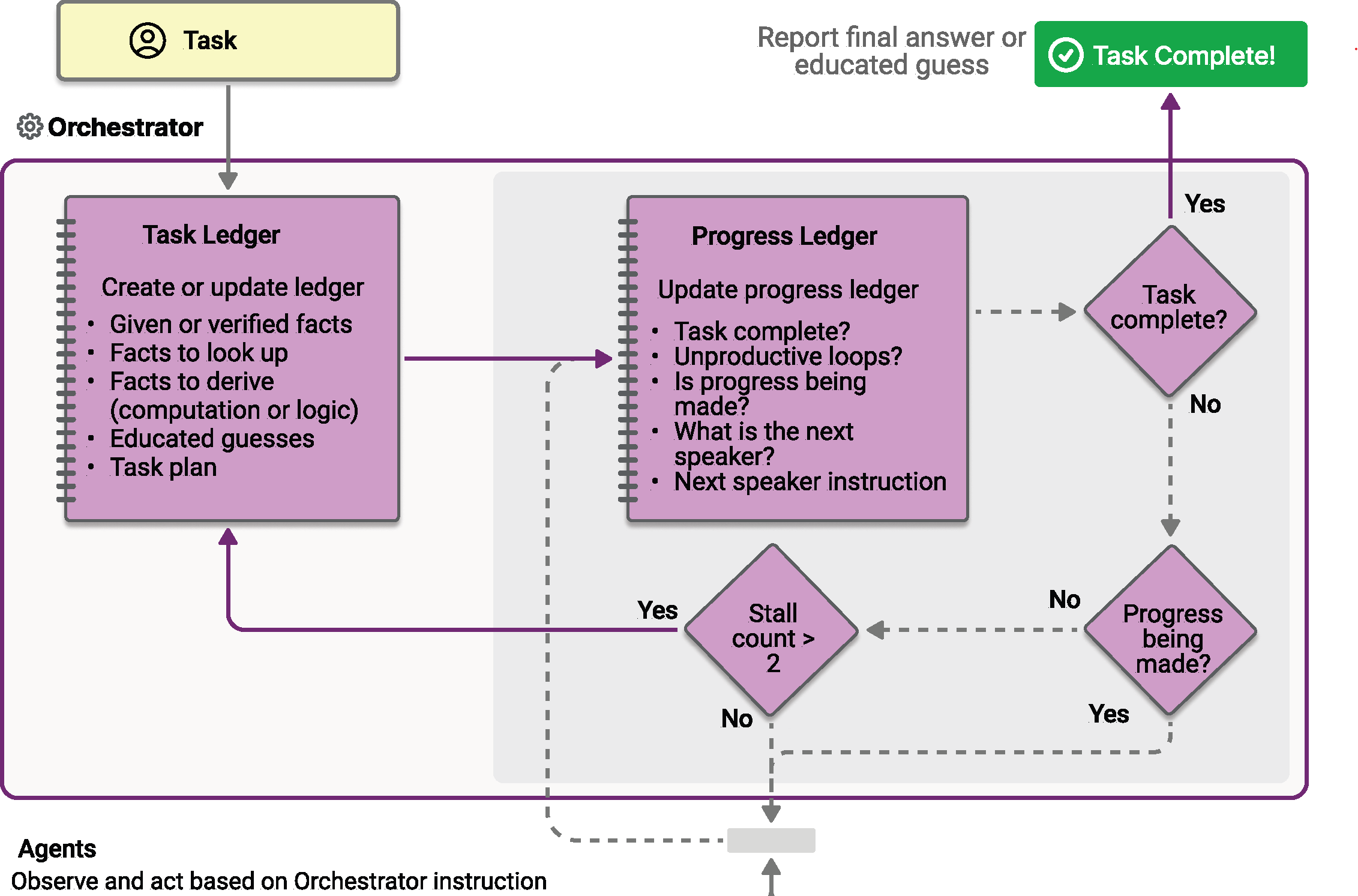
Magentic 編排是基於 AutoGen 發明的 Magentic-One 系統設計的。 它是一種靈活、通用的多代理模式,專為需要動態協作的複雜、開放式任務而設計。 在這種模式中,專門的 Magentic 經理協調一個專業代理團隊,根據不斷變化的上下文、任務進度和代理能力選擇下一步應該採取行動的代理。
Magentic 管理器維護共享上下文、跟踪進度並實時調整工作流程。 這使得系統能夠分解複雜的問題、委派子任務,並透過代理協作迭代完善解決方案。 這種協調特別適合事先未知解路徑,且可能需要多輪推理、研究與計算的情況。
Tip
Magentic 編排架構與 群組聊天編排 模式相同,擁有一個非常強大的管理者,利用規劃來協調代理間的協作。 如果你的情境需要更簡單的協調,且不需要複雜的規劃,可以考慮改用群組聊天模式。
備註
在 Magentic-One 論文中,有 4 種高度專業化的代理被設計用來解決一組非常特定的任務。 在 Agent Framework 的 Magentic orchestration 中,你可以定義自己的專用代理,以符合你特定的應用需求。 然而,Magentic 協調流程在原始 Magentic-One 設計之外的表現尚未經過測試。
您將學到的內容
- 如何設定 Magentic 管理程式以協調多個專業代理程式
- 如何處理串流事件
WorkflowEvent - 如何實作人機互動計劃審查
- 如何追蹤客服專員協作和複雜任務的進度
定義您的專業代理
在 Magentic 協調流程中,您可以定義經理可以根據任務需求動態選取的專用代理程式:
#pragma warning disable MAAIW001  // Magentic types are experimental
#pragma warning disable OPENAI001 // HostedCodeInterpreterTool is experimental

using Azure.AI.Projects;
using Azure.Identity;
using Microsoft.Agents.AI;
using Microsoft.Agents.AI.Workflows;
using Microsoft.Agents.AI.Workflows.Specialized.Magentic;
using Microsoft.Extensions.AI;

string endpoint = Environment.GetEnvironmentVariable("AZURE_AI_PROJECT_ENDPOINT")
    ?? throw new InvalidOperationException("AZURE_AI_PROJECT_ENDPOINT is not set.");
string deploymentName = Environment.GetEnvironmentVariable("AZURE_AI_MODEL_DEPLOYMENT_NAME") ?? "gpt-5.4-mini";

AIProjectClient projectClient = new(new Uri(endpoint), new DefaultAzureCredential());

AIAgent researcherAgent = projectClient.AsAIAgent(
    deploymentName,
    name: "ResearcherAgent",
    description: "Specialist in research and information gathering.",
    instructions: "You are a researcher. Find relevant information without doing additional computation or quantitative analysis.");

AIAgent coderAgent = projectClient.AsAIAgent(
    deploymentName,
    name: "CoderAgent",
    description: "A helpful assistant that writes and executes code to analyze data.",
    instructions: "You solve quantitative questions by writing and running code. Show the analysis and the computation process clearly.",
    tools: [new HostedCodeInterpreterTool()]);

AIAgent managerAgent = projectClient.AsAIAgent(
    deploymentName,
    name: "MagenticManager",
    description: "Orchestrator that coordinates the research and coding workflow.",
    instructions: "You coordinate the team to complete complex tasks efficiently.");
import os

from agent_framework import Agent
from agent_framework.foundry import FoundryChatClient
from azure.identity import AzureCliCredential

client = FoundryChatClient(
    project_endpoint=os.environ["FOUNDRY_PROJECT_ENDPOINT"],
    model=os.environ["FOUNDRY_MODEL"],
    credential=AzureCliCredential(),
)

researcher_agent = Agent(
    name="ResearcherAgent",
    description="Specialist in research and information gathering",
    instructions=(
        "You are a Researcher. You find information without additional computation or quantitative analysis."
    ),
    client=client,
)

coder_agent = Agent(
    name="CoderAgent",
    description="A helpful assistant that writes and executes code to process and analyze data.",
    instructions="You solve questions using code. Please provide detailed analysis and computation process.",
    client=client,
    tools=client.get_code_interpreter_tool(),
)

# Create a manager agent for orchestration
manager_agent = Agent(
    name="MagenticManager",
    description="Orchestrator that coordinates the research and coding workflow",
    instructions="You coordinate a team to complete complex tasks efficiently.",
    client=client,
)
建置 Magentic 工作流程
使用 Magentic 工作流程建構器,將工作流程配置為有一位經理和一組參與者。 建置器也提供內迴圈限制 (最大協調回合數、重新規劃前允許的最大連續停滯次數、計劃重設次數上限),以及用於人機互動計劃審查的旗標。
Workflow workflow = new MagenticWorkflowBuilder(managerAgent)
    .AddParticipants([researcherAgent, coderAgent])
    .WithName("Magentic Orchestration Workflow")
    .WithDescription("Coordinates a researcher and coder to solve a complex analytical task.")
    .RequirePlanSignoff(false)
    .WithMaxRounds(10)
    .WithMaxStalls(3)
    .WithMaxResets(2)
    .Build();
from agent_framework.orchestrations import MagenticBuilder

workflow = MagenticBuilder(
    participants=[researcher_agent, coder_agent],
    intermediate_output_from=[researcher_agent, coder_agent],
    manager_agent=manager_agent,
    max_round_count=10,
    max_stall_count=3,
    max_reset_count=2,
).build()
Tip
標準管理器基於 Magentic-One 設計,固定提示取自原始論文。 透過傳遞提示給 MagenticBuilder,自訂經理的行為。
當你自訂初始資料表或計畫提示時,也要調整相應的更新提示,讓重新規劃能保留你的格式。 自訂 progress_ledger_prompt 必須保留內建的 JSON 回應結構。
關於提示參數及其可用的佔位符,請參閱 自訂管理器提示範例。 若要進一步自訂該管理器,請將 MagenticManagerBase 設為子類別。
Python 建置者的管理員選項有不同的所有權行為:
-
manager_agent會為每個工作流程建立新的StandardMagenticManager,同時共用所提供的代理程式。 - 每次呼叫
build()時,manager_agent_factory和manager_factory都會執行一次。 -
manager在不同工作流程間共享所提供的 Manager 實例。
警告
不要在並行或交錯的工作流程間共享有狀態的明確式。manager 使用 manager_factory 讓每個工作流程擁有各自獨立的管理器狀態。
中間輸出
備註
此節目前僅適用於 Python 樞軸。
將 intermediate_output_from=[...] 傳遞給 MagenticBuilder 會將特定參與者指定為中間輸出來源。 它們的 yield_output 呼叫會發出 "intermediate" 事件,而管理器最終的合成答案仍是 "output"(終端)事件。 若未指定此參數(預設情況下),只會顯示管理器的終端機 AgentResponse。
這對於 Magentic 工作流程特別有用,因為:
- 任務往往是長期進行的,需多次代理合作
- 你可以在串流模式下隨著工作流程的進展即時顯示每個代理的貢獻
- 它提供工作流程中中介推理步驟的可見性
用事件串流執行工作流程
執行複雜任務,處理串流輸出與編排更新的事件。 終端工作流程輸出包含經理綜合的最終答案。
const string TaskPrompt =
    "I am preparing a report on the energy efficiency of different machine learning model architectures. " +
    "Compare the estimated training and inference energy consumption of ResNet-50, BERT-base, and GPT-2 " +
    "on standard datasets (for example, ImageNet for ResNet, GLUE for BERT, WebText for GPT-2). " +
    "Then, estimate the CO2 emissions associated with each, assuming training on an Azure Standard_NC6s_v3 " +
    "VM for 24 hours. Provide tables for clarity, and recommend the most energy-efficient model " +
    "per task type (image classification, text classification, and text generation).";

await using StreamingRun run = await InProcessExecution.RunStreamingAsync(
    workflow,
    new List<ChatMessage> { new(ChatRole.User, TaskPrompt) });

await run.TrySendMessageAsync(new TurnToken(emitEvents: true));

string? lastResponseId = null;
WorkflowOutputEvent? finalOutput = null;

await foreach (WorkflowEvent workflowEvent in run.WatchStreamAsync())
{
    switch (workflowEvent)
    {
        case AgentResponseUpdateEvent updateEvent:
            // Stream per-participant deltas. Group by ResponseId / MessageId / ExecutorId so
            // each new contiguous response prints its executor header once.
            string responseId = updateEvent.Update.ResponseId
                ?? updateEvent.Update.MessageId
                ?? updateEvent.ExecutorId;
            if (!string.Equals(responseId, lastResponseId, StringComparison.Ordinal))
            {
                if (lastResponseId is not null)
                {
                    Console.WriteLine();
                }
                Console.Write($"- {updateEvent.ExecutorId}: ");
                lastResponseId = responseId;
            }
            Console.Write(updateEvent.Update.Text);
            break;

        case MagenticPlanCreatedEvent planCreated:
            Console.WriteLine($"\n[Magentic Initial Plan]\n{planCreated.FullTaskLedger.Text}");
            break;

        case MagenticReplannedEvent replanned:
            Console.WriteLine($"\n[Magentic Replanned]\n{replanned.FullTaskLedger.Text}");
            break;

        case MagenticProgressLedgerUpdatedEvent progressUpdated:
            MagenticProgressLedger ledger = progressUpdated.ProgressLedger;
            Console.WriteLine(
                $"\n[Magentic Progress Ledger] satisfied={ledger.IsRequestSatisfied}, " +
                $"inLoop={ledger.IsInLoop}, progressing={ledger.IsProgressBeingMade}, " +
                $"nextSpeaker={ledger.NextSpeaker}, instruction={ledger.InstructionOrQuestion}");
            break;

        case WorkflowOutputEvent outputEvent when outputEvent.Is<List<ChatMessage>>():
            finalOutput = outputEvent;
            break;

        case WorkflowErrorEvent workflowError:
            Console.Error.WriteLine(workflowError.Exception?.ToString() ?? "Unknown workflow error.");
            break;

        case ExecutorFailedEvent executorFailed:
            Console.Error.WriteLine(
                $"Executor '{executorFailed.ExecutorId}' failed: " +
                (executorFailed.Data?.ToString() ?? "unknown error"));
            break;
    }
}

if (finalOutput?.As<List<ChatMessage>>() is { } transcript)
{
    Console.WriteLine("\n\n=== Final Conversation Transcript ===\n");
    foreach (ChatMessage message in transcript)
    {
        Console.WriteLine($"{message.AuthorName ?? message.Role.ToString()}: {message.Text}");
    }
}
import json
import asyncio
from typing import cast

from agent_framework import (
    AgentResponseUpdate,
    Message,
    WorkflowEvent,
)
from agent_framework.orchestrations import MagenticProgressLedger

task = (
    "I am preparing a report on the energy efficiency of different machine learning model architectures. "
    "Compare the estimated training and inference energy consumption of ResNet-50, BERT-base, and GPT-2 "
    "on standard datasets (for example, ImageNet for ResNet, GLUE for BERT, WebText for GPT-2). "
    "Then, estimate the CO2 emissions associated with each, assuming training on an Azure Standard_NC6s_v3 "
    "VM for 24 hours. Provide tables for clarity, and recommend the most energy-efficient model "
    "per task type (image classification, text classification, and text generation)."
)

# Keep track of the last executor to format output nicely in streaming mode
last_message_id: str | None = None
stream = workflow.run(task, stream=True)
async for event in stream:
    if event.type in ("intermediate", "output") and isinstance(event.data, AgentResponseUpdate):
        message_id = event.data.message_id
        if message_id != last_message_id:
            if last_message_id is not None:
                print("\n")
            print(f"- {event.executor_id}:", end=" ", flush=True)
            last_message_id = message_id
        print(event.data, end="", flush=True)

    elif event.type == "magentic_orchestrator":
        print(f"\n[Magentic Orchestrator Event] Type: {event.data.event_type.name}")
        if isinstance(event.data.content, Message):
            print(f"Please review the plan:\n{event.data.content.text}")
        elif isinstance(event.data.content, MagenticProgressLedger):
            print(f"Please review progress ledger:\n{json.dumps(event.data.content.to_dict(), indent=2)}")
        else:
            print(f"Unknown data type in MagenticOrchestratorEvent: {type(event.data.content)}")

        # Block to allow user to read the plan/progress before continuing
        # Note: this is for demonstration only and is not the recommended way to handle human interaction.
        # Please refer to `with_plan_review` for proper human interaction during planning phases.
        await asyncio.get_event_loop().run_in_executor(None, input, "Press Enter to continue...")

result = await stream.get_final_response()
if outputs := result.get_outputs():
    print(outputs[-1])
Magentic 顯示三個協調器事件,標示規劃與進度的里程碑:
- 初步計畫已建立 ——經理已擬定初步任務計畫。
- 重新規劃 — 已產生新的計畫,原因可能是偵測到停滯,或是有人員透過計畫審查修訂了計畫。
- 進度總帳更新 — 每協調回合發出一次;攜帶目前進度總帳 (要求是否被滿足、團隊是否處於迴圈中、是否有進展、下一位發言者,以及要傳送給他們的指令)。
在Python中,這些符號被承載於單一的 MagenticOrchestratorEvent,其 event_type 枚舉區分出 PLAN_CREATED、REPLANNED 和 PROGRESS_LEDGER_UPDATED。 .NET中,它們以三種不同類型發射——MagenticPlanCreatedEvent、MagenticReplannedEvent 和 MagenticProgressLedgerUpdatedEvent——這些都源自 MagenticOrchestratorEvent。
進階:人機互動計劃審查
啟用人員介入(HITL)功能,讓使用者能在計畫執行前審查並核准經理提出的計畫。 這有助於確保計畫符合使用者的期望與需求。
計劃審查有兩種選項:
- 修訂:使用者提供回饋以修訂計畫,經理會根據回饋重新規劃。
- 批准:使用者批准計畫 as-is,讓工作流程得以繼續。
在建立 Magentic 工作流程時啟用計畫審查。 預設值因語言而異:Python 中,計畫審查預設為 off(enable_plan_review=False),且需明確選擇;.NET 中,預設為 on(RequirePlanSignoff 預設為 true),而本頁前述的基本範例則選擇退出,以便能端對端無互動地執行。 以下程式碼說明如何選擇加入並處理審核請求。
計畫審查的暫停情形會透過工作流程中含有 MagenticPlanReviewRequest 資料的請求/回應機制顯示出來。 你會在事件串流中處理這些事項,並在人工審核者核准或修改計畫後,使用 MagenticPlanReviewResponse 繼續工作流程。
Tip
想了解更多關於請求與回應的資訊,請參閱「 請求與回應 」指南。
Workflow workflow = new MagenticWorkflowBuilder(managerAgent)
    .AddParticipants([researcherAgent, coderAgent])
    .RequirePlanSignoff(true)
    .WithMaxRounds(10)
    .WithMaxStalls(1)
    .WithMaxResets(2)
    .Build();

CheckpointManager checkpointManager = CheckpointManager.CreateInMemory();
InProcessExecutionEnvironment environment = ExecutionEnvironment.InProcess_Lockstep
    .ToWorkflowExecutionEnvironment()
    .WithCheckpointing(checkpointManager);

await using StreamingRun run = await environment.OpenStreamingAsync(workflow);
await run.TrySendMessageAsync(new List<ChatMessage> { new(ChatRole.User, TaskPrompt) });
await run.TrySendMessageAsync(new TurnToken(emitEvents: true));

ExternalRequest? pendingRequest = null;
CheckpointInfo? lastCheckpoint = null;
WorkflowOutputEvent? finalOutput = null;

async Task<WorkflowOutputEvent?> DrainAsync(StreamingRun activeRun)
{
    WorkflowOutputEvent? output = null;
    await foreach (WorkflowEvent evt in activeRun.WatchStreamAsync(blockOnPendingRequest: false))
    {
        switch (evt)
        {
            case AgentResponseUpdateEvent updateEvent:
                Console.Write(updateEvent.Update.Text);
                break;
            case RequestInfoEvent requestInfo
                when requestInfo.Request.Data.As<MagenticPlanReviewRequest>() is not null:
                pendingRequest = requestInfo.Request;
                break;
            case SuperStepCompletedEvent stepCompleted:
                lastCheckpoint = stepCompleted.CompletionInfo?.Checkpoint ?? lastCheckpoint;
                break;
            case WorkflowOutputEvent outputEvent when outputEvent.Is<List<ChatMessage>>():
                output = outputEvent;
                break;
        }
    }
    return output;
}

finalOutput = await DrainAsync(run);

// Loop until the workflow finishes or the user accepts a plan that runs to completion.
while (finalOutput is null && pendingRequest is not null)
{
    MagenticPlanReviewRequest reviewRequest = pendingRequest.Data.As<MagenticPlanReviewRequest>()!;

    Console.WriteLine("\n\n[Magentic Plan Review Request]");
    if (reviewRequest.CurrentProgress is { } progress)
    {
        Console.WriteLine(
            $"Current progress: satisfied={progress.IsRequestSatisfied}, " +
            $"inLoop={progress.IsInLoop}, progressing={progress.IsProgressBeingMade}");
    }
    if (reviewRequest.IsStalled)
    {
        Console.WriteLine("(Replan triggered by stall detection.)");
    }
    Console.WriteLine($"Proposed plan:\n{reviewRequest.Plan.Text}\n");
    Console.Write("Press Enter to approve, or type feedback to request a revision: ");

    string reply = Console.ReadLine() ?? string.Empty;
    MagenticPlanReviewResponse reviewResponse = string.IsNullOrWhiteSpace(reply)
        ? reviewRequest.Approve()
        : reviewRequest.Revise(reply);

    ExternalResponse response = pendingRequest.CreateResponse(reviewResponse);
    pendingRequest = null;

    await using StreamingRun resumed = await environment.ResumeStreamingAsync(workflow, lastCheckpoint!);
    await resumed.SendResponseAsync(response);
    finalOutput = await DrainAsync(resumed);
}

if (finalOutput?.As<List<ChatMessage>>() is { } transcript)
{
    Console.WriteLine("\n\n=== Final Conversation Transcript ===\n");
    foreach (ChatMessage message in transcript)
    {
        Console.WriteLine($"{message.AuthorName ?? message.Role.ToString()}: {message.Text}");
    }
}
import json
import asyncio
from typing import cast

from agent_framework import (
    AgentResponseUpdate,
    Agent,
    Message,
    WorkflowEvent,
)
from agent_framework.orchestrations import (
    MagenticBuilder,
    MagenticPlanReviewRequest,
    MagenticPlanReviewResponse,
)

workflow = MagenticBuilder(
    participants=[researcher_agent, coder_agent],
    intermediate_output_from=[researcher_agent, coder_agent],
    enable_plan_review=True,
    manager_agent=manager_agent,
    max_round_count=10,
    max_stall_count=1,
    max_reset_count=2,
).build()

pending_request: WorkflowEvent | None = None
pending_responses: dict[str, MagenticPlanReviewResponse] | None = None
final_response: object | None = None

while not final_response:
    if pending_responses is not None:
        stream = workflow.run(stream=True, responses=pending_responses)
    else:
        stream = workflow.run(task, stream=True)

    last_message_id: str | None = None
    async for event in stream:
        if event.type in ("intermediate", "output") and isinstance(event.data, AgentResponseUpdate):
            message_id = event.data.message_id
            if message_id != last_message_id:
                if last_message_id is not None:
                    print("\n")
                print(f"- {event.executor_id}:", end=" ", flush=True)
                last_message_id = message_id
            print(event.data, end="", flush=True)

        elif event.type == "request_info" and event.request_type is MagenticPlanReviewRequest:
            pending_request = event

    result = await stream.get_final_response()
    if outputs := result.get_outputs():
        final_response = outputs[-1]

    pending_responses = None

    # Handle plan review request if any
    if pending_request is not None:
        event_data = cast(MagenticPlanReviewRequest, pending_request.data)

        print("\n\n[Magentic Plan Review Request]")
        if event_data.current_progress is not None:
            print("Current Progress Ledger:")
            print(json.dumps(event_data.current_progress.to_dict(), indent=2))
            print()
        print(f"Proposed Plan:\n{event_data.plan.text}\n")
        print("Please provide your feedback (press Enter to approve):")

        reply = await asyncio.get_event_loop().run_in_executor(None, input, "> ")
        if reply.strip() == "":
            print("Plan approved.\n")
            pending_responses = {pending_request.request_id: event_data.approve()}
        else:
            print("Plan revised by human.\n")
            pending_responses = {pending_request.request_id: event_data.revise(reply)}
        pending_request = None
MagenticPlanReviewRequest 攜帶了擬議的計劃、目前的進度總帳 (在初始審查時為 null / None,並在觸發停滯重新規劃時填入),以及一個用來指示重新規劃是否由停滯偵測觸發的旗標。 透過呼叫 approve() 原封不動地接受該計畫,或呼叫 revise(...) 並提供意見回饋,請經理重新規劃,以建立回應。
關鍵概念
- 動態協調:Magentic 管理者根據演變的情境動態選擇下一個行動的代理人。
-
終端輸出:終端工作流程輸出攜帶管理者合成的最終答案(Python為
AgentResponse;.NET為WorkflowOutputEvent,有效載荷為List<ChatMessage>)。 -
協調器事件:計劃建立、重新規劃以及進度總帳更新的里程碑會透過
MagenticOrchestratorEvent公開 (在 Python 中為含有event_type列舉的單一事件;在 .NET 中為三個衍生類型)。 每位參與者的串流差異會透過架構的標準代理程式回應更新事件來傳遞。 - 迭代精煉:系統能拆解複雜問題,並透過多輪迭代精煉解決方案。
- 進度追蹤與停滯偵測:進度帳本追蹤請求是否被滿足、團隊是否陷入循環,以及是否有進展。 連續未取得進展的回合會增加停滯計數器,若超過設定的最大值,則會觸發自動重設和重新規劃。
- 彈性協作:代理可依管理器的決定,以任意順序多次呼叫。
-
人工監督:透過
MagenticPlanReviewRequest/MagenticPlanReviewResponse的選用人機互動審查。 -
中介輸出(目前僅Python):指定參與者,其
yield_output通話應與經理的終端輸出同時出現為"intermediate"事件。
工作流程執行流程
Magentic 協調流程遵循下列執行模式:
- 規劃階段:經理分析任務並建立初始計劃
- 可選計畫審查:若啟用,人類可審查並批准/修改計畫
- 代理選擇:經理為每個子任務選擇最合適的代理
- 執行:所選代理執行其任務部分
- 進度評估:經理評估進度並更新計劃
- 停滯偵測:若進度停滯,請自動重新規劃,並可選擇加入人工審查流程
- 迭代:步驟3至6重複,直到任務完成或達到極限
- 最終綜合: 經理將所有代理輸出綜合成最終結果
完整範例
完整範例請參閱 代理框架範例庫。
完整範例請參閱 代理框架範例庫。
備註
Go 對此功能的支援即將推出。 最新狀態請參閱 Agent Framework Go 倉庫 。