移交協調流程允許代理程式根據上下文或使用者請求將控制權相互轉移。 每個代理都可以將對話「移交」給具有適當專業知識的另一個代理,確保正確的代理處理任務的每個部分。 這在客戶支援、專家系統或任何需要動態委託的場景中特別有用。
在內部,接管編排是以網狀拓撲實現,代理程式直接連接,無需透過編排器。 每位客服人員可根據預先定義的規則或訊息內容決定何時切換對話。
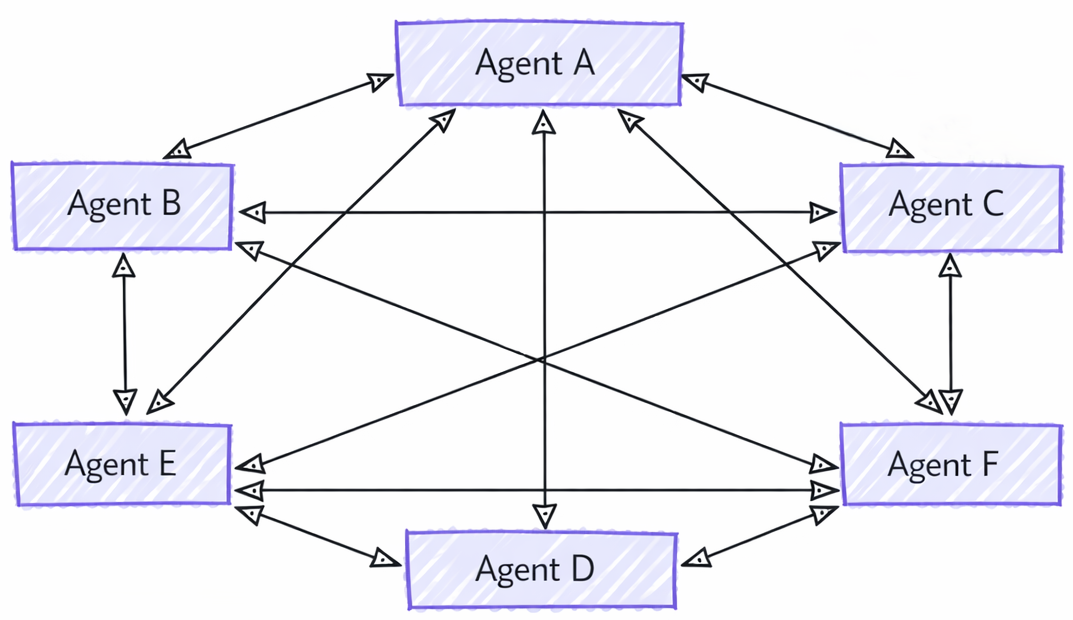
備註
交接協調僅支援 Agent ,代理程式必須支援本地工具的執行。
交接與代理作為工具之間的差異
雖然代理作為工具通常被視為多代理模式,乍看之下可能與交接相似,但兩者之間有根本差異:
- 控制流程:在切換協調流程中,控制權根據定義的規則在代理之間明確傳遞。 每個客服專員都可以決定將整個任務移交給另一個客服專員。 沒有管理工作流程的中央機構。 相較之下,代理即工具涉及將子任務委派給其他代理的主要代理,一旦代理完成子任務,控制權就會返回給主要代理。
- 任務擁有權:在交接中,接手任務的客服專員擁有任務的完全擁有權。 在代理即工具中,主要代理保留任務的整體責任,而其他代理則被視為協助特定子任務的工具。
- 上下文管理:在交接協調中,對話完全移交給另一個代理程式。 接收 Agent 對目前已完成哪些工作有完整的上下文脈絡。 在代理作為工具中,主要代理管理整體情境,並可能僅在需要時提供相關資訊給工具代理。
您將學到的內容
- 如何為不同網域建立專用代理程式
- 如何設定代理程式之間的交接規則
- 如何使用動態客服專員路由建立互動式工作流程
- 如何使用 Agent 切換來處理多回合交談
- 如何實施敏感作業的工具審核(HITL)
- 如何利用檢查點來實現持久的交接工作流程
在交接編排中,代理可以根據上下文相互轉移控制權,從而實現動態路由和專業知識處理。
設定 Azure OpenAI 用戶端
using System;
using System.Collections.Generic;
using System.Threading.Tasks;
using Azure.AI.Projects;
using Azure.Identity;
using Microsoft.Agents.AI.Workflows;
using Microsoft.Extensions.AI;
using Microsoft.Agents.AI;

// 1) Set up the Azure OpenAI client
var endpoint = Environment.GetEnvironmentVariable("AZURE_OPENAI_ENDPOINT") ??
    throw new InvalidOperationException("AZURE_OPENAI_ENDPOINT is not set.");
var deploymentName = Environment.GetEnvironmentVariable("AZURE_OPENAI_DEPLOYMENT_NAME") ?? "gpt-4o-mini";
var client = new AIProjectClient(new Uri(endpoint), new DefaultAzureCredential())
    .GetProjectOpenAIClient()
    .GetProjectResponsesClient()
    .AsIChatClient(deploymentName);
Warning
DefaultAzureCredential 開發方便,但在生產過程中需謹慎考量。 在生產環境中,建議使用特定的憑證(例如 ManagedIdentityCredential),以避免延遲問題、意外的憑證探測,以及備援機制帶來的安全風險。
定義您的專業代理
建立網域特定的代理程式和用於路由的分類代理程式:
// 2) Create specialized agents
ChatClientAgent historyTutor = client.AsAIAgent(new ChatClientAgentOptions
{
    Id = "history-tutor",
    Name = "history_tutor",
    Description = "Specialist agent for historical questions",
    ChatOptions = new()
    {
        Instructions = "You provide assistance with historical queries. Explain important events and context clearly. Only respond about history."
    }
});

ChatClientAgent mathTutor = client.AsAIAgent(new ChatClientAgentOptions
{
    Id = "math-tutor",
    Name = "math_tutor",
    Description = "Specialist agent for math questions",
    ChatOptions = new()
    {
        Instructions = "You provide help with math problems. Explain your reasoning at each step and include examples. Only respond about math."
    }
});

ChatClientAgent triageAgent = client.AsAIAgent(new ChatClientAgentOptions
{
    Id = "triage-agent",
    Name = "triage_agent",
    Description = "Routes messages to the appropriate specialist agent",
    ChatOptions = new()
    {
        Instructions = "You determine which agent to use based on the user's homework question. ALWAYS handoff to another agent."
    }
});
備註
如果轉接工作流程已建立檢查點,且之後重新建置,請為每個參與的 Agent 重複使用相同的唯一Id (如果有設定,也請使用相同的Name)。 當 Agent 的範圍限制在每次要求內,或是每次要求都會重建 Agent 時,穩定的識別碼就特別重要,因為轉接路由和檢查點相容性都取決於內部 Agent 身分識別。 欲了解更多資訊,請參閱 「從檢查站補水」一文。
設定交接規則
定義哪些客服專員可以移交給哪些其他客服專員:
// 3) Build handoff workflow with routing rules
var workflow = AgentWorkflowBuilder.CreateHandoffBuilderWith(triageAgent)
    .WithHandoffs(triageAgent, [mathTutor, historyTutor]) // Triage can route to either specialist
    .WithHandoffs([mathTutor, historyTutor], triageAgent) // Both specialists can return to triage
    .Build();
執行互動式交接工作流程
使用靈活的客服專員切換來處理多輪次對話:
// 4) Process multi-turn conversations
List<ChatMessage> messages = new();

while (true)
{
    Console.Write("Q: ");
    string userInput = Console.ReadLine()!;
    messages.Add(new(ChatRole.User, userInput));

    // Execute workflow and process events
    await using StreamingRun run = await InProcessExecution.RunStreamingAsync(workflow, messages);
    await run.TrySendMessageAsync(new TurnToken(emitEvents: true));

    string? lastExecutorId = null;
    List<ChatMessage> newMessages = new();
    await foreach (WorkflowEvent evt in run.WatchStreamAsync())
    {
        if (evt is AgentResponseUpdateEvent e)
        {
            if (e.ExecutorId != lastExecutorId)
            {
                lastExecutorId = e.ExecutorId;
                Console.WriteLine();
                Console.WriteLine(e.ExecutorId);
            }

            Console.Write(e.Update.Text);
        }
        else if (evt is WorkflowOutputEvent outputEvt)
        {
            newMessages = outputEvt.As<List<ChatMessage>>()!;
            break;
        }
    }

    // Add new messages to conversation history
    messages.AddRange(newMessages.Skip(messages.Count));
}
範例互動
Q: What is the derivative of x^2?
triage_agent: This is a math question. I'll hand this off to the math tutor.
math_tutor: The derivative of x^2 is 2x. Using the power rule, we bring down the exponent (2) and multiply it by the coefficient (1), then reduce the exponent by 1: d/dx(x^2) = 2x^(2-1) = 2x.

Q: Tell me about World War 2
triage_agent: This is a history question. I'll hand this off to the history tutor.
history_tutor: World War 2 was a global conflict from 1939 to 1945. It began when Germany invaded Poland and involved most of the world's nations. Key events included the Holocaust, Pearl Harbor attack, D-Day invasion, and ended with atomic bombs on Japan.

Q: Can you help me with calculus integration?
triage_agent: This is another math question. I'll route this to the math tutor.
math_tutor: I'd be happy to help with calculus integration! Integration is the reverse of differentiation. The basic power rule for integration is: ∫x^n dx = x^(n+1)/(n+1) + C, where C is the constant of integration.
自主模式
根據預設,轉接協調流程為互動式:當 Agent 在未轉接的情況下回覆時,工作流程將控制權交還給您,以等待下一次使用者輸入。 啟用 自動模式 ,讓代理人員在不等待使用者輸入的情況下繼續工作。 當代理未交接時,工作流程會給它一個繼續提示並再次呼叫,直到代理交接、達成終止條件或達到每位代理的回合限制為止。
在 handoff 建構器上呼叫 WithAutonomousMode() 來啟用它:
var workflow = AgentWorkflowBuilder.CreateHandoffBuilderWith(triageAgent)
    .WithHandoffs(triageAgent, [mathTutor, historyTutor])
    .WithHandoffs([mathTutor, historyTutor], triageAgent)
    .WithAutonomousMode()
    .Build();
預設情況下,每個代理人最多可執行 50 次自主回合,且每次續集使用提示 "User did not respond. Continue assisting autonomously."。 可依需求覆寫回合限制與提示:
var workflow = AgentWorkflowBuilder.CreateHandoffBuilderWith(triageAgent)
    .WithHandoffs(triageAgent, [mathTutor, historyTutor])
    .WithAutonomousMode(turnLimit: 10, continuationPrompt: "Continue assisting the user.")
    .Build();
將代理程式清單傳遞給 agents 參數,即可僅為部分參與者啟用自主模式。 不在列表中的代理在一次回應後總是返回控制權:
var workflow = AgentWorkflowBuilder.CreateHandoffBuilderWith(triageAgent)
    .WithHandoffs(triageAgent, [mathTutor, historyTutor])
    .WithAutonomousMode(agents: [triageAgent]) // Only triageAgent runs autonomously
    .Build();
將自主模式與終止條件結合,當對話達到某個狀態時停止迴圈:
var workflow = AgentWorkflowBuilder.CreateHandoffBuilderWith(triageAgent)
    .WithHandoffs(triageAgent, [mathTutor, historyTutor])
    .WithAutonomousMode(turnLimit: 10)
    .WithTerminationCondition(conversation => conversation.Any(m => m.Text?.Contains("RESOLVED") == true))
    .Build();
進階:交接工作流程中的工具核准
在交接工作流程中,客服人員可以使用需要人工核准才能執行的工具;對於處理退款、購買或執行不可逆行為等敏感操作非常有用。 將敏感函數包裹為 ApprovalRequiredAIFunction。 當 Agent 嘗試呼叫它時,工作流程會暫停,並發出一個包含ToolApprovalRequestContent的RequestInfoEvent。
使用需核准的工具來定義代理
ChatClientAgent triageAgent = new(client,
    "You are frontline support. Route the customer to the right specialist.",
    "triage_agent",
    "Routes customers to specialists");

ChatClientAgent refundAgent = new(client,
    "You process refund requests.",
    "refund_agent",
    "Handles refund requests",
    [new ApprovalRequiredAIFunction(AIFunctionFactory.Create(ProcessRefund))]);
處理使用者輸入與工具核准請求
有兩種情況會暫停交接工作流程:客服人員完成輪值並等待下一則使用者訊息,以及需要核准的工具呼叫。 在同一個事件迴圈中同時處理兩者;對 RequestInfoEvent 的核准以 SendResponseAsync 回應,並在工作流程返回控制權時提供下一則使用者訊息。
var workflow = AgentWorkflowBuilder.CreateHandoffBuilderWith(triageAgent)
    .WithHandoffs(triageAgent, [refundAgent])
    .WithHandoffs([refundAgent], triageAgent)
    .Build();

List<ChatMessage> messages = [];

while (true)
{
    Console.Write("You: ");
    string userInput = Console.ReadLine()!;
    if (userInput.Equals("exit", StringComparison.OrdinalIgnoreCase))
    {
        break;
    }

    messages.Add(new(ChatRole.User, userInput));

    await using StreamingRun run = await InProcessExecution.RunStreamingAsync(workflow, messages);
    await run.TrySendMessageAsync(new TurnToken(emitEvents: true));

    List<ChatMessage> newMessages = [];
    await foreach (WorkflowEvent evt in run.WatchStreamAsync())
    {
        // An approval-required tool call pauses the workflow and emits a RequestInfoEvent.
        if (evt is RequestInfoEvent requestEvt &&
            requestEvt.Request.TryGetDataAs(out ToolApprovalRequestContent? approval))
        {
            var toolCall = (FunctionCallContent)approval.ToolCall;
            Console.Write($"Approve {toolCall.Name}? (y/n): ");
            bool approved = (Console.ReadLine() ?? "n").Trim().Equals("y", StringComparison.OrdinalIgnoreCase);
            await run.SendResponseAsync(requestEvt.Request.CreateResponse(approval.CreateResponse(approved)));
        }
        else if (evt is AgentResponseUpdateEvent update)
        {
            Console.Write(update.Update.Text);
        }
        else if (evt is WorkflowOutputEvent outputEvt)
        {
            newMessages = outputEvt.As<List<ChatMessage>>()!;
            break;
        }
    }

    // Control returns here after the agent responds without handing off. Merge the new
    // messages into the conversation and loop to collect the next user input.
    messages.AddRange(newMessages.Skip(messages.Count));
}
備註
工具核准功能可直接與 CreateHandoffBuilderWith() 搭配運作;不需要額外的建構器設定。 當代理呼叫包裝着 ApprovalRequiredAIFunction 的工具時,工作流程會自動暫停並發出 RequestInfoEvent。 相同的 RequestInfoEvent處理模式會在各個協調流程中使用;如需完整且可執行的專案,請參閱 GroupChatToolApproval 範例。
定義幾個示範工具
@tool
def process_refund(order_number: Annotated[str, "Order number to process refund for"]) -> str:
    """Simulated function to process a refund for a given order number."""
    return f"Refund processed successfully for order {order_number}."

@tool
def check_order_status(order_number: Annotated[str, "Order number to check status for"]) -> str:
    """Simulated function to check the status of a given order number."""
    return f"Order {order_number} is currently being processed and will ship in 2 business days."

@tool
def process_return(order_number: Annotated[str, "Order number to process return for"]) -> str:
    """Simulated function to process a return for a given order number."""
    return f"Return initiated successfully for order {order_number}. You will receive return instructions via email."
設定聊天用戶端
import os

from agent_framework.foundry import FoundryChatClient
from azure.identity import AzureCliCredential

chat_client = FoundryChatClient(
    project_endpoint=os.environ["FOUNDRY_PROJECT_ENDPOINT"],
    model=os.environ["FOUNDRY_MODEL"],
    credential=AzureCliCredential(),
)
定義您的專業代理
使用路由協調器建立網域特定代理程式:
# Create triage/coordinator agent
triage_agent = chat_client.as_agent(
    instructions=(
        "You are frontline support triage. Route customer issues to the appropriate specialist agents "
        "based on the problem described."
    ),
    description="Triage agent that handles general inquiries.",
    name="triage_agent",
)

# Refund specialist: Handles refund requests
refund_agent = chat_client.as_agent(
    instructions="You process refund requests.",
    description="Agent that handles refund requests.",
    name="refund_agent",
    # In a real application, an agent can have multiple tools; here we keep it simple
    tools=[process_refund],
)

# Order/shipping specialist: Resolves delivery issues
order_agent = chat_client.as_agent(
    instructions="You handle order and shipping inquiries.",
    description="Agent that handles order tracking and shipping issues.",
    name="order_agent",
    # In a real application, an agent can have multiple tools; here we keep it simple
    tools=[check_order_status],
)

# Return specialist: Handles return requests
return_agent = chat_client.as_agent(
    instructions="You manage product return requests.",
    description="Agent that handles return processing.",
    name="return_agent",
    # In a real application, an agent can have multiple tools; here we keep it simple
    tools=[process_return],
)
設定交接規則
使用 HandoffBuilder 建置交接工作流程:
from agent_framework.orchestrations import HandoffBuilder

# Build the handoff workflow
workflow = (
    HandoffBuilder(
        name="customer_support_handoff",
        participants=[triage_agent, refund_agent, order_agent, return_agent],
        termination_condition=lambda conversation: len(conversation) > 0 and "welcome" in conversation[-1].text.lower(),
    )
    .with_start_agent(triage_agent) # Triage receives initial user input
    .build()
)
根據預設,所有 Agent 間都可以互相轉接。 若要進行更進階的路由,您可以設定轉接:
workflow = (
    HandoffBuilder(
        name="customer_support_handoff",
        participants=[triage_agent, refund_agent, order_agent, return_agent],
        termination_condition=lambda conversation: len(conversation) > 0 and "welcome" in conversation[-1].text.lower(),
    )
    .with_start_agent(triage_agent) # Triage receives initial user input
    # Triage cannot route directly to refund agent
    .add_handoff(triage_agent, [order_agent, return_agent])
    # Only the return agent can handoff to refund agent - users wanting refunds after returns
    .add_handoff(return_agent, [refund_agent])
    # All specialists can handoff back to triage for further routing
    .add_handoff(order_agent, [triage_agent])
    .add_handoff(return_agent, [triage_agent])
    .add_handoff(refund_agent, [triage_agent])
    .build()
)
備註
即使有自訂的切換規則,所有代理仍然是以網狀拓撲方式連接的。 這是因為代理之間需要共享上下文以維持對話歷史(詳見 上下文同步 )。 交接規則只決定哪些代理人可以接手對話。
預設情況下,使用者回應會回傳給請求它的代理。 若要讓 start agent 在再次路由前評估每個使用者回應,請關閉回傳至先前路由。
workflow = (
    HandoffBuilder(
        name="customer_support_handoff",
        participants=[triage_agent, refund_agent, order_agent, return_agent],
    )
    .with_start_agent(triage_agent)
    .enable_return_to_previous(False)
    .build()
)
執行轉接 Agent 互動
與其他協調流程不同,轉接是互動式的,因為 Agent 也許不會在每個回合後都決定進行轉接。 如果 Agent 沒有轉接,則需要人工輸入才能繼續交談。 請參見 自治模式 以繞過此要求。 在其他編排中,代理回應後,控制權會轉移到編排者或下一位代理。
當轉接工作流程中的 Agent 決定不轉接 (轉接是由特殊工具呼叫觸發)時,工作流程會發出WorkflowEvent,並附帶type="request_info"和包含 Agent 最新訊息的HandoffAgentUserRequest酬載。 使用者必須回應此請求才能繼續工作流程。
from agent_framework import WorkflowEvent
from agent_framework.orchestrations import HandoffAgentUserRequest

# Start workflow with initial user message
events = [event async for event in workflow.run("I need help with my order", stream=True)]

# Process events and collect pending input requests
pending_requests = []
for event in events:
    if event.type == "request_info" and isinstance(event.data, HandoffAgentUserRequest):
        pending_requests.append(event)
        request_data = event.data
        print(f"Agent {event.executor_id} is awaiting your input")
        # The request contains the most recent messages generated by the
        # agent requesting input
        for msg in request_data.agent_response.messages[-3:]:
            print(f"{msg.author_name}: {msg.text}")

# Interactive loop: respond to requests
while pending_requests:
    user_input = input("You: ")

    # Send responses to all pending requests
    responses = {req.request_id: HandoffAgentUserRequest.create_response(user_input) for req in pending_requests}
    # You can also send a `HandoffAgentUserRequest.terminate()` to end the workflow early
    events = [event async for event in workflow.run(responses=responses, stream=True)]

    # Process new events
    pending_requests = []
    for event in events:
        # Check for new input requests
自主模式
轉接協調流程旨在用於當 Agent 決定不轉接,需要人工輸入的互動式情境。 不過,作為 一個實驗性功能,你可以啟用「自主模式」,讓工作流程在不需人工介入的情況下繼續進行。 在此模式下,當代理決定不切換時,工作流程會自動向代理發送預設回應(例如User did not respond. Continue assisting autonomously.),允許代理繼續對話。
Tip
為什麼 Handoff 編排本質上是互動式的? 與其他在代理回應後只有一條路徑可循的編排不同(例如返回編排器或下一個代理),而在切換編排中,代理可以選擇切換給另一代理,或繼續協助使用者。 而且因為切換是透過工具呼叫完成的,如果客服人員沒有呼叫切換工具,而是產生回應,工作流程就不知道下一步該怎麼做,只能委派回給使用者進一步輸入。 它也無法透過要求 Agent 呼叫轉接工具來強迫 Agent 一律進行轉接,因為這樣 Agent 將無法產生有意義的回覆。
可透過在上呼叫with_autonomous_mode()來啟用自主HandoffBuilder。 此設計會設定工作流程自動以預設訊息回應輸入請求,讓代理能繼續進行,無需等待人工輸入。
workflow = (
    HandoffBuilder(
        name="autonomous_customer_support",
        participants=[triage_agent, refund_agent, order_agent, return_agent],
    )
    .with_start_agent(triage_agent)
    .with_autonomous_mode()
    .build()
)
你也可以只在部分代理上啟用自主模式,方法是將代理實例清單傳給 with_autonomous_mode()。
workflow = (
    HandoffBuilder(
        name="partially_autonomous_support",
        participants=[triage_agent, refund_agent, order_agent, return_agent],
    )
    .with_start_agent(triage_agent)
    .with_autonomous_mode(agents=[triage_agent])  # Only triage_agent runs autonomously
    .build()
)
你可以自訂預設回覆訊息。
workflow = (
    HandoffBuilder(
        name="custom_autonomous_support",
        participants=[triage_agent, refund_agent, order_agent, return_agent],
    )
    .with_start_agent(triage_agent)
    .with_autonomous_mode(
        agents=[triage_agent],
        prompts={triage_agent.name: "Continue with your best judgment as the user is unavailable."},
    )
    .build()
)
你可以自訂代理人在需要人工操作前能自主運行的回合數。 這會防止工作流程在沒有使用者參與的情況下無限運行。
當代理人沒有明確限制時,預設是50回合自主行動。 設定其限制為 0,當該代理在未轉交的情況下回應時,立即返回控制權,且不會自主繼續處理。
workflow = (
    HandoffBuilder(
        name="limited_autonomous_support",
        participants=[triage_agent, refund_agent, order_agent, return_agent],
    )
    .with_start_agent(triage_agent)
    .with_autonomous_mode(
        agents=[triage_agent],
        turn_limits={triage_agent.name: 3},  # Max 3 autonomous turns
    )
    .build()
)
進階:交接工作流程中的工具核准
轉接工作流程可能包含需要先取得人工核准才可執行的 Agent。 這對於處理退款、購買或執行不可逆操作等敏感操作非常有用。
定義需核准的工具
from typing import Annotated
from agent_framework import tool

@tool(approval_mode="always_require")
def process_refund(order_number: Annotated[str, "Order number to process refund for"]) -> str:
    """Simulated function to process a refund for a given order number."""
    return f"Refund processed successfully for order {order_number}."
使用需要批准的工具建立代理人
import os
from agent_framework import Agent
from agent_framework.openai import OpenAIChatCompletionClient
from azure.identity import AzureCliCredential

chat_client = OpenAIChatCompletionClient(
    model=os.environ["AZURE_OPENAI_CHAT_COMPLETION_MODEL"],
    azure_endpoint=os.environ["AZURE_OPENAI_ENDPOINT"],
    api_version=os.getenv("AZURE_OPENAI_API_VERSION"),
    credential=AzureCliCredential(),
)

triage_agent = chat_client.as_agent(
    instructions=(
        "You are frontline support triage. Route customer issues to the appropriate specialist agents "
        "based on the problem described."
    ),
    description="Triage agent that handles general inquiries.",
    name="triage_agent",
)

refund_agent = chat_client.as_agent(
    instructions="You process refund requests.",
    description="Agent that handles refund requests.",
    name="refund_agent",
    tools=[process_refund],
)

order_agent = chat_client.as_agent(
    instructions="You handle order and shipping inquiries.",
    description="Agent that handles order tracking and shipping issues.",
    name="order_agent",
    tools=[check_order_status],
)
同時處理使用者輸入與工具核准請求
from agent_framework import (
    Content,
    WorkflowEvent,
)
from agent_framework.orchestrations import HandoffBuilder, HandoffAgentUserRequest

workflow = (
    HandoffBuilder(
        name="support_with_approvals",
        participants=[triage_agent, refund_agent, order_agent],
    )
    .with_start_agent(triage_agent)
    .build()
)

pending_requests: list[WorkflowEvent] = []

# Start workflow
async for event in workflow.run("My order 12345 arrived damaged. I need a refund.", stream=True):
    if event.type == "request_info":
        pending_requests.append(event)

# Process pending requests - could be user input OR tool approval
while pending_requests:
    responses: dict[str, object] = {}

    for request in pending_requests:
        if isinstance(request.data, HandoffAgentUserRequest):
            # Agent needs user input
            print(f"Agent {request.executor_id} asks:")
            for msg in request.data.agent_response.messages[-2:]:
                print(f"  {msg.author_name}: {msg.text}")

            user_input = input("You: ")
            responses[request.request_id] = HandoffAgentUserRequest.create_response(user_input)

        elif isinstance(request.data, Content) and request.data.type == "function_approval_request":
            # Agent wants to call a tool that requires approval
            func_call = request.data.function_call
            args = func_call.parse_arguments() or {}

            print(f"\nTool approval requested: {func_call.name}")
            print(f"Arguments: {args}")

            approval = input("Approve? (y/n): ").strip().lower() == "y"
            responses[request.request_id] = request.data.to_function_approval_response(approved=approval)

    # Send all responses and collect new requests
    pending_requests = []
    async for event in workflow.run(responses=responses, stream=True):
        if event.type == "request_info":
            pending_requests.append(event)
        elif event.type == "output":
            print("\nWorkflow completed!")
針對持久工作流程的檢查點機制
對於長期執行的工作流程,其中工具核准可能會在數小時或數天後進行,請使用檢查點機制:
from agent_framework import FileCheckpointStorage

storage = FileCheckpointStorage(storage_path="./checkpoints")

workflow = (
    HandoffBuilder(
        name="durable_support",
        participants=[triage_agent, refund_agent, order_agent],
        checkpoint_storage=storage,
    )
    .with_start_agent(triage_agent)
    .build()
)

# Initial run - workflow pauses when approval is needed
pending_requests = []
async for event in workflow.run("I need a refund for order 12345", stream=True):
    if event.type == "request_info":
        pending_requests.append(event)

# Process can exit here - checkpoint is saved automatically

# Later: Resume from checkpoint and provide approval
checkpoints = await storage.list_checkpoints(workflow_name="durable_support")
latest = sorted(checkpoints, key=lambda c: c.timestamp, reverse=True)[0]

# Step 1: Restore checkpoint to reload pending requests
restored_requests = []
async for event in workflow.run(checkpoint_id=latest.checkpoint_id, stream=True):
    if event.type == "request_info":
        restored_requests.append(event)

# Step 2: Send responses
responses = {}
for req in restored_requests:
    if isinstance(req.data, Content) and req.data.type == "function_approval_request":
        responses[req.request_id] = req.data.to_function_approval_response(approved=True)
    elif isinstance(req.data, HandoffAgentUserRequest):
        responses[req.request_id] = HandoffAgentUserRequest.create_response("Yes, please process the refund.")

async for event in workflow.run(responses=responses, stream=True):
    if event.type == "output":
        print("Refund workflow completed!")
範例互動
User: I need help with my order

triage_agent: I'd be happy to help you with your order. Could you please provide more details about the issue?

User: My order 1234 arrived damaged

triage_agent: I'm sorry to hear that your order arrived damaged. I will connect you with a specialist.

support_agent: I'm sorry about the damaged order. To assist you better, could you please:
- Describe the damage
- Would you prefer a replacement or refund?

User: I'd like a refund

triage_agent: I'll connect you with the refund specialist.

refund_agent: I'll process your refund for order 1234. Here's what will happen next:
1. Verification of the damaged items
2. Refund request submission
3. Return instructions if needed
4. Refund processing within 5-10 business days

Could you provide photos of the damage to expedite the process?
情境同步
Agent Framework 中的代理依賴代理會話(AgentSession)來管理上下文。 在切換協調中,代理 不會 共用同一個會話實例,參與者負責確保上下文一致性。 為達成此目標,參與者在工作流程中產生回應時,會將自己的回應或使用者輸入廣播給所有其他人,確保所有參與者在下一回合中掌握最新的上下文。
備註
工具相關內容,包括轉接工具呼叫,不會廣播給其他 Agent。 只有使用者與代理訊息會同步於所有參與者之間。
Python 在同步交接歷史時,會保留使用者文字、內嵌資料、URI、託管檔案及託管向量儲存。 非使用者訊息僅保留文字。 在轉發前,系統會過濾功能呼叫、函式結果、核准有效載荷及其他工具控制內容。
Tip
代理不會共用同一個會話實例,因為不同 代理類型 可能有不同的抽象實作 AgentSession 。 共用同一個會話實例可能導致各代理處理與維護上下文的方式不一致。
廣播完回應後,參與者會檢查是否需要將對話交接給另一位代理。 如果是這樣,它會向所選客服人員發送請求,讓其接手對話。 否則,會根據工作流程設定自動請求使用者輸入或繼續。
關鍵概念
- 動態路由: 代理可以根據上下文決定哪個代理應該處理下一個互動
- AgentWorkflowBuilder.CreateHandoffBuilderWith():定義啟動工作流程的初始代理程式
- WithHandoff() 和 WithHandoffs():設定特定代理程式之間的交接規則
- 上下文保留: 在所有交接中保留完整的對話歷史記錄
- 多回合支持: 支持通過無縫代理切換進行對話
- 專業知識: 每個代理專注於自己的領域,同時通過交接進行協作
- WithAutonomousMode():讓代理人員在不等待使用者輸入的情況下繼續運作,最多可達每個代理的回合限制或直到達成終止條件
-
工具核准 (HITL):使用
ApprovalRequiredAIFunction裝合敏感性工具;工作流程會暫停,並發出帶有ToolApprovalRequestContent的RequestInfoEvent,您可透過SendResponseAsync回答
- 動態路由: 代理可以根據上下文決定哪個代理應該處理下一個互動
- HandoffBuilder: 通過自動交接工具註冊創建工作流程
- 交接工具名稱:Python 從目標代理 ID 衍生每個工具名稱,將字母、數字、底線和連字號以外的字元替換為底線,並將結果限制為 64 個字元。 最終產生的名稱必須是唯一的,且不能與現有工具衝突。
- with_start_agent():定義哪個代理先接收使用者輸入
- add_handoff():設定客服專員之間的特定交接關係
- enable_return_to_previous():控制使用者回應是返回傳出請求的代理,還是改經起始代理轉送。
-
輸出:預設
output_from為 所有參與者,因此每個代理的回應會以"output"(終端)事件形式出現(AgentResponse非串流模式下,串流AgentResponseUpdate模式下)。 若要指定特定代理人為中間來源,則可通過intermediate_output_from=[agent_a, agent_b]至HandoffBuilder— 這隱含地將這些代理人從預設輸出集中降級,使其回應成為"intermediate"事件。 沒有重疊誤差;降職是無聲且刻意的。 - 上下文保存:在切換過程中保留語意使用者內容,同時過濾工具控制內容。
- 請求/回應週期:工作流程請求使用者輸入,處理回應,並繼續直到滿足終止條件
-
工具核准:用於
@tool(approval_mode="always_require")需要人工核准的敏感操作 - 當代理呼叫需要核准的工具時,會發出一個類型為 的
Content物件,然後使用"function_approval_request"來回應。 -
檢查點機制:對於可在流程重啟時進行暫停和恢復的持久性工作流程,將
checkpoint_storage=傳遞給HandoffBuilder - 專業知識: 每個代理專注於自己的領域,同時通過交接進行協作
備註
Go 對此功能的支援即將推出。 最新狀態請參閱 Agent Framework Go 倉庫 。
轉接 Agent 執行程式
與標準工作流程中 Agent 裝合在通用 Agent 執行程式中不同,轉接協調流程會使用專門的HandoffAgentExecutor。 此執行程式會使用特定於轉接的功能,擴充基礎 Agent 執行程式:
- 切換工具注入 — 根據設定的切換規則自動在每個代理上註冊切換工具,讓代理能呼叫工具轉移控制權。
- 切換功能偵測 — 檢查代理對切換工具呼叫的回應,並將控制權導向目標代理。
- 工具呼叫過濾 — 在轉發給下一個代理前,從對話歷史中過濾掉與交接相關的函數呼叫及工具結果,避免內部工作流程機制混淆模型。