文件翻譯是 Azure Translator 服務的雲端功能。 您可以使用文件翻譯 API,以 支援的語言 和各種 檔案格式 ,以異步方式翻譯整個檔,同時保留源文檔結構和文字格式。 在本作指南中,您將瞭解如何使用文件翻譯 API 搭配您選擇的程式設計語言和 HTTP REST API。
必要條件
附註
S1 標準服務方案和 C2、C3、C4 和 D3 大量折扣方案支援文件翻譯。 請參閱Foundry Tools 價格—翻譯器。
若要開始,您需要:
Azure Blob 儲存帳戶。 您也必須在 Azure Blob 儲存體帳戶中為來源和目標檔案建立容器:
- 來源容器。 請在此容器中上傳您要翻譯的檔案(必需)。
- 目標容器。 此容器是翻譯的檔案所將儲存之處 (必要)。
-
完成翻譯工具專案和執行個體詳細資料欄位,如下所示:
訂用帳戶。 選取您可用的一個 Azure 訂用帳戶。
資源群組。 您可以建立新的資源群組,或將資源新增至共用相同生命週期、許可權和原則的現有資源群組。
資源區域。 除非您的業務或應用程式需要特定區域,否則請選擇 [全域]。 如果您打算使用系統指派的受控識別 進行驗證,請選擇地理區域,例如美國西部。
名稱. 輸入您為資源選擇的名稱。 您所選擇的名稱在 Azure 中必須是唯一的。
附註
檔翻譯需要自定義網域端點。 您在 [名稱] 欄位中輸入的值是端點的自訂網域名稱參數。
定價層。 免費層不支援文件翻譯。 若要嘗試服務,請選取 [標準 S1]。
選取 [檢閱 + 建立]。
檢閱服務條款,然後選取 [建立] 以部署資源。
成功部署資源之後,請選取 [移至資源] 以擷取金鑰與端點。
擷取金鑰和自訂網域端點
- 對轉譯器的請求需要唯讀金鑰及自訂端點來驗證存取。 自訂網域端點是以您的資源名稱、主機名稱和翻譯工具子目錄格式化的 URL,可在 Azure 入口網站取得。
當您建立新資源後,部署完成後,請選取 前往資源。 如果您有現有的文件翻譯資源,請直接流覽至您的資源頁面。
在左側滑軌中,於 [資源管理] 下選取 [金鑰和端點]。
複製您的
key和document translation endpoint並貼入方便的位置,例如 Microsoft 記事本。 呼叫 API 只需一把金鑰。您將
key和document translation endpoint插入到程式碼範例中,以驗證您對文件翻譯服務的請求。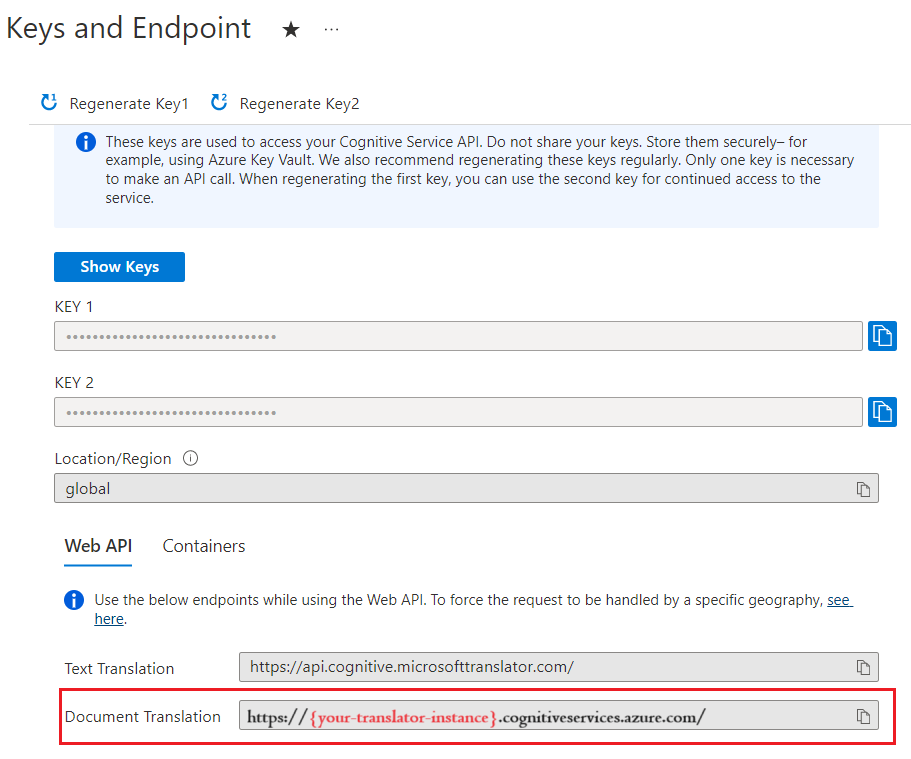
取得金鑰
對轉譯器的請求需要一把唯讀金鑰來驗證存取。
- 當您建立新資源後,部署完成後,請選取 前往資源。 如果您有現有的文件翻譯資源,請直接流覽至您的資源頁面。
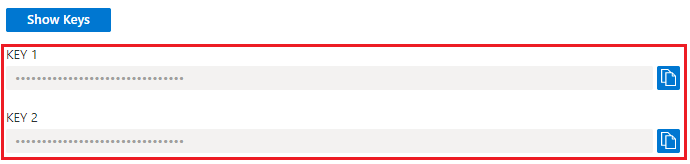
- 在左側滑軌中,於 [資源管理] 下選取 [金鑰和端點]。
- 複製金鑰並貼入方便的位置,例如 Microsoft 記事本。
- 您可以將它貼到程式碼範例中,向文件翻譯服務驗證您的要求。
建立 Azure Blob 儲存體容器
您必須在 Azure Blob 儲存體帳戶中為來源和目標檔案建立容器。
- 來源容器。 請在此容器中上傳您要翻譯的檔案(必需)。
- 目標容器。 此容器是翻譯的檔案所將儲存之處 (必要)。
附註
文件翻譯支援將詞彙整合為目標容器中的 Blob (而不是獨立的詞彙容器)。 如果您要包含自訂詞彙,請將它新增至目標容器,並在 glossaryUrl 要求中包含 。 如果翻譯的語言組合不在詞彙表中,就不會應用該詞彙表。
請參閱使用自訂字彙翻譯文件
建立文件翻譯的 SAS 存取令牌
sourceUrl、targetUrl 和選擇性 glossaryUrl 必須包含共用存取簽章 (SAS) 權杖,並附加為查詢字串。 權杖可以指派給您的容器或特定 Blob。
請參閱建立文件翻譯的 SAS 權杖。
- 您的來源容器或 Blob 必須具有指定的讀取和列出存取權。
- 您的目標容器或 Blob 必須具有指定的寫入和列出存取權。
- 您的字彙 Blob 必須具有指定的讀取和列出存取權。
提示
- 如果您要在單一作業中翻譯多個檔案 (Blob),請在容器層級委派 SAS 存取權。
- 如果您要在一個作業中翻譯單一檔案 (Blob),請在 Blob 層級委派 SAS 存取權。
- 作為 SAS 權杖的替代方案,您可以使用系統指派的受控識別來進行驗證。
HTTP 要求
非同步批次翻譯請求會透過 POST 請求提交至翻譯端點。 如果成功,POST 方法會傳回 202 Accepted 回應碼,且服務會建立批次要求。 翻譯的文件會列在您的目標容器中。
有關 Azure Translator 請求限制的詳細資訊, 請參見文件翻譯請求限制。
HTTP 標頭
每個檔案翻譯 API 要求都包含下列標頭:
| HTTP 標頭 | 描述 |
|---|---|
| Ocp-Apim-Subscription-Key | 必備:該值為你的 Translator 或 Microsoft Foundry 資源的 Azure 金鑰。 |
| 內容-類型 | 必要:指定承載的內容類型。 接受的值為 application/json 或 charset=UTF-8。 |
POST 要求本文屬性
- POST 要求 URL 為 POST
https://<NAME-OF-YOUR-RESOURCE>.cognitiveservices.azure.com/translator/text/batch/v1.1/batches。 - POST 要求本文是名為
inputs的 JSON 物件。 -
inputs物件包含來源和目標語言配對的sourceURL和targetURL容器位址。 -
prefix和suffix是區分大小寫的字串,用來篩選來源路徑中要翻譯的文件。prefix欄位通常用來分隔要翻譯的子資料夾。suffix欄位最常用於副檔名。 - 在翻譯文件時,會套用
glossaries欄位 (選擇性) 的值。 - 每個目標語言的
targetUrl都必須是唯一的。
附註
如果目的地中已存在相同名稱的檔案,工作便會失敗。
翻譯容器中的所有文件
{
    "inputs": [
        {
            "source": {
                "sourceUrl": "{sourceSASUrl}"
            },
            "targets": [
                {
                    "targetUrl": "{targetSASUrl}",
                    "language": "fr"
                }
            ]
        }
    ]
}
翻譯容器中的特定文件
- 指定
"storageType": "File"。 - 如果您未使用系統指派的受控識別進行驗證,請確定您已針對特定 Blob/文件 (而不是針對容器) 建立來源 URL 與 SAS 權杖。
- 確定您已在目標 URL 中指定目標檔案名稱;不過 SAS 權杖仍適用於容器。
- 此要求範例會傳回翻譯成兩種目標語言的單一文件。
{
    "inputs": [
        {
            "storageType": "File",
            "source": {
                "sourceUrl": "{sourceSASUrl}"
            },
            "targets": [
                {
                    "targetUrl": "{targetSASUrl}",
                    "language": "es"
                },
                {
                    "targetUrl": "{targetSASUrl}",
                    "language": "de"
                }
            ]
        }
    ]
}
翻譯內嵌在文件中影像的文字🆕
附註
- 這項功能是選擇性的,而且必須針對每個翻譯要求啟用。
- 啟用此功能會根據使用量產生額外的成本。 更多資訊請參閱Foundry 工具中的 Azure Vision 定價
- 這項功能目前僅適用於 Batch 檔翻譯 API。
- 僅支援檔案格式
.docx。 - 使用此功能需使用 Foundry 資源(非獨立的翻譯資源)。
要求設定
在欄位中使用選擇性
translateTextWithinImage參數options- 資料類型:布林值 (
true或false) - 預設布林值設定為
false。 將選項設定為true以啟用影像文字翻譯。
- 資料類型:布林值 (
以下是範例 JSON 要求:
{ "inputs": [ { "source": { "sourceUrl": "<SAS-URL>", "language": "en" }, "targets": [ { "targetUrl": "<SAS-URL>", "language": "ta" } ] } ], "options": { "experimental": false, "translateTextWithinImage": true } }回應詳細數據。 啟用此功能時,回應會包含已新增的影像處理資訊:
totalImageScansSucceeded。 成功翻譯的影像掃描數目。totalImageScansFailed。 無法處理的影像掃描數目。
以下是範例 JSON 回應:
  {
      "id": "1a2b0c23-45d6-789-a123-a456fdaf7890",
      "createdDateTimeUtc": "2024-11-13T22:06:58.2789197Z",
      "lastActionDateTimeUtc": "2024-11-13T22:07:14.1608283Z",
      "status": "Running",
      "summary": {
          "total": 1,
          "failed": 0,
          "success": 0,
          "inProgress": 1,
          "notYetStarted": 0,
          "cancelled": 0,
          "totalCharacterCharged": 1355,
          "totalImageScansSucceeded": 2,
          "totalImageScansFailed": 0
      }
  }
使用自訂字彙翻譯文件
{
    "inputs": [
        {
            "source": {
                "sourceUrl": "{sourceSASUrl}"
             },
            "targets": [
                {
                    "targetUrl": "{targetSASUrl}",
                    "language": "es",
                    "glossaries": [
                        {
                            "glossaryUrl": "{glossaryUrl/en-es.xlf}",
                            "format": "xliff"
                        }
                    ]
                }
            ]
        }
    ]
}
使用程式代碼提交文件翻譯要求
設定您的編碼平台
- 建立新的 專案。
- 以 C# 程式碼範例取代 Program.cs。
- 在 Program.cs 中設定您的端點、金鑰和容器 URL 值。
- 使用 .NET CLI 新增 Newtonsoft.Json 套件來處理 JSON 資料。
- 從專案目錄執行程式。
重要
針對程式代碼範例,在指定位置將您的共用存取簽章 (SAS) URL 硬編碼。 請記得在完成時請從程式碼中移除金鑰,且切勿公開發佈 SAS URL。 在生產環境中,請使用安全的方式來儲存和存取您的認證,例如 Azure 受控識別。 如需詳細資訊,請參閱 Azure 儲存體安全性。
視作業而定,您可能需要更新下列欄位:
endpointbasePathkeysourceURLtargetURLglossaryURLid(作業識別碼)
尋找 id 值
- 您會在 POST
id方法回應標頭start-batch-translationURL 值中找到作業Operation-Location。/document/參數後面的英數位元字串是操作的任務id:
| 回應標頭 | 回應 URL |
|---|---|
| 運作地點 | {document-translation-endpoint}/translator/document/9dce0aa9-78dc-41ba-8cae-2e2f3c2ff8ec?api-version={date} |
- 您也可以使用 get-translations-status 要求來擷取翻譯作業及其
id的清單。
啟動非同步批次翻譯
    using System;
    using System.Net.Http;
    using System.Threading.Tasks;
    using System.Text;


    class Program
    {

        static readonly string route = "?api-version={date}";

        private static readonly string basePath = "{your-document-translation-endpoint}/translator/document/batches";

        private static readonly string key = "{your-api-key}";

        static readonly string json = ("{\"inputs\": [{\"source\": {\"sourceUrl\": \"https://YOUR-SOURCE-URL-WITH-READ-LIST-ACCESS-SAS\",\"storageSource\": \"AzureBlob\",\"language\": \"en\"}, \"targets\": [{\"targetUrl\": \"https://YOUR-TARGET-URL-WITH-WRITE-LIST-ACCESS-SAS\",\"storageSource\": \"AzureBlob\",\"category\": \"general\",\"language\": \"es\"}]}]}");

        static async Task Main(string[] args)
        {
            using HttpClient client = new HttpClient();
            using HttpRequestMessage request = new HttpRequestMessage();
            {

                StringContent content = new StringContent(json, Encoding.UTF8, "application/json");

                request.Method = HttpMethod.Post;
                request.RequestUri = new Uri(basePath + route);
                request.Headers.Add("Ocp-Apim-Subscription-Key", key);
                request.Content = content;

                HttpResponseMessage  response = await client.SendAsync(request);
                string result = response.Content.ReadAsStringAsync().Result;
                if (response.IsSuccessStatusCode)
                {
                    Console.WriteLine($"Status code: {response.StatusCode}");
                    Console.WriteLine();
                    Console.WriteLine($"Response Headers:");
                    Console.WriteLine(response.Headers);
                }
                else
                    Console.Write("Error");

            }

        }

    }
取得支援的檔案格式
擷取支援的檔案格式清單。 如果成功,這個方法會傳回 200 OK 回應碼。
using System;
using System.Net.Http;
using System.Threading.Tasks;


class Program
{


    private static readonly string basePath = "{your-document-translation-endpoint}/translator/document/formats";

    static readonly string route = "?api-version={date}&type=document";

    private static readonly string key = "{your-api-key}";

    static async Task Main(string[] args)
    {

        HttpClient client = new HttpClient();
            using HttpRequestMessage request = new HttpRequestMessage();
            {
                request.Method = HttpMethod.Get;
                request.RequestUri = new Uri(basePath + route);
                request.Headers.Add("Ocp-Apim-Subscription-Key", key);


                HttpResponseMessage response = await client.SendAsync(request);
                string result = response.Content.ReadAsStringAsync().Result;

                Console.WriteLine($"Status code: {response.StatusCode}");
                Console.WriteLine($"Response Headers: {response.Headers}");
                Console.WriteLine();
                Console.WriteLine(result);
            }
}
取得翻譯作業的狀態
取得單一作業的目前狀態,以及文件翻譯要求中所有作業的摘要。 如果成功,這個方法會傳回 200 OK 回應碼。
using System;
using System.Net.Http;
using System.Threading.Tasks;


class Program
{


    private static readonly string basePath = "{your-document-translation-endpoint}/translator/document/batches/{id}";

    static readonly string route = "?api-version={date}";

    private static readonly string key = "{your-api-key}";

    static async Task Main(string[] args)
    {

        HttpClient client = new HttpClient();
            using HttpRequestMessage request = new HttpRequestMessage();
            {
                request.Method = HttpMethod.Get;
                request.RequestUri = new Uri(basePath + route);
                request.Headers.Add("Ocp-Apim-Subscription-Key", key);


                HttpResponseMessage response = await client.SendAsync(request);
                string result = response.Content.ReadAsStringAsync().Result;

                Console.WriteLine($"Status code: {response.StatusCode}");
                Console.WriteLine($"Response Headers: {response.Headers}");
                Console.WriteLine();
                Console.WriteLine(result);
            }
    }
}
取得特定文件的狀態
簡要概觀
擷取文件翻譯要求中特定文件的狀態。 如果成功,這個方法會傳回 200 OK 回應碼。
using System;
using System.Net.Http;
using System.Threading.Tasks;


class Program
{


    private static readonly string basePath = "{document-translation-endpoint}/translator/document/batches/{id}/documents/{documentId}";

    static readonly string route = "?api-version={date}";

    private static readonly string key = "{your-api-key}";

    static async Task Main(string[] args)
    {

        HttpClient client = new HttpClient();
            using HttpRequestMessage request = new HttpRequestMessage();
            {
                request.Method = HttpMethod.Get;
                request.RequestUri = new Uri(basePath + route);
                request.Headers.Add("Ocp-Apim-Subscription-Key", key);


                HttpResponseMessage response = await client.SendAsync(request);
                string result = response.Content.ReadAsStringAsync().Result;

                Console.WriteLine($"Status code: {response.StatusCode}");
                Console.WriteLine($"Response Headers: {response.Headers}");
                Console.WriteLine();
                Console.WriteLine(result);
            }
}
刪除作業
簡要概觀
取消目前正在處理或已排入佇列的作業。 只有未開始翻譯的文件才會取消。
using System;
using System.Net.Http;
using System.Threading.Tasks;


class Program
{


    private static readonly string basePath = "{your-document-translation-endpoint}/translator/document/batches/{id}";

    static readonly string route = "?api-version={date}";

    private static readonly string key = "{your-api-key}";

    static async Task Main(string[] args)
    {

        HttpClient client = new HttpClient();
            using HttpRequestMessage request = new HttpRequestMessage();
            {
                request.Method = HttpMethod.Delete;
                request.RequestUri = new Uri(basePath + route);
                request.Headers.Add("Ocp-Apim-Subscription-Key", key);


                HttpResponseMessage response = await client.SendAsync(request);
                string result = response.Content.ReadAsStringAsync().Result;

                Console.WriteLine($"Status code: {response.StatusCode}");
                Console.WriteLine($"Response Headers: {response.Headers}");
                Console.WriteLine();
                Console.WriteLine(result);
            }
}
常見的 HTTP 狀態碼
| HTTP 狀態碼 | 描述 | 可能的原因 |
|---|---|---|
| 200 | 好 | 要求成功。 |
| 400 | 錯誤的請求 | 必要的參數遺失、為空白或 Null。 或者,傳遞至必要或選用參數的值無效。 常見的問題是頁頭太長。 |
| 401 | 未經授權 | 要求未獲授權。 請檢查以確定您的金鑰或權杖有效,並且位於正確的區域。 |
| 429 | 過多要求 | 您已超出訂用帳戶允許的配額或要求率。 |
| 502 | 錯誤的閘道 | 網路或伺服器端問題。 也可能表示標頭無效。 |