
這很重要
SQL 模型情境協定(MCP)伺服器目前處於預覽階段,本文件及引擎實作可能會有所變動。 雖然 Data API 建構器版本 1.7 仍在預覽階段,但你必須明確使用預發布版本(例如 1.7.83-rc),因為 MCP 功能尚未包含在標籤中 :latest 。
這個快速入門工具使用 Aspire 來建立基於容器的解決方案。 此解決方案包括:
- 一個包含範例資料的 SQL 資料庫
- 一個由資料 API 建構器驅動的 SQL 模型上下文協定(MCP)伺服器
- MCP 檢查器用於測試
Aspire 會幫你執行所有流程,啟動服務並連接容器,關閉時會停止服務。
先決條件
在開始之前先安裝這些工具。
1. .NET 10
在這個步驟中,你要為快速入門做好前提準備,將機器設定完成。
這很重要
你可能已經安裝了這個工具。 透過執行 dotnet --version 測試,確認它顯示版本 10 或更新。 如果你執行這個安裝且 .NET 已經存在,系統會自動刷新而不會造成任何問題。
winget install Microsoft.DotNet.SDK.10
2. 容器運行時環境
在此步驟中,你會安裝 Docker Desktop 以支援 Aspire 專案。
這很重要
你可能已經安裝了這個工具。 執行 docker --version Docker 來測試,確認 Docker 是否可用。 如果你執行這個安裝且 Docker 已經存在,它會刷新系統而不會造成任何問題。
winget install Docker.DockerDesktop
備註
Podman 也可以,但設定會有所不同。 偏好 Podman 的開發者可以調整這些步驟。
3. Aspire 與 Data API 建構工具
此步驟中,你會建立後續使用的預設 Aspire 專案檔案。 執行以下命令:
dotnet new tool-manifest
dotnet tool install aspire.cli
dotnet tool install microsoft.dataapibuilder --prerelease
aspire init
備註
SQL MCP Server 目前處於預發布狀態。 使用 --prerelease 這個旗標可以確保你獲得最新版本的資料 API 建構器,包含這個快速入門中使用的所有功能。
當提示時,選擇所有預設值。
此指令安裝工具並建立以下檔案:
.
├── .config
│   └── dotnet-tools.json
├── AppHost.cs
└── apphost.run.json
4. 完成AppHost.cs檔案
在這個步驟中,你需要將 AppHost.cs 更新為正確的程式碼以執行這個快速入門。 以下列項目取代 AppHost.cs 的內容:
#:sdk Aspire.AppHost.Sdk@13.0.2
#:package Aspire.Hosting.SqlServer@13.0.2
#:package CommunityToolkit.Aspire.Hosting.McpInspector@9.8.0

using System.ComponentModel;
using Aspire.Hosting;
using Aspire.Hosting.ApplicationModel;

var builder = DistributedApplication.CreateBuilder(args);

var db = AddSqlServer(builder);
WithSqlCommander(db);

var mcp = AddMcpServer(db);
WithMcpInspector(mcp);

await builder.Build().RunAsync();

IResourceBuilder<SqlServerDatabaseResource> AddSqlServer(IDistributedApplicationBuilder builder) => builder
    .AddSqlServer("sql-server").WithDataVolume()
    .AddDatabase("sql-database", "productsdb")
    .WithCreationScript(SqlScript("productsdb"));

IResourceBuilder<ContainerResource> WithSqlCommander(IResourceBuilder<SqlServerDatabaseResource> db) => db
    .ApplicationBuilder.AddContainer("sql-cmdr", "jerrynixon/sql-commander", "latest")
    .WithImageRegistry("docker.io")
    .WithHttpEndpoint(targetPort: 8080, name: "http")
    .WithEnvironment("ConnectionStrings__db", db)
    .WithParentRelationship(db)
    .WaitFor(db)
    .WithUrls(x =>
    {
        x.Urls.Clear();
        x.Urls.Add(new() { Url = "/", DisplayText = "Commander", Endpoint = x.GetEndpoint("http") });
    });

IResourceBuilder<ContainerResource> AddMcpServer(IResourceBuilder<SqlServerDatabaseResource> db) => db
    .ApplicationBuilder.AddContainer("sql-mcp-server", "azure-databases/data-api-builder", "1.7.83-rc")
    .WithImageRegistry("mcr.microsoft.com")
    .WithHttpEndpoint(targetPort: 5000, name: "http")
    .WithEnvironment("MSSQL_CONNECTION_STRING", db)
    .WithBindMount("dab-config.json", "/App/dab-config.json", true)
    .WaitFor(db)
    .WithUrls(x =>
    {
        x.Urls.Clear();
        x.Urls.Add(new() { Url = "/swagger", DisplayText = "Swagger", Endpoint = x.GetEndpoint("http") });
    });

IResourceBuilder<McpInspectorResource> WithMcpInspector(IResourceBuilder<ContainerResource> mcp) => mcp
    .ApplicationBuilder.AddMcpInspector("mcp-inspector")
    .WithMcpServer(mcp)
    .WithParentRelationship(mcp)
    .WaitFor(mcp)
    .WithUrls(x =>
    {
        x.Urls[0].DisplayText = "Inspector";
    });

string SqlScript(string db) => $"""
    CREATE DATABASE {db};
    GO

    SELECT *
    INTO {db}.dbo.Products
    FROM (VALUES
        (1, 'Action Figure', 40, 14.99, 5.00),
        (2, 'Building Blocks', 25, 29.99, 10.00),
        (3, 'Puzzle 500 pcs', 30, 12.49, 4.00),
        (4, 'Toy Car', 50, 7.99, 2.50),
        (5, 'Board Game', 20, 34.99, 12.50),
        (6, 'Doll House', 10, 79.99, 30.00),
        (7, 'Stuffed Bear', 45, 15.99, 6.00),
        (8, 'Water Blaster', 35, 19.99, 7.00),
        (9, 'Art Kit', 28, 24.99, 8.00),
        (10,'RC Helicopter', 12, 59.99, 22.00)
    ) AS x (Id, Name, Inventory, Price, Cost);

    ALTER TABLE {db}.dbo.Products
    ADD CONSTRAINT PK_Products PRIMARY KEY (Id);
    """;
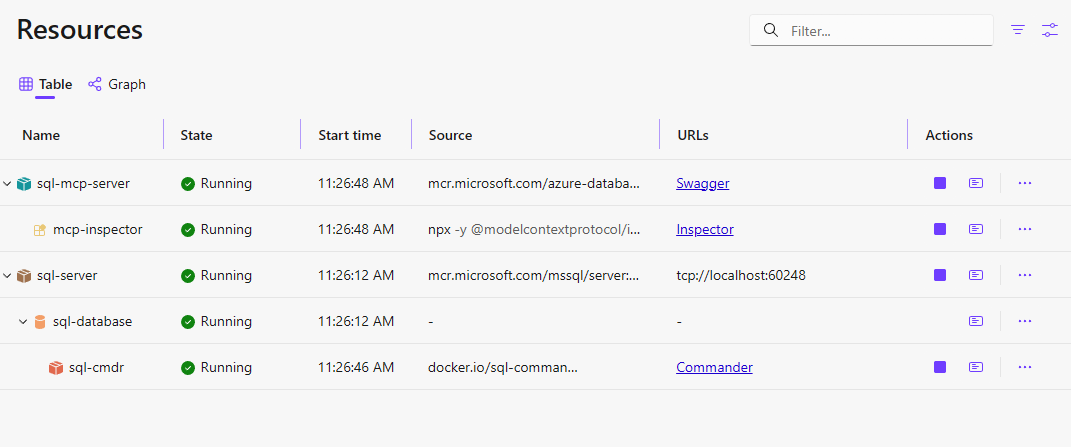
本程式碼配置以下資源:
.
├── SQL Server (sql)
│   └── SQL Database (productsdb)
└── SQL MCP Server (sql-mcp-server)
    └── MCP Inspector (inspector)
5. 建立您的 dab-config.json 檔案
在你的專案資料夾(與 所在資料夾相同 AppHost.cs )執行以下指令:
語法告訴 @env('MSSQL_CONNECTION_STRING') Data API 建構器在執行時從環境變數讀取連接字串。 Aspire 在啟動容器時會自動設定這個變數,所以你不需要在本地設定。
dab init --database-type mssql --connection-string "@env('MSSQL_CONNECTION_STRING')" --host-mode Development --config dab-config.json
dab add Products --source dbo.Products --permissions "anonymous:read" --description "Toy store products with inventory, price, and cost."
備註
這個 @env(...) 表達式是 DAB 的一個設定功能,會在執行時解決環境變數,而非在 dab init 時解決。 生成的 dab-config.json 包含文字字串 @env('MSSQL_CONNECTION_STRING'),當容器啟動時,DAB 會解析該字串。
該 dab-config.json 檔案會設定 SQL MCP 伺服器連接你的資料庫,並識別要暴露哪些物件。 在這種情況下, Products 是暴露的。
此指令會為你的專案新增一個檔案:
dab-config.json
這很重要
該 dab-config.json 檔案必須在你執行 aspire run的同一個目錄中,因為綁定掛載使用相對路徑(./dab-config.json)。
可選擇性地加入欄位描述。 這些元資料可以幫助語言模型理解你的結構。
dab update Products --fields.name Id --fields.primary-key true --fields.description "Product Id"
dab update Products --fields.name Name --fields.description "Product name"
dab update Products --fields.name Inventory --fields.description "Units in stock"
dab update Products --fields.name Price --fields.description "Retail price"
dab update Products --fields.name Cost --fields.description "Store cost"
測試解決方案
在此步驟中,你執行 Aspire 環境,確認 SQL Server、SQL MCP Server 與 MCP Inspector 是否協同運作。
1. 啟動 Aspire
aspire run
這很重要
確保 Docker 正在執行。 Aspire 需要你的容器主機正常運作。
當儀表板打開時,你會看到 Swagger、MCP 和 Inspector 的連結。
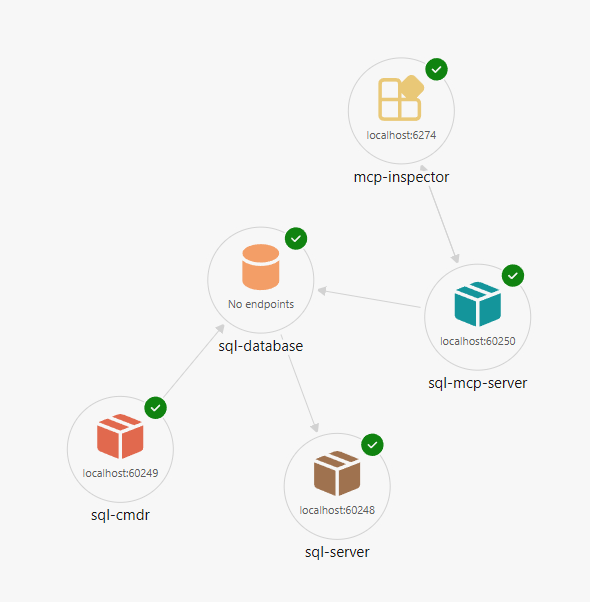
預期網址
Aspire 儀表板顯示這些連結(埠口是動態分配的):
| Resource | Link | Description |
|---|---|---|
| SQL-MCP-伺服器 | Swagger | REST API 文件 |
| SQL-MCP-伺服器 | MCP | MCP 端點 (/mcp) |
| 檢查員 | Inspector | MCP 檢查器使用者介面 |
2. 用 Swagger 測試 REST API
從儀表板選擇 Swagger 。
試試 GET 產品操作。 此測試確認 SQL MCP 伺服器正在執行且能連接資料庫。
3. 探索 MCP 工具
從儀表板選擇 檢查器 。
Try:
-
list_tools以查看可用的 MCP 工具 -
read_records對於該Products實體
試試一個過濾器(範例語法):
{ "filter": "Price gt 20" }
這個測試證實 MCP 正在運作。
4. 停止Aspire
要停止 Aspire,請按 Ctrl+C。
Aspire 停止所有服務。 SQL Server 的資料在每次執行之間會持續存在,因為程式碼使用了 .WithDataVolume() 和 .WithLifetime(ContainerLifetime.Persistent)。
故障排除
SQL MCP 伺服器容器無法啟動
- 請查看 Aspire 儀表板的容器日誌以獲取錯誤細節
- 確認
--config參數是否符合 DAB 容器的預期語法(有些版本可能會改用--ConfigFileName) - 確保
dab-config.json位於您執行aspire run的同一個目錄中
找不到資料庫初始化腳本
- Verify
init-db.sql在 AppHost 專案目錄中 - 檢查檔案是否包含在專案中,必要時複製到輸出
MCP 檢查員無法連線
- 確認 SQL MCP 伺服器容器運行正常且健康
- 驗證 MCP 端點路徑(
/mcp)是否與 DAB 配置相符