Important
這項功能位於 測試版 (Beta) 中。 要使用它,工作區管理員必須從預覽頁面開啟 Unity Gateway 管理設定。 請參閱 管理 Azure Databricks 預覽。
使用行動裝置管理(MDM)和 Unity Gateway CLI 來分發團隊的程式碼代理設定。 管理員會在工作區發佈設定,開發者則使用熟悉的代理,搭配已設定的模型、MCP 伺服器及技能。
支援的 MDM 軟體:
- Jamf Pro (macOS),搭配現成的佈建指令碼
你的 MDM 軟體會在每個裝置上執行一個帶有管理員權限的配置腳本。 腳本會安裝 ug、Databricks CLI 及編碼代理程式,然後執行 ug configure ,將工作區的編碼代理設定套用於裝置上的每位開發者。 開發者接著在沒有管理員權限的情況下啟動代理程式,並以自己的 Azure Databricks 帳號登入。
Note
MDM 配置會配置 Claude Code 和 Codex,這些都具有全機器的設定。 它不會在 Visual Studio Code 中設定 GitHub Copilot CLI 或 GitHub Copilot。 開發者自行使用 ug configure --agents copilot 設定 GitHub Copilot。
使用 MDM 部署
配置程式碼代理
啟用團隊使用的代理程式,並在工作區中發布設定。 請參見 設定程式設計代理。
每個已啟用的代理程式都必須在設定中至少有一個模型,讓下一個步驟中的服務主體名稱可以使用。 例如,Claude 程式碼需要 Claude 模型。
ug configure 跳過任何沒有模型的代理程式。
建立佈建服務主體
MDM 政策只在執行期間使用服務主體來讀取已發佈的設定檔。 開發者會以自己的身分進行驗證。 腳本會暫時使用服務主體的認證,以便該 ug 主體能連接工作區並下載編碼代理程式的設定。
只開啟 Workspace 存取 權限。 服務主體不需要其他權益。 請參閱 權限管理。
授權服務主體存取已發佈配置中的模型、MCP 伺服器及技能,包括所需的 Unity Catalog 權限。 請參見 「授予模型、MCP 伺服器與技能存取權」。
在服務主體的 Secrets 標籤中,點選 Generate secret。 選擇與你的輪替原則相符的有效期。 在 範圍中,點選 其他 API,新增
ai-gateway和unity-catalog範圍,並將每個設定為 讀取。 請參閱 步驟 1:建立 OAuth 密碼。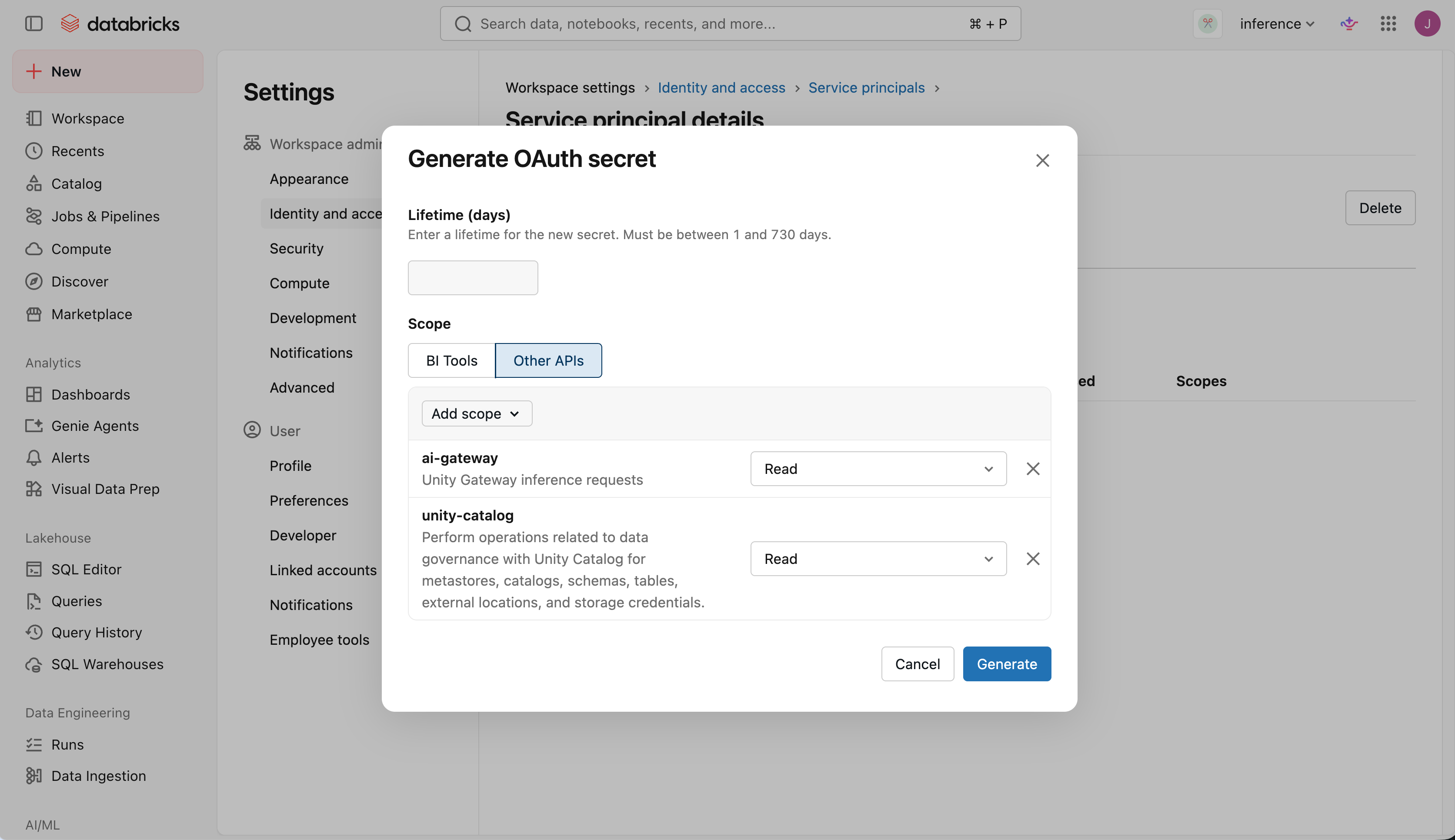
複製客戶 ID 和密鑰。 關閉對話框後,你無法再次查看秘密。
搭配你的 MDM 軟體一起部署
Important
安裝 ug 在裝置上每個使用者都能執行的共用位置,而不是在 root 使用者的首頁目錄。
ug configure 在全機代理設定中記錄路徑 ug,每個開發者的代理程式會從該路徑執行 ug 以進行身分驗證。
Jamf Pro(macOS)
這些步驟將使用 Jamf Pro 把 Claude Code 和 Codex 部署到 macOS 裝置。 每個裝置需要:
- 對你工作區 URL 的網路存取,PyPI(
pypi.org和github.com)、GitHub(raw.githubusercontent.com和astral.sh)、nodejs.org、registry.npmjs.org和files.pythonhosted.org。 - Xcode 的命令列工具,或允許腳本使用
softwareupdate安裝它們的權限。ug可從 GitHub 安裝,這需要git。
新增指令碼
在 Jamf Pro 中,請前往 設定 > 電腦管理 > 腳本 > 新增,並將腳本命名為
Unity Gateway provision。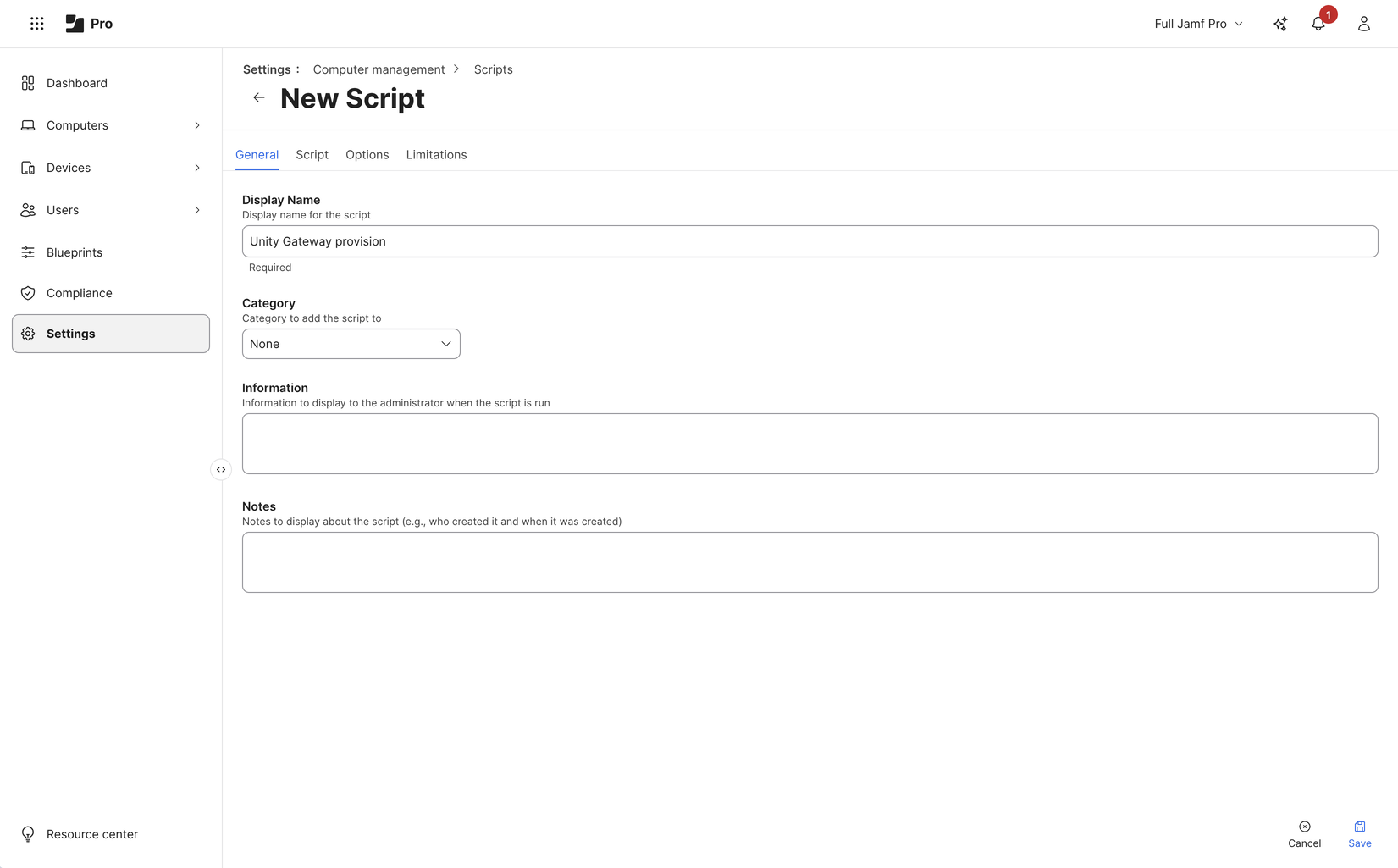
在 腳本 標籤中,貼上以下腳本:
查看配置腳本
#!/bin/bash
#
# macOS MDM provisioning script, written for Jamf Pro policies: install
# ug, the Databricks CLI, Claude Code and Codex machine-wide and run
# `ug configure` as root, which installs the workspace policy at
# /etc/unitygateway/managed-settings.json. It also adds `claude` and
# `codex` aliases to /etc/zshrc and /etc/bashrc, so users launch with
# `claude` or `codex` in a new terminal, with no sudo.
#
# Jamf parameters ($1-$3 are reserved by Jamf):
#   $4  Databricks workspace URL, starting with https://
#   $5  Service principal OAuth client id
#   $6  Service principal OAuth client secret
#
# The token is used for this run only; developers sign in with their own
# OAuth. Needs access to PyPI, GitHub, astral.sh, nodejs.org and npmjs.org.

set -euo pipefail
umask 022
export HOME=/var/root
export PATH=/usr/local/bin:/usr/bin:/bin:/usr/sbin:/sbin
WORKSPACE="${4%/}"
PREFIX=/usr/local/unity-gateway
NODE_VERSION=22.23.5
NODE_SHA256=89fadefd7798158d8990ca9ed7dbb58f8ca7593adb92fe3da8a445db99415533
UG_REPO=https://github.com/databricks/unity-gateway
UV_URL=https://astral.sh/uv/install.sh
CLI_URL=https://raw.githubusercontent.com
CLI_URL="$CLI_URL/databricks/setup-cli/main/install.sh"
CLT_MARKER=/tmp/.com.apple.dt.CommandLineTools
CLT_MARKER="$CLT_MARKER.installondemand.in-progress"

# ug must be in a shared path: the machine-wide agent settings
# run it by absolute path for every user.
export UV_TOOL_DIR="$PREFIX/tools"
export UV_TOOL_BIN_DIR=/usr/local/bin
export UV_PYTHON_INSTALL_DIR="$PREFIX/python"
export UV_PYTHON_PREFERENCE=only-managed
# ug's npm installer must put agents on every user's PATH, not in root's home.
export npm_config_prefix=/usr/local
mkdir -p /usr/local/bin

# Get ug from git
if ! xcode-select -p >/dev/null 2>&1; then
  touch "$CLT_MARKER"
  clt="$(softwareupdate -l 2>/dev/null \
    | sed -n 's/^\* Label: \(Command Line Tools.*\)$/\1/p' \
    | tail -n1)"
  softwareupdate -i "$clt"
  rm -f "$CLT_MARKER"
fi

if ! command -v uv >/dev/null; then
  curl -LsSf "$UV_URL" \
    | env UV_INSTALL_DIR=/usr/local/bin UV_NO_MODIFY_PATH=1 sh
fi
uv tool install --force "git+$UG_REPO"

if [ ! -x /usr/local/bin/databricks ]; then
  curl -fsSL "$CLI_URL" | sh
fi

# ug configure installs missing agents with npm; provide a shared Node.js runtime.
if ! command -v node >/dev/null || ! command -v npm >/dev/null; then
  tmp="$(mktemp -d)"
  trap 'rm -rf "$tmp"' EXIT
  package="node-v$NODE_VERSION.pkg"
  /usr/bin/curl -fsSL -o "$tmp/$package" \
    "https://nodejs.org/dist/v$NODE_VERSION/$package"
  printf '%s  %s\n' "$NODE_SHA256" "$tmp/$package" | /usr/bin/shasum -a 256 -c -
  /usr/sbin/installer -pkg "$tmp/$package" -target /
fi

# Get short lived credential; curl reads the client id and secret from
# stdin (-K -) so they don't appear in its arguments.
resp="$(printf 'user = "%s:%s"\n' "$5" "$6" \
  | curl -sS -K - \
      -d grant_type=client_credentials \
      --data-urlencode 'scope=ai-gateway:read unity-catalog:read' \
      "$WORKSPACE/oidc/v1/token")"
if ! DATABRICKS_BEARER="$(printf '%s' "$resp" \
    | plutil -extract access_token raw -o - -)"; then
  echo "Token request to $WORKSPACE failed: $resp" >&2
  exit 1
fi
export DATABRICKS_BEARER

/usr/local/bin/ug configure --global --mdm --workspace "$WORKSPACE" \
  --agents claude,codex </dev/null
unset DATABRICKS_BEARER resp

# Aliases for every user's interactive zsh and bash shells. The block is
# rewritten on each run, which restores it if a macOS update resets
# the file.
for rc in /etc/zshrc /etc/bashrc; do
  [ -f "$rc" ] || continue
  sed -i '' '/^# BEGIN unity-gateway/,/^# END unity-gateway/d' "$rc"
  cat >>"$rc" <<'ALIASES'
# BEGIN unity-gateway (managed by MDM)
alias claude='UG_SKIP_OS_SETTINGS=1 ug claude'
alias codex='UG_SKIP_OS_SETTINGS=1 ug codex'
# END unity-gateway
ALIASES
done
在 選項 索引標籤中,標示 參數 4
Workspace URL、參數 5Client ID和 參數 6Client secret。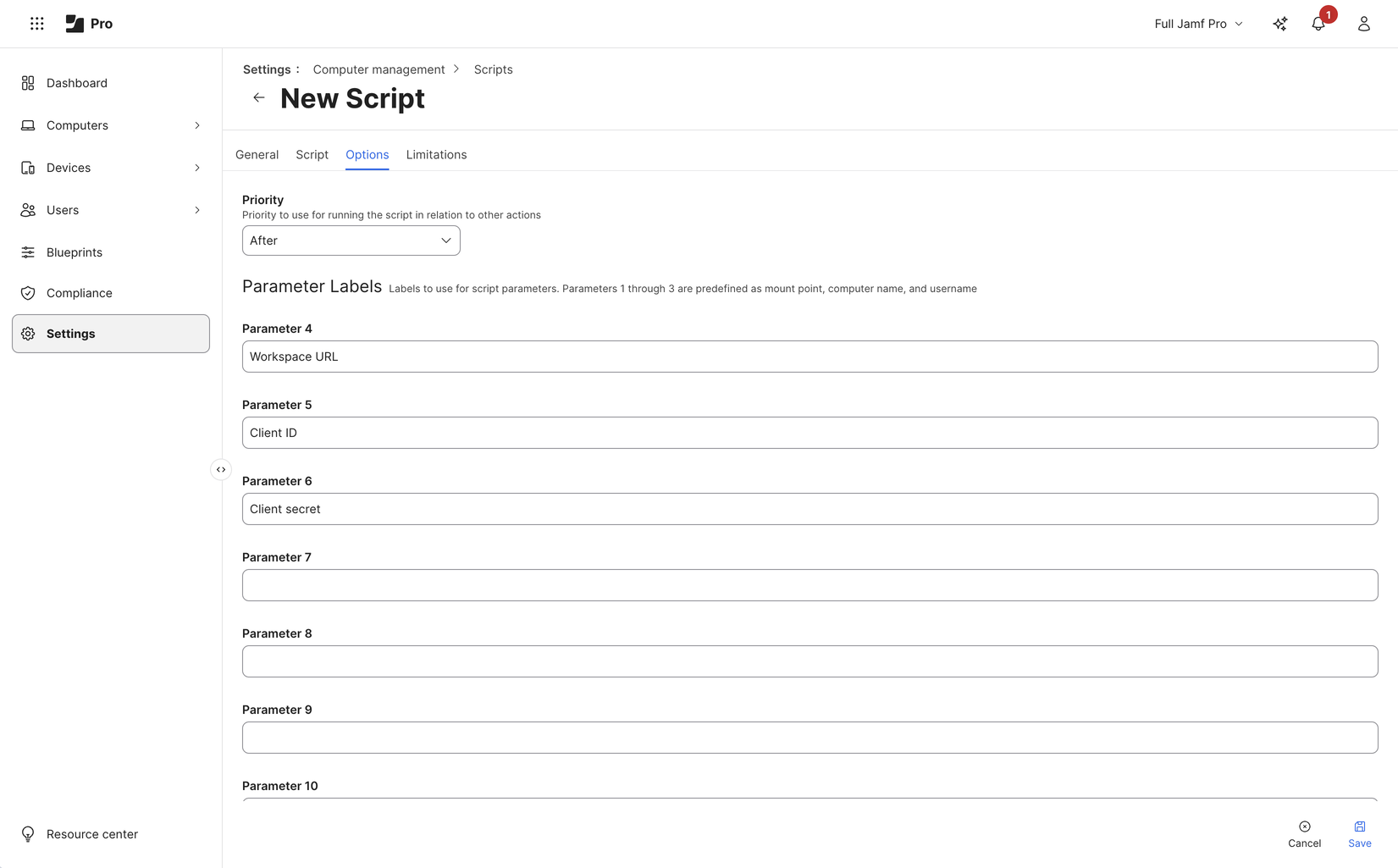
選取儲存。
腳本會在每次執行時重新安裝ug,並且只有在缺少 Databricks CLI 時才會安裝它。 如果缺少 Node.js 或 npm,腳本會在檢查固定的 SHA-256 校驗碼後安裝官方 Node.js 22.23.5 套件。
ug configure 然後在共用 PATH 上重複使用現有代理程式,或透過 Unity Gateway 內建安裝程式透過 npm 安裝 Claude Code 和 Codex。 工作區未啟用的代理程式則未安裝。 腳本不會更新 Node.js、代理程式或 CLI;為了保持它們的最新,請修改腳本以符合您更新裝置軟體的方式。
配置了此早期腳本版本的 Mac 會保留其原生代理程式安裝;執行新腳本並不等於遷移到 npm。 要將這些 Mac 移至 npm,請使用軟體管理程序移除舊的原生安裝,然後再次執行該政策。
建立政策
請前往電腦> 原則> 新增。
在 一般 中,將 觸發條件 設為 定期簽到,並將 執行頻率 設為 每天一次。 每個裝置每天都會執行
ug configure,並套用你在工作區發布的設定更新。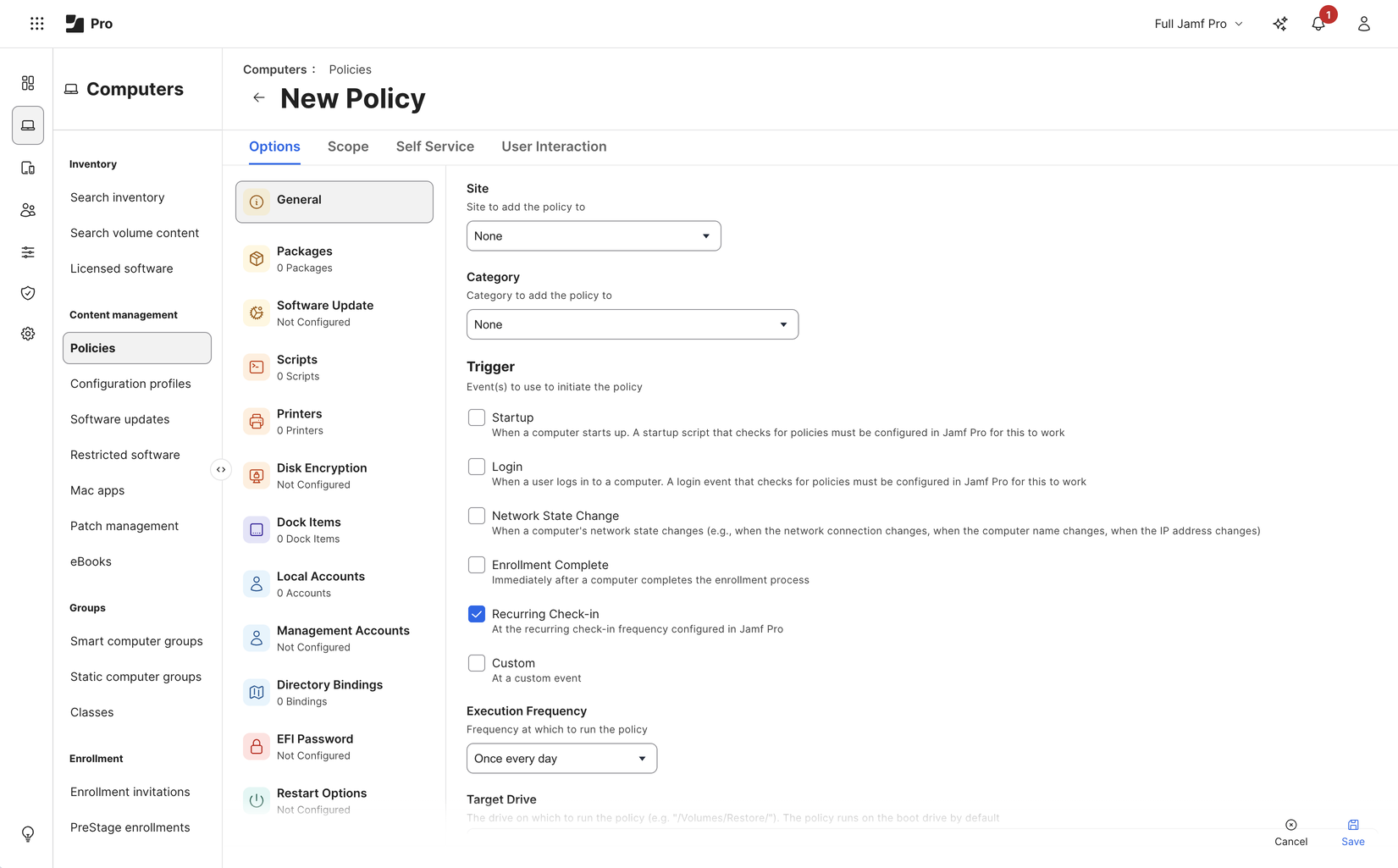
在腳本中,添加,並將Priority設為
Unity Gateway provision。 輸入參數:Parameter Value 4(工作區網址) 你的工作區網址,開頭是 https://.5(客戶識別碼) 服務主體的用戶端識別碼。 6(用戶端密鑰) 服務主體名稱的秘密。 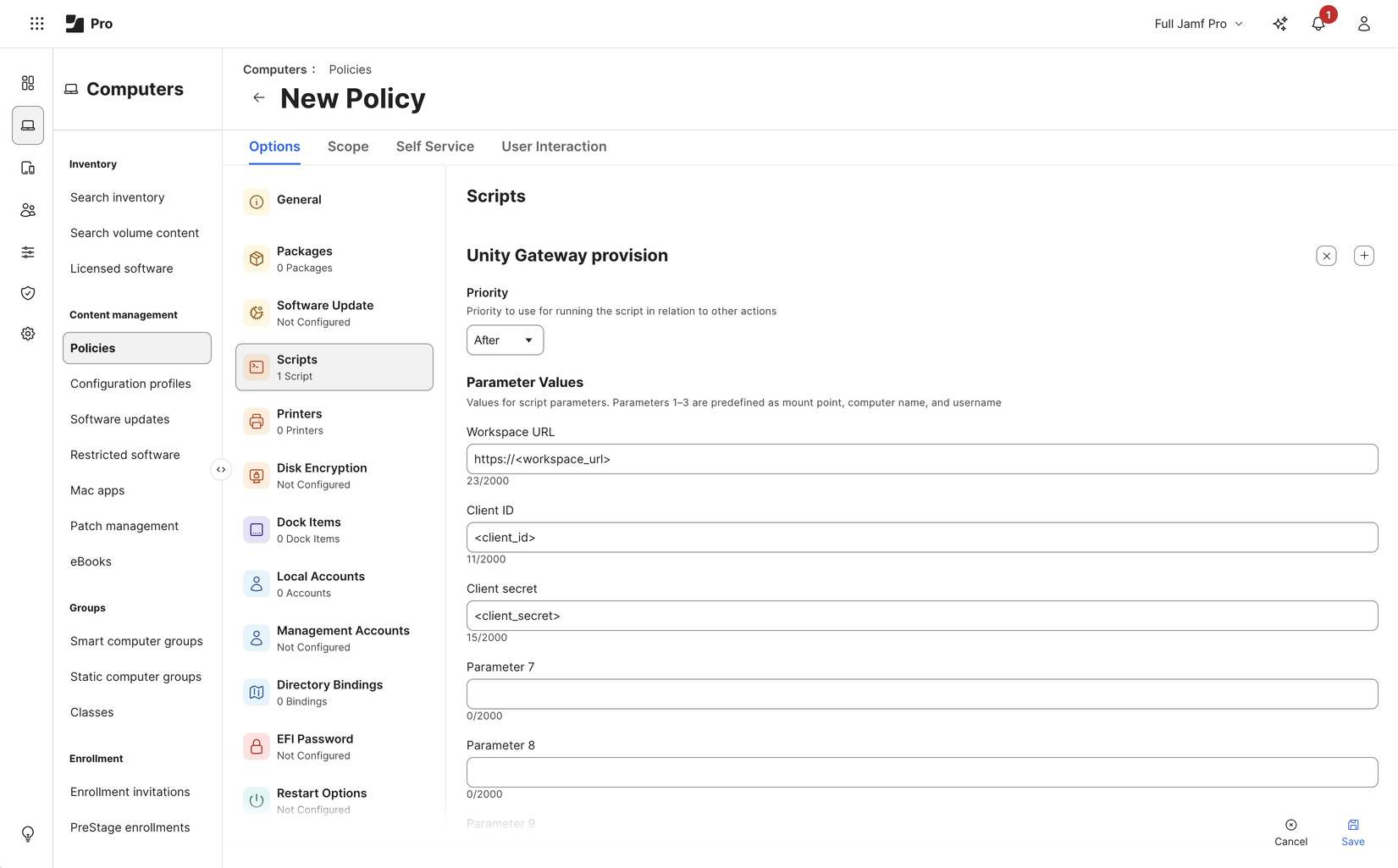
在 Scope 中,選擇要作為目標的裝置。 先從一小組試點裝置開始。
選取儲存。 Jamf Pro 會在每個目標裝置下一次檢查時執行該政策。
告訴開發人員
政策在裝置上執行後,開發者會開啟新的終端機並照常執行 codex 或 claude。 第一次啟動會開啟瀏覽器,開發者登入 Azure Databricks。 編碼代理程式的活動則歸因於個別開發者,而非服務主體。
推出 Claude 桌面版
同一 ug configure 執行也會為裝置上的每個使用者設定 Claude 桌面應用程式。 要支援 Claude 桌面,請在佈建腳本執行 ug configure 之前,先在該腳本中安裝 Claude 桌面。 上面提到的 Jamf Pro 腳本並未安裝 Claude 桌面版。
使用者第一次開啟 Claude 桌面時,會用自己的 Azure Databricks 帳號登入。 使用者也可以 匯入 claude.ai 專案和聊天內容。
驗證部署
在試驗裝置上,使用開發者的作業系統帳號登入並檢查:
- 代理程式會根據已設定的模型啟動並回應。
- 已設定的 MCP 伺服器與技能皆可使用,開發者可使用它們。
- 請求會出現在 Unity Gateway 使用追蹤中,若啟用追蹤則會出現追蹤。 請參見 監控編碼代理活動。
在更改佈建指令碼或已發布的設定後,重複這些檢查。
維護憑證與設定
若要輪換服務主體的密碼:
- 為服務主體產生一個新的密碼。
- 更新你的 MDM 原則中的密碼。
- 當原則在你的裝置上執行後,刪除舊的密碼。
要更新設定,請在工作區中發布變更。 裝置會在下一次執行政策時套用它們。 請參見 同步設定更新。
Troubleshooting
| 錯誤 | Cause |
|---|---|
Token request to ... failed: {"error":"invalid_client"...} |
MDM 政策中的客戶端 ID 或秘密密碼錯誤,或密碼已過期。 |
Token request ... failed: ... Scopes ... are not assigned to the client |
密鑰沒有 ai-gateway:read 和 unity-catalog:read 的範圍。 |
None of the coding agents enabled by your workspace configuration are available |
沒有任何已啟用的代理程式具有服務主體可使用的模型,例如,Claude Code 已設定,但未配置 Claude 模型。 |