Important
這項功能目前處於 公開預覽版。 工作區管理員可以從 「預覽 」頁面控制對此功能的存取。 請參閱 管理 Azure Databricks 預覽。
存取控制
特徵是可治理的 Unity 目錄物件。 功能存取由 、 CREATE FEATURE及 READ FEATURE Unity 目錄權限控制MANAGE。 完整說明請參閱 Unity 目錄權限參考資料。
-
CREATE FEATURE:在結構中建立特徵所必需。create_feature以及register_feature在父架構上的需求CREATE FEATURE。 依照最小權限原則,在結構層級授予CREATE FEATURE;你也可以在目錄中授予,允許在該目錄中的任何架構中建立功能。 -
READ FEATURE: 閱讀功能元資料必須使用。get_feature, ,create_training_set,list_materialized_features以及 需要READ FEATURE在該特徵上。 此權限不允許存取來源或實體化輸出表中的特徵資料。 要閱讀這些資料用於訓練或服務,你也必須在相關表格中取得SELECT資料。READ FEATURE在結構或目錄中授予的權限適用於其包含的所有現有及未來功能。 -
MANAGE: 必須管理功能生命週期及補助金。 刪除具有delete_feature的特徵,並實現具有materialize_features的特徵,需要MANAGE在該特徵上。 刪除具delete_materialized_feature現化特徵不受以下限制MANAGE:只有具象化特徵的創作者才能刪除。
所有功能操作也都需要 USE CATALOG 在父目錄和 USE SCHEMA 父架構上執行。 關於如何MANAGEREAD FEATURE與應用於物質化,請參見權限。
功能檢視 API
Feature 構造者與 register_feature()
建議的做法是在本地建構一個 Feature 物件,然後用 register_feature 來持久化到 Unity 目錄。 這個兩步驟工作流程讓你能在註冊前先嘗試各種功能(包括 create_training_set)。
Feature(
    source: DataSource,                                    # Required: DeltaTableSource, StreamSource, RequestSource, or FeatureViewSource
    function: Union[AggregationFunction, ColumnSelection, CustomUDF], # Required for all features
    entity: Optional[List[str]] = None,                    # Required for DeltaTableSource and StreamSource
    timeseries_column: Optional[str] = None,               # Required for DeltaTableSource and StreamSource
    name: Optional[str] = None,                            # Optional: Feature name (auto-generated if omitted)
    description: Optional[str] = None,                     # Optional: Feature description
)
FeatureEngineeringClient.register_feature()在 Unity 目錄中註冊本地建構的。Feature
FeatureEngineeringClient.register_feature(
    feature: Feature,       # Required: A Feature instance (not already registered)
    catalog_name: str,      # Required: UC catalog name
    schema_name: str,       # Required: UC schema name
) -> Feature
from databricks.feature_engineering.entities import Feature, DeltaTableSource, AggregationFunction, Sum, RollingWindow
from datetime import timedelta

# Step 1: Construct the feature locally
feature = Feature(
    source=DeltaTableSource(catalog_name="main", schema_name="store", table_name="transactions"),
    entity=["user_id"],
    timeseries_column="transaction_time",
    function=AggregationFunction(Sum(input="amount"), RollingWindow(window_duration=timedelta(days=7))),
)

# Step 2: Register in Unity Catalog
fe = FeatureEngineeringClient()
registered_feature = fe.register_feature(
    feature=feature,
    catalog_name="main",
    schema_name="store",
)
create_feature()
FeatureEngineeringClient.create_feature() 在 Unity 目錄中驗證、建構並立即註冊功能。 當不需要先在本地嘗試這個功能時,就用這個方法。
FeatureEngineeringClient.create_feature(
    source: DataSource,                                    # Required: DeltaTableSource, StreamSource, RequestSource, or FeatureViewSource
    function: Union[AggregationFunction, ColumnSelection, CustomUDF], # Required for all features
    catalog_name: str,                                     # Required: The catalog name for the feature
    schema_name: str,                                      # Required: The schema name for the feature
    entity: Optional[List[str]] = None,                    # Required for DeltaTableSource and StreamSource
    timeseries_column: Optional[str] = None,               # Required for DeltaTableSource and StreamSource
    name: Optional[str] = None,                            # Optional: Feature name (auto-generated if omitted)
    description: Optional[str] = None,                     # Optional: Feature description
) -> Feature
參數:
-
source:特徵計算中使用的資料來源(DeltaTableSource,StreamSource,RequestSource, , 或FeatureViewSource)。 -
function:一個AggregationFunction結合運算子與時間窗的函數,用於ColumnSelection("column_name")通過特徵或CustomUDF逐列變換。 有關相容的原始碼類型,請參見 支援函式 。 -
catalog_name:Unity 目錄中該功能的名稱。 -
schema_name: Unity 目錄中該功能的結構名稱。 -
entity: 定義聚合或查找鍵(主鍵)的欄位名稱列表。DeltaTableSource和StreamSource需要此項。 例如,依["user_id"]使用者彙整或查詢。 省略 和RequestSourceFeatureViewSource。 -
timeseries_column:用於時間視窗聚合或最新值選擇的時間戳欄位。DeltaTableSource和StreamSource需要此項。 省略 和RequestSourceFeatureViewSource。 -
name:可選的功能名稱。 若省略,則由輸入欄位、函式與視窗自動產生(例如,amount_avg_rolling_7d)。 -
description:功能可選描述。
退貨: 一個已驗證過的功能實例
拋出: 若任何驗證失敗,則拋出 ValueError
delete_feature()
刪除 Unity 目錄中以完全限定名稱刪除的功能。
FeatureEngineeringClient.delete_feature(
    full_name: str,  # Required: '<catalog>.<schema>.<feature_name>'
) -> None
fe.delete_feature(full_name="main.store.amount_sum_rolling_7d")
在刪除某個功能之前,先移除或更新任何參考該功能的模型或功能規格。 只要一個功能仍然具現化功能,就不能被刪除。 先刪除物質化的特徵,再刪除該特徵。 請參閱 如何刪除物質化特徵。
自動產生名稱
省 name 略時,會自動產生一個名稱。 產生的名稱遵循以下模式: {column}_{function}_{window}。 例如:
-
price_avg_rolling_1h(1小時平均價格) -
transaction_count_rolling_30d_1d(交易計數 30 天,事件時間戳後延遲 1 天)
支援的功能
彙總函數
Note
聚合函數被包裹在 AggregationFunction 一個帶有時間窗的框架中,如同時間 窗所述。 每個函式會接受 input 一個參數,指定要彙總的來源欄位。
| 功能 | 描述 | 使用案例範例 |
|---|---|---|
Sum(input="column") |
數值總和 | 每位用戶每日應用程式使用量(幾分鐘) |
Avg(input="column") |
平均值 | 平均交易金額 |
Count(input="column") |
記錄數 | 每位使用者的登入次數 |
Min(input="column") |
最小值 | 穿戴裝置記錄的最低心率 |
Max(input="column") |
最大值 | 每個會話的最高交易金額 |
StddevPop(input="column") |
母體標準差 | 所有客戶每日交易金額的變動 |
StddevSamp(input="column") |
樣本標準差 | 廣告活動點擊率的變異性 |
VarPop(input="column") |
族群變異數 | 工廠中物聯網裝置感測器讀數的分布 |
VarSamp(input="column") |
樣本變異數 | 電影評分在抽樣群組中的分布 |
ApproxCountDistinct(input="column", relativeSD=0.05) |
近似唯一計數 | 購買物品數量不同 |
ApproxPercentile(input="column", percentile=0.95, accuracy=100) |
近似百分位 | P95 回應延遲 |
First(input="column") |
第一個值 | 第一次登入時間戳記 |
Last(input="column") |
最後一個值 | 最近一次購買金額 |
FirstN(input="column", n=3) |
第一個 n 值作為陣列 |
前三個產品在一次會議中瀏覽 |
LastN(input="column", n=3) |
最後 n 的值以陣列形式呈現 |
三個最近的支援案件狀態 |
FirstDistinct(input="column", n=3) |
第一個 n 不同值作為陣列 |
前三個明顯不同的產品類別 |
LastDistinct(input="column", n=3) |
最後 n 不同的值作為陣列 |
三個最近明顯不同的商人類別 |
Note
First、、Last、FirstNLastNFirstDistinctLastDistinct預設包含空值。 要跳過 null,可以新增一個明確排除 null 輸入欄位的 a filter_condition 。
FirstN
LastN、 、 FirstDistinct,並LastDistinct利用特徵timeseries_column來排序輸入列,並回傳包含最多 的n數值陣列。
n參數必須是正整數。
FirstN 並從 FirstDistinct 最早到最新選擇數值。
LastN 從 LastDistinct 最晚到最早選擇數值,然後依時間戳記順序回傳所選值。
FirstDistinct 並在 LastDistinct 選擇該方向的值時移除重複值。
例如,若某實體的來源列依 為 排序event_time["A", "A", "B", "C", "B", "B"],以下函數可返回:
| 功能 | Result |
|---|---|
FirstN(input="event_type", n=3) |
["A", "A", "B"] |
LastN(input="event_type", n=3) |
["C", "B", "B"] |
FirstDistinct(input="event_type", n=3) |
["A", "B", "C"] |
LastDistinct(input="event_type", n=3) |
["A", "C", "B"] |
FirstN、LastNFirstDistinctLastDistinct,且需要databricks-feature-engineering版本 0.17.0 或更新版本。
CustomUDF
CustomUDF會對每一列套用註冊的 Unity Catalog Python 使用者定義函式(UDF)。 用它來轉換請求輸入或合併功能值。 它不會彙整列數或定義時間窗。
CustomUDF(
    function_name="main.ecommerce.log_amount_udf",
    input_bindings={"amount": "transaction_amount"},
)
input_bindings 將每個 UDF 參數名稱映射到輸入。 對於 RequestSource,輸入是一個來源欄位名稱。 對於 FeatureViewSource,它是一個上游特徵參考。 綁定所有 UDF 參數,包括預設參數。 輸入型別必須與 UDF 參數型別完全匹配,且不得隱含數值鑄造。 使用純量輸入型別和回傳型別。
| Source | 行為 |
|---|---|
RequestSource |
從訓練中的 DataFrame 或推理請求中轉換欄位。 |
FeatureViewSource |
結合上游特徵值。 詳見 FeatureViewSource。 |
Delta CustomUDF 支援的功能無法在線上實現或提供。 若要轉換資料表支持的特徵值以進行訓練與服務,請定義一個 Delta 支持的聚合或欄位選擇特徵,並透過 FeatureViewSource來參考。
CustomUDF不支援。StreamSource 要轉換串流功能的輸出,請透過 來參考該功能 FeatureViewSource。
CustomUDF 且 RequestSource 需要 databricks-feature-engineering 版本 0.17.0 或更新。
要使用 , CustomUDF你需要 EXECUTE 對 UDF、 USE CATALOG 其父目錄 USE SCHEMA 以及父結構的權限。
以下範例使用 NumPy 來計算 log(1 + amount),減少大筆交易金額的規模。 在無伺服器運算並啟用 自訂 UDF 相依條件 下執行。
main.ecommerce這個圖式必須存在。
spark.sql("""
CREATE OR REPLACE FUNCTION main.ecommerce.log_amount_udf(amount DOUBLE)
RETURNS DOUBLE
LANGUAGE PYTHON
ENVIRONMENT (
  dependencies = '["numpy==1.26.4"]',
  environment_version = '5'
)
AS $$
import numpy as np

if amount is None or not np.isfinite(amount) or amount < 0:
    return None
return float(np.log1p(amount))
$$
""")
註冊一個將請求欄位 transaction_amount 綁定至 UDF 參數 amount的功能:
from databricks.feature_engineering import FeatureEngineeringClient
from databricks.feature_engineering.entities import (
    CustomUDF, FieldDefinition, RequestSource, ScalarDataType,
)

fe = FeatureEngineeringClient()

log_transaction_amount = fe.create_feature(
    source=RequestSource(
        schema=[
            FieldDefinition(name="transaction_amount", data_type=ScalarDataType.DOUBLE),
        ]
    ),
    function=CustomUDF(
        function_name="main.ecommerce.log_amount_udf",
        input_bindings={"amount": "transaction_amount"},
    ),
    catalog_name="main",
    schema_name="ecommerce",
    name="log_transaction_amount",
)
UDF ENVIRONMENT 配置依賴以供離線計算。 線上服務時,也請將包裹申報為 create_feature_spec(extra_pip_requirements=...) 或 log_model(extra_pip_requirements=...)。 它們不會自動從UDF複製。 參見 特徵服務依賴 關係與 模型依賴關係。
CustomUDF 特徵無法具體化。 請求支援與功能支援的 UDF 會在訓練與服務期間隨需運行。 依賴鏈中的每個 UDF 都會增加計算量,因此保持函數和鏈的數量較小。 UDF必須處理缺失的輸入,這些輸入可以是 None 離線或 NaN 線上。
關於處理缺失值的指引,請參見 《如何處理缺失特徵值》。
ColumnSelection (穿透聲)
ColumnSelection 從來源中選取單一欄位,且不應用任何聚合。 它直接包裹在 function 參數中(而非內部 AggregationFunction)。 回傳類型是從來源結構推斷出來的。
| 功能 | 描述 | 使用案例範例 |
|---|---|---|
ColumnSelection("col") |
欄位的最新版本值(無聚合) | 最新的供應商類別,請求欄位的直通 |
ColumnSelection 支援以下資料來源:
-
DeltaTableSource: 透過時間點連接(無回溯視窗聚合)回傳每個實體鍵的最新值。 -
StreamSource: 從串流中回傳每個實體鍵的最新值(無回溯視窗聚合)。 -
RequestSource: 通過推論時提供的值(或訓練時從標記 DataFrame 中擷取)。
對於 DeltaTableSource, ColumnSelection 功能支援 filter_condition 和 transformation_sql,在最新值選擇前應用,這與聚合特徵相同。
from databricks.feature_engineering.entities import (
    ColumnSelection, DeltaTableSource, Feature, FieldDefinition,
    RequestSource, ScalarDataType,
)

delta_source = DeltaTableSource(
    catalog_name="main", schema_name="feature_store", table_name="transactions",
)

request_source = RequestSource(
    schema=[
        FieldDefinition(name="session_duration", data_type=ScalarDataType.DOUBLE),
    ]
)

# ColumnSelection from a Delta table
latest_amount = Feature(
    source=delta_source,
    function=ColumnSelection("amount"),
    entity=["user_id"],
    timeseries_column="transaction_time",
    name="latest_transaction_amount",
)

# ColumnSelection from a RequestSource
session_feature = Feature(
    source=request_source,
    function=ColumnSelection("session_duration"),
    name="session_duration",
)
範例:聚合與欄位選擇功能
以下範例展示了在同一資料來源上定義的特徵。
from databricks.feature_engineering.entities import (
    AggregationFunction, Feature, Sum, Avg, ApproxCountDistinct,
    ColumnSelection, RollingWindow,
)
from datetime import timedelta

window = RollingWindow(window_duration=timedelta(days=7))

sum_feature = Feature(
    source=source,
    entity=["user_id"],
    timeseries_column="event_time",
    function=AggregationFunction(Sum(input="amount"), window),
)

avg_feature = Feature(
    source=source,
    entity=["user_id"],
    timeseries_column="event_time",
    function=AggregationFunction(Avg(input="amount"), window),
)

distinct_count = Feature(
    source=source,
    entity=["user_id"],
    timeseries_column="event_time",
    function=AggregationFunction(ApproxCountDistinct(input="product_id", relativeSD=0.01), window),
)

# Column selection (no aggregation, no time window)
latest_amount = Feature(
    source=source,
    function=ColumnSelection("amount"),
    entity=["user_id"],
    timeseries_column="event_time",
    name="latest_amount",
)
具有篩選條件的特徵
這個 filter_condition 參數允許你在計算彙總或選擇最新欄位值 前 ,從來源資料表中篩選出資料列。 這就像一個 SQL WHERE 子句,會在分組和彙整資料之前套用。
Note
對於聚合功能,會在 filter_condition 聚合前篩選列,就像 WHERE 在 GROUP BY。 它不會改變特徵定義上的粒度,而粒度總是由 定義 entity 。
當處理包含特徵計算所需資料超集的大型來源資料表時,過濾器非常有用,並減少在這些資料表上建立獨立視圖的需求。
from databricks.feature_engineering.entities import AggregationFunction, Sum, Count, RollingWindow, DeltaTableSource
from datetime import timedelta

# Source with filter applied at the source level
high_value_transactions = DeltaTableSource(
    catalog_name="main",
    schema_name="ecommerce",
    table_name="transactions",
    filter_condition="amount > 100",  # Only transactions over $100
)

high_value_sales = Feature(
    source=high_value_transactions,
    entity=["user_id"],
    timeseries_column="transaction_time",
    function=AggregationFunction(Sum(input="amount"), RollingWindow(window_duration=timedelta(days=30))),
)

# Multiple conditions
completed_orders_source = DeltaTableSource(
    catalog_name="main",
    schema_name="ecommerce",
    table_name="orders",
    filter_condition="status = 'completed' AND payment_method = 'credit_card'",
)

completed_orders = Feature(
    source=completed_orders_source,
    entity=["user_id"],
    timeseries_column="order_time",
    function=AggregationFunction(Count(input="order_id"), RollingWindow(window_duration=timedelta(days=7))),
)

# Filter on a StreamSource
from databricks.feature_engineering.entities import StreamSource

purchase_stream = StreamSource(
    full_name="main.ecommerce.transactions_stream",
    filter_condition="value.event_type = 'purchase'",
)

purchase_total = Feature(
    source=purchase_stream,
    entity=["value.user_id"],
    timeseries_column="value.event_time",
    function=AggregationFunction(Sum(input="value.amount"), RollingWindow(window_duration=timedelta(hours=1))),
)
數據源
DeltaTableSource
DeltaTableSource 是一個短暫的Python物件,用來定義如何從來源資料表計算特徵。 它不會建立新的表格。 它規定了讀取資料與整合特徵的配置。
DeltaTableSource(
    catalog_name: str,                              # Required: Catalog name
    schema_name: str,                               # Required: Schema name
    table_name: str,                                # Required: Table name
    filter_condition: Optional[str] = None,         # Optional: SQL WHERE clause to filter source data
    transformation_sql: Optional[str] = None,       # Optional: SQL SELECT expression for column transformations
    dataframe_schema: Optional[str] = None,         # Required if transformation_sql is set: schema of the resulting DataFrame
    lateness: Optional[SourceLateness] = None,       # Optional: Expected source settling time
)
參數:
-
catalog_name,schema_name, :table_name在 Unity 目錄中識別來源 Delta 資料表。 -
filter_condition:在彙總或欄位選擇前套用的 SQLWHERE子句。 範例:"status = 'completed'"。 -
transformation_sql: 一個套用到來源資料表的 SQLSELECT表達式。 利用此功能重新命名欄位、鑄造類型,或在彙整或欄位選擇前計算衍生欄位。 若省略,則所有欄位皆被選取(*)。 範例:"user_id, CAST(amount AS DOUBLE) AS amount, event_time"。 -
dataframe_schema: 經過轉換後所得資料框架的結構,採用 Spark StructType JSON 格式(來源df.schema.json())。 若提供,transformation_sql則為必備。 這會告訴系統你轉換後產生的欄位名稱和類型。 -
lateness:描述SourceLateness源在事件時間內通常完成所需的時間的物件。 若省略,該來源即視為完整。
當兩者filter_condition同時transformation_sql設定時,所得查詢為: SELECT {transformation_sql} FROM {table} WHERE {filter_condition}。
SourceLateness.settling_delay 是訓練期間模擬持續ETL延遲的推薦方式,該延遲會影響線上物質化。 Azure Databricks 會將合格的訓練評估時間往後推移,讓訓練範例不會使用原本仍在線上傳輸的資料。 在實體化期間,Azure Databricks 會等待相同時間才發布已完成的視窗,並在此期間服務最後一個已完成的視窗。
例如,假設一個每日的 ETL 工作在當地時區午夜後 8 小時完成,而午夜對應於 07:00 UTC。 使用8小時的穩定延遲和7小時的窗口偏移:
from datetime import timedelta
from databricks.feature_engineering.entities import (
    DeltaTableSource,
    SourceLateness,
    TumblingWindow,
)

source = DeltaTableSource(
    catalog_name="main",
    schema_name="analytics",
    table_name="events",
    lateness=SourceLateness(settling_delay=timedelta(hours=8)),
)

window = TumblingWindow(
    window_duration=timedelta(days=1),
    offset=timedelta(hours=7),
)
Note
必須 timeseries_column 是類型 TimestampType 或 TimestampNTZType。
DateType 不支援時間序列;將欄位鑄造為 TimestampType 第一(例如,為 transformation_sql)。
範例:用於 transformation_sql 欄位變換
source = DeltaTableSource(
    catalog_name="main",
    schema_name="analytics",
    table_name="raw_events",
    transformation_sql="user_id, CAST(price_cents AS DOUBLE) / 100 AS price, event_time",
    filter_condition="event_type = 'purchase'",
    dataframe_schema=spark.sql(
        "SELECT user_id, CAST(price_cents AS DOUBLE) / 100 AS price, event_time FROM main.analytics.raw_events LIMIT 0"
    ).schema.json(),
)
範例:從 PySpark 資料框架衍生 transformation_sql 與 dataframe_schema 取自
你可以將轉換寫成 PySpark 查詢,然後從產生的 DataFrame 中擷取結構:
df = spark.sql(f"""
  SELECT user_id, CAST(amount AS DOUBLE) / 100 AS amount_dollars, event_time
  FROM main.analytics.events
  WHERE event_date >= date_sub(current_date(), 7)
  LIMIT 0
""")

# Use df.schema.json() as the dataframe_schema
source = DeltaTableSource(
    catalog_name="main",
    schema_name="analytics",
    table_name="events",
    transformation_sql="user_id, CAST(amount AS DOUBLE) / 100 AS amount_dollars, event_time",
    filter_condition="event_date >= date_sub(current_date(), 7)",
    dataframe_schema=df.schema.json(),
)
支援 transformation_sql 的表達式
同樣的規則也 transformation_sql 適用於 和 DeltaTableSourceStreamSource。
transformation_sql 支援任何列式運算;每列獨立評估運算。 它們不會改變資料列數或與來源一對一的對應關係。 列數運算式包括欄位重命名、鑄造、算術運算等。
不支援改變形狀或列數的操作,例如聚合,如 SUM()COUNT()或 。 而是用 AggregationFunction 特徵定義來處理。
DeltaTableSource.from_sql()
為了方便,你可以從 SQL 查詢建立一個 DeltaTableSource 。 該方法解析查詢以自動擷取資料表名稱、 transformation_sql和 filter_condition。
DeltaTableSource.from_sql(
    sql: str,                           # Required: SQL SELECT query
    spark: SparkSession,                # Required: active SparkSession (for schema inference)
) -> DeltaTableSource
僅支援簡單的 SELECT ... FROM ... [WHERE ...] 查詢。 複雜的 SQL(JOIN、子查詢、 CTE、UNION)則被拒絕。 對於複雜查詢,直接構造 DeltaTableSource 與 transformation_sqlfilter_condition。
from databricks.feature_engineering.entities import (
    AggregationFunction,
    DeltaTableSource,
    Feature,
    Sum,
    TumblingWindow,
)

source = DeltaTableSource.from_sql(
    spark=spark,
    sql=f"SELECT customer_id, event_ts, amount * 2 AS doubled_amount, amount FROM {CATALOG}.{SCHEMA}.{TABLE}",
)

feature = Feature(
    source=source,
    function=AggregationFunction(Sum(input="doubled_amount"), time_window=TumblingWindow(window_duration=timedelta(days=7))),
    entity=["customer_id"], timeseries_column="event_ts",
)
迭代 to_dataframe()
用 source.to_dataframe() 來預覽將用於特徵計算的資料。 這對於反覆filter_conditiontransformation_sql迭代直到產生預期結果非常有用。
source = DeltaTableSource(
    catalog_name="main",
    schema_name="analytics",
    table_name="events",
    filter_condition="event_type = 'purchase'",
)

# Preview the filtered source data
source.to_dataframe().display()
理解實體
實體欄位定義了你特徵的聚合層級。 它們是在定義上指定,而非定義 Feature 上 DeltaTableSource。 實體決定:
-
資料分組方式:特徵依據獨特的實體值組合彙整(類似
GROUP BYSQL 中的 SQL) - 主要鍵結構:每個獨特的實體組合會產生一列計算出的特徵
範例:客戶層級功能
以下程式碼彙整客戶層級的功能(每位客戶一列):
from databricks.feature_engineering.entities import DeltaTableSource

source = DeltaTableSource(
    catalog_name="main",
    schema_name="analytics",
    table_name="user_events",
)

Feature(
    source=source,
    entity=["user_id"],                # Features aggregated per user
    timeseries_column="event_time",    # Timestamp for time windows
    function=AggregationFunction(Sum(input="amount"), RollingWindow(window_duration=timedelta(days=7))),
)
範例:客戶-門市層級功能
若要更細緻地彙整功能(每個客戶與商店組合一列),可使用多個實體欄位:
source = DeltaTableSource(
    catalog_name="main",
    schema_name="retail",
    table_name="transactions",
)

Feature(
    source=source,
    entity=["user_id", "store_id"],  # Features aggregated per user-store pair
    timeseries_column="transaction_time",
    function=AggregationFunction(Sum(input="amount"), RollingWindow(window_duration=timedelta(days=7))),
)
當你需要在不同層級的聚合(例如客戶層級和客戶店級)提供功能時,在功能定義中使用不同的 entity 值。 同樣 DeltaTableSource 的特性可以在不同實體配置的特徵間共享。
StreamSource
StreamSource 提及 一條溪流。 串流包含串流來源的連線、認證、結構及擷取設定。 對於 Kafka,特徵定義中的欄位引用必須以或作為前綴value.key.,以指示要閱讀的訊息部分。
StreamSource(
    full_name: str,                       # Required: Three-part Stream name (catalog.schema.stream)
    filter_condition: Optional[str] = None,      # Optional: SQL WHERE clause applied before aggregation
    transformation_sql: Optional[str] = None,    # Optional: SQL SELECT expression for column transformations
    dataframe_schema: Optional[str] = None,      # Required if transformation_sql is set: schema of the resulting DataFrame
    lateness: Optional[SourceLateness] = None,    # Optional: Expected source settling time
)
參數:
-
full_name:串流的完整三部分名稱(例如,"my_catalog.my_schema.my_stream")。 -
filter_condition(可選):在彙整前應用於串流資料的 SQLWHERE子句,使用點前的欄位參考(例如,"value.event_type = 'purchase'")。 -
transformation_sql(可選):在彙總或欄位選擇前套用的 SQLSELECT表達式,並以點為前綴的keyandvalue結構體引用。 支援與 相同的列式DeltaTableSource表達式。 若省略,來源將使用所有欄位(*)。 -
dataframe_schema: 投影輸出的 SparkStructTypeJSON 架構。 如果你設定transformation_sql,這是必須的。 -
lateness:一個SourceLateness描述串流在事件時間內通常完成所需時間的物件。 參見SourceLateness.settling_delay。
from databricks.feature_engineering.entities import StreamSource

stream_source = StreamSource(
    full_name="my_catalog.my_schema.my_stream",
    filter_condition="value.event_type = 'purchase'",
)
透過將投影與串流的吞取表對比來推導dataframe_schema,該表會key揭露 和 value 結構。
transformation_sql = (
    "value.amount * value.conversion_rate AS converted_amount, "
    "struct(value.user_id AS user_id, value.event_time AS time) AS event"
)

ingestion_table = "my_catalog.my_schema.events_ingestion"
dataframe_schema = spark.sql(
    f"SELECT {transformation_sql} FROM {ingestion_table} LIMIT 0"
).schema.json()

stream_source = StreamSource(
    full_name="my_catalog.my_schema.my_stream",
    transformation_sql=transformation_sql,
    dataframe_schema=dataframe_schema,
)
RequestSource
RequestSource 定義了在請求有效載荷推論時提供的資料結構,而非從預先實體化的資料表中查詢。 在訓練過程中,這些欄位會從傳遞給 create_training_set的標記 DataFrame 中擷取。 在模型服務過程中,呼叫者必須將這些資料納入 HTTP 請求有效載荷中。
RequestSource 可搭配 CustomUDF 或 ColumnSelection 功能檢視功能使用。 它不支援聚合函數或時間窗。
定義模式
將結構定義為一個物件清單FieldDefinition,每個物件指定欄位名稱及:ScalarDataType
from databricks.feature_engineering.entities import (
    FieldDefinition, RequestSource, ScalarDataType,
)

request_source = RequestSource(
    schema=[
        FieldDefinition(name="transaction_amount", data_type=ScalarDataType.DOUBLE),
        FieldDefinition(name="vendor_id", data_type=ScalarDataType.STRING),
        FieldDefinition(name="transaction_id", data_type=ScalarDataType.STRING),
        FieldDefinition(name="transaction_time", data_type=ScalarDataType.DATE),
    ]
)
支援的數據類型
RequestSource支援定義於 ScalarDataType的純量類型:INTEGER, FLOAT, BOOLEANSTRINGDOUBLELONGTIMESTAMPDATESHORT。 複雜型態如陣列、映射和結構體不被支援。
請求資料如何被水合
| 背景 | 行為 |
|---|---|
訓練(create_training_set) |
欄位是從標記為 DataFrame 的中擷取的。 類型會根據宣告的架構進行驗證。 不匹配會產生錯誤(無隱性投擲)。 |
| 服務 (模型端點) | 欄位是從 dataframe_records HTTP 請求中拉取或 dataframe_split 包含在 HTTP 請求中。 JSON 值會被鑄造成宣告的類型(例如 JSON 編號 → DOUBLE)。 |
模型簽章
當模型以包含log_model特徵的訓練集記錄RequestSource時,欄位RequestSource會作為必要的輸入加入 MLflow 模型簽名。 這表示服務端點的 API 架構反映了呼叫者在推論時必須提供的欄位。
FeatureViewSource
FeatureViewSource使用其他特徵視圖的輸出作為輸入。CustomUDF 串接特徵會產生有向無環圖(DAG)。 例如,利潤率功能可以合併營收與成本總量,另一個功能則可以轉換利潤率。
請使用 databricks-feature-engineering 0.18.0 或更新版本。FeatureViewSource
將物件清單 Feature 傳給 features,而不是功能名稱字串。 用 取得註冊特徵。get_feature 在 input_bindings中,使用每個註冊特徵的 full_name。 對於本地未註冊的功能,請使用它 name 。
以下範例假設兩個註冊特徵 revenue_sum_7d 和 ,分別以 和 回傳 DOUBLE 和 用於時間點計算的值customer_idevent_time:cost_sum_7d
from databricks.feature_engineering import FeatureEngineeringClient
from databricks.feature_engineering.entities import CustomUDF, FeatureViewSource

fe = FeatureEngineeringClient()
revenue = fe.get_feature(full_name="main.ecommerce.revenue_sum_7d")
cost = fe.get_feature(full_name="main.ecommerce.cost_sum_7d")

spark.sql("""
CREATE OR REPLACE FUNCTION main.ecommerce.margin_udf(revenue DOUBLE, cost DOUBLE)
RETURNS DOUBLE
LANGUAGE PYTHON
AS $$
import math

if revenue is None or cost is None:
    return None
if not math.isfinite(revenue) or not math.isfinite(cost) or revenue <= 0:
    return None
return (revenue - cost) / revenue
$$
""")

margin = fe.create_feature(
    source=FeatureViewSource(features=[revenue, cost]),
    function=CustomUDF(
        function_name="main.ecommerce.margin_udf",
        input_bindings={"revenue": revenue.full_name, "cost": cost.full_name},
    ),
    catalog_name="main",
    schema_name="ecommerce",
    name="margin",
)
適用以下限制:
- 僅
CustomUDF支援函式。 上游特徵可以是聚合、欄位選擇或其他CustomUDF功能。 - 省略
entity,並timeseries_column針對衍生特徵。 每個上游特徵保留其獨立的實體、時間戳記及視窗定義。 - 一個特徵只有一個來源。 若要將請求值與資料表支持的功能結合,請定義一個
RequestSource功能並透過FeatureViewSource來參考。 - 每個宣告的上游特徵都必須在 中使用
input_bindings。 不允許騎自行車。 - 在註冊衍生特徵前,先註冊上游特徵。 局部且未註冊的圖可用於
create_training_set實驗。 - 訓練或服務時,你需要對衍生特徵及其傳遞上游特徵擁有
READ FEATUREORMANAGE權限。 在圖中使用不同的特徵名稱來進行註冊與服務,甚至跨目錄或結構。 - 一個特徵最多可參考20個直接上游特徵。 註冊圖在依賴路徑上最多支援五個特徵深度,包括基礎特徵。
-
FeatureViewSource特徵無法用 來實現或評估。compute_features用create_training_set來離線評估。 線上服務則應實現支援的表格備份上游功能。
關於依賴性評估與輸出選擇,請參見 「使用 FeatureViewSource 特徵訓練」。 關於部署,請參見 Serve 衍生功能。
訓練與推論 API
create_training_set 並 score_batch 可根據來源資料按需計算點點正確的特徵值。 對於支援離線實體化的功能,例如在 delta 表格來源上的滑動視窗聚合,先將功能實體化到離線商店,能提升兩種操作的效能。 當實體化的離線特徵可用時,操作會讀取預先計算的離線資料,而非從來源重新計算特徵值。 請參閱「 實體化功能檢視 」,將功能實體化到離線商店。
create_training_set()
建立帶有點點正確特徵計算的訓練資料集。 詳情請參見 具備特徵視圖的火車模型。
FeatureEngineeringClient.create_training_set(
    df: DataFrame,                                # DataFrame with training data
    features: Optional[List[Feature]],            # List of Feature objects
    label: Union[str, List[str], None],           # Label column name(s)
    exclude_columns: Optional[List[str]] = None,  # Optional: columns to exclude
) -> TrainingSet
log_model()
記錄模型中包含特徵元資料,用於譜系追蹤及推論時的自動特徵查詢。 詳情請參見 具備特徵視圖的火車模型。
FeatureEngineeringClient.log_model(
    model,                                    # Trained model object
    artifact_path: str,                       # Path to store model artifact
    flavor: ModuleType,                       # MLflow flavor module (e.g., mlflow.sklearn)
    training_set: TrainingSet,                # TrainingSet used for training
    registered_model_name: Optional[str],     # Optional: register model in Unity Catalog
)
score_batch()
執行離線批次推論並自動查找功能。 利用模型中儲存的特徵元資料計算出即時正確的特徵,確保與訓練一致。
FeatureEngineeringClient.score_batch(
    model_uri: str,                           # URI of logged model (e.g., "models:/catalog.schema.model/1")
    df: DataFrame,                            # DataFrame with entity keys and timestamps
) -> DataFrame
輸入資料框架必須包含訓練中使用的實體欄與時間序列欄位。 特徵會自動從來源資料中計算。
fe = FeatureEngineeringClient()

# Batch scoring with automatic feature lookup
predictions = fe.score_batch(
    model_uri="models:/main.ecommerce.fraud_model/1",
    df=inference_df,
)
predictions.display()
時間範圍
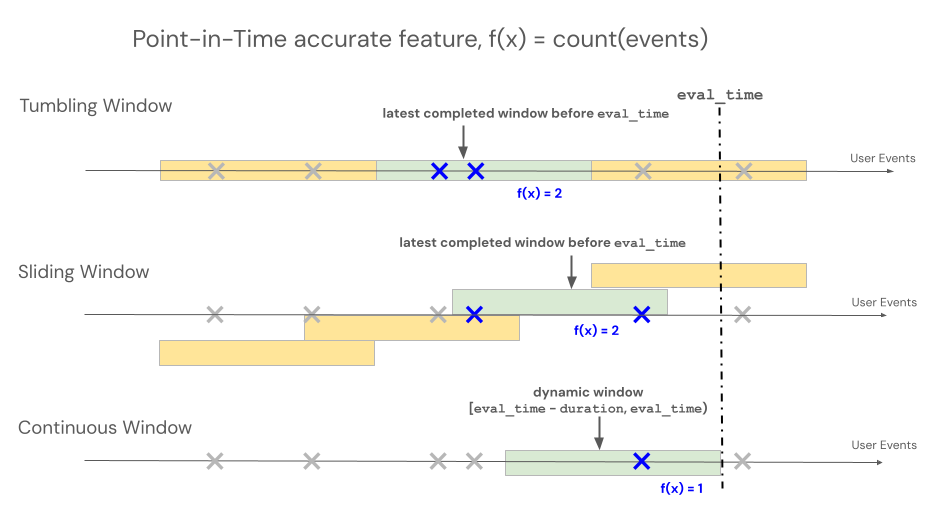
特徵檢視支援四種視窗類型,以控制基於時間視窗的聚合的回查行為。 可用的視窗類型依功能來源而異:串流原始碼功能可使用滾動視窗與鋸齒窗,批次原始碼功能則可使用滾動、翻滾及滑動視窗。
- 搖動窗從活動時間回望過去。 持續時間與延遲有明確定義。
- 翻滾窗是固定且不重疊的時間窗。 每個資料點只屬於一個視窗。
- 滑動視窗是重疊的滾動時間視窗,具有可設定的滑動間隔。
- 鋸齒視窗透過混合批次與串流路徑,讓串流來源保持長時間的回顧視窗新鮮。 請參考 鋸齒窗。
下圖展示了翻滾窗、滑動窗、捲窗和鋸齒窗的類型。
時間窗時間
用來 delay 評估較早分析時間點的視窗。 例如,一個延遲7天的30天窗口,計算出評估前一週的30天值。
delay 與來源抵達時間無關。 要模擬來源資料到達所需的時間,請改為設定 SourceLateness.settling_delay 。
當這兩種環境同時存在時,他們就會作曲。 Azure Databricks 在原始結算延遲後將視窗視為完整,並使用分析延遲來評估。
用 offset 來更改固定視窗邊界的對齊。 預設情況下,翻滾視窗和滑動視窗會對齊到午夜UTC。 例如,22小時的偏移將每日邊界對齊於22:00 UTC。 若要近似當地時區的邊界,可以設定相對於UTC的靜態偏移量。 偏移量不會因夏令時間而調整,也不會調整評估時間,也不會模擬晚到的資料。
下表總結了這些欄位的支援情況:
| Field | 支援的視窗 | Constraint |
|---|---|---|
delay |
翻滾、翻滾與滑行 | 必須是非負數 datetime.timedelta |
offset |
翻滾與滑行 | 必須非負且時間短於該週期* |
SourceLateness.settling_delay |
滾動、翻滾與滑動特徵 | 必須是非負數 datetime.timedelta |
start_time |
翻滾、翻滾與滑行 | 一定是 datetime.datetime |
*句點:對於滾動視窗,偏移量必須小於 window_duration。 對於滑動視窗,它必須比 slide_duration。
開始時間
用 start_time 來設定 UTC 中特徵可發出輸出的最早事件時間邊界。 邊界是包容性的。
start_time 閘輸出。 它不會限制視窗可讀取的歷史來源列,也不會改變視窗的對齊方式。 若 start_time 位於兩個對齊邊界之間,第一個合格的固定視窗輸出即為下一個邊界。
在 start_time的情況下,固定時長的視窗可以在源頭尚未過滿的視窗時長前就發射。 這些早期輸出使用可用的來源歷史。 例如,考慮一個滑動視窗,其 window_duration 一年與一天 slide_duration為 ,該來源資料始於 2024 年 1 月 1 日:
- 若無
start_time,該特徵將於 2025 年 1 月 1 日首次發布,屆時可形成完整的一年窗口。 -
start_time該專題定於2024年8月21日播出,首播日期為2024年8月21日。 該輸出僅涵蓋截至2024年1月1日的原始資料歷史。 該窗口於2025年1月1日達到完整的一年期,並從此產生完整的產出。
由於 start_time 不改變視窗對齊,兩個對齊邊界之間的值不會產生新的邊界。 對於在UTC午夜有每日邊界的翻滾窗口,06:00 UTC的A start_time 會在下一個午夜邊界首次發射。 一個恰好落在邊界上的 A start_time 會從該邊界發射,因為該邊界是包含的。
若 start_time 未設定,滾動視窗與固定時長滑動視窗會在形成完整視窗後,先在對齊邊界發射。 Lifetime 滑動視窗與捲動視窗會在有合格來源資料存在時立即發布。
Note
start_time 支援用於與滾動、翻滾或滑動視窗一起使用 DeltaTableSource 的批次功能。 它不支援與 或 StreamSourceSawtoothWindow。
例如:
from datetime import datetime, timedelta
from databricks.feature_engineering.entities import SlidingWindow

window = SlidingWindow(
    window_duration=timedelta(days=365),
    slide_duration=timedelta(days=1),
    start_time=datetime(2024, 8, 21),
)
捲動窗
Note
RollingWindow 之前稱為 ContinuousWindow。 如果你是從較舊的 SDK 版本遷移過來,請相應地更新匯入。
滾動視窗是 up-to日期和即時聚合,通常用於串流資料。 在串流管線中,滾動視窗只有在固定長度視窗內容改變時才會發出新列,例如事件進入或離開時。 當訓練管線中使用滾動視窗特徵時,會利用特定事件時間戳前的固定長度視窗長度,對來源資料進行精確的點點計算。 這有助於防止線上離線偏差或資料外洩。 時間點 T 的功能會彙整事件範圍 [T − 持續時間, T)。
class RollingWindow(TimeWindow):
    window_duration: datetime.timedelta
    delay: Optional[datetime.timedelta] = None
    start_time: Optional[datetime.datetime] = None
下表列出滾動視窗的參數。 視窗的開始與結束時間基於以下參數:
- 開賽時間:
evaluation_time - window_duration - delay(含) - 終結時間:
evaluation_time - delay(獨家)
| 參數 | Constraints |
|---|---|
delay (選用) |
一定是≥0。 將分析視窗從評估時間戳回去。 用 SourceLateness.settling_delay 來建模一個一致的來源到達延遲基準線。 |
window_duration |
必須為 > 0 |
start_time (選用) |
特徵能在最早的事件時間邊界發出輸出。 |
from databricks.feature_engineering.entities import RollingWindow
from datetime import timedelta

# Look back 7 days from evaluation time
window = RollingWindow(window_duration=timedelta(days=7))
請用下方程式碼定義一個有延遲的滾動視窗。
# Compute a 7-day value as of one day before the evaluation time
window = RollingWindow(
    window_duration=timedelta(days=7),
    delay=timedelta(days=1)
)
捲動窗範例
window_duration=timedelta(days=7):這會產生一個7天的回溯窗口,直到當前評估時間結束。 第7天下午2點的活動,包含從第0天下午2點開始到第7天下午2點為止(但不包括)的所有活動。window_duration=timedelta(hours=1), delay=timedelta(minutes=30):這會產生一個為期1小時的回顧視窗,結束於評估時間前30分鐘。 下午3點的活動涵蓋下午1點30分至2點半(但不包括)下午3點30分的所有活動。
用 Last 來綁定最新值的新鮮度
Last
RollingWindow結合當最新值僅在有限時間內有效時。 在評估時,功能會回傳該區間中時間戳記最晚的列的值:
[evaluation_time - delay - window_duration, evaluation_time - delay)
若區間中最新的列包含 null 值,則該特徵回傳 null。 如果你想排除空輸入值,可以在來源設定 a filter_condition 。
此組合與 ColumnSelection不同。
ColumnSelection 回傳最新觀察到的非零值,且不會根據年齡過期。
對於批次功能,這種組合還有一種專門的線上實體化模式。 它只 DeltaTableSource支援 、 Last、 RollingWindow和 TableTrigger。 參見 「Materialize」新鮮度限制的最新價值。
翻轉視窗
對於使用翻滾視窗定義的特徵,聚合會透過預先設定的固定長度視窗計算,該視窗會依滑動間隔前進,產生不重疊且完全分割時間的視窗。 因此,來源中的每個事件恰好貢獻於一個視窗。 功能 在 Time t 上彙整從 Windows 停止於或更早 t 的時間(排他)。 Windows 從 Unix 時代開始。
class TumblingWindow(TimeWindow):
    window_duration: datetime.timedelta
    delay: Optional[datetime.timedelta] = None
    offset: Optional[datetime.timedelta] = None
    start_time: Optional[datetime.datetime] = None
下表列出翻滾窗的參數。
| 參數 | Constraints |
|---|---|
window_duration |
必須為 > 0 |
delay (選用) |
一定是≥0。 將分析視窗從評估時間戳回去。 |
offset (選用) |
必須是 ≥ 0,且小於 window_duration。 從UTC午夜開始,調整視窗邊界。 |
start_time (選用) |
特徵能在最早的事件時間邊界發出輸出。 |
from databricks.feature_engineering.entities import TumblingWindow
from datetime import timedelta

window = TumblingWindow(
    window_duration=timedelta(days=1),
    delay=timedelta(hours=2),
    offset=timedelta(hours=22),
)
翻滾窗戶範例
-
window_duration=timedelta(days=5):這會產生預先設定的固定長度窗口,每個時段為5天。 舉例來說:視窗 #1 從第 0 天到 第 4 天,視窗 #2 從第 5 天到 第 9 天,視窗 #3 從第 10 天到 14 天,依此類推。 具體來說,視窗 #1 包含所有從第 0 天開始00:00:00.00的時間戳事件,直到(但不包括)任何第 5 天有時間戳00:00:00.00的事件。 每個事件只屬於一個視窗。
滑動視窗
對於使用滑動視窗定義的特徵,聚合會計算在一個依滑動區間前進的視窗上。 滑動視窗可以是固定的持續時間,也可以是終身的。 固定時長視窗會重疊,因此每個來源事件都能貢獻於多個視窗的功能聚合。 終身視窗包含視窗結束前的所有來源事件。 功能 在 Time t 上彙整從 Windows 停止於或更早 t 的時間(排他)。 Windows 與 Unix 時代對齊。
class SlidingWindow(TimeWindow):
    window_duration: Optional[datetime.timedelta]
    slide_duration: datetime.timedelta
    delay: Optional[datetime.timedelta] = None
    offset: Optional[datetime.timedelta] = None
    start_time: Optional[datetime.datetime] = None
下表列出滑動視窗的參數。
| 參數 | Constraints |
|---|---|
window_duration |
必須是固定期間的陽性。 設定為 None 終身視窗。 |
slide_duration |
必須是正數。 對於固定持續時間的視窗,它也必須比 window_duration。 |
delay (選用) |
一定是≥0。 將分析視窗從評估時間戳回去。 |
offset (選用) |
必須是 ≥ 0,且小於 slide_duration。 從UTC午夜開始,調整視窗邊界。 |
start_time (選用) |
特徵能在最早的事件時間邊界發出輸出。 |
from databricks.feature_engineering.entities import SlidingWindow
from datetime import timedelta

window = SlidingWindow(
    window_duration=timedelta(days=7),
    slide_duration=timedelta(days=1),
    delay=timedelta(hours=2),
    offset=timedelta(hours=22),
)
滑動視窗範例
-
window_duration=timedelta(days=5), slide_duration=timedelta(days=1):這會產生重疊的5天窗口,每次提前1天。 範例:視窗 #1 涵蓋第 0 天至 第 4 天,視窗 #2 涵蓋第 1 天至 第 5 天,視窗 #3 涵蓋第 2 天至 第 6 天,依此類推。 每個視窗包含從00:00:00.00起始日到結束日(但不包括)00:00:00.00的事件。 由於視窗重疊,單一事件可能屬於多個視窗(在此範例中,每個事件最多屬於五個不同的視窗)。
終身窗口
設定 window_duration=None 為建立終身窗口。 在每個投影片邊界,該特徵會彙整該實體所有來源事件,並有早於該邊界的時間戳記。 例如,一天的幻燈片每天產生一次累積值。
終身視窗僅支援。SlidingWindow
RollingWindow 且 TumblingWindow 需要有限的 window_duration。
Note
Lifetime Windows 需要一個 databricks-feature-engineering 支援 window_duration=None 並啟用工作空間的客戶端版本。 早期的用戶端版本不支援此語法。
from datetime import timedelta
from databricks.feature_engineering.entities import (
    AggregationFunction,
    DeltaTableSource,
    Feature,
    SlidingWindow,
    Sum,
)

lifetime_spend = Feature(
    source=DeltaTableSource(
        catalog_name="main",
        schema_name="store",
        table_name="transactions",
    ),
    entity=["user_id"],
    timeseries_column="transaction_time",
    function=AggregationFunction(
        Sum(input="amount"),
        SlidingWindow(
            window_duration=None,
            slide_duration=timedelta(days=1),
        ),
    ),
    name="lifetime_spend",
)
鋸齒窗
Important
SawtoothWindow 目前仍處於測試階段。
鋸齒視窗是一種彙整,能支持近期事件的高度更新,並每日壓縮歷史資料。 其後緣(較舊)以固定的每日步進方式前進,而前緣(近期)則保持最新事件,因此有效窗口長度在一天中「鋸切」了。 大部分時間的視窗是從串流的擷取表中提供,只有最近兩天的資訊來自直播串流。 這是一種折衷方案,能有效計算長時段視窗(可擴展至數年),同時保持對最新更新的回應。
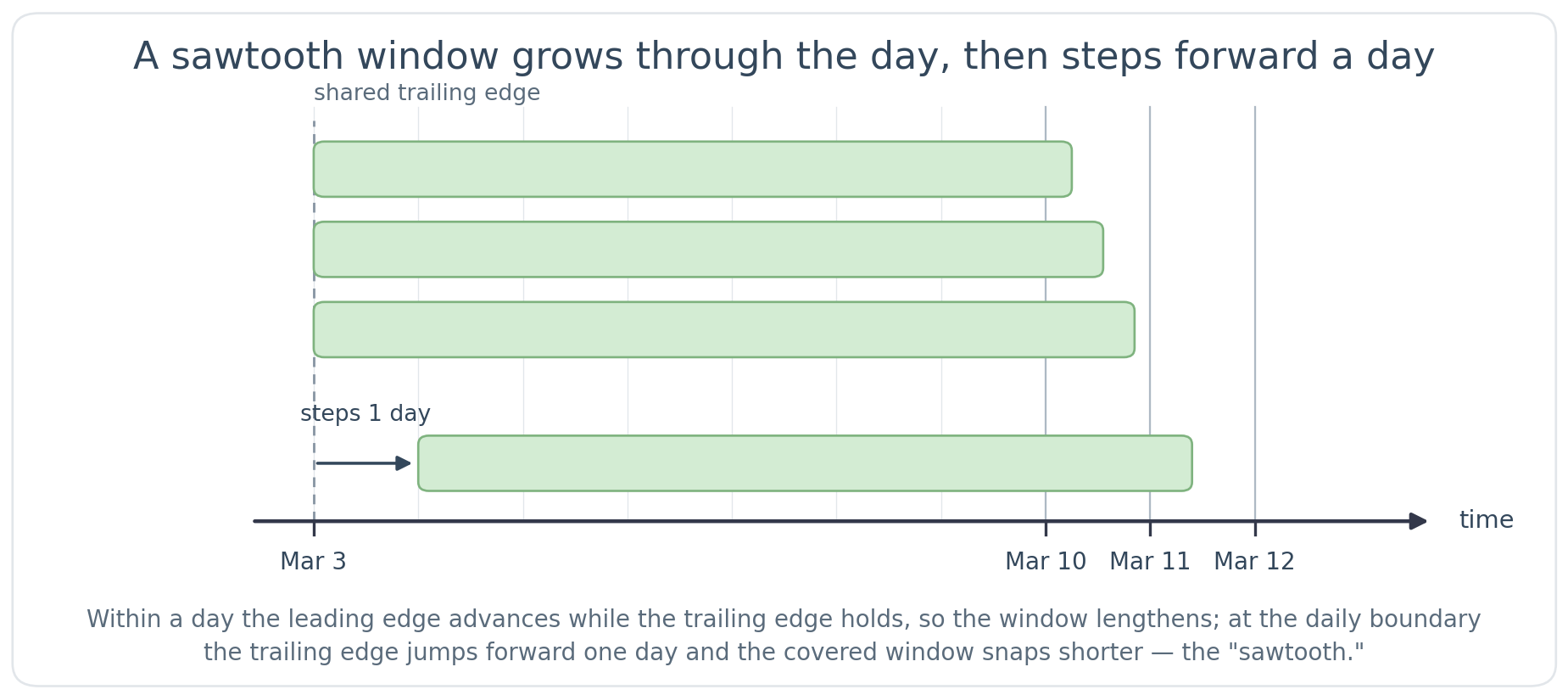
鋸齒窗以混合批次與串流路徑實現。 批次管線維護視窗的大部分,而串流管線則即時保持最新資料的新鮮。 兩者在讀取時合併,因此對模特兒或服務消費者來說,這只是一個單一功能。
由於窗口的歷史部分由批次管線計算,鋸齒槽特徵在物質化開始後不久即可投入使用,即使窗口跨越數月或數年。 只有當整個窗口時間結束後,才算完整。 最低 window_duration 限度必須超過兩天(強制下限)。 Databricks 建議在持續超過 7 天時使用鋸齒式視窗。 對於超過兩天甚至最多七天的窗戶,請在 捲動窗 的固定長度精度與鋸齒窗的快速生產準備之間選擇。
Note
鋸齒形特徵依賴於已有的歷史。 串流的擷取表必須包含至少涵蓋整個視窗長度的資料,否則計算出的視窗不完整。 不到兩整天,該特徵僅反映迄今為止呈現的數據。 建議在製作期間持續服務,直到兩整天後。 在空視窗上的聚合對 和 回傳 0Sum,對 StddevSampStddevPopLastVarPopMinFirstVarSampAvgMax、Count
要判斷鋸齒形特徵是否已準備好,請在目錄總管中開啟功能檢視。 在 「實體化特徵」區塊中,當特徵最後一次物質化時間過去且狀態顯示成功時,批次回填即告完成。 串流部分由 Lakeflow 宣告式管線實現。 功能檢視通過驗證後,實體化的功能會連結到該管線,你可以監控其運行狀態。
鋸齒窗需要 ,StreamSource且以 為具體化。StreamingMode
class SawtoothWindow(TimeWindow):
    window_duration: datetime.timedelta
鋸齒窗的邊緣移動方式與滾動窗不同:前緣追蹤最新事件,而後緣則是一天前進一次,而非連續前進。 每天在固定的 18:00 UTC 截止點,後緣會向前移動至當天的 UTC-午夜邊界。 因此,有效窗口會稍微長 window_duration 一些,並且會隨著一天的變化,然後在下一個截止日突然恢復。 訓練和服務使用相同的18:00 UTC截止時間,因此離線訓練與線上服務保持一致。
| 參數 | Constraints |
|---|---|
window_duration |
必須超過兩天。 允許的持續時間不是整數天(例如), timedelta(days=3, minutes=15)但視窗仍會以每日細節更新。 |
鋸齒視窗支援 Sum、 Avg、 MaxMinFirstCountVarPopLast、 StddevPopVarSamp及StddevSamp 聚合函數。
鋸齒窗範例
以下範例顯示用戶交易的7天計數。 前緣追蹤當前事件,後緣則一天一天地前進。 至於3月10日的事件,時間窗口大約可以追溯到3月3日左右。 隨著3月10日的進行,前緣持續前進,而後緣保持穩定,因此覆蓋跨度會逐漸擴大。 接著,在3月11日初,尾緣會逐漸接近3月4日左右。 有效期限總是略長於七天。 最近兩天由直播串流提供,較早的兩天則由串流的匯入表提供。
from databricks.feature_engineering.entities import SawtoothWindow
from datetime import timedelta

# 7-day window kept continuously fresh with streaming data
window = SawtoothWindow(window_duration=timedelta(days=7))
鋸齒窗的限制
- 該
delay參數不被支援。 - 不支援
SourceLateness.settling_delay。 - 除
Sum、Avg、Count、FirstVarSampLastMinVarPopStddevPopMax及StddevSamp之外,其他聚合函數不被支援(例如ApproxCountDistinct、ApproxPercentile、FirstNLastNFirstDistinctLastDistinct及 )。 - 鋸齒窗需要一個
StreamSource.DeltaTableSourceA 不支援。
物質化觸發
觸發器控制物質化管線何時運行。 觸發類型取決於功能類型。
CronSchedule
用於 CronSchedule 批次聚合功能。 預設情況下,Azure Databricks 會從聚合視窗中推導出排程。 導出排程會考慮視窗期間、視窗 delay 和 offset,以及來源 settling_delay ,確保執行不會在其原始資料完成前發布視窗。 衍生排程支援翻滾與滑動視窗。
若要請求導出排程,請省略 cron 運算式。
CronSchedule() 而顯式 CronSchedule(mode=CronScheduleMode.DERIVED) 形式等價:
from databricks.feature_engineering.entities import (
    CronSchedule,
    CronScheduleMode,
)

trigger = CronSchedule(mode=CronScheduleMode.DERIVED)
不要設定 quartz_cron_expression 為 CronScheduleMode.DERIVED。 當你取得實體化功能時,回傳的排程可以包含 Azure Databricks 計算的 cron 運算式。
若要直接控制排程,請提供 Quartz cron 表達式。
CronScheduleMode.MANUAL 當你提供一個表達式時,可以推斷出:
from databricks.feature_engineering.entities import CronSchedule

trigger = CronSchedule(
    quartz_cron_expression="0 0 * * * ?",  # Hourly
    timezone_id="UTC",
)
TableTrigger
用於TableTriggerColumnSelection特徵或聚合特徵(),AggregationFunction並由 DeltaTableSource. 當上游 Delta 資料表收到新的提交時,管線就會執行。
對於聚合功能,管線會被限速,避免每次提交都執行。 管線最多每功能視窗長度的一半運行一次,但頻率從未超過每5分鐘一次。 例如,一個有1小時倒閉窗口的長片,最多每30分鐘播出一次,或一個有8小時時間的長片最多每4小時放一次。 當時段時間比5分鐘還小時,5分鐘樓層會被限制,所以10分鐘以內的時段最多每5分鐘跑一次。 聚合功能在 5 分鐘內無法使用 TableTrigger,請改用串流觸發器。
from databricks.feature_engineering.entities import TableTrigger

trigger = TableTrigger()
StreamingMode
用於 StreamingMode 由 StreamSource. 該管線以連續串流管線形式運作。
from databricks.feature_engineering import FeatureEngineeringClient
from databricks.feature_engineering.entities import (
    StreamSource, Feature, AggregationFunction, Sum,
    RollingWindow, OnlineStoreConfig, StreamingMode,
)
from datetime import timedelta

fe = FeatureEngineeringClient()

stream_source = StreamSource(full_name="my_catalog.my_schema.my_stream")

streaming_feature = fe.create_feature(
    source=stream_source,
    entity=["value.user_id"],
    timeseries_column="value.event_time",
    function=AggregationFunction(
        operator=Sum(input="value.amount"),
        time_window=RollingWindow(window_duration=timedelta(hours=1)),
    ),
    catalog_name="my_catalog",
    schema_name="my_schema",
    name="user_purchase_sum",
)

fe.materialize_features(
    features=[streaming_feature],
    online_config=OnlineStoreConfig(
        catalog_name="my_catalog",
        schema_name="my_schema",
        table_name_prefix="streaming_features_serving",
        online_store_name="feature_store_online",
    ),
    trigger=StreamingMode(),
)
選擇觸發點
每個功能使用一個觸發器;依功能類型提供的選項如下:
| 特徵類型 | Trigger | 當它運行時 |
|---|---|---|
聚合(AggregationFunction) DeltaTableSource |
CronSchedule |
在衍生或手動排程上 |
聚合(AggregationFunction) DeltaTableSource |
TableTrigger |
在每個來源資料表上 提交 |
ColumnSelection (摘自 DeltaTableSource) |
TableTrigger |
在每個來源資料表上 提交 |
特色來自 StreamSource |
StreamingMode |
連續串流 |
你無法在單一 materialize_features 通話中實現需要不同觸發類型的功能。 改為分開來電。