適用於:Azure Logic Apps (標準)
Note
此預覽功能受 Microsoft Azure 預覽版補充使用條款約束。
如果您的組織使用Visual Studio Code中Azure Logic Apps遷移代理擴充功能目前不支援的整合平台,例如TIBCO BusinessWorks、IBM IIB/ACE、Dell Boomi或Workato,您可以透過建立並新增該平台的自訂解析器來擴充代理程式。 此擴充套件採用基於登錄檔的解析器架構,支援內建與外部解析器,因此你可以在不修改核心遷移流程的情況下加入平台支援。
本文將說明如何建立並新增一個自訂解析器,將您的來源整合平台的產物轉換成遷移代理通用的中間表示(IR)格式。 這份 JSON 文件以平台中立的方式描述工件,讓代理人員能在所有五個遷移階段處理你的工件。
先決條件
在開始之前,請確保你擁有以下資源:
| 需求 | Description |
|---|---|
| Node.js 18歲或更晚 | 免費、開源、跨平台的 JavaScript 執行環境 |
| Visual Studio Code 1.85.0 或更新版本 | 本地開發體驗 |
| Visual Studio Code Extension API | 讓你能為 Visual Studio Code 建立擴充套件的 API。 |
| Azure Logic Apps 遷移代理擴展 | Visual Studio Code 的移轉 Agent 所需擴充功能 |
| Azure Logic Apps(標準)擴展 | Azure Logic Apps Migration Agent 擴充功能的必要相依性 |
| 對 TypeScript 的熟悉度 | 以 JavaScript 為基礎建置的強型別程式設計語言 |
| 原始碼整合專案 | 您想要取得支援之平台的來源整合專案和成品檔案 |
解析器架構
若要為遷移代理新增平台支援,請採用以下方法:
| Approach | Recommended | Description |
|---|---|---|
| 內建解析器:貢獻到 擴充功能的 GitHub 儲存庫 | Yes | 直接在專案中加入解析器和技能。 完整整合所有五個移轉階段。 此方法之所以被推薦,是因為內建解析器隨擴充功能出廠,使用相同的 CI/CD 管線,且能存取所有內部 API。 |
| 外部解析器擴充 | No | 建立一個獨立的 Visual Studio Code 擴充功能,透過外掛 API 註冊解析器。 僅涵蓋探索階段。 |
所有解析器都會將原始平台產物轉換成通用的 IR 格式,作為 JSON 文件。 遷移代理在規劃、轉換及驗證階段使用 IR 格式。 解析器登錄檔支援內建及外部解析器插件:
| 內建剖析器 | 外部解析器插件 |
|---|---|
BizTalk (.btproj, .odx) BizTalk ( .btm, .xsd) BizTalk( .btp) MuleSoft(草稿) |
合作夥伴平台解析器 社群解析器 |
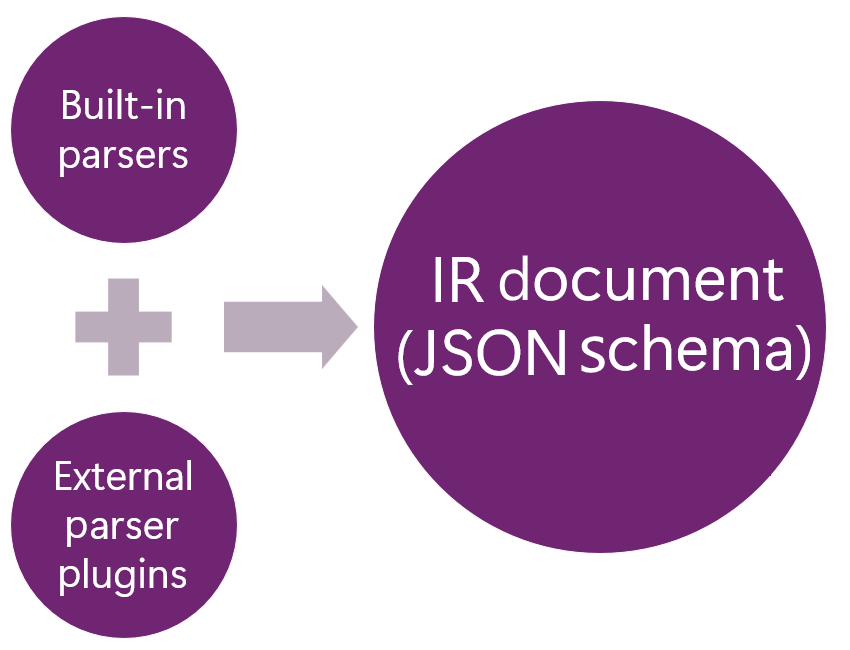
步驟 1:加入內建解析器
在 下
src/parsers/<your-platform>/,建立一個新的解析器模組。src/parsers/ ├── biztalk/ # Reference implementation │ ├── index.ts │ ├── types.ts │ ├── BizTalkProjectParser.ts │ ├── BizTalkOrchestrationParser.ts │ └── ... ├── <your-platform>/ # Your new parser │ ├── index.ts │ ├── types.ts │ └── <your-platform-parser-name>.ts確保每個解析器都實作了該
IParser介面。import { IParser, ParserCapabilities, ParseResult, ParseOptions } from '../types'; import { IRDocument, createEmptyIRDocument } from '../../ir/types'; export class YourPlatformParser implements IParser { get capabilities(): ParserCapabilities { return { platform: '<your-platform>', fileExtensions: ['.<your-extension>'], fileTypes: ['flow'], supportsFolder: false, description: 'Parses <your-platform> integration flows.', }; } canParse(filePath: string): boolean { return filePath.endsWith('.<your-extension>'); } async parse( filePath: string, options?: ParseOptions ): Promise<ParseResult> { const ir = createEmptyIRDocument(); // Parse the source file and populate the IR document. // For the complete schema, see docs/IRSchema.md. return { ir, stats: { /* parsing statistics */ } }; } }將你的解析器註冊在
src/parsers/index.ts。import { <your-platform-parser-name> } from './<your-platform>'; export function initializeParsers(): void { // ... existing parsers ... defaultParserRegistry.register(new <your-platform-parser-name>()); }小提示
如需完整運作的參考,請使用
src/parsers/biztalk/中的 BizTalk 剖析器實作。
步驟 2:新增平台專屬技能
作為 Markdown 檔案,技能會為每個遷移階段提供 AI 指令。 這些技能會告訴 GitHub Copilot Agent 如何為您的特定平台分析、規劃和轉換成品。
若要尋找這些技能,請查看 resources/skills/ 下方的平台特定變體。
resources/skills/
├── detect-logical-groups/
│   ├── biztalk/SKILL.md
│   ├── mulesoft/SKILL.md
│   └── <your-platform>/SKILL.md
├── source-to-logic-apps-mapping/
│   ├── biztalk/SKILL.md
│   ├── mulesoft/SKILL.md
│   └── <your-platform>/SKILL.md
└── ... (13 skills total)
每個 SKILL.md 檔案使用 YAML 前置,接著是 Markdown 內容,例如:
---
name: source-to-logic-apps-mapping
description: >-
   Component mapping for \<*your-platform*\> components to their equivalents in Azure Logic Apps (Standard).
---
步驟 3:將您的平台映射到 Azure Logic Apps(標準)元件
請參考下表以建立轉接器映射:
< 你的平台> 元件 Azure Logic Apps 等效項目 原生? 備註 HTTP 監聽器 HTTP 觸發器 Yes Built-in 資料庫連接器 SQL Server 連接器 Yes Built-in 對下表中的每個技能,建立所需的
<your-platform>/SKILL.md技能變體:小提示
複製支援平台的技能 (例如
biztalk/SKILL.md) 作為起點,並為您的平台調整內容。GitHub Copilot 代理人 技能 Purpose @migration-analyserdetect-logical-groups將工件分組為邏輯流程群組的規則 @migration-analyseranalyse-source-design分析原始碼架構與產生視覺化的規則 @migration-analyserdependency-and-decompilation-analysis識別缺少相依關係的規則 所有代理人 source-to-logic-apps-mapping從來源到 Azure Logic Apps 的逐元件對應 @migration-plannerlogic-apps-planning-rules產生遷移計畫的規則 @migration-converterconversion-task-plan-rules建立轉換任務的規則 @migration-converterscaffold-logic-apps-project建立標準邏輯應用專案架構的規則 @migration-converterworkflow-json-generation-rules產生 workflow.json檔案的規則@migration-converterconnections-json-generation-rules產生 connections.json檔案的規則@migration-converterdotnet-local-functions-logic-apps產生 .NET 局部函數的規則 @migration-converterno-stubs-code-generation確保生成程式碼完整無缺的規則 @migration-converterruntime-validation-and-testing執行時驗證與測試規則 @migration-convertercloud-deployment-and-testing雲端部署與測試規則
步驟四:註冊你的平台
在檔案中
src/types/platforms.ts,將你的平台加入支援平台清單。export type SourcePlatform = 'biztalk' | 'mulesoft' | '<your-platform>'; export const SUPPORTED_PLATFORMS: PlatformInfo[] = [ // ... existing platforms ... { id: '<your-platform>', label: '<your-platform-name>', description: '<your-platform> version <version-number>', icon: '$(server)', filePatterns: ['.<your-extension>', '.<your-config>'], }, ];在
src/stages/discovery/PlatformDetector.ts檔案中加入偵測邏輯。在
src/stages/discovery/SourceFolderService.ts檔案中加入檔案範本。
步驟五(可選):新增紅外線範例
要記錄平台產物如何映射到 IR 架構,請新增一個 docs/IRExamples_YourPlatform.md 檔案。 以下範例存在並作為範本:
| 範例 | Description |
|---|---|
docs/IRExamples_BizTalk.md |
BizTalk 參考 |
docs/IRExamples_MuleSoft.md |
MuleSoft 參考 |
docs/IRExamples_Boomi.md |
Dell Boomi 範例 |
docs/IRExamples_IBMIIB.md |
IBM IIB/ACE 範例 |
docs/IRExamples_TIBCO.md |
TIBCO BusinessWorks 範例 |
docs/IRExamples_Workato.md |
Workato 範例 |
替代方案:外部解析器擴充
外部解析器擴充只涵蓋遷移代理的發現階段,代理會解析你的原始檔案。 技能、平台偵測,以及 AI 驅動的規劃與轉換,都要求你直接貢獻到 extension 的 GitHub repository。
不過,如果你不想直接貢獻到倉庫,可以建立一個獨立的 Visual Studio Code 擴充功能,透過使用 parse 插件 API 來註冊解析器:
import * as vscode from 'vscode';

export async function activate(context: vscode.ExtensionContext) {
    const assistant = vscode.extensions.getExtension('microsoft.logicapps-migration-assistant');

    if (assistant) {
        const api = await assistant.activate();
        api.registerParser(new MyPlatformParser(), {
            priority: 10,
        });
    }
}
解析器插件 API
| 方法或屬性 | Description |
|---|---|
version |
擴充功能版本(唯讀) |
registerParser(parser, options?) |
在登錄檔註冊一個解析器。 |
unregisterParser(id) |
移除註冊的解析器。 |
getParserRegistry() |
直接存取解析器登錄檔。 |
hasParser(id) |
檢查解析器是否已註冊。 |
getExternalParsers() |
取得註冊外部解析器的資訊。 |