適用於: Azure CLI ml extension v2 (目前版本)Python SDK azure-ai-ml v2 (目前版本)
在本文中,您將學習如何利用 Azure 機器學習資料儲存庫連接 Azure 資料儲存服務。
先決條件
小提示
本文中的 Python SDK 範例使用 MLClient.from_config(),這需要你目前目錄中的 config.json 檔案或父目錄。 從 Azure 入口網站下載此檔案:進入你的工作區,然後選擇 概覽>下載 config.json。 或者你也可以手動建立MLClient。
ml_client = MLClient(
    credential=DefaultAzureCredential(),
    subscription_id="<your-subscription-id>",
    resource_group_name="<your-resource-group>",
    workspace_name="<your-workspace-name>",
)
附註
機器學習資料儲存庫不會建立底層的儲存帳號資源。 相反地,它們會連結一個現有的儲存帳號供機器學習使用。
每種資料儲存類型(Azure Blob、ADLS Gen2、Azure 檔案儲存體、OneLake)都是獨立建立的。 本文章節的順序並不代表必須的步驟順序。
建立 Azure Blob 資料存放區
from azure.ai.ml.entities import AzureBlobDatastore
from azure.ai.ml import MLClient
from azure.identity import DefaultAzureCredential

ml_client = MLClient.from_config(credential=DefaultAzureCredential())

store = AzureBlobDatastore(
    name="",
    description="",
    account_name="",
    container_name=""
)

ml_client.create_or_update(store)
from azure.ai.ml.entities import AzureBlobDatastore
from azure.ai.ml.entities import AccountKeyConfiguration
from azure.ai.ml import MLClient
from azure.identity import DefaultAzureCredential

ml_client = MLClient.from_config(credential=DefaultAzureCredential())

store = AzureBlobDatastore(
    name="blob_protocol_example",
    description="Datastore pointing to a blob container using https protocol.",
    account_name="mytestblobstore",
    container_name="data-container",
    protocol="https",
    credentials=AccountKeyConfiguration(
        account_key="aaaaaaaa-0b0b-1c1c-2d2d-333333333333"
    ),
)

ml_client.create_or_update(store)
from azure.ai.ml.entities import AzureBlobDatastore
from azure.ai.ml.entities import SasTokenConfiguration
from azure.ai.ml import MLClient
from azure.identity import DefaultAzureCredential

ml_client = MLClient.from_config(credential=DefaultAzureCredential())

store = AzureBlobDatastore(
    name="blob_sas_example",
    description="Datastore pointing to a blob container using SAS token.",
    account_name="mytestblobstore",
    container_name="data-container",
    credentials=SasTokenConfiguration(
        sas_token= "?xx=A1bC2dE3fH4iJ5kL6mN7oP8qR9sT0u&xx=C2dE3fH4iJ5kL6mN7oP8qR9sT0uV1wx&xx=Ff6Gg~7Hh8.-Ii9Jj0Kk1Ll2Mm3Nn4_Oo5Pp6Qq7&xx=N7oP8qR9sT0uV1wX2yZ3aB4cD5eF6g&xxx=Ee5Ff~6Gg7.-Hh8Ii9Jj0Kk1Ll2Mm3_Nn4Oo5Pp6&xxx=C2dE3fH4iJ5kL6mN7oP8qR9sT0uV1w"
    ),
)

ml_client.create_or_update(store)
建立以下 YAML 檔案 (更新相應的值):
# my_blob_datastore.yml
$schema: https://azuremlschemas.azureedge.net/latest/azureBlob.schema.json
name: my_blob_ds # add your datastore name here
type: azure_blob
description: here is a description # add a datastore description here
account_name: my_account_name # add the storage account name here
container_name: my_container_name # add the storage container name here
以 Azure CLI 建立 機器學習 資料存放區:
az ml datastore create --file my_blob_datastore.yml
建立以下 YAML 檔案 (更新相應的值):
# my_blob_datastore.yml
$schema: https://azuremlschemas.azureedge.net/latest/azureBlob.schema.json
name: blob_example
type: azure_blob
description: Datastore pointing to a blob container.
account_name: mytestblobstore
container_name: data-container
credentials:
  account_key: aaaaaaaa-0b0b-1c1c-2d2d-333333333333
以 CLI 建立 機器學習 資料存放區:
az ml datastore create --file my_blob_datastore.yml
建立以下 YAML 檔案 (更新相應的值):
# my_blob_datastore.yml
$schema: https://azuremlschemas.azureedge.net/latest/azureBlob.schema.json
name: blob_sas_example
type: azure_blob
description: Datastore pointing to a blob container using SAS token.
account_name: mytestblobstore
container_name: data-container
credentials:
  sas_token: "?xx=A1bC2dE3fH4iJ5kL6mN7oP8qR9sT0u&xx=C2dE3fH4iJ5kL6mN7oP8qR9sT0uV1wx&xx=Ff6Gg~7Hh8.-Ii9Jj0Kk1Ll2Mm3Nn4_Oo5Pp6Qq7&xx=N7oP8qR9sT0uV1wX2yZ3aB4cD5eF6g&xxx=Ee5Ff~6Gg7.-Hh8Ii9Jj0Kk1Ll2Mm3_Nn4Oo5Pp6&xxx=C2dE3fH4iJ5kL6mN7oP8qR9sT0uV1w"
以 CLI 建立 機器學習 資料存放區:
az ml datastore create --file my_blob_datastore.yml
建立 Azure Data Lake Storage Gen2 資料存放區
from azure.ai.ml.entities import AzureDataLakeGen2Datastore
from azure.ai.ml import MLClient
from azure.identity import DefaultAzureCredential

ml_client = MLClient.from_config(credential=DefaultAzureCredential())

store = AzureDataLakeGen2Datastore(
    name="",
    description="",
    account_name="",
    filesystem=""
)

ml_client.create_or_update(store)
from azure.ai.ml.entities import AzureDataLakeGen2Datastore
from azure.ai.ml.entities._datastore.credentials import ServicePrincipalCredentials

from azure.ai.ml import MLClient
from azure.identity import DefaultAzureCredential

ml_client = MLClient.from_config(credential=DefaultAzureCredential())

store = AzureDataLakeGen2Datastore(
    name="adls_gen2_example",
    description="Datastore pointing to an Azure Data Lake Storage Gen2.",
    account_name="mytestdatalakegen2",
    filesystem="my-gen2-container",
     credentials=ServicePrincipalCredentials(
        tenant_id= "bbbbcccc-1111-dddd-2222-eeee3333ffff",
        client_id= "44445555-eeee-6666-ffff-7777aaaa8888",
        client_secret= "Cc3Dd~4Ee5.-Ff6Gg7Hh8Ii9Jj0Kk1_Ll2Mm3Nn4",
    ),
)

ml_client.create_or_update(store)
建立以下 YAML 檔案 (更新值):
# my_adls_datastore.yml
$schema: https://azuremlschemas.azureedge.net/latest/azureDataLakeGen2.schema.json
name: adls_gen2_credless_example
type: azure_data_lake_gen2
description: Credential-less datastore pointing to an Azure Data Lake Storage Gen2 instance.
account_name: mytestdatalakegen2
filesystem: my-gen2-container
以 CLI 建立 機器學習 資料存放區:
az ml datastore create --file my_adls_datastore.yml
建立以下 YAML 檔案 (更新值):
# my_adls_datastore.yml
$schema: https://azuremlschemas.azureedge.net/latest/azureDataLakeGen2.schema.json
name: adls_gen2_example
type: azure_data_lake_gen2
description: Datastore pointing to an Azure Data Lake Storage Gen2 instance.
account_name: mytestdatalakegen2
filesystem: my-gen2-container
credentials:
  tenant_id: bbbbcccc-1111-dddd-2222-eeee3333ffff
  client_id: 44445555-eeee-6666-ffff-7777aaaa8888
  client_secret: Cc3Dd~4Ee5.-Ff6Gg7Hh8Ii9Jj0Kk1_Ll2Mm3Nn4
以 CLI 建立 機器學習 資料存放區:
az ml datastore create --file my_adls_datastore.yml
建立 Azure 檔案儲存體資料存放區
from azure.ai.ml.entities import AzureFileDatastore
from azure.ai.ml.entities import AccountKeyConfiguration
from azure.ai.ml import MLClient
from azure.identity import DefaultAzureCredential

ml_client = MLClient.from_config(credential=DefaultAzureCredential())

store = AzureFileDatastore(
    name="file_example",
    description="Datastore pointing to an Azure File Share.",
    account_name="mytestfilestore",
    file_share_name="my-share",
    credentials=AccountKeyConfiguration(
        account_key= "aaaaaaaa-0b0b-1c1c-2d2d-333333333333"
    ),
)

ml_client.create_or_update(store)
from azure.ai.ml.entities import AzureFileDatastore
from azure.ai.ml.entities import SasTokenConfiguration
from azure.ai.ml import MLClient
from azure.identity import DefaultAzureCredential

ml_client = MLClient.from_config(credential=DefaultAzureCredential())

store = AzureFileDatastore(
    name="file_sas_example",
    description="Datastore pointing to an Azure File Share using SAS token.",
    account_name="mytestfilestore",
    file_share_name="my-share",
    credentials=SasTokenConfiguration(
        sas_token="?xx=A1bC2dE3fH4iJ5kL6mN7oP8qR9sT0u&xx=C2dE3fH4iJ5kL6mN7oP8qR9sT0uV1wx&xx=Ff6Gg~7Hh8.-Ii9Jj0Kk1Ll2Mm3Nn4_Oo5Pp6Qq7&xx=N7oP8qR9sT0uV1wX2yZ3aB4cD5eF6g&xxx=Ee5Ff~6Gg7.-Hh8Ii9Jj0Kk1Ll2Mm3_Nn4Oo5Pp6&xxx=C2dE3fH4iJ5kL6mN7oP8qR9sT0uV1w"
    ),
)

ml_client.create_or_update(store)
建立以下 YAML 檔案 (更新值):
# my_files_datastore.yml
$schema: https://azuremlschemas.azureedge.net/latest/azureFile.schema.json
name: file_example
type: azure_file
description: Datastore pointing to an Azure File Share.
account_name: mytestfilestore
file_share_name: my-share
credentials:
  account_key: aaaaaaaa-0b0b-1c1c-2d2d-333333333333
以 CLI 建立 機器學習 資料存放區:
az ml datastore create --file my_files_datastore.yml
建立以下 YAML 檔案 (更新值):
# my_files_datastore.yml
$schema: https://azuremlschemas.azureedge.net/latest/azureFile.schema.json
name: file_sas_example
type: azure_file
description: Datastore pointing to an Azure File Share using a SAS token.
account_name: mytestfilestore
file_share_name: my-share
credentials:
  sas_token: "?xx=A1bC2dE3fH4iJ5kL6mN7oP8qR9sT0u&xx=C2dE3fH4iJ5kL6mN7oP8qR9sT0uV1wx&xx=Ff6Gg~7Hh8.-Ii9Jj0Kk1Ll2Mm3Nn4_Oo5Pp6Qq7&xx=N7oP8qR9sT0uV1wX2yZ3aB4cD5eF6g&xxx=Ee5Ff~6Gg7.-Hh8Ii9Jj0Kk1Ll2Mm3_Nn4Oo5Pp6&xxx=C2dE3fH4iJ5kL6mN7oP8qR9sT0uV1w"
以 CLI 建立 機器學習 資料存放區:
az ml datastore create --file my_files_datastore.yml
建立 Azure Data Lake Storage Gen1 資料存放區
from azure.ai.ml.entities import AzureDataLakeGen1Datastore
from azure.ai.ml import MLClient
from azure.identity import DefaultAzureCredential

ml_client = MLClient.from_config(credential=DefaultAzureCredential())

store = AzureDataLakeGen1Datastore(
    name="",
    store_name="",
    description="",
)

ml_client.create_or_update(store)
from azure.ai.ml.entities import AzureDataLakeGen1Datastore
from azure.ai.ml.entities._datastore.credentials import ServicePrincipalCredentials
from azure.ai.ml import MLClient
from azure.identity import DefaultAzureCredential

ml_client = MLClient.from_config(credential=DefaultAzureCredential())

store = AzureDataLakeGen1Datastore(
    name="adls_gen1_example",
    description="Datastore pointing to an Azure Data Lake Storage Gen1.",
    store_name="mytestdatalakegen1",
    credentials=ServicePrincipalCredentials(
        tenant_id= "bbbbcccc-1111-dddd-2222-eeee3333ffff",
        client_id= "44445555-eeee-6666-ffff-7777aaaa8888",
        client_secret= "Cc3Dd~4Ee5.-Ff6Gg7Hh8Ii9Jj0Kk1_Ll2Mm3Nn4",
    ),
)

ml_client.create_or_update(store)
建立以下 YAML 檔案 (更新值):
# my_adls_datastore.yml
$schema: https://azuremlschemas.azureedge.net/latest/azureDataLakeGen1.schema.json
name: alds_gen1_credless_example
type: azure_data_lake_gen1
description: Credential-less datastore pointing to an Azure Data Lake Storage Gen1 instance.
store_name: mytestdatalakegen1
以 CLI 建立 機器學習 資料存放區:
az ml datastore create --file my_adls_datastore.yml
建立以下 YAML 檔案 (更新值):
# my_adls_datastore.yml
$schema: https://azuremlschemas.azureedge.net/latest/azureDataLakeGen1.schema.json
name: adls_gen1_example
type: azure_data_lake_gen1
description: Datastore pointing to an Azure Data Lake Storage Gen1 instance.
store_name: mytestdatalakegen1
credentials:
  tenant_id: bbbbcccc-1111-dddd-2222-eeee3333ffff
  client_id: 44445555-eeee-6666-ffff-7777aaaa8888
  client_secret: Cc3Dd~4Ee5.-Ff6Gg7Hh8Ii9Jj0Kk1_Ll2Mm3Nn4
以 CLI 建立 機器學習 資料存放區:
az ml datastore create --file my_adls_datastore.yml
建立 OneLake (Microsoft Fabric) 資料存放區 (預覽)
本節說明建立 OneLake 資料存放區的各種選項。 OneLake 資料存放區屬 Microsoft Fabric 的一部分。 目前,機器學習 支援在包含資料夾或檔案及 Amazon S3 捷徑的「Files」資料夾連線 Microsoft Fabric 湖存放庫成品。 如需湖存放庫的詳細資訊,請參閱什麼是 Microsoft Fabric 的湖存放庫?。
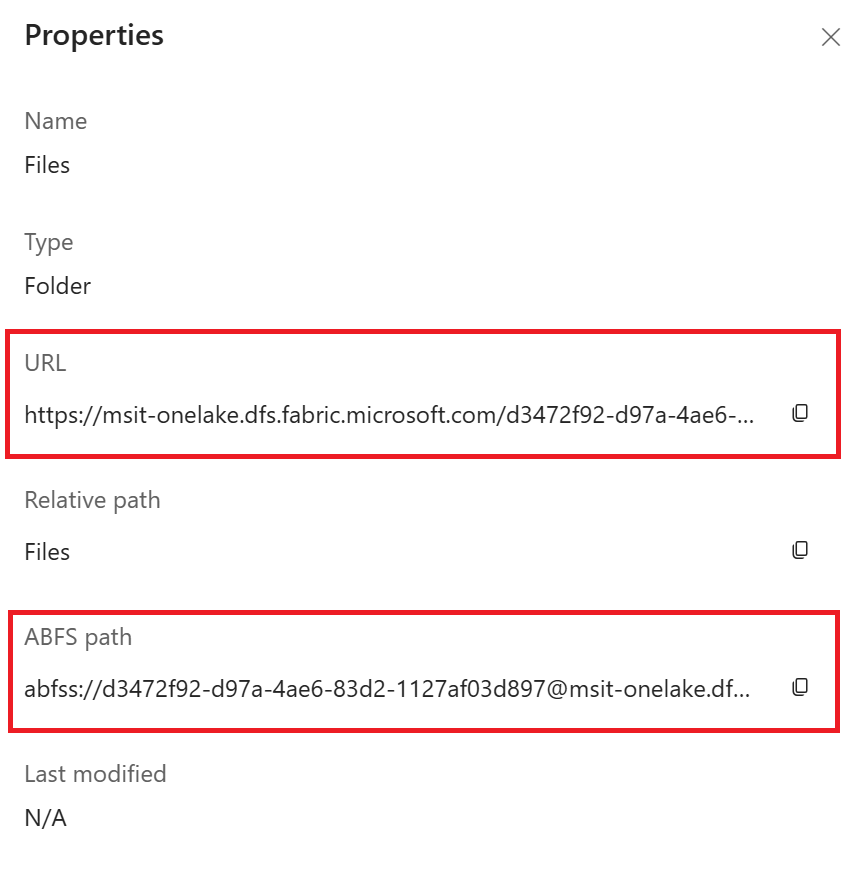
建立 OneLake 資料存放區需要您從 Microsoft Fabric 執行個體提供以下資訊:
以下截圖說明如何從您的 Microsoft Fabric 實例中取得這些必要的資訊資源。
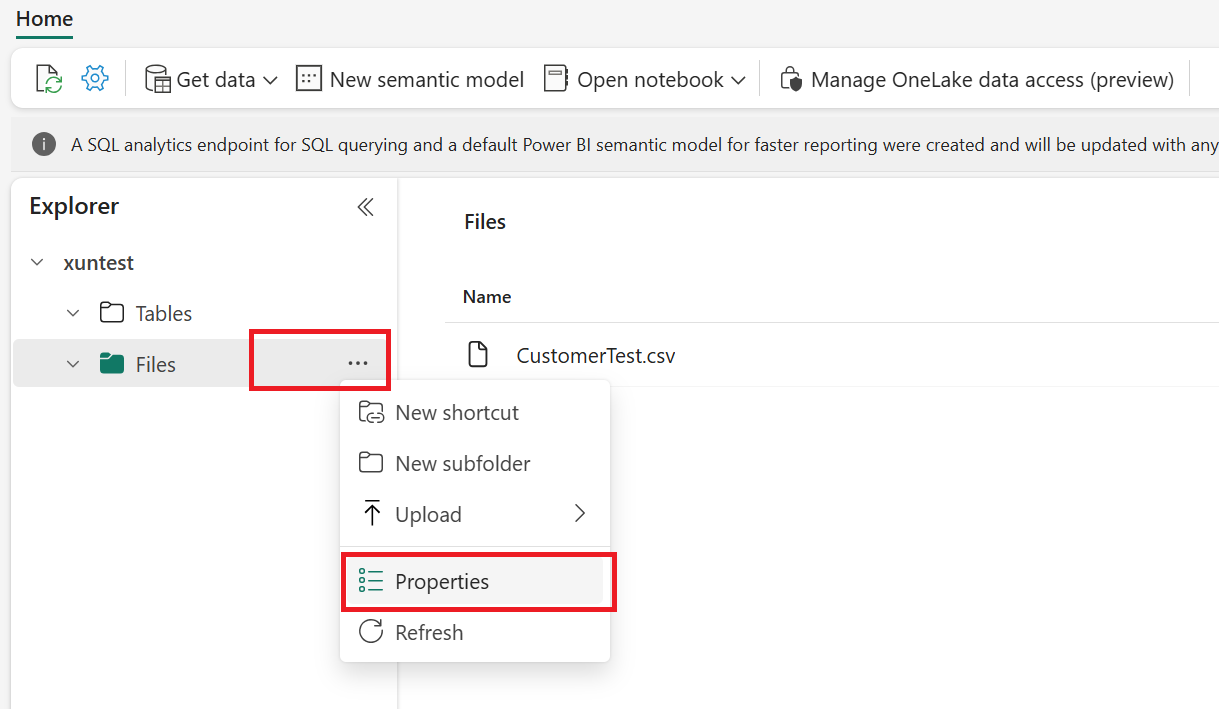
你可以在「Properties」頁面的「URL」和「ABFS path」中找到「Endpoint」、「Workspace GUID」和「Artifact GUID」:
-
URL 格式: https://{your_one_lake_endpoint}/{your_one_lake_workspace_guid}/{your_one_lake_artifact_guid}/Files
-
ABFS 路徑格式: abfss://{your_one_lake_workspace_guid}@{your_one_lake_endpoint}/{your_one_lake_artifact_guid}/Files
建立 OneLake 資料存放區
from azure.ai.ml.entities import OneLakeDatastore, OneLakeArtifact
from azure.ai.ml import MLClient
from azure.identity import DefaultAzureCredential

ml_client = MLClient.from_config(credential=DefaultAzureCredential())

store = OneLakeDatastore(
    name="onelake_example_id",
    description="Datastore pointing to a Microsoft fabric artifact.",
    one_lake_workspace_name="bbbbbbbb-7777-8888-9999-cccccccccccc", #{your_one_lake_workspace_guid}
    endpoint="msit-onelake.dfs.fabric.microsoft.com", #{your_one_lake_endpoint}
    artifact=OneLakeArtifact(
        name="cccccccc-8888-9999-0000-dddddddddddd/Files", #{your_one_lake_artifact_guid}/Files
        type="lake_house"
    )
)

ml_client.create_or_update(store)
from azure.ai.ml.entities import OneLakeDatastore, OneLakeArtifact
from azure.ai.ml.entities._datastore.credentials import ServicePrincipalCredentials
from azure.ai.ml import MLClient
from azure.identity import DefaultAzureCredential

ml_client = MLClient.from_config(credential=DefaultAzureCredential())

store = OneLakeDatastore(
    name="onelake_example_sp",
    description="Datastore pointing to a Microsoft fabric artifact.",
    one_lake_workspace_name="bbbbbbbb-7777-8888-9999-cccccccccccc", #{your_one_lake_workspace_guid}
    endpoint="msit-onelake.dfs.fabric.microsoft.com", #{your_one_lake_endpoint}
    artifact=OneLakeArtifact(
        name="cccccccc-8888-9999-0000-dddddddddddd/Files", #{your_one_lake_artifact_guid}/Files
        type="lake_house"
    ),
    credentials=ServicePrincipalCredentials(
        tenant_id= "bbbbcccc-1111-dddd-2222-eeee3333ffff",
        client_id= "44445555-eeee-6666-ffff-7777aaaa8888",
        client_secret= "Cc3Dd~4Ee5.-Ff6Gg7Hh8Ii9Jj0Kk1_Ll2Mm3Nn4",
    ),
)

ml_client.create_or_update(store)
建立以下 YAML 檔案。 更新數值:
# my_onelake_datastore.yml
$schema: http://azureml/sdk-2-0/OneLakeDatastore.json
name: onelake_example_id
type: one_lake
description: Credential-less datastore pointing to a OneLake lakehouse.
one_lake_workspace_name: "eeeeffff-4444-aaaa-5555-bbbb6666cccc"
endpoint: "msit-onelake.dfs.fabric.microsoft.com"
artifact:
  type: lake_house
  name: "1111bbbb-22cc-dddd-ee33-ffffff444444/Files"
以 CLI 建立 機器學習 資料存放區:
az ml datastore create --file my_onelake_datastore.yml
建立以下 YAML 檔案。 更新數值:
# my_onelakesp_datastore.yml
$schema: http://azureml/sdk-2-0/OneLakeDatastore.json
name: onelake_example_id
type: one_lake
description: Credential-less datastore pointing to a OneLake lakehouse.
one_lake_workspace_name: "eeeeffff-4444-aaaa-5555-bbbb6666cccc"
endpoint: "msit-onelake.dfs.fabric.microsoft.com"
artifact:
  type: lake_house
  name: "1111bbbb-22cc-dddd-ee33-ffffff444444/Files"
credentials:
  tenant_id: bbbbcccc-1111-dddd-2222-eeee3333ffff
  client_id: 44445555-eeee-6666-ffff-7777aaaa8888
  client_secret: Cc3Dd~4Ee5.-Ff6Gg7Hh8Ii9Jj0Kk1_Ll2Mm3Nn4
以 CLI 建立 機器學習 資料存放區:
az ml datastore create --file my_onelakesp_datastore.yml
後續步驟
