從 適用於端點的 Microsoft Defender 移轉進階搜捕查詢
適用於:
- Microsoft Defender XDR
使用一組更廣泛的數據,將進階搜捕工作流程從 適用於端點的 Microsoft Defender 移至主動搜捕威脅。 在 Microsoft Defender 全面偵測回應 中,您可以從其他Microsoft 365 安全性解決方案存取數據,包括:
- 適用於端點的 Microsoft Defender
- 適用於 Office 365 的 Microsoft Defender
- Microsoft 雲端 App 安全性
- 適用於身分識別的 Microsoft Defender
注意事項
大部分 適用於端點的 Microsoft Defender 客戶都可以使用 Microsoft Defender 全面偵測回應,而不需要額外的授權。 若要開始從適用於端點的Defender轉換進階搜捕工作流程,請開啟 Microsoft Defender 全面偵測回應。
您可以轉換,而不會影響現有的適用於端點的 Defender 工作流程。 儲存的查詢會保持不變,而且自定義偵測規則會繼續執行併產生警示。 不過,它們會顯示在 Microsoft Defender 全面偵測回應 中。
僅限 Microsoft Defender 全面偵測回應 中的架構數據表
Microsoft Defender 全面偵測回應 進階搜捕架構提供包含各種Microsoft 365 安全性解決方案數據的其他數據表。 下表僅適用於 Microsoft Defender 全面偵測回應:
| 表格名稱 | 描述 |
|---|---|
| AlertEvidence | 與警示相關聯的檔案、IP 位址、URL、使用者或裝置 |
| AlertInfo | 來自 適用於端點的 Microsoft Defender、適用於 Office 365 的 Microsoft Defender、Microsoft Defender for Cloud Apps 和 適用於身分識別的 Microsoft Defender 的警示,包括嚴重性資訊和威脅類別 |
| EmailAttachmentInfo | 附加至電子郵件之檔案的相關資訊 |
| EmailEvents | Microsoft 365 電子郵件事件,包括電子郵件傳送和封鎖事件 |
| EmailPostDeliveryEvents | 在 Microsoft 365 將電子郵件傳遞至收件者信箱之後發生的安全性事件 |
| EmailUrlInfo | 電子郵件 URL 相關資訊 |
| IdentityDirectoryEvents | 涉及執行 Active Directory (AD) 之內部部署網域控制站的事件。 此資料表涵蓋一系列身分識別相關事件,以及網域控制站上的系統事件。 |
| IdentityInfo | 來自各種來源的帳戶資訊,包括 Microsoft Entra ID |
| IdentityLogonEvents | Active Directory 和 Microsoft 線上服務上的驗證事件 |
| IdentityQueryEvents | 查詢 Active Directory 物件,例如使用者、群組、裝置和網域 |
重要事項
使用僅適用於 Microsoft Defender 全面偵測回應 之架構數據表的查詢和自定義偵測,只能在 Microsoft Defender 全面偵測回應 中檢視。
對應 DeviceAlertEvents 數據表
和 AlertEvidence 數據AlertInfo表會取代 DeviceAlertEvents 適用於端點的 Microsoft Defender 架構中的數據表。 除了裝置警示的相關數據之外,這兩個數據表也包含身分識別、應用程式和電子郵件警示的相關數據。
使用下表來檢查數據行如何DeviceAlertEvents對應至 和 AlertEvidence 數據表中AlertInfo的數據行。
提示
除了下表中的數據行之外,數據 AlertEvidence 表還包含許多其他數據行,可提供來自各種來源之警示的更全面性圖片。
查看所有 AlertEvidence 資料行
| DeviceAlertEvents 數據行 | 在 Microsoft Defender 全面偵測回應 中尋找相同數據的位置 |
|---|---|
AlertId |
AlertInfo 和數據 AlertEvidence 表 |
Timestamp |
AlertInfo 和數據 AlertEvidence 表 |
DeviceId |
AlertEvidence 桌子 |
DeviceName |
AlertEvidence 桌子 |
Severity |
AlertInfo 桌子 |
Category |
AlertInfo 桌子 |
Title |
AlertInfo 桌子 |
FileName |
AlertEvidence 桌子 |
SHA1 |
AlertEvidence 桌子 |
RemoteUrl |
AlertEvidence 桌子 |
RemoteIP |
AlertEvidence 桌子 |
AttackTechniques |
AlertInfo 桌子 |
ReportId |
此數據行通常用於 適用於端點的 Microsoft Defender,以找出其他數據表中的相關記錄。 在 Microsoft Defender 全面偵測回應 中,您可以直接從AlertEvidence數據表取得相關數據。 |
Table |
此數據行通常用於 適用於端點的 Microsoft Defender 其他數據表中的其他事件資訊。 在 Microsoft Defender 全面偵測回應 中,您可以直接從AlertEvidence數據表取得相關數據。 |
調整現有的 適用於端點的 Microsoft Defender 查詢
除非查詢參考DeviceAlertEvents數據表,否則 適用於端點的 Microsoft Defender 查詢會依目前狀態運作。 若要在 Microsoft Defender 全面偵測回應 中使用這些查詢,請套用下列變更:
- 取代取代
DeviceAlertEvents為AlertInfo。 -
AlertInfo將 和數據表AlertId聯結AlertEvidence至 ,以取得對等的數據。
原始查詢
下列查詢會在 適用於端點的 Microsoft Defender 中使用 DeviceAlertEvents 來取得涉及 powershell.exe的警示:
DeviceAlertEvents
| where Timestamp > ago(7d)
| where AttackTechniques has "PowerShell (T1086)" and FileName == "powershell.exe"
修改過的查詢
已調整下列查詢以用於 Microsoft Defender 全面偵測回應。 與其直接從 DeviceAlertEvents檢查檔名,而是會聯結 AlertEvidence 並檢查該數據表中的檔名。
AlertInfo
| where Timestamp > ago(7d)
| where AttackTechniques has "PowerShell (T1086)"
| join AlertEvidence on AlertId
| where FileName == "powershell.exe"
移轉自定義偵測規則
在 Microsoft Defender 全面偵測回應 上編輯 適用於端點的 Microsoft Defender 規則時,如果產生的查詢只查看裝置數據表,它們會繼續如先前般運作。
例如,僅查詢裝置數據表的自定義偵測規則所產生的警示會繼續傳遞至您的 SIEM 併產生電子郵件通知,視您在 適用於端點的 Microsoft Defender 中設定的方式而定。 適用於端點的 Defender 中任何現有的隱藏規則也會繼續套用。
一旦您編輯適用於端點的 Defender 規則,使其查詢僅適用於 Microsoft Defender 全面偵測回應 的身分識別和電子郵件數據表,規則就會自動移至 Microsoft Defender 全面偵測回應。
移轉的規則所產生的警示:
- 不再顯示在適用於端點的Defender入口網站中 (Microsoft Defender 資訊安全中心)
- 停止傳遞至您的 SIEM 或產生電子郵件通知。 若要解決這項變更,請透過 Microsoft Defender 全面偵測回應 設定通知以取得警示。 您可以使用 Microsoft Defender 全面偵測回應 API 來接收客戶偵測警示或相關事件的通知。
- 適用於端點的 Microsoft Defender 隱藏規則不會隱藏。 若要防止針對特定使用者、裝置或信箱產生警示,請修改對應的查詢,以明確排除這些實體。
如果您以這種方式編輯規則,系統會在套用這類變更之前提示您確認。
Microsoft Defender 全面偵測回應 中自定義偵測規則所產生的新警示會顯示在提供下列資訊的警示頁面中:
- 警示標題和描述
- 受影響的資產
- 回應警示所採取的動作
- 觸發警示的查詢結果
- 自定義偵測規則的相關信息
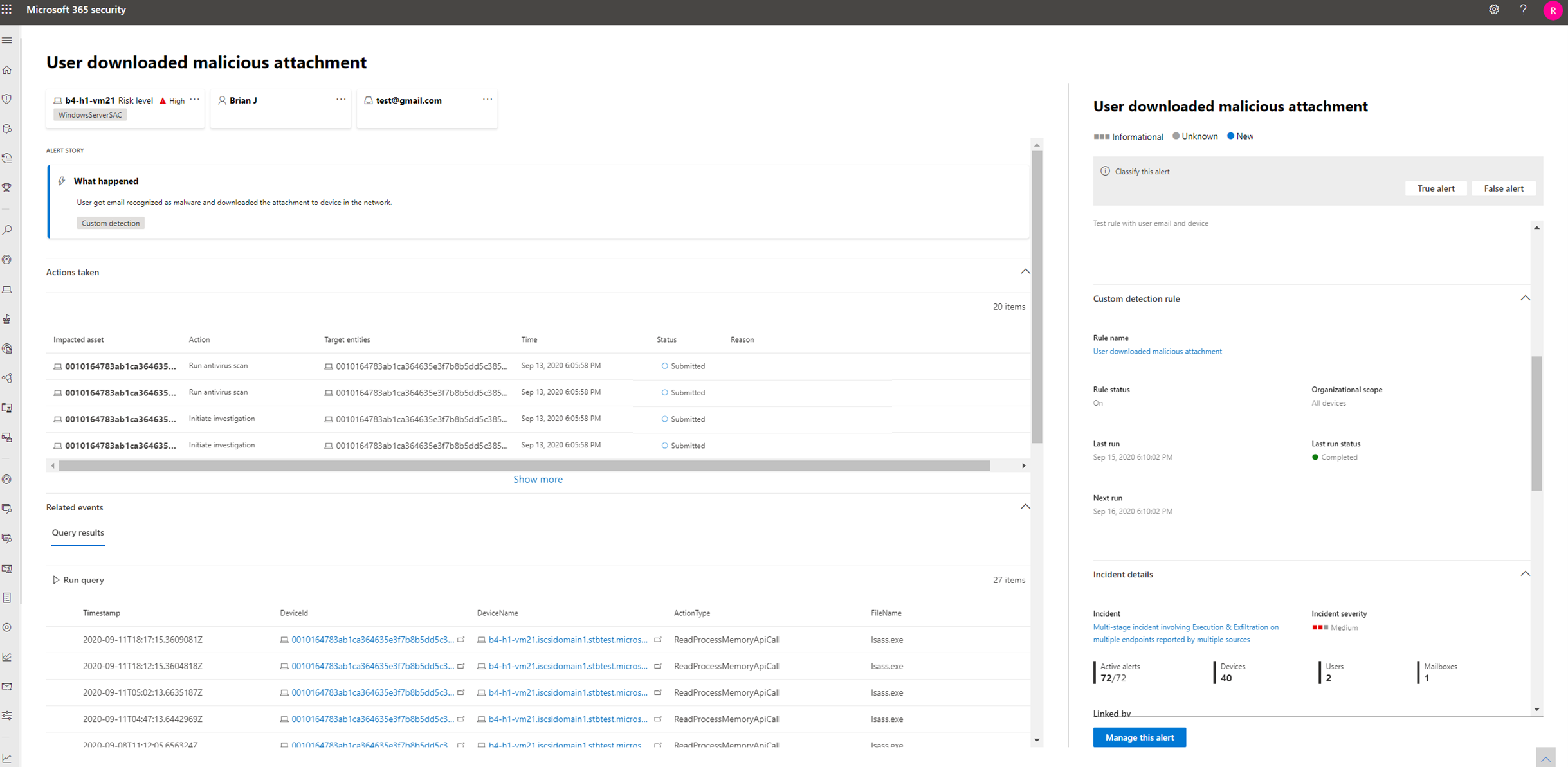
撰寫沒有 DeviceAlertEvents 的查詢
在 Microsoft Defender 全面偵測回應 架構中AlertInfo,會提供 和 AlertEvidence 數據表,以容納各種來源的警示隨附的各種資訊集。
若要取得您用來從 DeviceAlertEvents 適用於端點的 Microsoft Defender 架構中的數據表取得的相同警示資訊,AlertInfo請依 篩選數據表ServiceSource,然後將每個唯一標識符與AlertEvidence數據表聯結,以提供詳細的事件和實體資訊。
請參閱下列範例查詢:
AlertInfo
| where Timestamp > ago(7d)
| where ServiceSource == "Microsoft Defender for Endpoint"
| join AlertEvidence on AlertId
此查詢會產生比 DeviceAlertEvents 適用於端點的 Microsoft Defender 架構更多的數據行。 若要讓結果保持可管理,請使用 project 只取得您感興趣的數據行。 下列範例會在調查偵測到 PowerShell 活動時,投送您可能感興趣的數據行:
AlertInfo
| where Timestamp > ago(7d)
| where ServiceSource == "Microsoft Defender for Endpoint"
    and AttackTechniques has "powershell"
| join AlertEvidence on AlertId
| project Timestamp, Title, AlertId, DeviceName, FileName, ProcessCommandLine
如果您想要篩選警示中涉及的特定實體,可以藉由在 中指定實體類型 EntityType 和您想要篩選的值來進行篩選。 下列範例會尋找特定的 IP 位址:
AlertInfo
| where Title == "Insert_your_alert_title"
| join AlertEvidence on AlertId
| where EntityType == "Ip" and RemoteIP == "192.88.99.01"
另請參閱
提示
想要深入了解? 請到我們的技術社群中與 Microsoft 安全性社群互動: Microsoft Defender 全面偵測回應技術社群。