TextDecorations 類別
定義
重要
部分資訊涉及發行前產品,在發行之前可能會有大幅修改。 Microsoft 對此處提供的資訊,不做任何明確或隱含的瑕疵擔保。
提供一組靜態的預設文字裝飾。
public ref class TextDecorations abstract sealedpublic static class TextDecorationstype TextDecorations = classPublic Class TextDecorations- 繼承
-
TextDecorations
範例
以下範例中,劃線文字裝飾使用預設字型值。
// Use the default font values for the strikethrough text decoration.
private void SetDefaultStrikethrough()
{
    // Set the underline decoration directly to the text block.
    TextBlock1.TextDecorations = TextDecorations.Strikethrough;
}
' Use the default font values for the strikethrough text decoration.
Private Sub SetDefaultStrikethrough()
    ' Set the underline decoration directly to the text block.
    TextBlock1.TextDecorations = TextDecorations.Strikethrough
End Sub
<!-- Use the default font values for the strikethrough text decoration. -->
<TextBlock
  TextDecorations="Strikethrough"
  FontSize="36" >
  The quick red fox
</TextBlock>
你也可以為同一文字指定多個文字裝飾。 以下範例中,同一文字使用底線與劃線裝飾。
<!-- Use both an underline and overline text decoration for the same text. -->
<TextBlock TextDecorations="Underline, Overline">
  The quick red fox
</TextBlock>
你可以使用字串值「None」表示收藏中 TextDecorations 沒有文字裝飾。 以下範例中,集合 TextDecorations 設定為「無」。
<!-- Set the text decoration collection to None to indicate no decorations. -->
<TextBlock TextDecorations="None">
  The quick red fox
</TextBlock>
你可以用這個 Clear 方法移除所有文字裝飾。 以下範例中, TextDecorations 該集合已被清除。
TextBlock2.TextDecorations.Clear();
TextBlock2.TextDecorations.Clear()
預設情況下,會 Hyperlink 使用 TextDecoration 物件來顯示底線。 下列標記語法範例顯示一個 Hyperlink 包含和不包含底線的定義:
<!-- Hyperlink with default underline. -->
<Hyperlink NavigateUri="http://www.msn.com">
  MSN Home
</Hyperlink>

<Run Text=" | " />

<!-- Hyperlink with no underline. -->
<Hyperlink Name="myHyperlink" TextDecorations="None"
           MouseEnter="OnMouseEnter"
           MouseLeave="OnMouseLeave"
           NavigateUri="http://www.msn.com">
  My MSN
</Hyperlink>
TextDecoration 物件實例化起來會非常耗效能,尤其是當你有很多 Hyperlink 物件時。 欲了解更多資訊,請參閱 「如何指定:指定超連結是否被底線」。
備註
文字裝飾分為四種:底線、上線、劃線和底線。 以下範例展示了文本裝飾相對於文本的位置。
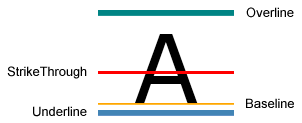 文字裝飾類型的範例
XAML 屬性使用方式
<object textDecorationsProperty="textDecorationType[,textDecorationType]"/>
XAML 值
textDecorationType文字裝飾的類型有:Baseline、OverLineStrikethrough或Underline。 允許多個裝飾,數值以逗號分隔。 你也可以選擇「無」來表示沒有文字裝飾。
屬性
| 名稱 | Description |
|---|---|
| Baseline |
指定一個基準。TextDecoration |
| OverLine |
指定一個上線 TextDecoration。 |
| Strikethrough |
指定劃線。TextDecoration |
| Underline |
指定底線 TextDecoration。 |
