動畫可以變更應用程式中文字的顯示和外觀。 下列範例使用不同類型的動畫來影響 TextBlock 控制項中的文字顯示。
範例
下列範例使用 DoubleAnimation 以動畫顯示文字區塊的寬度。 寬度值會在 10 秒的期間內從文字區塊的寬度變更為 0,然後回復寬度值並繼續進行。 這種動畫會建立擦去效果。
<TextBlock
  Name="MyWipedText"
  Margin="20"
  Width="480" Height="100" FontSize="48" FontWeight="Bold" Foreground="Maroon">
  This is wiped text

  <!-- Animates the text block's width. -->
  <TextBlock.Triggers>
    <EventTrigger RoutedEvent="TextBlock.Loaded">
      <BeginStoryboard>
        <Storyboard>
          <DoubleAnimation
            Storyboard.TargetName="MyWipedText"
            Storyboard.TargetProperty="(TextBlock.Width)"
            To="0.0" Duration="0:0:10"
            AutoReverse="True" RepeatBehavior="Forever" />
        </Storyboard>
      </BeginStoryboard>
    </EventTrigger>
  </TextBlock.Triggers>
</TextBlock>
下列範例使用 DoubleAnimation 以動畫顯示文字區塊的不透明度。 不透明度值會在 5 秒的期間內從 1.0 變更為 0,然後回復不透明度值並繼續進行。
<TextBlock
  Name="MyFadingText"
  Margin="20"
  Width="640" Height="100" FontSize="48" FontWeight="Bold" Foreground="Maroon">
  This is fading text

  <!-- Animates the text block's opacity. -->
  <TextBlock.Triggers>
    <EventTrigger RoutedEvent="TextBlock.Loaded">
      <BeginStoryboard>
        <Storyboard>
          <DoubleAnimation
            Storyboard.TargetName="MyFadingText"
            Storyboard.TargetProperty="(TextBlock.Opacity)"
            From="1.0" To="0.0" Duration="0:0:5"
            AutoReverse="True" RepeatBehavior="Forever" />
        </Storyboard>
      </BeginStoryboard>
    </EventTrigger>
  </TextBlock.Triggers>
</TextBlock>
下圖顯示 TextBlock 控制項在 1.00 所定義的 5 秒間隔期間將不透明度從 0.00 變更為 Duration 的效果。
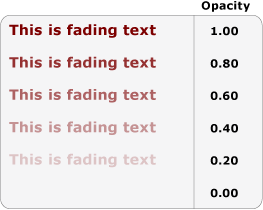
下列範例使用 ColorAnimation 以動畫顯示文字區塊的前景色彩。 前景色彩值會在 5 秒的期間內從某種色彩變更為第二種色彩,然後回復色彩值並繼續進行。
<TextBlock
  Name="MyChangingColorText"
  Margin="20"
  Width="640" Height="100" FontSize="48" FontWeight="Bold">
  This is changing color text
  <TextBlock.Foreground>
    <SolidColorBrush x:Name="MySolidColorBrush" Color="Maroon" />
  </TextBlock.Foreground>

  <!-- Animates the text block's color. -->
  <TextBlock.Triggers>
    <EventTrigger RoutedEvent="TextBlock.Loaded">
      <BeginStoryboard>
        <Storyboard>
          <ColorAnimation
            Storyboard.TargetName="MySolidColorBrush"
            Storyboard.TargetProperty="Color"
            From="DarkOrange" To="SteelBlue" Duration="0:0:5"
            AutoReverse="True" RepeatBehavior="Forever" />
        </Storyboard>
      </BeginStoryboard>
    </EventTrigger>
  </TextBlock.Triggers>
</TextBlock>
下列範例使用 DoubleAnimation 來旋轉文字區塊。 文字區塊會在 20 秒的期間內執行完整旋轉,然後繼續重複進行旋轉。
<TextBlock
  Name="MyRotatingText"
  Margin="20"
  Width="640" Height="100" FontSize="48" FontWeight="Bold" Foreground="Teal"
  >
  This is rotating text
  <TextBlock.RenderTransform>
    <RotateTransform x:Name="MyRotateTransform" Angle="0" CenterX="230" CenterY="25"/>
  </TextBlock.RenderTransform>

  <!-- Animates the text block's rotation. -->
  <TextBlock.Triggers>
    <EventTrigger RoutedEvent="TextBlock.Loaded">
      <BeginStoryboard>
        <Storyboard>
          <DoubleAnimation
            Storyboard.TargetName="MyRotateTransform"
            Storyboard.TargetProperty="(RotateTransform.Angle)"
            From="0.0" To="360" Duration="0:0:10"
            RepeatBehavior="Forever" />
        </Storyboard>
      </BeginStoryboard>
    </EventTrigger>
  </TextBlock.Triggers>
</TextBlock>
