該 ai.generate_response 函數使用生成式 AI 生成基於您自己的指令的自定義文本響應,只需一行代碼。
備註
概觀
此 ai.generate_response 函式適用於 Spark DataFrames。 您必須將現有輸入資料行的名稱指定為參數。 您也必須指定字串型提示,以及指出該提示是否應被視為格式字串的布林值。
此函式會傳回新的 DataFrame,其中包含儲存在輸出欄中的每個輸入文字列的自訂回應。
小提示
了解如何按照 OpenAI 的 gpt-4.1 提示提示技巧製作更有效的提示以獲得更高品質的回應。
語法
df.ai.generate_response(prompt="Instructions for a custom response based on all column values", output_col="response")
參數
| 名稱 | Description |
|---|---|
prompt 為必填項目 |
包含提示指示的 字串 。 這些指示會套用至自訂回應的輸入文字值。 |
is_prompt_template 可選 |
一個布林值,指示提示是格式字串還是字面量字串。 如果此參數設定為 True,則函數只會考慮格式字串中出現的每個直欄中的特定列值。 在此情況下,這些資料行名稱必須出現在大括弧之間,並忽略其他資料行。 如果此參數設為其預設值 False,則函數會將所有資料行值視為每一個輸入列的環境定義。 |
output_col 可選 |
包含新欄名稱的 字串 ,用於儲存每列輸入文字的自訂回應。 如果您未設定此參數,則會為輸出資料行產生預設名稱。 |
error_col 可選 |
字串,其中包含新欄位的名稱,以存儲處理每一行輸入文字時產生的任何 OpenAI 錯誤。 如果您未設定此參數,則會為錯誤資料行產生預設名稱。 如果輸入資料列沒有任何錯誤,則此資料列中的值會 null。 |
response_format 可選 |
一個字 串 或字 典 ,用來指定模型反應的預期結構。 字串值可設定為「text」以表示自由格式文字,或「json_object」以確保輸出為有效的 JSON 物件。 否則, type 欄位可設定為「json_schema」,並自訂 JSON 架構以強制執行特定的回應結構。 若未提供此參數,回應將以純文字回傳。 |
退貨
函式會傳回一個 Spark DataFrame,且該資料框架中新增一個欄位,此欄位包含了每個輸入文字列的提示自訂文字回應。
Example
# This code uses AI. Always review output for mistakes.

df = spark.createDataFrame([
        ("Scarves",),
        ("Snow pants",),
        ("Ski goggles",)
    ], ["product"])

responses = df.ai.generate_response(prompt="Write a short, punchy email subject line for a winter sale.", output_col="response")
display(responses)
此範例程式碼儲存格提供下列輸出:
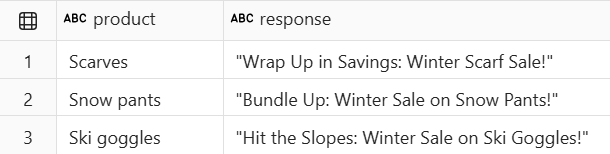

回應格式範例
以下範例展示了如何使用該 response_format 參數來指定不同的回應格式,包括純文字、JSON 物件以及自訂的 JSON 結構。
# This code uses AI. Always review output for mistakes.

df = spark.createDataFrame([
        ("Alex Rivera is a 24-year-old soccer midfielder from Barcelona who scored 12 goals last season.",),
        ("Jordan Smith, a 29-year-old basketball guard from Chicago, averaged 22 points per game.",),
        ("William O'Connor is a 22-year-old tennis player from Dublin who won 3 ATP titles this year.",)
    ], ["bio"])

# response_format : text
df = df.ai.generate_response(
        prompt="Create a player card with the player's details and a motivational quote",
        response_format="text",
        output_col="card_text"
)

# response_format : json object
df = df.ai.generate_response(
        prompt="Create a player card with the player's details and a motivational quote in JSON",
        response_format="json_object", # Requires "json" in the prompt
        output_col="card_json_object"
)

# response_format : specified json schema
df = df.ai.generate_response(
        prompt="Create a player card with the player's details and a motivational quote",
        response_format={
           "type": "json_schema",
            "json_schema": {
                "name": "player_card_schema",
                "strict": True,
                "schema": {
                    "type": "object",
                    "properties": {
                        "name": {"type": "string"},
                        "age": {"type": "integer"},
                        "sport": {"type": "string"},
                        "position": {"type": "string"},
                        "hometown": {"type": "string"},
                        "stats": {"type": "string", "description": "Key performance metrics or achievements"},
                        "motivational_quote": {"type": "string"},
                    },
                    "required": ["name", "age", "sport", "position", "hometown", "stats", "motivational_quote"],
                    "additionalProperties": False,
                },
            }
        },
        output_col="card_json_schema"
)

display(df)
此範例程式碼儲存格提供下列輸出:

相關內容
用 ai.analyze_sentiment檢測情緒。
使用 ai.classify 對文本進行分類。
用 ai.embed 產生向量嵌入。
使用 ai_extract 擷取實體。
用 ai.fix_grammar修復語法。
使用 ai.similarity 計算相似度。
使用 ai.summarize 總結文本。
使用 ai.translate 翻譯文本。
進一步了解 全套 AI 功能。
自訂 AI功能的配置。
我們錯過了您需要的功能嗎? 請在 Fabric Ideas 論壇上提出建議。