你可以使用 Spark 和 Azure Cosmos DB Spark 連接器,從 Azure Cosmos DB for NoSQL 帳號讀取、寫入和查詢資料。 此外,你也可以用這個連接器來建立和管理 Cosmos DB 容器。
使用 Spark 和連接器與使用 Spark 從 OneLake 中 Cosmos DB 的 Fabric 鏡像資料讀取資料不同,因為 Spark 是直接連接到 Cosmos DB 端點執行操作。
Cosmos DB Spark 連接器可用於支援反向 ETL 情境,需要以低延遲或高並發性從 Cosmos DB 端點提供資料。
備註
反向 ETL(擷取、轉換、載入)是指將分析系統中轉換後的分析資料重新載入營運系統(如 CRM、ERP、POS 或行銷工具)的過程,讓業務團隊能直接在日常使用的應用程式中根據洞察採取行動。
先決條件
現有的 Fabric 架構容量
- 如果您沒有 Fabric 容量, 請啟動 Fabric 試用版。
Fabric 中現有的 Cosmos DB 資料庫
- 如果您還沒有,請 在 Fabric 中建立新的 Cosmos DB 資料庫。
具有數據的現有容器
- 如果您還沒有範例 數據容器,建議您載入範例數據容器。
備註
本文使用內建的 Cosmos DB 範例,資料庫名稱為 CosmosSampleDatabase ,容器名稱為 SampleData。
取回 Cosmos DB 端點
首先,取得 Fabric 中 Cosmos DB 資料庫的端點。 此端點必須使用 Cosmos DB Spark 連接器連接。
開啟 Fabric 入口網站 (https://app.fabric.microsoft.com)。
流覽至您現有的 Cosmos DB 資料庫。
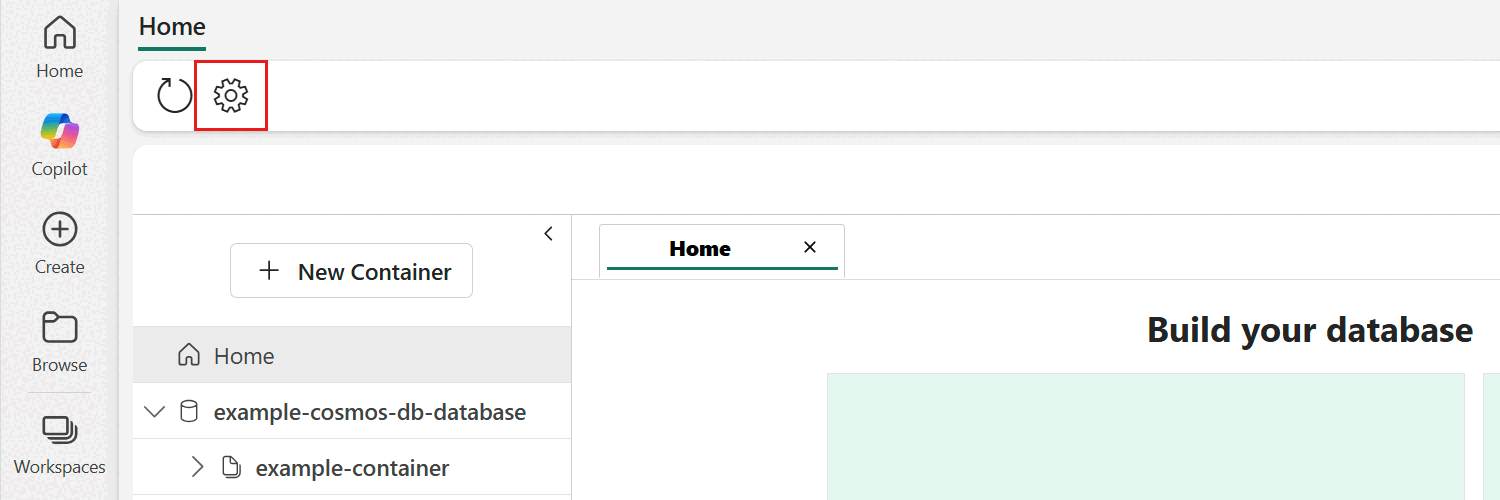
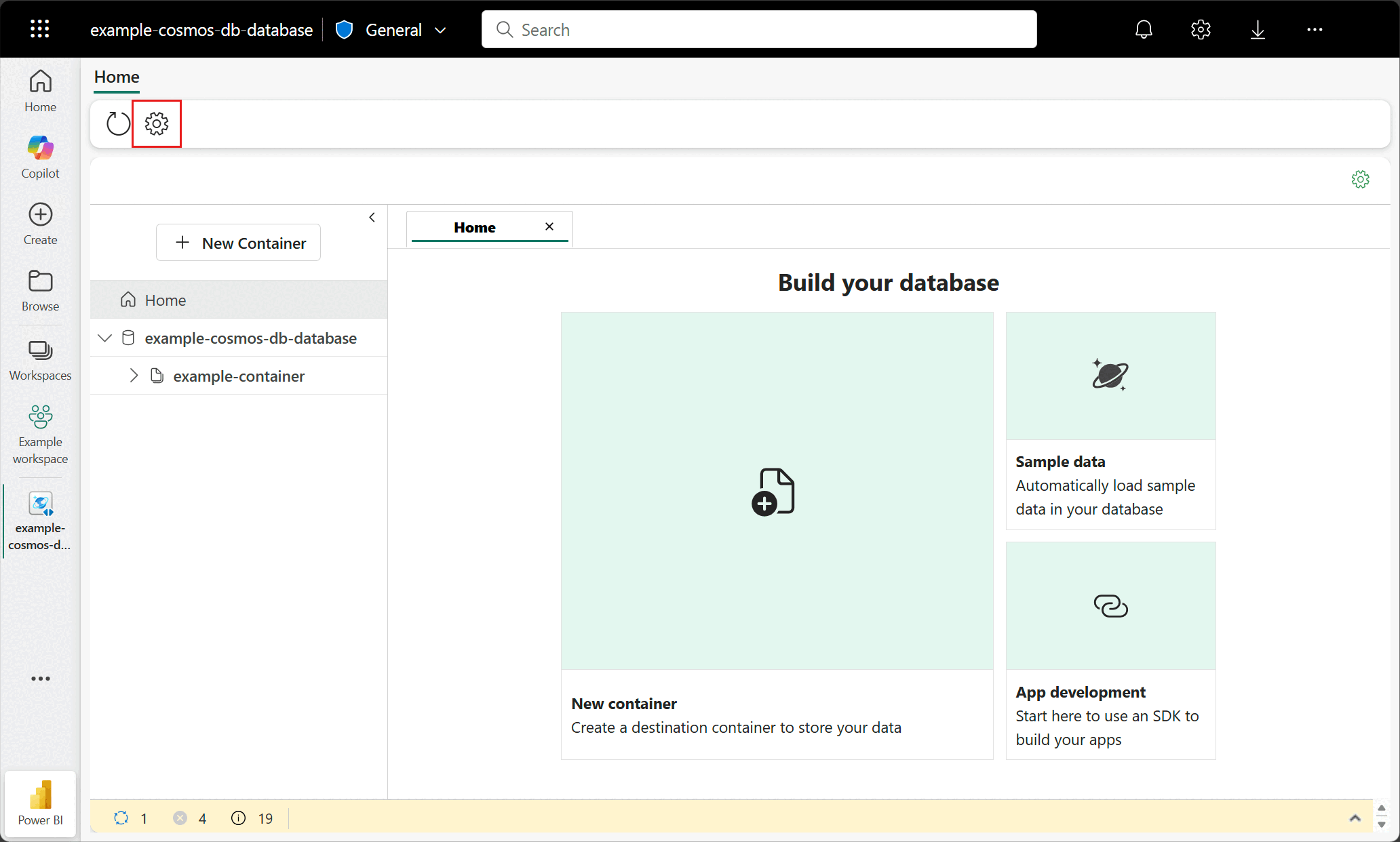
在資料庫選單列中選擇 設定 選項。
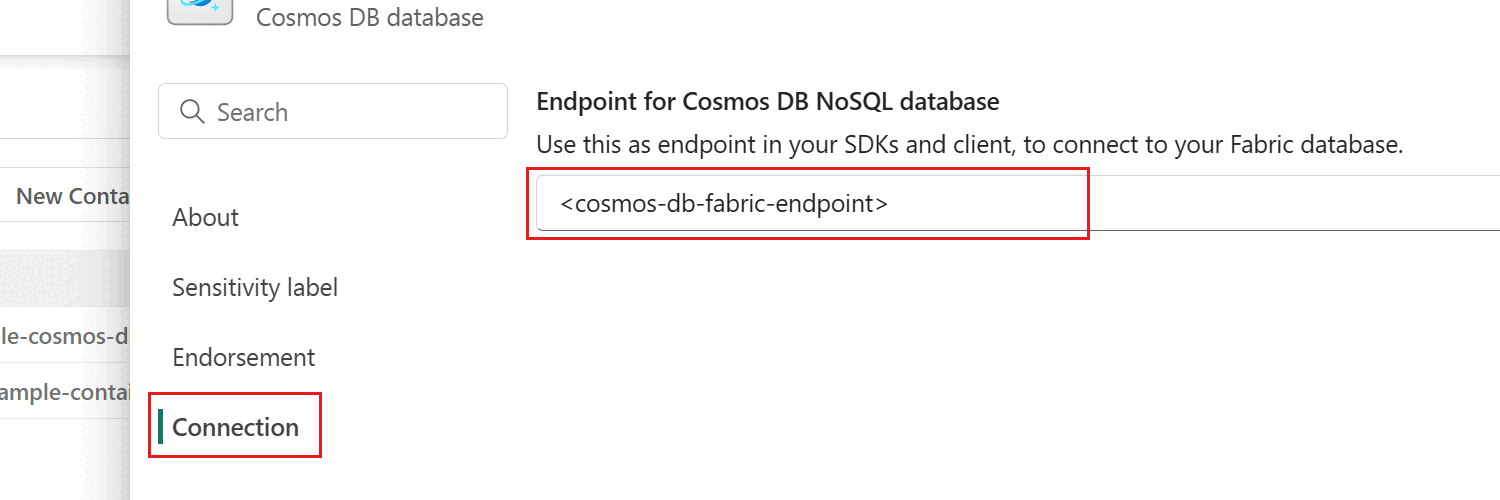
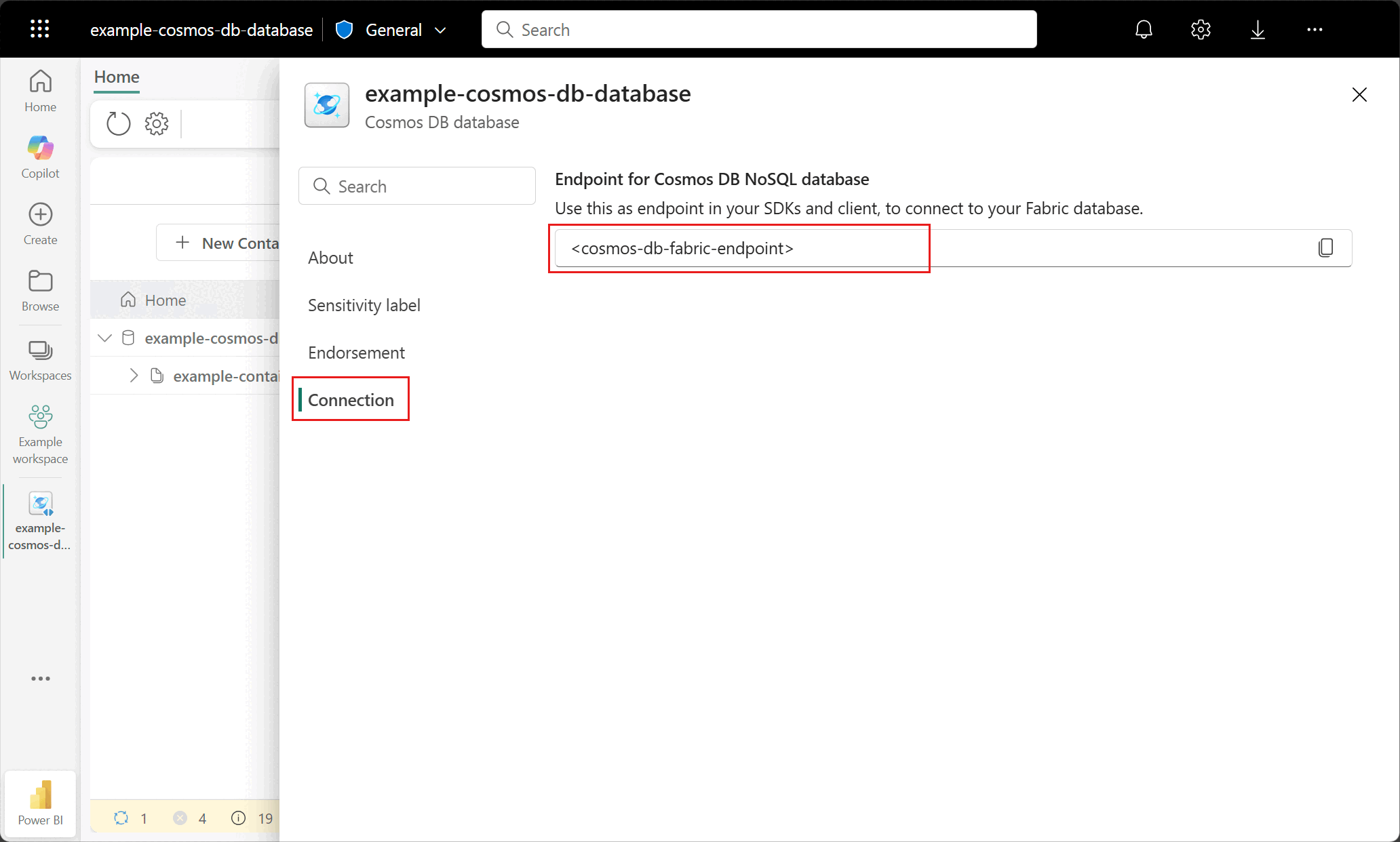
在設定對話框中,進入 連線 區塊。 接著,複製 Endpoint for Cosmos DB NoSQL 資料庫 欄位的值。 這個數值會在後面的步驟使用。
在 Fabric 筆記本中設定 Spark
要使用 Spark 連接器連接 Cosmos DB,你需要設定一個自訂的 Spark 環境。 本節將引導您如何建立自訂 Spark 環境並上傳 Cosmos DB Spark 連接器函式庫。
從 Maven 倉庫(群組 ID:com.azure.cosmos.spark)下載 Spark 3.5 的最新 Cosmos DB Spark 連接器函式庫檔案。
建立新的筆記本。
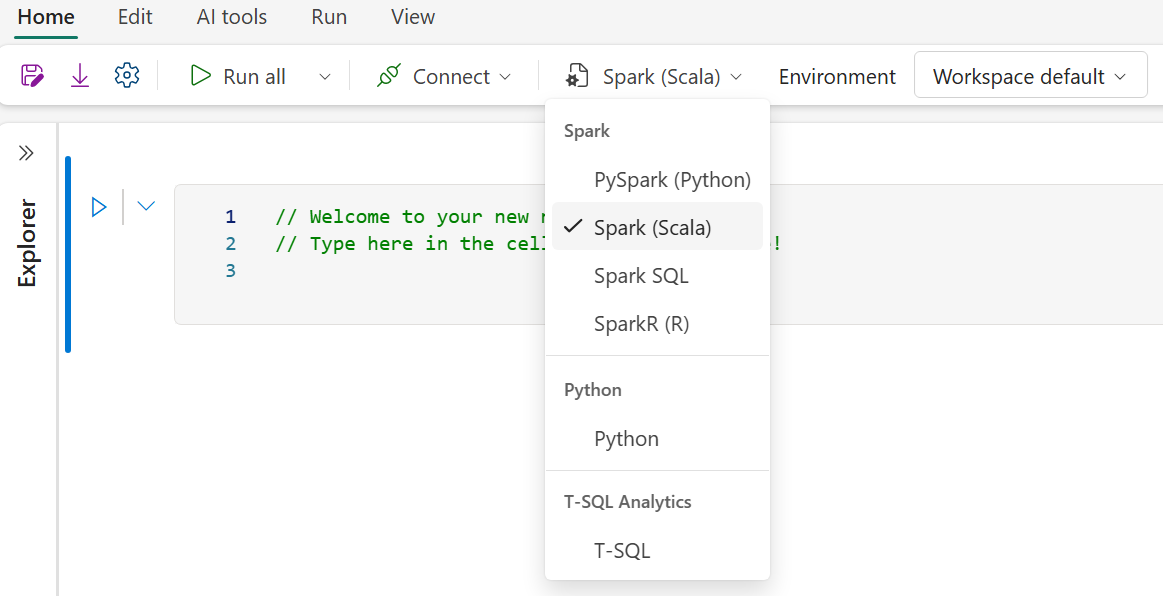
選擇 Spark(Scala)作為你想使用的語言。
選擇環境下拉選單。
檢查你的工作區設定,確保你使用的是執行環境 1.3(Spark 3.5)。
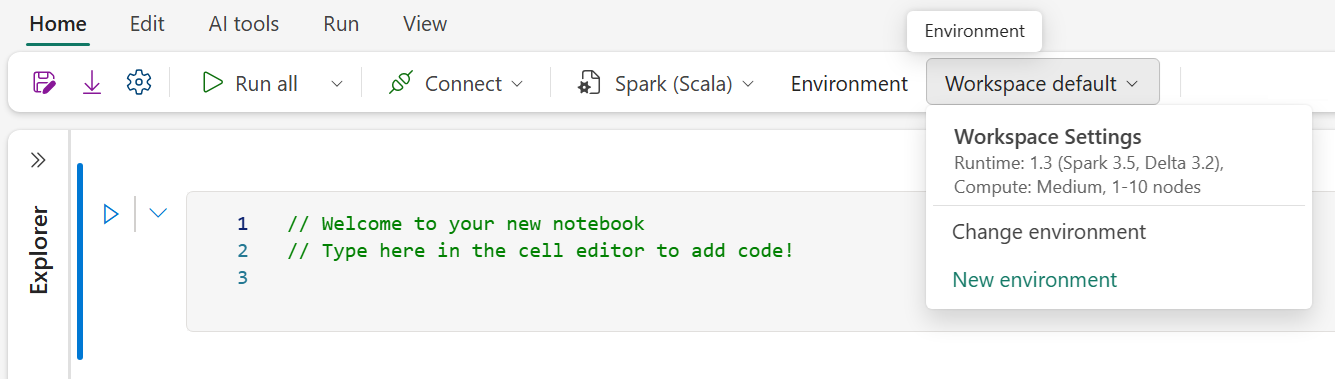
選擇新增環境。
請為這個新環境取個名字。
確保運行階段已設定為 Runtime 1.3(Spark 3.5)。
從左側面板的 Libraries 資料夾選擇自訂函式庫。
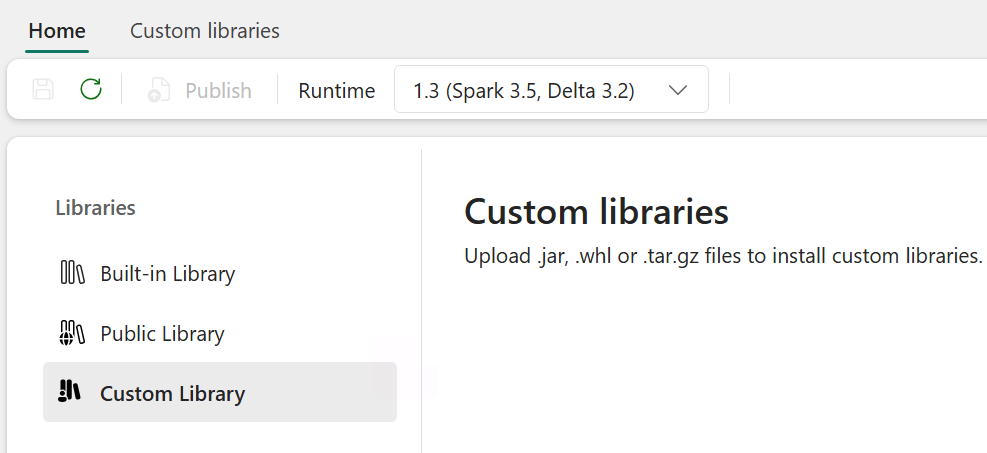
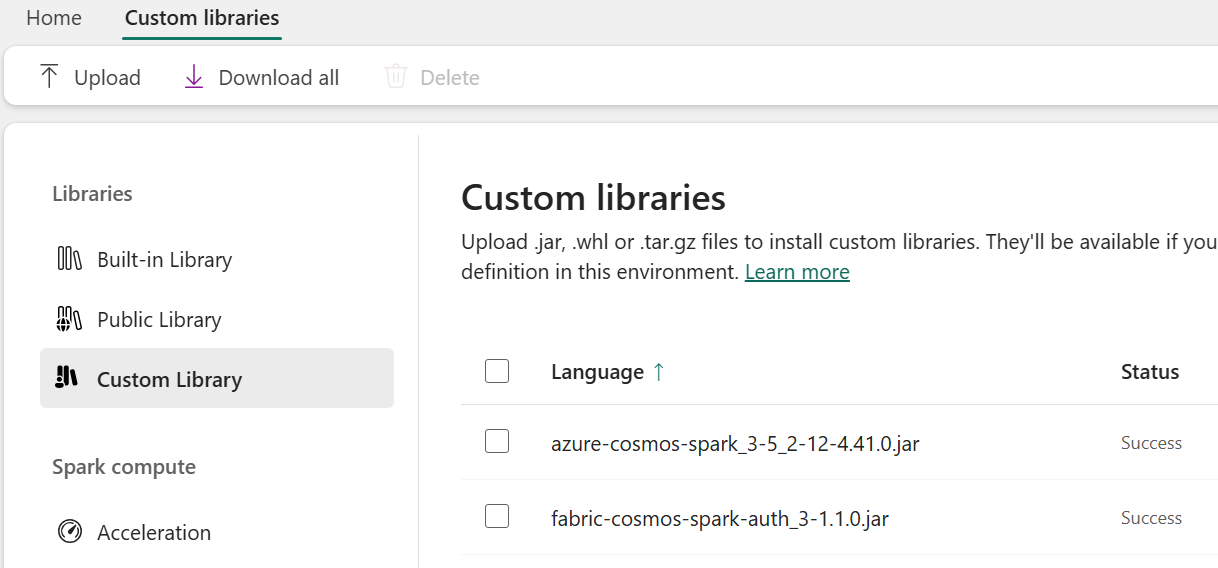
上傳你之前下載的兩個函式庫
.jar檔案。選取 [儲存]。
選擇 發佈,然後選擇 全部發佈,最後選擇 發佈。
一旦發佈,自訂函式庫應該會保持成功狀態。
回到筆記本,點擊環境下拉選單,選擇 變更環境,並選擇新建立環境名稱,選擇新設定的環境。
使用 Spark 進行連線
要在 Fabric 資料庫和容器中連接你的 Cosmos DB,請指定一個連接設定,以便在讀取和寫入容器時使用。
在筆記本中,貼上你之前保留的 Cosmos DB 端點、資料庫和容器名稱,然後為 NoSQL 帳號端點、資料庫名稱和容器名稱設定線上交易處理(OLTP)設定。
// User values for Cosmos DB
val ENDPOINT = "https://{YourAccountEndpoint....cosmos.fabric.microsoft.com:443/}"
val DATABASE = "{your-cosmos-artifact-name}"
val CONTAINER = "{your-container-name}"

// Set configuration settings
val config = Map(
      "spark.cosmos.accountendpoint" -> ENDPOINT,
      "spark.cosmos.database" -> DATABASE,
      "spark.cosmos.container" -> CONTAINER,
      // auth config options
      "spark.cosmos.accountDataResolverServiceName" -> "com.azure.cosmos.spark.fabric.FabricAccountDataResolver",
      "spark.cosmos.auth.type" -> "AccessToken",
      "spark.cosmos.useGatewayMode" -> "true",
      "spark.cosmos.auth.aad.audience" -> "https://cosmos.azure.com/"
)
從容器查詢資料
將 OLTP 資料載入 DataFrame 以執行一些基本的 Spark 操作。
用
spark.read來將 OLTP 資料載入 DataFrame 物件。 請使用前一步建立的設定。 此外,將spark.cosmos.read.inferSchema.enabled設為true,以允許 Spark 連接器透過對現有項目取樣來推斷結構描述。// Read Cosmos DB container into a dataframe val df = spark.read.format("cosmos.oltp") .options(config) .option("spark.cosmos.read.inferSchema.enabled", "true") .load()在 DataFrame 中顯示前五列資料。
// Show the first 5 rows of the dataframe
df.show(5)
備註
你之前建立的 SampleData 容器包含兩個不同的實體,分別是 產品 和 審查。 inferSchema 選項會偵測 Cosmos DB 容器內的兩個不同結構並將它們合併。
顯示載入 DataFrame 的資料結構,透過使用
printSchema並確認結構與範例文件結構相符。// Render schema df.printSchema()結果應該與以下範例相似:
    root
     |-- inventory: integer (nullable = true)
     |-- name: string (nullable = true)
     |-- priceHistory: array (nullable = true)
     |    |-- element: struct (containsNull = true)
     |    |    |-- date: string (nullable = true)
     |    |    |-- price: double (nullable = true)
     |-- stars: integer (nullable = true)
     |-- description: string (nullable = true)
     |-- currentPrice: double (nullable = true)
     |-- reviewDate: string (nullable = true)
     |-- countryOfOrigin: string (nullable = true)
     |-- id: string (nullable = false)
     |-- categoryName: string (nullable = true)
     |-- productId: string (nullable = true)
     |-- firstAvailable: string (nullable = true)
     |-- userName: string (nullable = true)
     |-- docType: string (nullable = true)
這兩個結構及其資料可以透過容器中的 docType 屬性進行過濾。 使用
where函式來篩選僅包含商品的 DataFrame。// Render filtered rows by specific document type val productsDF = df.where("docType = 'product'") productsDF.show(5)顯示 篩選產品 實體的結構圖。
// Render schema
productsDF.printSchema()
利用函
filter式過濾 DataFrame,只顯示特定類別內的產品。// Render filtered rows by specific document type and categoryName val filteredDF = df .where("docType = 'product'") .filter($"categoryName" === "Computers, Laptops") filteredDF.show(10)
使用 Spark SQL 查詢 Microsoft Fabric 中的 Cosmos DB
設定目錄 API,讓你能透過 Spark 查詢,使用先前定義的端點值,在 Fabric 中參考和管理 Cosmos DB 資源。
spark.conf.set("spark.sql.catalog.cosmosCatalog", "com.azure.cosmos.spark.CosmosCatalog")
spark.conf.set("spark.sql.catalog.cosmosCatalog.spark.cosmos.accountEndpoint", ENDPOINT)
spark.conf.set("spark.sql.catalog.cosmosCatalog.spark.cosmos.auth.type", "AccessToken")
spark.conf.set("spark.sql.catalog.cosmosCatalog.spark.cosmos.useGatewayMode", "true")
spark.conf.set("spark.sql.catalog.cosmosCatalog.spark.cosmos.accountDataResolverServiceName", "com.azure.cosmos.spark.fabric.FabricAccountDataResolver")
用目錄資訊和 SQL 查詢字串,搭配 Spark SQL 函式來查詢資料。
 // Show results of query
  val queryDF = spark.sql(
  " SELECT " +
  "  categoryName, " +
  "  productId, " +
  "  docType, " +
  "  name, " +
  "  currentPrice, " +
  "  stars " +
  " FROM cosmosCatalog." + DATABASE + "." + CONTAINER
  )
  queryDF.show(10)
結果顯示,個別文件中缺少的屬性會以 NULL 值回傳,並應類似以下範例:
+------------------+--------------------+-------+--------------------+------------+-----+
|      categoryName|           productId|docType|                name|currentPrice|stars|
+------------------+--------------------+-------+--------------------+------------+-----+
|Computers, Laptops|77be013f-4036-431...|product|TechCorp SwiftEdg...|     2655.33| NULL|
|Computers, Laptops|77be013f-4036-431...| review|                NULL|        NULL|    4|
|Computers, Laptops|77be013f-4036-431...| review|                NULL|        NULL|    1|
|Computers, Laptops|d4df3f4e-5a90-41e...|product|AeroTech VortexBo...|     2497.71| NULL|
|Computers, Laptops|d4df3f4e-5a90-41e...| review|                NULL|        NULL|    1|
|Computers, Laptops|d4df3f4e-5a90-41e...| review|                NULL|        NULL|    2|
|Computers, Laptops|d4df3f4e-5a90-41e...| review|                NULL|        NULL|    1|
|Computers, Laptops|d4df3f4e-5a90-41e...| review|                NULL|        NULL|    2|
|Computers, Laptops|d4df3f4e-5a90-41e...| review|                NULL|        NULL|    5|
|Computers, Laptops|e8b100f0-166d-43d...|product|NovaTech EdgeBook...|     1387.45| NULL|
+------------------+--------------------+-------+--------------------+------------+-----+
這個範例展示了如何在 Cosmos DB 中儲存的 JSON 文件中,使用嵌入陣列來操作。 首先,查詢容器,然後使用運算子
explode將陣列元素展開priceHistory成列,然後計算每個產品在產品歷史中儲存的最低價格。// Retrieve the product data from the SampleData container val productPriceMinDF = spark.sql( "SELECT " + " productId, " + " categoryName, " + " name, " + " currentPrice, " + " priceHistory " + "FROM cosmosCatalog." + DATABASE + "." + CONTAINER + " " + "WHERE " + CONTAINER + ".docType = 'product'" ) // Prepare an exploded result set containing one row for every member of the priceHistory array val explodedDF = productPriceMinDF .withColumn("priceHistory", explode(col("priceHistory"))) .withColumn("priceDate", col("priceHistory").getField("date")) .withColumn("newPrice", col("priceHistory").getField("price")) // Aggregate just the lowest price ever recorded in the priceHistory val lowestPriceDF = explodedDF .filter(col("docType") === "product") .groupBy("productId", "categoryName", "name") .agg(min("newPrice").as("lowestPrice")) // Show 10 rows of the result data lowestPriceDF.show(10)結果應該是這樣。
   +--------------------+--------------------+--------------------+-----------+
   |           productId|        categoryName|                name|lowestPrice|
   +--------------------+--------------------+--------------------+-----------+
   |5d81221f-79ad-4ae...|Accessories, High...|PulseCharge Pro X120|      79.99|
   |9173595c-2b5c-488...|Accessories, Desi...| Elevate ProStand X2|     117.16|
   |a5d1be8f-ef18-484...|Computers, Gaming...|VoltStream Enigma...|     1799.0|
   |c9e3a6ce-432f-496...|Peripherals, Keyb...|HyperKey Pro X77 ...|     117.12|
   |f786eb9e-de01-45f...|    Devices, Tablets|TechVerse TabPro X12|     469.93|
   |59f21059-e9d4-492...|Peripherals, Moni...|GenericGenericPix...|     309.77|
   |074d2d7a-933e-464...|Devices, Smartwat...|  PulseSync Orion X7|     170.43|
   |dba39ca4-f94a-4b6...|Accessories, Desi...|Elevate ProStand ...|      129.0|
   |4775c430-1470-401...|Peripherals, Micr...|EchoStream Pro X7...|     119.65|
   |459a191a-21d1-42f...|Computers, Workst...|VertexPro Ultima ...|     3750.4|
   +--------------------+--------------------+--------------------+-----------+
使用 Cosmos DB 實作 Spark 的反向 ETL
Cosmos DB 因其架構特性,是分析工作負載中卓越的服務層。 以下範例展示了如何對分析資料執行反向 ETL 並使用 Cosmos DB 來提供資料。
用 Spark 在 Fabric 容器中建立 Cosmos 資料庫
使用 Spark Catalog API 和
CREATE TABLE IF NOT EXISTS建立MinPricePerProduct容器。 將分割鍵路徑設為/id,並將自動擴展吞吐量設定為最小1000的 RU/s,因為容器預期會保持小型。// Create a MinPricePerProduct container by using the Catalog API val NEW_CONTAINER = "MinPricePerProduct" spark.sql( "CREATE TABLE IF NOT EXISTS cosmosCatalog." + DATABASE + "." + NEW_CONTAINER + " " + "USING cosmos.oltp " + "TBLPROPERTIES(partitionKeyPath = '/id', autoScaleMaxThroughput = '1000')" )
用 Spark 在 Fabric 容器中寫入 Cosmos 資料庫
若要直接在 Fabric 容器中寫入 Cosmos 資料庫,您需要:
- 一個格式正確的資料框架,包含容器分割鍵與
id欄位。 - 一個正確指定、針對你想寫入的容器的設定。
Cosmos DB 中的所有文件都需要 id 屬性,這也是容器所選的
Products分割鍵。 在 DataFrame 上建立idProductsDF一個欄位,值為productId。// Create an id column and copy productId value into it val ProductsDF = lowestPriceDF.withColumn("id", col("productId")) ProductsDF.show(10)為您要寫入的
MinPricePerProduct容器建立一個新的配置。 將spark.cosmos.write.strategy設為ItemOverwrite,表示任何具有相同 ID 與分割鍵值的現有文件都會被覆寫。// Configure the Cosmos DB connection information for the database and the new container. val configWrite = Map( "spark.cosmos.accountendpoint" -> ENDPOINT, "spark.cosmos.database" -> DATABASE, "spark.cosmos.container" -> NEW_CONTAINER, "spark.cosmos.write.strategy" -> "ItemOverwrite", // auth config options "spark.cosmos.accountDataResolverServiceName" -> "com.azure.cosmos.spark.fabric.FabricAccountDataResolver", "spark.cosmos.auth.type" -> "AccessToken", "spark.cosmos.useGatewayMode" -> "true", "spark.cosmos.auth.aad.audience" -> "https://cosmos.azure.com/" )把 DataFrame 寫入容器。
ProductsDF.write
  .format("cosmos.oltp")
  .options(configWrite)
  .mode("APPEND")
  .save()
查詢容器以驗證它現在包含正確的資料。
// Test that the write operation worked
val queryString = s"SELECT * FROM cosmosCatalog.$DATABASE.$NEW_CONTAINER"
val queryDF = spark.sql(queryString)
queryDF.show(10)
結果應該與以下範例相似:
   +--------------------+--------------------+-----------+--------------------+--------------------+
   |                name|        categoryName|lowestPrice|                  id|           productId|
   +--------------------+--------------------+-----------+--------------------+--------------------+
   |PulseCharge Pro X120|Accessories, High...|      79.99|5d81221f-79ad-4ae...|5d81221f-79ad-4ae...|
   | Elevate ProStand X2|Accessories, Desi...|     117.16|9173595c-2b5c-488...|9173595c-2b5c-488...|
   |VoltStream Enigma...|Computers, Gaming...|     1799.0|a5d1be8f-ef18-484...|a5d1be8f-ef18-484...|
   |HyperKey Pro X77 ...|Peripherals, Keyb...|     117.12|c9e3a6ce-432f-496...|c9e3a6ce-432f-496...|
   |TechVerse TabPro X12|    Devices, Tablets|     469.93|f786eb9e-de01-45f...|f786eb9e-de01-45f...|
   |GenericGenericPix...|Peripherals, Moni...|     309.77|59f21059-e9d4-492...|59f21059-e9d4-492...|
   |  PulseSync Orion X7|Devices, Smartwat...|     170.43|074d2d7a-933e-464...|074d2d7a-933e-464...|
   |Elevate ProStand ...|Accessories, Desi...|      129.0|dba39ca4-f94a-4b6...|dba39ca4-f94a-4b6...|
   |EchoStream Pro X7...|Peripherals, Micr...|     119.65|4775c430-1470-401...|4775c430-1470-401...|
   |VertexPro Ultima ...|Computers, Workst...|     3750.4|459a191a-21d1-42f...|459a191a-21d1-42f...|
   +--------------------+--------------------+-----------+--------------------+--------------------+