適用於:✅Microsoft Fabric 中的 SQL 資料庫
Important
這項功能目前處於預覽階段。
Fabric 技能是可重複使用的指令,幫助 AI 編碼助理理解 Fabric 的工作負載、API、查詢模式及營運最佳實務。 SQL 資料庫技能提供針對特定任務的指導,協助你從代理式命令列或程式設計環境中操作 Fabric 中的 SQL 資料庫。
本文說明如何安裝 Fabric 技能套件、將助理連接到 Fabric 環境,以及使用 SQL 資料庫的撰寫、使用與操作技能。 技能會引導助理;但你的身分、權限、工具和 Fabric 安全性控制仍會規範每一項操作。
先決條件
- 存取 Fabric 工作區並執行您要求的操作的權限。
-
AI 編碼工具,例如 GitHub Copilot CLI、Claude Code、Visual Studio Code、游標、Windsurf 或其他
AGENTS.md相容工具。 -
Node.js:獨立式 GitHub Copilot CLI 需要 Node.js,該 CLI 會以 npm 套件形式安裝(
npm install -g @github/copilot)。 完整設定步驟請參見 Set GitHub Copilot CLI。 -
PowerShell 7:GitHub Copilot CLI 必須使用。 使用
pwsh --version進行驗證。 - Git:對於不使用外掛市集的工具,必須使用 Git 來複製技能存放庫。
-
Azure CLI:大多數 Fabric 操作都需要 Azure 認證。 安裝後,請用
az login.登入。
安裝 Microsoft Fabric 技能
開啟 GitHub Copilot CLI 或 Claude Code。 GitHub Copilot CLI 和 Claude Code 都使用相同的外掛市場工作流程。
在 GitHub Copilot CLI 中新增公開市集:
/plugin marketplace add microsoft/skills-for-fabric新增 Skills for Fabric 市集:
/plugin marketplace add microsoft/skills-for-fabric要查看市場上所有可用的插件和技能,請輸入:
/plugin marketplace browse fabric-collection。安裝 Fabric 系列。
/plugin install fabric-skills@fabric-collection為了縮小範圍,安裝一個聚焦的套件,例如
fabric-operations,其中包含以下技能:sqldb-cli/plugin install fabric-operations@fabric-collection退出並重新啟動你的工具來載入技能:
/quit確認安裝:
/skills
SQL 資料庫技能
以下技能與 Fabric 中的 SQL 資料庫相關:
| Skill | 用它來做 | 意圖範例 |
|---|---|---|
sqldb-authoring-cli |
建立與修改資料庫物件或資料。 | 建立資料表、載入資料列、新增索引,或部署儲存程序。 |
sqldb-consumption-cli |
發現結構並執行唯讀查詢。 | 列出表格、檢查欄位、總結近期訂單,或解釋結果集。 |
sqldb-operations-cli |
調查健康、績效及營運問題。 | 分析緩慢查詢、識別阻塞,或檢視資料庫資源使用情況。 |
欲了解所有 Fabric 工作負載中可用的完整技能目錄,請參閱 GitHub: Skills for Fabric。
如何在 Fabric 中使用 SQL 資料庫的技能
在你的專案或工作資料夾中開啟終端機。
輸入
Copilot並選擇Enter。
GitHub Copilot 正式啟動。
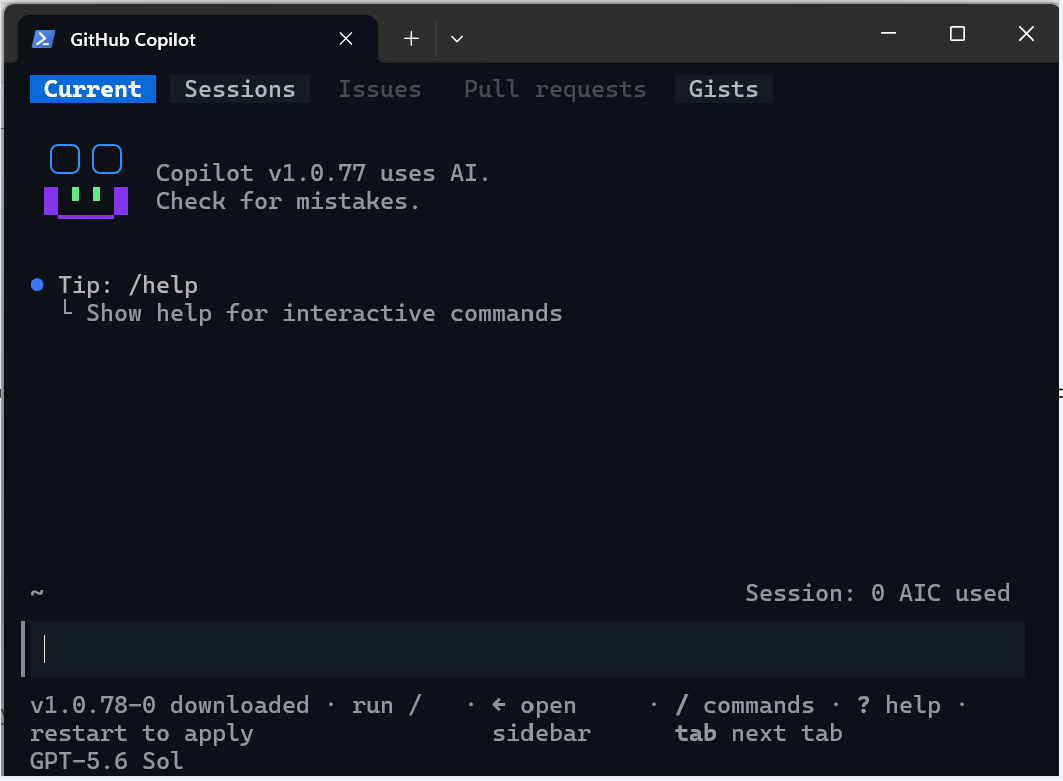
要用有權限存取目標 Fabric 工作空間的 Microsoft 身份驗證,請輸入
az login並遵循步驟。
建立 SQL 資料庫
當任務改變資料庫狀態時,使用這個 sqldb-authoring-cli 技能。 要使用 GitHub Copilot 撰寫或更新資料庫物件,務必包含目標工作空間、資料庫、環境、物件、預期架構、約束條件,以及助理是只產生腳本還是在你審查後執行。 對於架構變更或資料變更,你可以請求 TRY...CATCH 處理錯誤並執行交易回滾。
Tip
先以唯讀請求產生 T-SQL 語句,然後在執行前檢視任何產生的 T-SQL 語句。
例如,這些範例提示可以用來建立並載入包含範例資料的表格。
In the Sales SQL database, create a dbo.CustomerFeedback table with an identity key,
customer ID, feedback text, sentiment, created date, and a foreign key to
dbo.Customer.CustomerID. All columns should be nullable. The create date should
be populated by a default. Generate the T-SQL for review; don't execute it.
Generate 100 sample data rows for the dbo.CustomerFeedback as a single
INSERT statement, referencing rows in the dbo.Customer table.
Generate a TRY...CATCH structure to handle any errors and rollback.
Do not execute the script, let me review.
探索與查詢資料
使用此 sqldb-consumption-cli 技能進行唯讀發現與分析。 請助理先檢查元資料,限定物件名稱,限制結果大小,並解釋假設。
例如,使用 Copilot 查詢元資料或資料表資料:
List the user tables and views in the Sales SQL database and describe their relationships.
Don't modify any objects.
Find the top 10 products by revenue in the last 30 days.
Show the T-SQL and summarize the result.
Inspect the available columns before answering:
Which customers have not placed an order in the last 90 days?
調查資料庫操作
利用這項技能 sqldb-operations-cli 來調查效能與可靠性。 提供時間範圍、觀察到的症狀、受影響的工作量,以及助理是否能收集診斷資料。
例如,以下查詢會調查目前或過去的效能問題,或調整查詢效能。
Investigate why the nightly order-processing query slowed down between 01:00 and 02:00 UTC.
Start with read-only diagnostics and rank the likely causes.
Check for blocking sessions and long-running requests.
Explain the evidence before recommending a mitigation.
Review this execution plan and suggest indexes only when the expected benefit and write overhead are clear.
檢視並執行 T-SQL 查詢的檢查清單
- 確認助理已選擇指定的 SQL 資料庫技能。
- 確認工作區名稱、資料庫、結構名稱和物件名稱。
- 檢查產生的 T-SQL 是否涉及破壞性作業、交易行為及資料範圍。
- 在著手撰寫變更內容前,先要求提供影響摘要和回滾方案。 對於結構描述變更,請準備回復或復原用的 T-SQL 指令碼。
- 只有在計畫符合你的意圖後才執行。
- 用一個獨立的唯讀查詢來驗證結果。
安全性與負責任的使用
- 這些技能不會繞過 Microsoft Entra 認證、Fabric 權限、SQL 權限或組織政策。
- 務必使用最低權限身份,並將開發、測試與生產目標分開。
- 不要在提示或專案檔案中放置秘密、存取權杖或敏感資料。
- 將產生的 SQL 視為提案程式碼。 像檢視任何其他資料庫變更一樣檢視即可。
- 應優先進行僅供讀取的探索,再進行編寫或修復。
欲了解更多資訊,請參閱 Copilot 在 Fabric 中隱私、安全與負責任的 AI 使用。