Fabric Maps 可藉由連接到透過 Eventstream 擷取而持續更新的 eventhouse 資料集,來視覺化 即時地理空間資料。
與使用儲存在 Lakehouse 檔案的靜態情境不同,本教學展示了一種 串流式、事件驅動架構 ,內容包括:
- 事件會被匯入 Eventhouse 中
- 資料是使用 Kusto 查詢語言(KQL) 查詢的
- 地圖會隨著新資料的到來動態刷新
本教學重點在於利用
在這個教學中,你將學習如何使用 Eventstream、Eventhouse 和 KQL 在 Microsoft Fabric 中建立並自動化即時地理空間解決方案。
使用 Fabric REST API,您可以:
- 建立活動屋與 KQL 資料庫
- 建立一個事件串流來將資料匯入事件屋
- 建立含有內嵌定義且參照 Eventhouse 資料的對應表
- 設定一個具有定期更新功能的地圖層,以實現即時更新
- 預先加入初始事件,讓地圖立即顯示資料
若想模擬連續串流並近乎即時地觀察地圖更新,請先完成此教學,然後繼續後續的教學:使用 REST API 與 Python 模擬地圖的即時資料擷取,該課程直接建立在你在此建立的事件屋、事件串流、KQL 函式與地圖之上。
情境概述:即時資產追蹤
本教學以即時資產追蹤情境為基礎,類似於原始 Fabric Maps 教學 教學:使用 Fabric Maps 建立即時工作訂單路由中所使用的車隊追蹤情境。
在此情節中:
- 車輛會定期發送位置更新
- 地點事件會被納入活動中心
- 地圖會顯示最新的車輛位置,並隨著新事件自動更新
此模式代表常見的即時操作應用,例如:
- 車隊追蹤
- 工作訂單調度
- 資產與設備監控
Microsoft Fabric 使用 Eventstream 與 Eventhouse,近乎即時地擷取、處理與分析串流資料,使得直接在地圖上視覺化即時營運資料成為可能。
本教學遵循Fabric常見的自動化模式:建立基礎設施→導入串流→驗證擷取→渲染映射。
Prerequisites
- Python 3.10 或更新版本
- Azure CLI
- Fabric 工作區 ID
- 呼叫 Fabric REST API 的權限,例如:
Item.ReadWrite.All
Note
委派範圍,例如 Item.ReadWrite.All 透過其 工作區角色授予登入身份。 在執行腳本前,確保你用 az login 時的身份在目標Fabric工作區被分配為 Contributor、Member,或 Admin 角色,然後再執行腳本。
驗證
這個教學使用 DefaultAzureCredential,可以利用多個本地/開發憑證來源來驗證。 對於首次閱讀者,最簡單的方法是使用 Azure CLI 登入。
本地認證(建議首次使用)
- 開啟終端機。
- 跑步:
az login
DefaultAzureCredential 您可以使用您已登入的身份來取得以下存取權杖:
- Fabric REST API(資源:
https://api.fabric.microsoft.com/.default) - 針對 eventhouse 的 Kusto(KQL)資料平面查詢(資源:
https://api.kusto.windows.net/.default) - Power BI / Fabric 用於長期操作輪詢的 REST 端點(資源:
https://analysis.windows.net/powerbi/api/.default)
Tip
關於 https://api.fabric.microsoft.com/.default,此數值為 令牌請求範圍,而非可直接呼叫的 URL。 它告訴 Microsoft Entra,存取權杖應該是針對 Microsoft Fabric REST API 發出的,並且應包含 所有已授權 給已認證身份的 Fabric 權限(例如 Item.ReadWrite.All 或 Workspace.ReadWrite.All)。
該 .default 範圍僅在令牌取得時使用,且絕不會傳送至 Fabric REST API 端點。
欲了解更多關於 Microsoft 身份平台中範圍的運作方式 .default ,請參閱 Microsoft 身份平台的範圍與權限。
建議登入 Microsoft Fabric
在執行這個教學之前,我們建議至少登入一次 Microsoft Fabric:
https://app.fabric.microsoft.com
登入可確保您的 Fabric 身份、工作空間角色成員資格及容量分配都已完整配置,然後再以程式方式取得 Microsoft Entra 存取權杖。
此步驟在以下情況特別有幫助:
- 你是 Microsoft Fabric 的新手
- 這個工作空間是最近才建立的
- 你的角色分配是最近新增的
Note
本教學使用 Microsoft Entra ID 進行認證。DefaultAzureCredential Fabric REST API 不需要瀏覽器會話,但登入 Fabric 網頁體驗可避免因角色配置延遲而引發的首次執行授權問題。
建立種子資料檔(初始地圖資料)
為了確保地圖在配置後立即顯示資料,腳本會向事件串流傳送一小組種子事件。
- 在和你Python腳本相同的目錄裡建立一個新檔案:vehicle_locations_seed.csv
- 請貼上以下內容:
VehicleId,Latitude,Longitude,EventTime
V-001,47.6101,-122.3344,2026-01-01T10:00:00Z
V-002,47.6150,-122.3200,2026-01-01T10:00:00Z
V-003,47.6205,-122.3493,2026-01-01T10:00:00Z
V-004,47.6050,-122.3300,2026-01-01T10:00:00Z
步驟 1—建立新的 Python 專案檔案
在這個步驟中,你會建立一個空白的 Python 檔案,並逐節建立。
建立一個新檔案,名稱為:
create_realtime_map.py
在編輯器裡打開檔案。
步驟 2—安裝所需的函式庫並新增必要的匯入語句
在這個步驟中,安裝相依性並添加腳本所需的匯入。
安裝所需的函式庫
在你剛打開的終端機視窗中,執行以下指令:
pip install httpx azure-identity azure-eventhub
每個圖書館的用途
- httpx:向 Fabric REST API 發送 HTTP 請求。
-
azure-identity:提供
DefaultAzureCredential用於Microsoft Entra認證。 - azure-eventhub:將種子事件傳送到 Eventstream 的 Event Hub 相容端點以填充 eventhouse。
將匯入語句加入你的.py檔案
在 create_realtime_map.py頂部,請補充:
import base64
import csv
import json
import os
import time
import uuid

import httpx
from azure.eventhub import EventData, EventHubProducerClient
from azure.eventhub.exceptions import EventHubError
from azure.identity import DefaultAzureCredential
Note
EventHubError 在此匯入,但直到腳本後期才使用。
seed_eventstream_from_csv 輔助程式會在其重試迴圈中捕捉它(連同 ConnectionError 和 TimeoutError),讓暫時性的事件中樞傳送失敗(例如自訂端點尚未就緒)會觸發重試,而不是中止指令碼。
步驟 3—新增配置區段
在此步驟中,你定義應用程式所使用的變數,包括工作區 ID 和資源名稱。
將配置集中在單一 Config 類別中——而不是將硬編碼的值分散在函數中——會帶來三個具體的優勢:
- 環境可攜性:Workspace ID、資源名稱及其他設定集中於一處,因此你只需修改幾行(或環境變數)即可在不同工作區或機器上重執行腳本,無需在程式碼中搜尋。
-
更乾淨的函式簽名:Step 函式接受單一
cfg物件而非冗長的參數列表,保持編排main()易於閱讀。 - 更安全的秘密處理:像工作區 ID 這類敏感值是從環境變數載入,因此不會與腳本同時提交。
請在 進口 語句下方補充以下內容:
# =========================================================
# Configuration (centralized)
# =========================================================

class Config:
    """
    Central configuration: workspace ID, resource display names, and
    ingestion settings. A single instance is built in main() and passed
    to each step function.
    """
    def __init__(self):
        # Workspace
        self.workspace_id = os.environ.get("FABRIC_WORKSPACE_ID", "")
        if not self.workspace_id:
            raise RuntimeError("Set FABRIC_WORKSPACE_ID environment variable before running the script.")

        # Resource display names / descriptions
        self.eventhouse_display_name = "eh_realtime_locations"
        self.eventhouse_description = "Stores streaming location events for a Fabric Maps real-time tutorial"

        self.eventhouse_table_name = "VehicleLocations"
        self.kql_function_name = "LatestVehicleLocations"

        self.eventstream_display_name = "es_realtime_locations"
        self.eventstream_description = "Streams events into an eventhouse table (created via Eventstream REST API)"

        self.map_display_name = "My Real-Time Fabric Map"
        self.map_description = "Created using Fabric Maps REST API (Eventhouse + Eventstream + Kusto function)"

        # Map refresh
        self.refresh_interval_ms = 5000

        # Seed data (initial map data)
        self.seed_csv_path = os.path.join(os.path.dirname(__file__), "vehicle_locations_seed.csv")

        # Will be provided interactively after eventstream is created
        self.eventhub_connection_string = os.environ.get("EVENTHUB_CONNECTION_STRING", "")
使用環境變數設定工作區 ID
這個教學不是直接在腳本裡硬編碼工作區 ID,而是從環境變數讀取。 這樣可以避免環境特定的數值出現在原始碼中,讓你能在不同工作區或機器間重複使用腳本,而不必編輯它。
在執行腳本前,建立一個名為 FABRIC_WORKSPACE_ID的環境變數。
Important
終端機設定的環境變數只存在 於該單一終端機會話中。 它不會與其他終端機視窗共享,也不會與不同 shell 類型或在該終端機外啟動的程序共享——包括從 VS Code 執行按鈕啟動的腳本,該按鈕通常會自動生成自己的終端機。 如果腳本找不到變數,則以 為失敗。Set FABRIC_WORKSPACE_ID environment variable before running the script
為了避免這種情況,你可以從你設定變數的 同終端機會話執行腳本,或者持續設定(詳見後面的 Windows 和 macOS/Linux 章節),讓每個新的終端機工作階段都能自動接收變數。
在 Windows 上設定環境變數
在 Windows 上,你可以在任何支援環境變數的終端機中設定此變數——包括 PowerShell、Windows PowerShell、Visual Studio 和 Visual Studio Code 內建的 PowerShell 或命令提示字元視窗、Windows 終端機,以及大多數其他 Shell。
請在 PowerShell 或 VS Code 整合終端機中執行以下操作:
$env:FABRIC_WORKSPACE_ID="<WORKSPACE_ID>"
為了確認變數的設定:
echo $env:FABRIC_WORKSPACE_ID
此變數僅設定當前終端會話的變數。
設定一個持久的環境變數(Windows)
若要讓變數在未來的會話中可用,請使用以下其中之一:
-
PowerShell(單行行):執行
setx FABRIC_WORKSPACE_ID "<WORKSPACE_ID>"。 該setx指令會寫入使用者環境,但不會更新目前的終端機——在執行腳本前,先關閉並重新開啟終端機(或開啟新的)。 -
圖形使用者介面:
- 開放 系統屬性。
- 選擇 進階系統設定。
- 選擇 環境變數。
- 在使用者變數中,選擇新。
- 輸入:
- 名稱:
FABRIC_WORKSPACE_ID - 值:你的工作區 ID
- 名稱:
- 選取 [確定] 以儲存。
- 在再次執行腳本前,請關閉並重新開啟終端機。
在 macOS 或 Linux 上設定環境變數
在 macOS 和 Linux 上,你可以從任何支援 export 的 shell 設定變數——包括 Bash、Zsh(現代 macOS 的預設)、Fish(語法略有不同),以及 Visual Studio Code 和其他編輯器中的整合終端機。
跑步:
export FABRIC_WORKSPACE_ID="<WORKSPACE_ID>"
為了確認變數的設定:
echo $FABRIC_WORKSPACE_ID
這只設定當前 shell session 的變數。
設定一個持久環境變數(macOS 或 Linux)
為了讓變數在未來的會話中可用,請將這 export 行加入你的 shell 設定檔:
-
Zsh (macOS 預設):
~/.zshrc -
Bash:
~/.bashrc(Linux)或~/.bash_profile(macOS) -
Fish:執行
set -Ux FABRIC_WORKSPACE_ID "<WORKSPACE_ID>"而非編輯檔案
更新設定檔後,開啟新的終端機或執行 source ~/.zshrc (或相應的檔案)讓變更生效。
步驟 4—新增輔助功能
在此步驟中,您將將交叉領域的關注點——認證、標頭建構、長期操作輪詢與重試邏輯——分解成一小組可重用的輔助工具,每個步驟函數都能呼叫。
將這些問題集中在助手身上——而不是在每個通話點都內嵌——能帶來三個具體優勢:
- 橫切關注點的單一可信來源:幾乎每個 API 呼叫都需要身分驗證、標頭和 LRO 輪詢。 集中化它們能讓每個步驟功能專注於自身資源,而不必重新實作代幣取得與重試邏輯。
- 無雜亂的韌性:輔助工具能吸收暫時性條件——非同步配置、後端傳播延遲、可重試的傳送失敗——因此步驟函式簡短且讀起來像檢查清單。
- 教學與修改較容易:每位助手只介紹一次並重複使用。 如果 Fabric 變更了 LRO 模式或驗證範圍,你只需在同一處修正即可。
你在此步驟新增的幫手有:
- Auth helpers:為 Fabric REST API(及Power BI叢集 LRO 端點)建置標頭
- FabricClient:用於一致性 API 呼叫的輕量包裝器
-
LRO 處理常式:使用
Location/x-ms-operation-id/Retry-After輪詢長時間執行作業,包括200-with-Running回應、Power BI 叢集端點,以及僅含狀態的完成承載資料(透過displayName解析) -
定義酬載輔助程式:將
map.json進行 Base64 編碼,供內嵌定義使用 - Eventstream connection helper:提示輸入自訂端點連線字串
- 種子輔助器:傳送帶有重試邏輯的初始事件,以確保擷取成功
- KQL 資料庫就緒協助程式:等待 KQL 資料庫可供 Fabric 地圖使用
Note
本教學涵蓋兩個層面:
- Control plane (Fabric REST API):建立 Eventhouse、Eventstream 和 Map 資源
- 資料/查詢平面 (Kusto 管理 API):在事件屋內建立並管理 KQL 表格與函式
建立認證輔助函式
本教學中進行的每個 Fabric REST 呼叫,都會在 Authorization 標頭中攜帶 Microsoft Entra 存取權杖(持有人權杖)。 此步驟不再臨時取得代幣,而是以 DefaultAzureCredential 小型 TokenProvider 包裝,為腳本呼叫的每個端點族群提供受眾專屬的標頭建置器。
將代幣取得與標頭建置集中於輔助服務中——而非在每個呼叫點都取得代幣——能帶來三個具體優勢:
-
Centralized credential:單一
DefaultAzureCredential封裝在TokenProvider中,並每次 API 呼叫重複使用,因此身份發現(Azure CLI、VS Code、管理身份等)只發生一次。 - 受眾感知令牌:Fabric、Kusto 和 Power BI 叢集端點會拒絕錯誤受眾發放的令牌。 每個受眾有一個獨立的標頭建構器,會在呼叫網站旁邊顯示正確的範圍,這樣就能清楚知道每個函式的目標端點。
-
每次請求都重新產生:標頭建構器會在需要時建構
Authorization標頭,而不是自行快取權杖。 底層憑證會透明更新,因此呼叫網站永遠不用擔心過期問題。
此教學使用委派範圍(如 Item.ReadWrite.All)呼叫Fabric REST API。
在 Config 類別之後新增以下內容:
# =========================================================
# Auth helpers
#
# Authentication utilities built on `DefaultAzureCredential` that acquire and
# construct Authorization headers for calling Fabric REST APIs.
# =========================================================

class TokenProvider:
    """
    Thin wrapper around `DefaultAzureCredential` that acquires Entra access
    tokens. `_fabric_headers()` and `_pbi_headers()` call `get()` per
    request so the Authorization header is always fresh; the underlying
    credential refreshes transparently.
    """
    def __init__(self):
        self._cred = DefaultAzureCredential()

    def get(self, scope: str) -> str:
        return self._cred.get_token(scope).token


_tokens = TokenProvider()


def _fabric_headers() -> dict[str, str]:
    """
    Build headers for Fabric REST API calls.

    This function is called each time we make a Fabric REST call so the token is fresh.
    """
    return {
        "Authorization": f"Bearer {_tokens.get('https://api.fabric.microsoft.com/.default')}",
        "Content-Type": "application/json"
    }


def _kusto_headers() -> dict[str, str]:
    """
    Build headers for Kusto (Eventhouse `queryServiceUri`) management and query calls.
    """
    return {
        "Authorization": f"Bearer {_tokens.get('https://api.kusto.windows.net/.default')}",
        "Content-Type": "application/json",
        "Accept": "application/json"
    }


def _pbi_headers() -> dict[str, str]:
    """
    Build headers for polling Power BI cluster LRO endpoints
    (e.g., df-*.analysis.windows.net) that require a Power BI audience token.
    """
    return {
        "Authorization": f"Bearer {_tokens.get('https://analysis.windows.net/powerbi/api/.default')}",
        "Content-Type": "application/json"
    }
Note
部分 Fabric 長時間執行作業 (LRO) 是在 Power BI 叢集端點 (*.analysis.windows.net) 上執行,而不是在 api.fabric.microsoft.com 上執行。 這些端點需要 Power BI 適用對象權杖,因此當 LRO 助手偵測到該輪詢 URL 時,會自動切換為 _pbi_headers()。
建立 Fabric 用戶端包裝函式
本教學中大多數Fabric REST 呼叫都會傳送相同的 Authorization 和 Content-Type 標頭。 這個教學不會在每個呼叫位置都重複指定這些標頭,而是以一個小型的 FabricClient 包裝 httpx.Client,自動附加標頭,同時仍回傳原始的 httpx.Response,讓每個呼叫端都能檢查狀態碼(例如,用來區分 201 和 202)。
像這樣封裝 httpx.Client,而不是在每個呼叫處都傳入 headers=_fabric_headers(),會帶來兩個明確的優勢:
-
標頭集中在一處:每個呼叫站都會自動接收最新的
_fabric_headers()標頭,因此不會誤發新請求而沒有標Authorization頭。 -
狀態碼仍然可見:
request()會回傳原始的httpx.Response,而不是解碼後的 JSON,因此呼叫端仍可根據狀態碼(201與202)進行分支處理,並檢查像是Location或Retry-After這類標頭,以處理 LRO。
在認證輔助功能後新增以下內容:
# =========================================================
# FabricClient (minimal wrapper so call sites stay clean)
# =========================================================

class FabricClient:
    """
    Small wrapper around httpx.Client so we don't repeat headers everywhere.

    Keeps the tutorial behavior:
    - request() returns the raw httpx.Response so the caller can handle 201 vs 202.
    """
    def __init__(self, http_client: httpx.Client):
        self._http = http_client

    def request(self, method: str, url: str, *, json_body=None) -> httpx.Response:
        return self._http.request(method, url, headers=_fabric_headers(), json=json_body)
建立 LRO 輔助函式
本教學中使用的幾個Fabric REST API——如 Create Eventhouse、Create Eventstream 和 Create Map——支援 長跑操作(LRO)。
這些 API 可以多種模式回傳回應:
-
201 Created具有內嵌的資源主體(同步) -
202 Accepted,其Location標頭指向作業狀態 URL(非同步) -
202 Accepted以x-ms-operation-id標頭取代Location(非同步,另有不同形式) -
200 OK與status: "Running"或status: "NotStarted"在輪詢時(仍在進行中) -
200 OK搭配status: "Succeeded",但本文中沒有資源 ID(已成功;可透過列出並比對displayName來解決)
為了一致處理這些,你建立一個單一的輔助函式,該函式:
- 如果初始回應已經包含資源 ID,則會立即回傳。
- 否則會使用
Retry-After輪詢該作業 URL(由Location或x-ms-operation-id建構而成)。 - 將具有
200 OK、status: "Running"/"NotStarted"的項目視為仍在進行中,並持續輪詢。 - 成功時,會從回應主體中傳回資源 ID;如果回應主體僅包含狀態資訊,則會改為列出資源,並依據
displayName進行比對(含重試)。 - 當輪詢 URL 位於 Power BI 叢集 (
*.analysis.windows.net) 時,使用_pbi_headers();否則使用 Fabric 標頭。
這個單一輔助函式省去了為每個資源各自提供「依名稱解析」輔助函式的需要——本教學中的每個 create_* 函式都會使用適當的 list_url 和 match_display_name 來呼叫 _handle_lro。
在 FabricClient 類別之後新增以下內容:
# =========================================================
# LRO handler
# =========================================================

def _handle_lro(
    client: httpx.Client,
    initial_response: httpx.Response,
    *,
    list_url: str | None = None,
    match_display_name: str | None = None,
    id_field: str = "id",
    max_attempts: int = 10,
    delay: int = 5,
) -> str:
    """
    Handle a Fabric long-running operation (LRO) and return the resource id.

    Supports the response patterns used by Fabric REST APIs:
    - 200/201 with the resource body inline (synchronous).
    - 202 with a `Location` header or `x-ms-operation-id` (asynchronous).
    - 200 with `status: "Running"` / `"NotStarted"` while polling.
    - 200 with `status: "Succeeded"` but no id (resolve by listing and matching `displayName`).

    Polling uses `Retry-After` and switches to a Power BI audience token when
    the operation URL is on `*.analysis.windows.net`.
    """
    # Sync 200/201 with body: return the id immediately.
    if initial_response.status_code in (200, 201):
        try:
            body = initial_response.json() if initial_response.content else {}
        except ValueError:
            body = {}
        if isinstance(body, dict) and body.get(id_field):
            return body[id_field]

    # Location header, with x-ms-operation-id fallback.
    op_url = initial_response.headers.get("Location")
    if not op_url:
        op_id = initial_response.headers.get("x-ms-operation-id")
        if op_id:
            op_url = f"https://api.fabric.microsoft.com/v1/operations/{op_id}"
        else:
            raise RuntimeError(
                f"Missing LRO Location/x-ms-operation-id. "
                f"status={initial_response.status_code} body={initial_response.text[:500]!r}"
            )

    # Audience-aware polling: Power BI cluster endpoints need a different token.
    poll_headers = _pbi_headers() if "analysis.windows.net" in op_url else _fabric_headers()
    retry_after = int(initial_response.headers.get("Retry-After", "5"))

    while True:
        time.sleep(retry_after)
        poll = client.get(op_url, headers=poll_headers)

        if poll.status_code == 202:
            retry_after = int(poll.headers.get("Retry-After", "5"))
            continue

        poll.raise_for_status()
        body = poll.json() if poll.content else {}
        status = body.get("status") if isinstance(body, dict) else None

        if status in ("Running", "NotStarted"):
            retry_after = int(poll.headers.get("Retry-After", "5"))
            continue
        if status == "Failed":
            raise RuntimeError(f"LRO failed. Body: {body}")

        if isinstance(body, dict) and body.get(id_field):
            return body[id_field]

        # Status-only success: list and match by displayName, with retries.
        if status == "Succeeded" and list_url and match_display_name:
            for attempt in range(max_attempts):
                r = client.get(list_url, headers=_fabric_headers())
                r.raise_for_status()
                match = next(
                    (i for i in r.json().get("value", []) if i.get("displayName") == match_display_name),
                    None,
                )
                if match and match.get(id_field):
                    return match[id_field]
                time.sleep(delay)
            raise RuntimeError(
                f"LRO succeeded but resource not visible after retries. "
                f"match_display_name={match_display_name!r}"
            )

        raise RuntimeError(f"LRO completed but no resource id was returned. Body: {body}")
Note
由於後端傳播延遲,呼叫清單 API 時,新建立的資源可能不會立即顯示。 輔助功能會自動重試,直到資源變得可見。
定義有效載荷輔助器
當你使用公開定義建立地圖時,Create map REST API 會要求 definition.parts 中的每個部分都攜帶含有 "payloadType": "InlineBase64" 的 base64 編碼資料。
_json_to_b64 助手會將 Python dict(你的 map.json)編碼成該格式,讓 create_map 能直接放入請求主體。
在 _handle_lro 函式後加入以下內容:
# =========================================================
# Definition payload helper
#
# Encodes map.json as base64 for inline Create map payloads.
# =========================================================

def _json_to_b64(obj: dict) -> str:
    """
    Convert a Python dict to base64-encoded JSON text.

    Fabric Map "Create Map with definition inline" requires:
    - definition.parts[].payloadType = InlineBase64
    - definition.parts[].payload     = base64(json(map_json))
    """
    return base64.b64encode(json.dumps(obj).encode("utf-8")).decode("utf-8")
建立用來提供事件串流連線字串的輔助程式
要將事件傳送到事件串流的自訂端點,腳本需要該端點的 連接字串。
與你目前呼叫的Fabric REST API(控制平面操作用於建立和管理資源)不同,事件串流擷取使用的是 Event Hubs 相容的資料平面端點,且該端點以基於 SAS 的 連接字串 而非 Microsoft Entra 令牌進行認證。 連接字串 是你新增自訂端點來源時產生的,Fabric REST API 不會公開,所以必須從 Fabric 入口複製。
get_eventhub_connection_string_interactive 要麼重用來自 EVENTHUB_CONNECTION_STRING 環境變數的值(對重複執行很方便),要麼在執行時提示你輸入該值,然後將其快取到 cfg,讓後續步驟可以重複使用,而無須再次提示輸入。
在 _json_to_b64 函式後加入以下內容:
def get_eventhub_connection_string_interactive(cfg: Config) -> str:
    """
    Prompt for (or read) the eventstream custom endpoint connection string.

    The connection string is created when the custom endpoint source is added
    to the eventstream and isn't exposed by the Fabric REST API, so we read it
    from the `EVENTHUB_CONNECTION_STRING` environment variable when set, or
    prompt interactively otherwise. The value is cached on `cfg` for reuse.
    """
    if getattr(cfg, "eventhub_connection_string", None):
        return cfg.eventhub_connection_string

    print("\n=== Eventstream connection string required ===")
    print("In the Fabric portal:")
    print("  1) Open the eventstream you just created")
    print("  2) Select the custom endpoint source")
    print("  3) Select SAS Key Authentication")
    print("  4) Copy Connection string-primary key\n")

    cfg.eventhub_connection_string = input("Paste connection string here: ").strip()

    if not cfg.eventhub_connection_string:
        raise RuntimeError("Connection string cannot be empty.")

    return cfg.eventhub_connection_string
Note
連接字串 與 Fabric REST API 使用的 Microsoft Entra 存取權杖是分開的。 REST API token 用於資源管理,而 eventstream 連接字串 則用於串流資料擷取。
建立可從 CSV 匯入初始事件的輔助程式
為了確保地圖在建立後立即顯示資料,腳本會在建立地圖前,先向事件串流發送一小組 種子事件 。
若無此步驟,Eventhouse 資料表可能尚未包含任何資料,且首次載入時映射可能顯示為空。
此輔助功能會從本地 CSV 檔案讀取資料,並透過 EventHub 協定將每一列以 JSON 事件形式傳送到事件串流。
由於事件串流資源是非同步配置的,自訂端點在建立事件後可能無法立即接受。 為此,輔助函式內建重試邏輯,自動嘗試傳送事件直到端點可用。 這確保初始化過程可靠且可重複,且不需手動調整時序。
這種方法反映了現實世界的攝取模式:
- 資料是從外部產生的(例如物聯網裝置或應用程式)
- 事件會串流到 Eventstream
- Eventstream 將資料傳送至 Eventhouse,以便查詢與視覺化
透過播種初始事件,你可以模擬這個吞取流程,並確保:
- 目標資料表已填入資料
- KQL 函式有資料可回傳
- 地圖在建立後會立即顯示
在 get_eventhub_connection_string_interactive() 函式後加入以下程式碼:
def seed_eventstream_from_csv(cfg: Config, max_attempts: int = 10, delay: int = 3) -> int:
    """
    Send seed events from a CSV with retries to handle eventstream readiness delay.
    """
    conn_str = get_eventhub_connection_string_interactive(cfg)

    last_error = None
    for attempt in range(1, max_attempts + 1):
        print(f"Seeding attempt {attempt}/{max_attempts}...")
        try:
            sent = 0
            producer = EventHubProducerClient.from_connection_string(conn_str=conn_str)
            try:
                with open(cfg.seed_csv_path, newline="", encoding="utf-8") as f:
                    reader = csv.DictReader(f)
                    batch = producer.create_batch()
                    batch_count = 0
                    for row in reader:
                        event = {
                            "VehicleId": row["VehicleId"],
                            "Latitude": float(row["Latitude"]),
                            "Longitude": float(row["Longitude"]),
                            "EventTime": row["EventTime"],
                        }
                        data = EventData(json.dumps(event))
                        try:
                            batch.add(data)
                            batch_count += 1
                        except ValueError:
                            producer.send_batch(batch)
                            sent += batch_count
                            batch = producer.create_batch()
                            batch.add(data)
                            batch_count = 1
                    if batch_count > 0:
                        producer.send_batch(batch)
                        sent += batch_count
                print(f"Seed events sent: {sent}")
                return sent
            finally:
                producer.close()
        except (EventHubError, ConnectionError, TimeoutError) as exc:
            last_error = exc
            print(f"Seeding failed (attempt {attempt}): {exc}. Retrying in {delay}s...")
            time.sleep(delay)

    raise RuntimeError(f"Seeding failed after {max_attempts} attempts. Last error: {last_error}")
Note
此步驟會將少量靜態資料引入串流管線。
在生產環境中,事件通常由外部系統持續產生,而非從檔案載入。
等待 KQL 資料庫可用性
一旦事件屋、其 KQL 資料庫和 KQL 函式存在,KQL 資料庫可能仍無法立即從其他 Fabric REST 端點解析。 Fabric 服務運行於分散式後端,因此新建立的資源在分散式後端間傳播可能花費較短時間。
如果你在 KQL 函式啟用後立即呼叫 Create Map,Create Map 可能會無法解析資料來源,並回傳像是 Kusto 資料庫找不到的錯誤。
wait_for_kql_database_ready 輪詢 Fabric 中 KQL 資料庫的 REST 端點,並在端點回應後立即傳回 200 OK。 這是一個盡力而為的關卡——此控制平面端點若成功回應,便是 Maps 也能解析該資料庫的強烈跡象——如果資料庫始終未變得可見,則會在 max_attempts 後引發 RuntimeError。
在 seed_eventstream_from_csv 函式後加入以下內容:
# =========================================================
# KQL database readiness helper
#
# Polls the KQL database's Fabric REST endpoint until it
# responds 200, as a best-effort gate before Create Map
# references it as a data source.
# =========================================================

def wait_for_kql_database_ready(
    client: httpx.Client,
    cfg: Config,
    kql_database_item_id: str,
    max_attempts: int = 10,
    delay: int = 3,
) -> None:
    """
    Poll the Fabric REST endpoint for a KQL database until it returns 200.

    Acts as a best-effort readiness gate before calling Create Map with the
    KQL database as a data source. Retries `max_attempts` times with `delay`
    seconds between attempts, then raises `RuntimeError` if the database
    never becomes visible.
    """
    url = f"https://api.fabric.microsoft.com/v1/workspaces/{cfg.workspace_id}/kqlDatabases/{kql_database_item_id}"
    for attempt in range(1, max_attempts + 1):
        resp = client.get(url, headers=_fabric_headers())
        if resp.status_code == 200:
            print("KQL database is available to Fabric Maps")
            return
        print(
            f"Waiting for KQL database availability "
            f"(attempt {attempt}/{max_attempts}, status={resp.status_code})..."
        )
        time.sleep(delay)

    raise RuntimeError(
        f"KQL database {kql_database_item_id!r} did not become available after {max_attempts} attempts."
    )
建立主要函數
接著,加入定義工作流程的主要功能。 這些都是從 main() 呼叫的。
函式是依照程式碼中定義的順序加入的。
main() 呼叫順序略有不同,使得 KQL 表格在事件串流綁定前就已存在,且在驗證執行前已取得種子資料。
- 建立活動場館
- 建立 KQL 表格
- 驗證攝取(播種後呼叫)
- 建立事件流
- 建立一個 KQL 函式
- 建立映射定義 (
map.json) - 建立平台元資料(
.platform) - 建立地圖
建立活動場館
create_eventhouse 會在工作區中建立 eventhouse,並回傳該項目的 ID。 Create Eventhouse REST API 可以用三種不同方式回應相同的呼叫:
-
201 Createdeventhouse ID 是線上(同步)的。 -
202 Accepted並以 LRO 操作的 URL(非同步)進行。 -
409 Conflict,將x-ms-public-api-error-code設為ItemDisplayNameNotAvailableYet(先前的名稱仍保留於後端),或設為ItemDisplayNameAlreadyInUse(工作區中已存在同名的 Eventhouse)。
為了可靠地處理這三者,create_eventhouse:
- 將
201和202的回應委派給_handle_lro,而_handle_lro已統一涵蓋同步與非同步完成情況。 - 遵循
Retry-After,並在ItemDisplayNameNotAvailableYet上重試(最多五次)。 - 透過列出工作區中的事件屋,並依
displayName比對,以重複使用ItemDisplayNameAlreadyInUse上現有的事件屋。 - 若在重試額度用盡後,該名稱仍始終無法使用,則會改用經唯一化處理的顯示名稱(附加短 UUID 後綴),以便指令碼仍可繼續執行。
在 wait_for_kql_database_ready 函式後加入以下內容:
# =========================================================
# Create an eventhouse
# =========================================================

def create_eventhouse(client: httpx.Client, fabric: FabricClient, cfg: Config) -> str:
    """
    Create an eventhouse in the workspace and return its item ID.

    Handles the three response patterns Create Eventhouse can return:
    - 201/202: delegate to `_handle_lro` (synchronous body or LRO completion).
    - 409 `ItemDisplayNameNotAvailableYet`: honor `Retry-After` and retry.
    - 409 `ItemDisplayNameAlreadyInUse`: list eventhouses and reuse the one
      whose `displayName` matches `cfg.eventhouse_display_name`.

    If the name remains unavailable after the retry budget, falls back to a
    uniquified display name (suffixed with a short UUID) so the script can
    still make forward progress.
    """
    eventhouse_url = f"https://api.fabric.microsoft.com/v1/workspaces/{cfg.workspace_id}/eventhouses"
    eventhouse_payload = {
        "displayName": cfg.eventhouse_display_name,
        "description": cfg.eventhouse_description
    }

    # Retry loop to handle transient "name not available yet"
    for attempt in range(1, 6):
        eh_resp = fabric.request("POST", eventhouse_url, json_body=eventhouse_payload)

        print("Create eventhouse status:", eh_resp.status_code)
        print("Create eventhouse headers:", dict(eh_resp.headers))

        # 201/202: success or LRO — _handle_lro handles both.
        if eh_resp.status_code in (201, 202):
            eventhouse_id = _handle_lro(
                client, eh_resp,
                list_url=eventhouse_url,
                match_display_name=cfg.eventhouse_display_name,
            )
            print("Eventhouse created. Eventhouse ID:", eventhouse_id)
            return eventhouse_id

        # 409: name issues
        if eh_resp.status_code == 409:
            api_code = eh_resp.headers.get("x-ms-public-api-error-code")

            # Name reserved temporarily: wait and retry
            if api_code == "ItemDisplayNameNotAvailableYet":
                wait_s = int(eh_resp.headers.get("retry-after", "20"))
                print(f"Name not available yet (attempt {attempt}/5). Waiting {wait_s}s then retrying...")
                time.sleep(wait_s)
                continue

            # Name already exists: reuse existing eventhouse by displayName
            if api_code == "ItemDisplayNameAlreadyInUse":
                print(f"Eventhouse {cfg.eventhouse_display_name!r} already exists. Reusing it...")
                r = client.get(eventhouse_url, headers=_fabric_headers())
                r.raise_for_status()
                match = next(
                    (i for i in r.json().get("value", []) if i.get("displayName") == cfg.eventhouse_display_name),
                    None,
                )
                if match and match.get("id"):
                    return match["id"]
                raise RuntimeError(
                    f"Eventhouse {cfg.eventhouse_display_name!r} reported as existing but not found in list."
                )

        # Anything else: fail fast with details
        raise RuntimeError(f"Create eventhouse failed: {eh_resp.status_code} {eh_resp.text}")

    # If the name never becomes available, last-resort: pick a unique name and try once
    cfg.eventhouse_display_name = f"{cfg.eventhouse_display_name}-{uuid.uuid4().hex[:8]}"
    print(f"Name still not available; switching to unique name: {cfg.eventhouse_display_name}")
    eh_resp = fabric.request("POST", eventhouse_url, json_body={
        "displayName": cfg.eventhouse_display_name,
        "description": cfg.eventhouse_description
    })
    eh_resp.raise_for_status()
    return eh_resp.json()["id"]
建立 KQL 表格
create_kql_table_if_missing 確保目的資料表在事件串流開始寫入前已存在於 KQL 資料庫中。 您稍後建立的事件串流目的地會以 ProcessedIngestion 和固定的 tableName 進行設定,因此當事件到達時,該資料表必須已存在,否則資料擷取將失敗。
該函式對活動屋的 Kusto 管理端點發出.create-merge table指令(queryServiceUri + /v1/rest/mgmt)。
.create-merge 具有冪等性:如果資料表不存在,則會建立該資料表;如果已存在,則會合併其結構描述。 這使得每次執行時呼叫它都是安全的。
在發出命令之前,函式會讀取 eventhouse 屬性,以取得 queryServiceUri 和 KQL 資料庫項目 ID,接著解析資料庫的 displayName,使 mgmt 承載內容以名稱而非 ID 參照它。
在 create_eventhouse 函式後加入以下內容:
# =========================================================
# Create the KQL table (idempotent)
# =========================================================

def create_kql_table_if_missing(client: httpx.Client, fabric: FabricClient, cfg: Config, eventhouse_id: str) -> None:
    """
    Create or merge the destination table in the eventhouse's KQL database.

    Reads the eventhouse properties to discover `queryServiceUri` and the KQL
    database item ID, resolves the database's `displayName`, then issues a
    `.create-merge table` command against the Kusto management endpoint.
    `.create-merge` is idempotent: it creates the table if missing and merges
    the schema if it already exists.
    """
    # Get queryServiceUri + KQL database item id
    get_eventhouse_url = f"https://api.fabric.microsoft.com/v1/workspaces/{cfg.workspace_id}/eventhouses/{eventhouse_id}"
    eh = fabric.request("GET", get_eventhouse_url)
    eh.raise_for_status()

    props = eh.json().get("properties") or {}
    query_service_uri = props.get("queryServiceUri")
    databases_item_ids = props.get("databasesItemIds") or []
    if not query_service_uri or not databases_item_ids:
        raise RuntimeError("Eventhouse missing queryServiceUri or databasesItemIds")

    kql_database_item_id = databases_item_ids[0]

    # Resolve actual DB displayName (don't rely on cfg.kql_database_name)
    get_db_url = f"https://api.fabric.microsoft.com/v1/workspaces/{cfg.workspace_id}/kqlDatabases/{kql_database_item_id}"
    db_resp = fabric.request("GET", get_db_url)
    db_resp.raise_for_status()
    kql_database_name = db_resp.json().get("displayName")
    if not kql_database_name:
        raise RuntimeError("KQL database response did not include displayName")

    # Create (or merge) the table schema
    # (Schema matches what your CSV sends: VehicleId, Latitude, Longitude, EventTime)
    csl = f""".create-merge table {cfg.eventhouse_table_name} (
        VehicleId: string,
        Latitude: real,
        Longitude: real,
        EventTime: datetime
    )"""

    mgmt_url = f"{query_service_uri}/v1/rest/mgmt"
    mgmt_payload = {"db": kql_database_name, "csl": csl}
    resp = client.post(mgmt_url, headers=_kusto_headers(), json=mgmt_payload)
    if resp.status_code >= 400:
        raise RuntimeError(f"Create table failed: {resp.status_code}\n{resp.text}")

    print(f"Ensured table exists: {cfg.eventhouse_table_name}")
確認資料擷取
verify_eventhouse_data 確認植入 eventstream 的事件確實已寫入 Eventhouse 資料表中。 它會對 eventhouse 的 Kusto 查詢端點(queryServiceUri + /v1/rest/query)輪詢一個 <table> | count查詢,直到傳回的計數大於零,否則會在逾時後失敗。 事件串流資料從自訂端點流入資料表需要幾秒鐘,因此要取得可靠的通過/失敗判定,應採用輪詢,而不是只查詢一次。
它被定義在 create_kql_table_if_missing 旁邊,因為兩個輔助函式都會查找相同的 Eventhouse 屬性(queryServiceUri、databasesItemIds),並解析 KQL 資料庫的 displayName。 它是從 main()afterseed_eventstream_from_csv 之後呼叫的,這樣預先植入的事件就有機會流經事件串流,並在執行計數之前到達資料表。
預先執行此檢查可及早發現資料擷取設定錯誤,例如事件串流目的地設成錯誤的資料表名稱,而不是等到之後才以空白對應表的形式顯現。
在 create_kql_table_if_missing 函式後加入以下內容:
# =========================================================
# Verify data ingestion (called after seeding)
# =========================================================

def verify_eventhouse_data(client: httpx.Client, fabric: FabricClient, cfg: Config, eventhouse_id: str):
    """
    Poll a count query against the eventhouse table until rows arrive.

    Reads the eventhouse properties to get `queryServiceUri` and the KQL
    database item ID, resolves the database's `displayName`, then polls
    `<table> | count` against the Kusto query endpoint
    (`queryServiceUri` + `/v1/rest/query`) until the count is greater than
    zero or the timeout elapses. Eventstream ingestion is asynchronous, so
    polling avoids a false negative when the query runs before seeded
    events have landed in the table.
    """

    # Reuse your existing pattern to get KQL DB info
    eh = fabric.request("GET", f"https://api.fabric.microsoft.com/v1/workspaces/{cfg.workspace_id}/eventhouses/{eventhouse_id}")
    eh.raise_for_status()

    props = eh.json().get("properties") or {}
    db_ids = props.get("databasesItemIds") or []
    query_service_uri = props.get("queryServiceUri")

    if not db_ids or not query_service_uri:
        raise RuntimeError("Missing eventhouse properties for verification")

    db_id = db_ids[0]

    db_resp = fabric.request("GET", f"https://api.fabric.microsoft.com/v1/workspaces/{cfg.workspace_id}/kqlDatabases/{db_id}")
    db_resp.raise_for_status()

    db_name = db_resp.json().get("displayName")

    # Simple count query
    csl = f"{cfg.eventhouse_table_name} | count"
    query_url = f"{query_service_uri}/v1/rest/query"

    max_attempts = 12
    delay_seconds = 5

    for attempt in range(1, max_attempts + 1):
        resp = client.post(
            query_url,
            headers=_kusto_headers(),
            json={"db": db_name, "csl": csl}
        )

        if resp.status_code >= 400:
            raise RuntimeError(f"Verification query failed: {resp.text}")

        # Kusto v1 query response: Tables[0].Rows[0][0] holds the count.
        count = resp.json()["Tables"][0]["Rows"][0][0]
        print(f"Data verification attempt {attempt}/{max_attempts}: count = {count}")

        if count > 0:
            print(f"Data ingestion verified: {count} row(s) in {cfg.eventhouse_table_name}")
            return

        if attempt < max_attempts:
            time.sleep(delay_seconds)

    raise RuntimeError(
        f"Data verification failed: no rows in {cfg.eventhouse_table_name} after "
        f"{max_attempts * delay_seconds}s"
    )
建立帶有定義的事件串流
create_eventstream_with_definition 在工作區建立一個事件串流,並將完整拓撲內建於請求中,然後回傳事件串流的項目 ID。 使用公開定義可以讓你在一次呼叫中配置事件串流,並連接其來源、串流和目的地,而不必先建立事件串流再修補定義。
在發送請求前,函式會讀取 eventhouse 屬性以取得 KQL 資料庫的項目 ID,並解析 displayName 資料庫的項目,使目的網站以名稱而非 ID 來參考。 接著,它會建立一個事件串流圖,其中包含 CustomEndpoint 來源、一個 DefaultStream,以及一個 Eventhouse 目的地;該目的地設定為使用 ProcessedIngestion,並採用來自 cfg 的固定 tableName,然後將該圖進行 Base64 編碼作為 eventstream.json 部分,並將其 POST 至 Create Eventstream。
Create Eventstream REST API 可以回應為 201 Created(同步,主體內嵌於回應中)、202 Accepted(透過 Location 或 x-ms-operation-id 的非同步 LRO),或 200 OK(僅含狀態的完成承載);在此情況下,因後端傳播延遲,事件流可能尚未顯示於 List Eventstreams 回應中。
_handle_lro 涵蓋了所有這些情況——包括依 displayName 列出和比對——因此此函式會在一次呼叫中將完整的回應處理委派給它。
在 verify_eventhouse_data 函式後加入以下內容:
# =========================================================
# Create eventstream with definition
# =========================================================

def create_eventstream_with_definition(client: httpx.Client, fabric: FabricClient, cfg: Config, eventhouse_id: str) -> str:
    """
    Create an eventstream with a public definition and return its item ID.

    Reads the eventhouse properties to discover the KQL database item ID and
    resolves the database's `displayName`, then builds an eventstream graph
    with a `CustomEndpoint` source, a `DefaultStream`, and an `Eventhouse`
    destination configured with `ProcessedIngestion` and the table name from
    `cfg`. Base64-encodes the graph as the `eventstream.json` part, POSTs it
    to Create Eventstream, and delegates response handling to `_handle_lro`.
    """
    eventstream_url = f"https://api.fabric.microsoft.com/v1/workspaces/{cfg.workspace_id}/eventstreams"

    source_name = "CustomEndpointSource"
    stream_name = "DefaultStream"
    destination_name = "EventhouseDestination"

    # Resolve the KQL database item ID from the Eventhouse
    get_eventhouse_url = f"https://api.fabric.microsoft.com/v1/workspaces/{cfg.workspace_id}/eventhouses/{eventhouse_id}"
    eh = fabric.request("GET", get_eventhouse_url)
    eh.raise_for_status()

    props = (eh.json().get("properties") or {})
    databases_item_ids = props.get("databasesItemIds") or []
    if not databases_item_ids:
        raise RuntimeError("Eventhouse properties did not include databasesItemIds.")

    kql_database_item_id = databases_item_ids[0]

    # Resolve the actual KQL database *name* (displayName) to avoid name drift
    get_db_url = f"https://api.fabric.microsoft.com/v1/workspaces/{cfg.workspace_id}/kqlDatabases/{kql_database_item_id}"
    db_resp = fabric.request("GET", get_db_url)
    db_resp.raise_for_status()
    kql_database_name = db_resp.json().get("displayName")
    if not kql_database_name:
        raise RuntimeError("KQL database response did not include displayName.")

    print("Eventhouse ID:", eventhouse_id)
    print("KQL database item ID:", kql_database_item_id)
    print("KQL database name:", kql_database_name)

    eventstream_json = {
        "sources": [
            {
                "name": source_name,
                "type": "CustomEndpoint",
                "properties": {
                    "inputSerialization": {"type": "Json", "properties": {"encoding": "UTF8"}}
                }
            }
        ],
        "streams": [
            {
                "name": stream_name,
                "type": "DefaultStream",
                "properties": {},
                "inputNodes": [{"name": source_name}]
            }
        ],
        "operators": [],
        "destinations": [
            {
                "name": destination_name,
                "type": "Eventhouse",
                "properties": {
                    "dataIngestionMode": "ProcessedIngestion",
                    "workspaceId": cfg.workspace_id,
                    "itemId": kql_database_item_id,
                    "databaseName": kql_database_name,
                    "tableName": cfg.eventhouse_table_name,
                    "inputSerialization": {"type": "Json", "properties": {"encoding": "UTF8"}}
                },
                "inputNodes": [{"name": stream_name}]
            }
        ],
        "compatibilityLevel": "1.1"
    }

    eventstream_payload = {
        "displayName": cfg.eventstream_display_name,
        "description": cfg.eventstream_description,
        "definition": {
            "parts": [
                {
                    "path": "eventstream.json",
                    "payload": _json_to_b64(eventstream_json),
                    "payloadType": "InlineBase64"
                }
            ]
        }
    }

    es_resp = fabric.request("POST", eventstream_url, json_body=eventstream_payload)

    eventstream_id = _handle_lro(
        client,
        es_resp,
        list_url=eventstream_url,
        match_display_name=cfg.eventstream_display_name,
    )

    print("Eventstream created. Eventstream ID:", eventstream_id)
    return eventstream_id
建立 KQL 函式
create_kql_function 在活動屋的 KQL 資料庫中建立(或更新)儲存的 Kusto 函式,並回傳 KQL 資料庫的項目 ID,讓呼叫者能將地圖資料來源接線至該資料庫。 此函式在預設情況下使用 LatestVehicleLocations,透過 arg_max(EventTime, *) 針對每個 VehicleId 傳回最新的一列,並選取 Latitude、Longitude、VehicleId 和 EventTime,以便 Fabric Maps 能夠繫結該圖層的緯度與經度欄位。
例如create_kql_table_if_missing,這個輔助工具會針對事件屋的 Kusto 管理端點(queryServiceUri + /v1/rest/mgmt)執行,且是冪立的:.create-or-alter function如果函式不存在,則建立該函式,若存在則替換其主體,因此每次執行時都能安全呼叫該輔助器。
命令會隨 skipvalidation=true 一起傳送,因為函式主體是透過 table("<name>") 參照目標資料表,而不是將其作為未加修飾的識別碼。 這個 table() 表單會將名稱解析延遲到查詢時間,因此如果資料表尚未收到資料且其結構對驗證者來說尚未完全可見,建立時的驗證就會失敗。 將 skipvalidation=true 與 table("...") 搭配使用,可在資料擷取程序尚未將資料填入資料表前先建立函式,而本教學正是依照這個順序進行。
在 create_eventstream_with_definition 函式後加入以下內容:
# =========================================================
# Create KQL function
# =========================================================

def create_kql_function(client: httpx.Client, fabric: FabricClient, cfg: Config, eventhouse_id: str) -> str:
    """
    Create or update the stored Kusto function used by the map layer.

    Reads the eventhouse properties to discover `queryServiceUri` and the
    KQL database item ID, resolves the database's `displayName`, then
    issues a `.create-or-alter function` command against the Kusto
    management endpoint with `skipvalidation=true` and a `table("...")`
    reference so the function can be created before the destination table
    has any data. Returns the KQL database item ID so the caller can wire
    the map's data source to it.
    """
    # Get eventhouse properties (queryServiceUri + databasesItemIds)
    get_eventhouse_url = f"https://api.fabric.microsoft.com/v1/workspaces/{cfg.workspace_id}/eventhouses/{eventhouse_id}"
    eh = fabric.request("GET", get_eventhouse_url)
    eh.raise_for_status()

    props = (eh.json().get("properties") or {})
    query_service_uri = props.get("queryServiceUri")
    databases_item_ids = props.get("databasesItemIds") or []

    if not query_service_uri:
        raise RuntimeError("Eventhouse properties did not include queryServiceUri.")
    if not databases_item_ids:
        raise RuntimeError("Eventhouse properties did not include databasesItemIds.")

    # We'll return this so the caller can wire the map to the correct KQL database item id.
    kql_database_item_id = databases_item_ids[0]

    # Resolve actual KQL database name (displayName)
    get_db_url = f"https://api.fabric.microsoft.com/v1/workspaces/{cfg.workspace_id}/kqlDatabases/{kql_database_item_id}"
    db_resp = fabric.request("GET", get_db_url)
    db_resp.raise_for_status()

    kql_database_name = db_resp.json().get("displayName")
    if not kql_database_name:
        raise RuntimeError("KQL database response did not include displayName.")

    # Create the function that returns the latest location per vehicle.
    # Keep columns explicit so the map config can bind Latitude/Longitude.
    kql = f""".create-or-alter function with (skipvalidation=true) {cfg.kql_function_name}() {{
    table("{cfg.eventhouse_table_name}")
    | summarize arg_max(EventTime, *) by VehicleId
    | project Latitude, Longitude, VehicleId, EventTime
    }}"""

    mgmt_url = f"{query_service_uri}/v1/rest/mgmt"
    mgmt_payload = {"db": kql_database_name, "csl": kql}

    mgmt_resp = client.post(mgmt_url, headers=_kusto_headers(), json=mgmt_payload)

    if mgmt_resp.status_code >= 400:
        # Kusto usually returns a detailed JSON error body on 400s.
        raise RuntimeError(
            "Kusto mgmt call failed.\n"
            f"URL: {mgmt_url}\n"
            f"DB: {mgmt_payload.get('db')}\n"
            f"Status: {mgmt_resp.status_code}\n"
            f"Body: {mgmt_resp.text}"
        )

    print("KQL function created/updated:", cfg.kql_function_name)
    return kql_database_item_id
Note
你的 KQL 函式回傳的欄位名稱必須與你映射定義中使用的Latitude 欄位名稱(以及 Longitude 本教學中)相符。
生成 map.json
build_map_json 建立並傳回定義 Fabric Map 內容的 map.json 承載資料。 有效載荷遵循地圖項目定義架構,包含四個區塊: dataSources (資料來源)、 iconSources (可選自訂標記)、 layerSources (查詢內容及頻率)、以及 layerSettings (結果如何在地圖上呈現)。
在此教學中,dataSources 指向先前建立的 KQL 資料庫(itemType: "KqlDatabase"),而 layerSources 中的唯一項目是以 Kusto 為後端的圖層(type: "kusto"、queryType: "function"),其 query 會呼叫預存函式 LatestVehicleLocations()。
refreshIntervalMs 會從 cfg.refresh_interval_ms 讀取(預設為 5000 毫秒),因此該圖層會依計時器重新執行該函式,讓地圖近乎即時地反映新匯入的資料。
相符的layerSettings項目會透過 latitudeColumnName: "Latitude" 和 longitudeColumnName: "Longitude",將圖層的結果欄位繫結至地圖,將每一列渲染為一個bubble點,並在工具提示中顯示VehicleId和EventTime。 這個函式會列印組合後的有效載荷,讓你可以檢查 Create Map 呼叫傳送的精確 JSON。
欲了解更多關於 map 定義 REST API 的資訊,請參見 Map 項目定義。
在 create_kql_function 函式後加入以下內容:
# =========================================================
# Build map.json
# =========================================================

def build_map_json(cfg: Config, kql_database_item_id: str) -> dict:
    """
    Build and return the map.json payload for the Fabric Map.

    Wires `dataSources` to the KQL database created earlier, defines a
    single Kusto-backed layer in `layerSources` that calls the stored
    function `cfg.kql_function_name` and re-runs it every
    `cfg.refresh_interval_ms` milliseconds, and configures `layerSettings`
    to bind the `Latitude` / `Longitude` columns and render each row as a
    bubble point. Prints the assembled payload for inspection.
    """
    layer_source_id = str(uuid.uuid4())
    layer_setting_id = str(uuid.uuid4())
    data_source_name = "kqlConnection"

    map_json = {
        "$schema": "https://developer.microsoft.com/json-schemas/fabric/item/map/definition/2.0.0/schema.json",
        "basemap": {},

        "dataSources": [
            {
                "name": data_source_name,
                "itemType": "KqlDatabase",
                "workspaceId": cfg.workspace_id,
                "itemId": kql_database_item_id
            }
        ],

        "iconSources": [],

        "layerSources": [
            {
                "id": layer_source_id,
                "name": cfg.kql_function_name,
                "type": "kusto",
                "dataSourceName": data_source_name,
                "workspaceId": cfg.workspace_id,
                "itemId": kql_database_item_id,
                "refreshIntervalMs": cfg.refresh_interval_ms,
                "queryType": "function",
                "query": f"{cfg.kql_function_name}()"
            }
        ],
        "layerSettings": [
            {
                "id": layer_setting_id,
                "name": "Live Locations",
                "sourceId": layer_source_id,
                "options": {
                    "type": "vector",
                    "visible": True,
                    "pointLayerType": "bubble",
                    "tooltipKeys": ["VehicleId", "EventTime"],
                    "bubbleOptions": {
                        "color": "#0078D4"
                    }
                },
                "latitudeColumnName": "Latitude",
                "longitudeColumnName": "Longitude"

            }
        ]
    }


    print("Map definition (map.json):", json.dumps(map_json, indent=2))
    return map_json
Build .platform(平台元資料)
build_platform_json 建置並回傳一個可選 .platform 的部分,當你想在地圖上設定非預設的項目元資料時,Create Map 呼叫可以與此一併包含 map.json 。 不一定要包含 .platform 部分——Fabric 在省略該零件時會套用預設的元資料——但這個教學展示了如何撰寫一個,讓你在需要明確控制項目類型、顯示名稱、描述或穩定邏輯識別碼時,可以重複使用該模式。
有效載荷遵循平台屬性結構,分為兩個部分: metadata (type: "Map", displayName, description) 與 config (version, logicalId)。
logicalId這裡會以全新的 UUID 產生,這對於一次性創建來說沒問題;如果你打算透過 Git 整合或重複執行重新部署同一張地圖,請釘選logicalId到穩定值,這樣更新時會針對同一項目。
在 build_map_json 函式後加入以下內容:
# =========================================================
# Build .platform (platform metadata)
# =========================================================

def build_platform_json(cfg: Config) -> dict:
    """
    Build and return the optional .platform payload for a Fabric Map item.

    The map definition supports an optional .platform part alongside
    map.json that carries non-default item metadata: the item type,
    display name and description, and a `logicalId` used for
    deterministic updates. Fabric applies defaults when the part is
    omitted, so this payload is only needed when you want explicit
    control over those fields. A fresh UUID is used for `logicalId`
    here; pin it to a stable value if repeat runs should target the
    same item.
    """
    return {
        "$schema": "https://developer.microsoft.com/json-schemas/fabric/gitIntegration/platformProperties/2.0.0/schema.json",
        "metadata": {
            "type": "Map",
            "displayName": cfg.map_display_name,
            "description": cfg.map_description
        },
        "config": {
            "version": "2.0",
            # Use a stable logicalId if you want deterministic updates; UUID is fine for create.
            "logicalId": str(uuid.uuid4())
        }
    }
建立帶有內嵌定義的地圖
create_map 透過 POST 你組合的內嵌定義來建立地圖,並回傳新地圖的項目 ID。 請求包含三個 base64 編碼的部分 payloadType: "InlineBase64": map.json (所需的核心定義)、你在前一步建立的可選 .platform 元資料,以及一個名為 queries/layerSource-<layerSourceId>.kql Kusto 的查詢檔案,該檔案包含對儲存 KQL 函式的呼叫。 將三個部分綁定在單一次呼叫中,即可一次以原子方式建立地圖,並將其資料層連接到 KQL 函式,因此無需後續 getDefinition / updateDefinition 來回呼叫。
查詢檔案的名稱很重要:Fabric 透過將 queries/layerSource-<layerSourceId>.kql 與 id 中對應條目的 layerSources 來解析該層的查詢,因此函式會從 map_json["layerSources"][0]["id"] 中拉取圖層來源 ID,以構建路徑。
map.json 和 .platform 會透過 _json_to_b64 進行 base64 編碼;查詢文字則會直接進行 base64 編碼,因為它是字串而非 dict。
Create Map REST API 可以回傳 201 Created(同步,內嵌 ID)、202 Accepted(透過 Location 或 x-ms-operation-id 的非同步 LRO),或 200 OK(僅含狀態的完成承載資料;由於後端傳播延遲,地圖此時尚未顯示在 List Maps 中)。
_handle_lro 涵蓋所有這些情況——包括依 displayName 進行列出和比對——因此此函式會在單次呼叫中將完整的回應處理委派給它。
欲了解更多資訊,請參閱 地圖項目定義。
在 build_platform_json 函式後加入以下內容:
# =========================================================
# Create a map with inline definition
# =========================================================


def create_map(client: httpx.Client, fabric: FabricClient, cfg: Config, map_json: dict, platform_json: dict) -> str:
    """
    Create the Fabric Map with its definition inline and return its item ID.

    Sends a single Create Map request whose `parts` array carries three
    base64-encoded payloads: `map.json` (the required core definition),
    the optional `.platform` metadata, and a Kusto query file named
    `queries/layerSource-<layerSourceId>.kql` whose `<layerSourceId>`
    matches `map_json["layerSources"][0]["id"]` so Fabric can bind the
    query to the layer. Delegates response handling to `_handle_lro`,
    which covers synchronous, asynchronous, and status-only completions.
    """

    create_map_url = f"https://api.fabric.microsoft.com/v1/workspaces/{cfg.workspace_id}/maps"

    # Extract the layer source id so we can name the query file correctly
    layer_source_id = map_json["layerSources"][0]["id"]

    # Kusto query content (bind to the stored function)
    query_text = f"{cfg.kql_function_name}()"
    query_b64 = base64.b64encode(query_text.encode("utf-8")).decode("utf-8")

    create_map_payload = {
        "displayName": cfg.map_display_name,
        "description": cfg.map_description,
        "definition": {
            "parts": [
                {
                    "path": "map.json",
                    "payload": _json_to_b64(map_json),
                    "payloadType": "InlineBase64"
                },
                {
                    "path": ".platform",
                    "payload": _json_to_b64(platform_json),
                    "payloadType": "InlineBase64"
                },
                {
                    # Kusto layer query file naming convention
                    "path": f"queries/layerSource-{layer_source_id}.kql",
                    "payload": query_b64,
                    "payloadType": "InlineBase64"
                }
            ]
        }
    }

    map_resp = fabric.request("POST", create_map_url, json_body=create_map_payload)

    return _handle_lro(
        client, map_resp,
        list_url=create_map_url,
        match_display_name=cfg.map_display_name,
    )
協調工作流程
main 是教學端到端運行的唯一入口。 它會實例化 Config,開啟一個在所有輔助函式之間重複使用的 httpx.Client,將其包裝在 FabricClient 中,然後依相依性順序呼叫各步驟函式:create_eventhouse → create_kql_table_if_missing(事件串流繫結到它之前必須先存在)→ create_eventstream_with_definition → seed_eventstream_from_csv → verify_eventhouse_data(在進行任何 Map 作業之前捕捉到擷取設定錯誤)→ create_kql_function → wait_for_kql_database_ready(最佳努力的關卡,讓 Create Map 能夠解析 KQL 資料庫)→ build_map_json → build_platform_json → create_map。
排序很重要,因為大多數步驟會消耗先前步驟建立的東西—— create_eventstream_with_definition 需要事件屋的 databasesItemIds,以及 create_map KQL 函式名稱和 KQL 資料庫項目 ID。 最後一個print區塊會顯示每個資源的ID,讓你能在Fabric傳送門中找到它們。
在 create_map 函式後加入以下內容:
# =========================================================
# main(): orchestrates the full workflow
# =========================================================

def main():
    """
    Orchestrate the tutorial workflow.

    1) Create eventhouse
    2) Create KQL table (required for ingestion)
    3) Create Eventstream (definition-based)
    4) Seed initial data so the map is not empty on first open
    5) Validate ingestion BEFORE moving on
    6) Create KQL function (required for Maps layer)
    7) Ensure KQL database is available to Maps
    8) Build map.json
    9) Build .platform metadata
    10) Create map with inline definition
    """
    cfg = Config()

    print("Initializing clients...")
    with httpx.Client(timeout=60) as client:
        fabric = FabricClient(client)

        # Step 1: Create eventhouse
        eventhouse_id = create_eventhouse(client, fabric, cfg)

        # Step 2: Ensure table exists BEFORE Eventstream binds to it
        create_kql_table_if_missing(client, fabric, cfg, eventhouse_id)

        # Step 3: Create Eventstream (definition-based)
        eventstream_id = create_eventstream_with_definition(client, fabric, cfg, eventhouse_id)

        # Step 4: Seed initial data so the map is not empty on first open
        seed_count = seed_eventstream_from_csv(cfg)

        # Step 5: Validate ingestion BEFORE moving on
        verify_eventhouse_data(client, fabric, cfg, eventhouse_id)

        # Step 6: Create KQL function (required for Maps layer)
        kql_database_item_id = create_kql_function(client, fabric, cfg, eventhouse_id)

        # Step 7: Ensure KQL database is available to Maps
        wait_for_kql_database_ready(client, cfg, kql_database_item_id)

        # Step 8: Build map.json (Kusto function layer)
        map_json = build_map_json(cfg, kql_database_item_id)

        # Step 9: Build .platform metadata
        platform_json = build_platform_json(cfg)

        # Step 10: Create map with inline definition
        map_id = create_map(client, fabric, cfg, map_json, platform_json)

        print("\nDONE")
        print("Eventhouse ID:", eventhouse_id)
        print("Eventstream ID:", eventstream_id)
        print(f"Seed events sent: {seed_count}")
        print("KQL database item ID:", kql_database_item_id)
        print("KQL function:", cfg.kql_function_name)
        print("Map ID:", map_id)

if __name__ == "__main__":
    main()
執行應用程式
Note
Eventhouse、eventstream、KQL 資料庫及地圖顯示名稱必須在工作空間中唯一。 在重執行腳本前,先從Fabric工作區刪除上一次執行產生的項目,或在 Config 中更改對應的顯示名稱。 否則,create 呼叫會因 409 ItemDisplayNameAlreadyInUse 而失敗。
在執行指令碼期間,系統會提示你貼上事件串流的連接字串。
若要擷取此值:
- 打開你的 Fabric 工作區
- 打開腳本建立的事件串流
- 選擇 自訂端點來源
- 開啟 SAS 金鑰驗證
- 複製 連接字串-主鍵
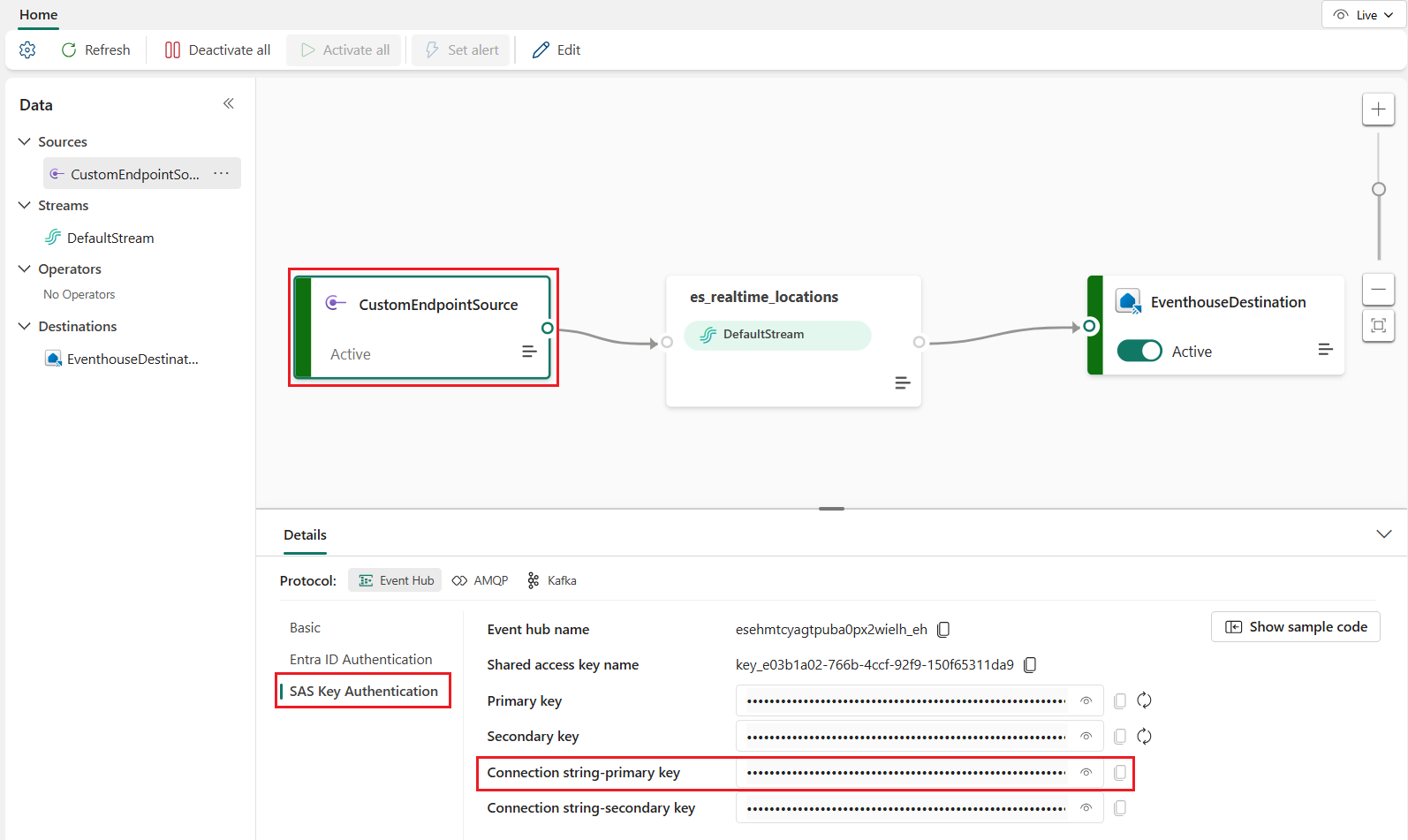
提示時把數值貼到控制台。
Important
腳本會暫停執行,直到提供此值。
執行指令碼:
python create_realtime_map.py
確認所有項目均已建立:
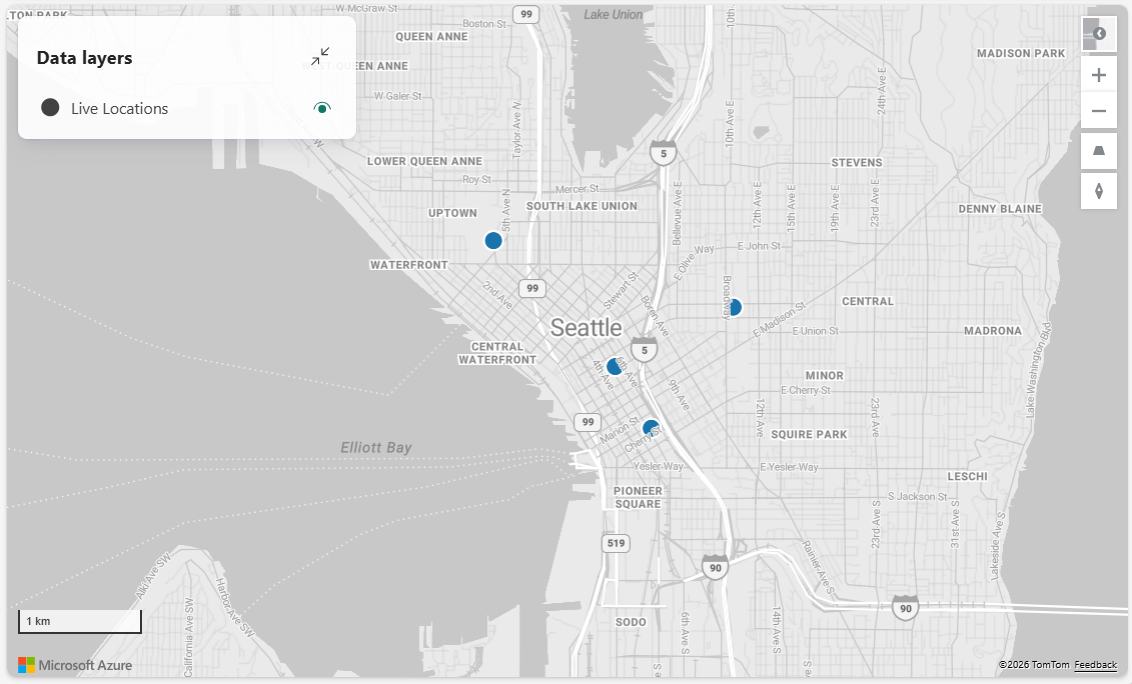
此時所有資源都會被建立並設定完成。
為了模擬連續串流並近乎即時地觀察地圖更新,請繼續後續的教學:使用 REST API 和 Python 模擬地圖的即時資料擷取。 它直接建立在這個教學基礎上,並重複使用你創建的 eventhouse、eventstream、KQL 函式和地圖。
總結
在這個教學中,你利用 Fabric REST API 和 Python,為 Microsoft Fabric 提供即時地理空間解決方案所需的資源。
你完成了以下任務:
- 使用 Fabric REST API 建立了 eventhouse 和 KQL 資料庫
- 建立了具有自訂端點的事件串流,用於擷取串流事件
- 定義了一個 KQL 函式 ,用於查詢並塑造即時資料以供地圖視覺化
- 建立了並部署了一張Fabric地圖,並採用內嵌定義參考事件屋資料
- 在事件串流中植入初始事件,讓地圖能立即顯示資料
此架構展示了 Fabric 中常見的即時分析模式:
- 外部製作者會將事件傳送到 Eventstream
- Eventstream 將資料路由並匯入 Eventhouse
- KQL 函式轉換資料
- 地圖會查詢 Eventhouse,並自動更新以反映新增的事件
透過使用 Python 和 REST API 自動化資源創建,你現在擁有一種可重複的方式,無需手動設定即可建立即時空間應用程式。 要將連續資料輸入地圖,請繼續進行後續模擬器教學。
下一步
現在你已經了解端到端的流程,可以將此方案擴展為即時模擬器。
關於如何用 REST API 為剛製作的地圖建立即時模擬器的教學,請參考: