提示 API 是一種實驗性 Web API,可讓您從網站或瀏覽器擴充功能的 JavaScript 程式碼提示小型語言模型 (Microsoft Edge 內建的 SLM) 。 使用提示 API 根據使用者輸入產生和分析文字或建立應用程式邏輯,並探索將提示工程功能整合到 Web 應用程式的創新方法。
詳細內容:
- 提示 API 的可用性
- 提示 API 的替代方案與優點
- 內建於 Microsoft Edge 的小型語言模型
- Phi-4-mini 型號
- Aion-1.0-Instruct 模型
- 啟用提示 API
- 查看運作範例
- 使用提示 API
- 傳送意見反應
- 另請參閱
提示 API 的可用性
提示 API 可在 Microsoft Edge Canary 和 Edge Dev 通道中以開發人員預覽形式提供,從版本 138.0.3309.2 開始。
提示 API 旨在協助探索使用案例並瞭解內建 SLM 面臨的挑戰。 此 API 預期將由其他實驗性 API 取代,用於特定 AI 支援的任務,例如寫作協助和文字翻譯。 若要深入了解這些其他 API,請參閱:
提示 API 的替代方案與優點
若要在網站和瀏覽器擴充功能中利用 AI 功能,您也可以使用下列方法:
將網路要求傳送至雲端式 AI 服務,例如 Azure AI 解決方案。
使用 Web 神經網路 (WebNN) API 或適用於 Web 的 ONNX 執行階段來執行本機 AI 模型。
提示 API 會使用在使用模型輸入和輸出的相同裝置上執行的 SLM,也就是 (本機) 。 相較於雲端式解決方案,這有下列優點:
降低成本: 使用雲端 AI 服務無需支付任何費用。
網路獨立性: 除了初始模型下載之外,提示模型時沒有網路延遲,也可以在裝置離線時使用。
改善隱私權: 輸入到模型的資料永遠不會離開裝置,也不會被收集來訓練 AI 模型。
提示 API 使用 Microsoft Edge 提供並內建於瀏覽器的模型,其具有額外的優點,優於自訂本機解決方案,例如以 WebGPU、WebNN 或 WebAssembly 為基礎的解決方案:
共用一次性費用: 第一次呼叫 API 時就會下載瀏覽器提供的模型,並在瀏覽器中執行的所有網站上共用,從而降低使用者和開發人員的網路成本。
簡化網頁開發人員的使用方式: 內建模型可以使用簡單的 Web API 執行,不需要 AI/ML 專業知識或使用第三方架構。
內建於 Microsoft Edge 的小型語言模型
在 Microsoft Edge Canary 和開發人員通道中,從版本 138.0.3309.2 開始,提示 API 會使用 Phi-4-mini 模型,其內建於 Microsoft Edge 中。
從版本 150.0.4070 開始,提示 API 也可以與發行前版本 Aion-1.0-Instruct 模型一起使用,該模型也內建於 Microsoft Edge。 Aion-1.0-Instruct 是比 Phi-4-mini 更小、更快、更有效率的模型,並且透過 CPU 推理在 GPU 功能較弱或沒有 GPU 的裝置上提供支援。 如果您的裝置效能等級不足以支援 Phi-4-mini,您可以測試發行前版本的 Aion-1.0-Instruct 型號。
要了解有關這兩個模型以及如何啟用 Aion-1.0-Instruct 的更多信息,請閱讀以下各節。
Phi-4-mini 型號
提示 API 可讓您提示內建於 Microsoft Edge 中的 Phi-4-mini。 Phi-4-mini 是一種功能強大的小型語言模型,擅長基於文本的工作。 若要深入了解 Phi-4-mini 及其功能,請參閱位於 microsoft/Phi-4-mini-struct 的型號卡片。
免責聲明
就像其他語言模型一樣,Phi 系列模型可能會以不公平、不可靠或冒犯的方式運作。 若要深入了解模型的 AI 考量,請參閱負責任的 AI 考量。
硬體需求
提示 API 開發人員預覽適用於具備硬體功能的裝置,可產生具有可預測品質和延遲的 SLM 輸出。 提示 API 目前僅限於:
作業系統:Windows 10 或 11 以及 macOS 13.3 或更新版本。
儲存空間: 包含 Edge 設定檔的磁碟區至少有 20 GB 的可用空間。 如果可用儲存空間低於 10 GB,模型將被刪除,以確保其他瀏覽器功能有足夠的空間來運作。
GPU: 5.5 GB VRAM 或以上。
網路: 無限數據方案或不限流量連線。 如果使用計量付費連線,則不會下載模型。
若要檢查您的裝置是否支援提示 API 開發人員預覽,請參閱下方 的啟用提示 API ,並檢查您的裝置效能等級。
由於提示 API 的實驗性質,您可能會在特定硬體設定上觀察到問題。 如果您發現特定硬體設定的問題,請在 MSEdgeExplainers 存放庫 開啟新問題 ,以提供意見反應。
Phi-4-mini 型號的可用性
網站首次呼叫需要裝置上模型的 API 時,需要初始下載 Phi-4-mini 模型。 您可以在建立新的提示 API 工作階段時,使用 monitor 選項來監視 Phi-4-mini 模型的下載。 若要深入了解,請參閱下方的 監視模型下載進度。
Aion-1.0-Instruct 模型
在 Microsoft Edge Canary 或 Edge Dev 中,從版本 150.0.4070 開始,提示 API 也可以與 Microsoft Edge 內建的發行前版本 Aion-1.0-Instruct 模型一起使用。
此 Aion-1.0-Instruct 模型比 Phi-4-mini 更小、更快、更有效率,並且透過 CPU 推理在 GPU 功能較弱或沒有 GPU 的裝置上提供支援。
Aion-1.0-Instruct 預計將於 2026 年 7 月作為開放原始碼模型提供。
為提示 API 啟用 Aion-1.0-Instruct
根據預設,提示 API 會使用 Phi-4-mini 模型。 若要在 Microsoft Edge Canary 或 Edge Dev 中使用 Aion-1.0-Instruct,請啟用 [啟用發行前版本裝置上語言模型] 旗標,如下列步驟所述。 啟用此旗標時,Aion-1.0-Instruct 會覆寫 Phi-4-mini 做為提示 API 的預設模型。
請確定您使用的是最新版本的 Edge Canary 或 Edge Dev (版本 150.0.4070 或更新版本) 。 請參閱 成為 Microsoft Edge 測試人員。
在 Edge Canary 或 Edge Dev 中,開啟新的索引標籤或視窗,然後移至
edge://flags。在頁面頂端的搜尋方塊中,輸入 [啟用發行前版本裝置上語言模型]。
在 [啟用發行前版本裝置上語言模型 ] 下拉式清單中,選取 [已啟用],然後按一下 [ 重新啟動 ] 按鈕:
![顯示發行前版本裝置上語言模型旗標的 [旗標] 頁面](prompt-api-images/prerelease-model-flag-for-prompt-api.png)
若要檢查 Aion-1.0-Instruct 是否正在用作裝置上的語言模型,請前往
edge://on-device-internals,按一下 模型狀態,然後檢查模型名稱是否設定為 Aion-1.0-Instruct。
免責聲明
Aion-1.0-Instruct 模型可在 Microsoft Edge 中供早期開發人員測試和意見反應。 除了上面列出的負責任 AI 考量事項外,請注意,鑑於其發行前版本狀態,模型行為和功能可能會變更。
Aion-1.0-Instruct 模型的可用性
網站首次呼叫需要裝置上模型的 API 時,需要初始下載 Aion-1.0-Instruct 模型。 您可以在建立新的提示 API 工作階段時使用 monitor 選項來監控 Aion-1.0-Instruct 模型的下載。 若要深入了解,請參閱下方的 監視模型下載進度。
啟用提示 API
若要在 Microsoft Edge 中使用提示 API:
請確定您使用的是最新版本的 Microsoft Edge Canary 或 Edge Dev (版本 138.0.3309.2 或更新版本) 。 請參閱 成為 Microsoft Edge 測試人員。
在 Edge Canary 或 Edge Dev 中,開啟新的索引標籤或視窗,然後移至
edge://flags/。在頁面頂端的搜尋方塊中,輸入裝置上 語言模型的提示 API。
頁面會經過篩選以顯示相符的標幟。
在 裝置上語言模型的提示 API 底下,選取 [已啟用]:
![瀏覽器的 [旗標] 頁面](prompt-api-images/flags-prompt-api.png)
或者,若要在本機記錄可能對偵錯問題有用的資訊,也請啟用 [ 在裝置上啟用 AI 模型偵錯記錄] 旗標。
重新啟動 Edge Canary 或 Edge Dev。
若要檢查您的裝置是否符合提示 API 開發人員預覽的硬體需求,請開啟新的索引標籤,移至
edge://on-device-internals,然後檢查 裝置效能等級 值。如果您的裝置效能等級為 高 或更高,您的裝置上應該支援提示 API。
如果您的裝置效能類別為「中」或「低」,則只有透過發行前版本 Aion-1.0-Instruct 模型才支援提示 API,該模型從 Edge 版本 150.0.4070 開始提供。 若要測試 Aion-1.0-Instruct 模型,請參閱上面為提示 API 啟用 Aion-1.0-Instruct。
如果您發現這些模型有問題,請在 MSEdgeExplainers 存放庫中 建立新問題 。
查看運作範例
若要查看 Prompt API 的實際運作方式,並檢閱使用該 API 的現有程式碼:
如前所述,啟用提示 API。
在 Edge Canary 或 Edge Dev 中,開啟索引標籤或視窗,然後移至 提示 API playground。
在左側的 內建 AI 遊樂場 瀏覽中,已選取 [提示 ]。
在頂端的資訊橫幅中,檢查狀態:最初顯示為 模型下載中,請稍候:
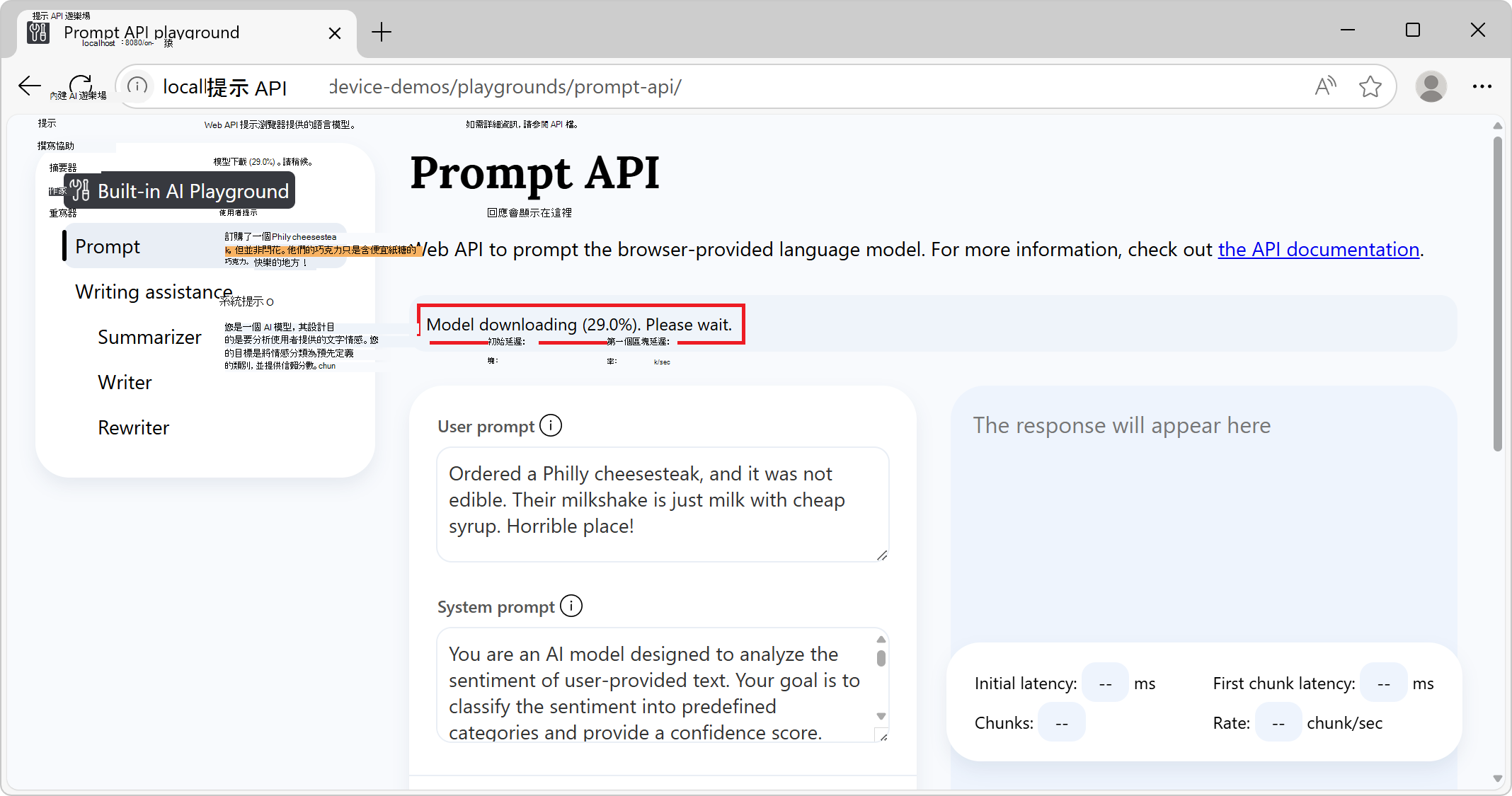
模型下載完成後,資訊橫幅會顯示 API 和模型就緒,表示可以使用 API 和模型:

如果模型下載未開始,請重新啟動 Microsoft Edge 並再試一次。
只有符合特定硬體需求的裝置才支援提示 API。 如需詳細資訊,請參閱上方的 硬體需求。
您可以選擇變更提示設定值,例如:
- 使用者提示
- 系統提示
- 回應限制式架構
- 其他設定>N-shot 提示說明
按一下頁面底部的 [ 提示 ] 按鈕。
回應會在頁面的回應區段中產生:
![含有設定和 [提示] 按鈕的提示示範頁面](prompt-api-images/prompting.png)
若要停止產生回應,請隨時按一下 [停止 ] 按鈕。
另請參閱:
- /built-in-ai/ - 內建 AI 遊樂場的原始程式碼和讀我檔案,包括提示 API 遊樂場。
使用提示 API
檢查 API 是否已啟用
在網站或擴充功能的程式碼中使用API之前,請測試物件的 LanguageModel 是否存在,以檢查API是否已啟用:
if (!LanguageModel) {
  // The Prompt API is not available.
} else {
  // The Prompt API is available.
}
檢查模型是否可以使用
只有在裝置支援執行模型,且 Microsoft Edge 下載語言模型和模型執行階段後,才能使用提示 API。
若要檢查是否可以使用 API,請使用 LanguageModel.availability() 下列方法:
const availability = await LanguageModel.availability();

if (availability == "unavailable") {
  // The model is not available.
}

if (availability == "downloadable" || availability == "downloading") {
  // The model can be used, but it needs to be downloaded first.
}

if (availability == "available") {
  // The model is available and can be used.
}
建立新的工作階段
建立工作階段會指示瀏覽器在記憶體中載入語言模型,以便可以使用。 在提示語言模型之前,請使用以下 create() 方法建立新的工作階段:
// Create a LanguageModel session.
const session = await LanguageModel.create();
若要自訂模型工作階段,您可以將選項傳遞給方法 create() :
// Create a LanguageModel session with options.
const session = await LanguageModel.create(options);
可用選項包括:
monitor,以追蹤模型下載的進度。initialPrompts,為模型提供將傳送至模型之提示的相關內容,並建立模型應遵循的使用者/助理互動模式,以供未來提示使用。
這些選項記錄如下。
監控模型下載進度
您可以使用選項 monitor 來追蹤模型下載的進度。 當模型尚未完全下載到將要使用它的設備上時,這很有用,可以通知您網站的用戶他們應該等待。
// Create a LanguageModel session with the monitor option to monitor the model
// download.
const session = await LanguageModel.create({
  monitor: m => {
    // Use the monitor object argument to add an listener for the
    // downloadprogress event.
    m.addEventListener("downloadprogress", event => {
      // The event is an object with the loaded and total properties.
      if (event.loaded == event.total) {
        // The model is fully downloaded.
      } else {
        // The model is still downloading.
        const percentageComplete = (event.loaded / event.total) * 100;
      }
    });
  }
});
為模型提供系統提示
若要定義系統提示 (這是一種提供模型指令以在產生文字以回應提示時使用的方法),請使用 initialPrompts 選項。
建立新工作階段時所提供的系統提示會保留整個工作階段,即使內容視窗因太多提示而溢位。
// Create a LanguageModel session with a system prompt.
const session = await LanguageModel.create({
  initialPrompts: [{
    role: "system",
    content: "You are a helpful assistant."
  }]
});
將提示放在 { role: "system", content: "You are a helpful assistant." } 中 initialPrompts 第 0 個位置以外的任何位置都會以 TypeError拒絕。
使用 initialPrompts 進行 N-shot 提示
此initialPrompts選項也可讓您提供使用者/助理互動的範例,您希望模型在出現提示時繼續使用。
此技術也稱為 N-shot 提示 ,有助於使模型產生的回應更具確定性。
// Create a LanguageModel session with multiple initial prompts, for N-shot
// prompting.
const session = await LanguageModel.create({
  initialPrompts: [
    { role: "system", content: "Classify the following product reviews as either OK or Not OK." },
    { role: "user", content: "Great shoes! I was surprised at how comfortable these boots are for the price. They fit well and are very lightweight." },
    { role: "assistant", content: "OK" },
    { role: "user", content: "Terrible product. The manufacturer must be completely incompetent." },
    { role: "assistant", content: "Not OK" },
    { role: "user", content: "Could be better. Nice quality overall, but for the price I was expecting something more waterproof" },
    { role: "assistant", content: "OK" }
  ]
});
複製工作階段,以使用相同的選項重新開始交談
複製現有的工作階段,以在不知道先前互動的情況下提示模型,但使用相同的工作階段選項。
當您想要使用先前工作階段中的選項,但不影響具有先前回應的模型時,複製工作階段非常有用。
// Create a first LanguageModel session.
const firstSession = await LanguageModel.create({
  initialPrompts: [
    role: "system",
    content: "You are a helpful assistant."
  ]
});

// Later, create a new session by cloning the first session to start a new
// conversation with the model, but preserve the first session's settings.
const secondSession = await firstSession.clone();
提示模型
若要提示模型,請在建立模型工作階段之後,使用 session.prompt() OR session.promptStreaming() 方法。
等待最終回覆
prompt這個方法會傳回一個 Promise,一旦模型完成產生文字以回應您的提示,就會解決該 Promise:
// Create a LanguageModel session.
const session = await LanguageModel.create();

// Prompt the model and wait for the response to be generated.
const result = await session.prompt(promptString);

// Use the generated text.
console.log(result);
在產生權杖時顯示權杖
promptStreaming此方法會立即傳回串流物件。 使用串流在產生回應權杖時顯示:
// Create a LanguageModel session.
 const session = await LanguageModel.create();

// Prompt the model.
 const stream = session.promptStreaming(myPromptString);

// Use the stream object to display tokens that are generated by the model, as
// they are being generated.
for await (const chunk of stream) {
  console.log(chunk);
}
您可以在相同的工作階段物件中多次呼叫 prompt and promptStreaming 方法,以根據先前與該工作階段中模型的互動繼續產生文字。
使用 JSON 結構描述或規則運算式限制模型輸出
若要讓模型回應的格式更具確定性,且更容易以程式設計方式使用,請在提示模型時使用 responseConstraint 選項。
此 responseConstraint 選項接受 JSON 結構描述或規則運算式:
若要讓模型以遵循指定結構描述的字串化 JSON 物件回應,請設定
responseConstraint為您想要使用的 JSON 結構描述。若要讓模型以符合規則運算式的字串回應,請設定
responseConstraint為該規則運算式。
下列範例顯示如何讓模型使用遵循指定結構描述的 JSON 物件來回應提示:
// Create a LanguageModel session.
const session = await LanguageModel.create();

// Define a JSON schema for the Prompt API to constrain the generated response.
const schema = {
  "type": "object",
  "required": ["sentiment", "confidence"],
  "additionalProperties": false,
  "properties": {
    "sentiment": {
      "type": "string",
      "enum": ["positive", "negative", "neutral"],
      "description": "The sentiment classification of the input text."
    },
    "confidence": {
      "type": "number",
      "minimum": 0,
      "maximum": 1,
      "description": "A confidence score indicating certainty of the sentiment classification."
    }
  }
}
;

// Prompt the model, by providing a system prompt and the JSON schema in the
// responseConstraints option.
const response = await session.prompt(
  "Ordered a Philly cheesesteak, and it was not edible. Their milkshake is just milk with cheap syrup. Horrible place!",
  {
    initialPrompts: [
      {
        role: "system",
        content: "You are an AI model designed to analyze the sentiment of user-provided text. Your goal is to classify the sentiment into predefined categories and provide a confidence score. Follow these guidelines:\n\n- Identify whether the sentiment is positive, negative, or neutral.\n- Provide a confidence score (0-1) reflecting the certainty of the classification.\n- Ensure the sentiment classification is contextually accurate.\n- If the sentiment is unclear or highly ambiguous, default to neutral.\n\nYour responses should be structured and concise, adhering to the defined output schema."
      },
    ],
    responseConstraint: schema
  }
);
執行上述程式碼會傳回包含字串化 JSON 物件的回應,例如:
{"sentiment": "negative", "confidence": 0.95}
然後,您可以使用以下函數剖 JSON.parse() 析回應,以在程式碼邏輯中使用回應:
// Parse the JSON string generated by the model and extract the sentiment and
// confidence values.
const { sentiment, confidence } = JSON.parse(response);

// Use the values.
console.log(`Sentiment: ${sentiment}`);
console.log(`Confidence: ${confidence}`);
根據每個提示傳送多則訊息
除了字串之外,and promptpromptStreaming 方法也接受物件陣列,用來以自訂角色傳送多個訊息。 您傳送的物件應採用格式 { role, content },其中 role 是 或 assistantuser ,和 content 是訊息。
例如,若要在同一個提示中提供多個使用者訊息和一個助理訊息:
// Create a LanguageModel session.
const session = await LanguageModel.create();

// Prompt the model by sending multiple messages at once.
const result = await session.prompt([
  { role: "user", content: "First user message" },
  { role: "user", content: "Second user message" },
  { role: "assistant", content: "The assistant message" }
]);
停止產生文字
若要在 Promise 所傳回的 Promise 完成之前,或是在 Response 傳session.prompt()session.promptStreaming()回的資料流程結束之前中止提示,請使用AbortController訊號:
// Create a LanguageModel session.
const session = await LanguageModel.create();

// Create an AbortController object.
const abortController = new AbortController();

// Prompt the model by passing the AbortController object by using the signal
// option.
const stream = session.promptStreaming(myPromptString , {
  signal: abortController.signal
});

// Later, perhaps when the user presses a "Stop" button, call the abort()
// method on the AbortController object to stop generating text.
abortController.abort();
終結工作階段
銷毀會話,讓瀏覽器知道你不再需要語言模型,這樣就可以從記憶體中卸載模型。
您可以使用兩種不同的方式終結工作階段:
- 方法是使用方法
destroy()。 - 透過使用
AbortController。
使用 destroy () 方法終結工作階段
// Create a LanguageModel session.
const session = await LanguageModel.create();

// Later, destroy the session by using the destroy method.
session.destroy();
使用 AbortController 終結工作階段
// Create an AbortController object.
const controller = new AbortController();

// Create a LanguageModel session and pass the AbortController object by using
// the signal option.
const session = await LanguageModel.create({ signal: controller.signal });

// Later, perhaps when the user interacts with the UI, destroy the session by
// calling the abort() function of the AbortController object.
controller.abort();
傳送意見反應
提示 API 開發人員預覽旨在協助探索瀏覽器提供的語言模型的使用案例。
我們有興趣了解:
- 您要使用提示 API 的案例範圍。
- 提示 API 的任何問題。
- 語言模型的任何問題。
- 新的工作特定 API 是否有用。
若要傳送有關您的案例和您想要達成之工作的意見反應,請在 提示 API 意見反應問題中新增留言。
如果您在改用 API 時發現任何問題,請 在存放庫中回報。
您也可以參與 W3C Web 機器學習工作群組存放庫中提示 API 設計的討論。
另請參閱
- 提示 API 草稿規格
- webmachinelearning/prompt-api GitHub 存放庫
- 使用撰寫協助 API 撰寫、重寫及摘要文字
- 使用校對器 API 修正文字中的文法、拼字和標點符號錯誤
- 使用翻譯工具 API 翻譯文字
- /built-in-ai/ - 內建 AI 遊樂場的原始程式碼和讀我檔案,包括提示 API 遊樂場。