代表圖案的格式專案報表中的資料表。
註解
注意事項
[!注意事項] 沒有實作巨集錄製 ReportTable物件。 也就是當您在Project錄製巨集和手動新增 [報表資料表或編輯表格項目,不會記錄新增及操作報表資料表的步驟。
ReportTable物件是一種 Shape物件 ;它不相關的 Table物件。 專案有限報表資料表 ; VBA 的支援若要指定資料表欄位,您手動使用 [ 欄位清單] 工作窗格 (請參閱圖 1)。 若要顯示或隱藏 [ 欄位清單] 工作窗格,選擇 [ 資料表資料命令 設計] 索引標籤中的 [ 表格工具下的功能區上。 若要指定表格版面配置] 或 [設計屬性,您可以使用功能區上的 [ 設計] 索引標籤和 [ 版面配置] 索引標籤。
您可以使用 UpdateTableData 方法與報表表格、 相關聯的資料查詢來更新。 若要取得文字中的表格儲存格,請使用 GetCellText 方法。
若要以程式設計方式建立 ReportTable,使用 Shapes.AddTable 方法。 若要傳回 ReportTable 物件,請使用 Shapes(Index).Table,其中 Index 是圖形的名稱或索引號碼。
範例
TestReportTable巨集會建立名為表格測試報表並接著會建立 ReportTable物件。
Sub TestReportTable()
    Dim theReport As Report
    Dim theShape As Shape
    Dim theReportTable As ReportTable
    Dim reportName As String
    Dim tableName As String
    Dim rows As Integer, columns As Integer, left As Integer, _
        top As Integer, width As Integer, height As Integer
    rows = 3
    columns = 4
    left = 20
    top = 20
    width = 200
    height = 100

    reportName = "Table Tests"
    tableName = "Basic Project Data Table"

    Set theReport = ActiveProject.Reports.Add(reportName)

    ' Project ignores the NumRows and NumColumns parameters when creating a ReportTable.
    Set theShape = theReport.Shapes.AddTable( _
        rows, columns, left, top, width, height)

    theShape.Name = tableName

    Set theReportTable = theShape.Table

    With theReportTable
        Debug.Print "Rows: " & .RowsCount
        Debug.Print "Columns: " & .ColumnsCount
        Debug.Print "Table contents:" & vbCrLf & .GetCellText(1, 1)
    End With
End Sub
圖 1 TestReportTable巨集建立表格測試報表中的最 ReportTable物件。 當您第一次建立表格時,有一列和一欄; NumRows和 NumColumnsAddTable方法的參數有任何影響。 當您從 [欄位清單 ] 工作窗格手動新增欄位至資料表,或使用 UpdateTableData 方法時,資料表中的列數和欄數會更新。 您可以篩選的欄位來限制的列數。 TestReportTable巨集在 VBE 的 [即時運算] 視窗中寫入項:
Rows: 1
Columns: 1
Table contents:
Use the Table Data taskpane to build a table
圖 1 的底部 ReportTable物件是當您在 報告工具] 下的 [ 設計] 索引標籤上選擇 [ 表格的專案會建立預設報告表格。 它會顯示專案名稱、 開始日期、 完成日期和 %完成的專案摘要任務 (任務識別碼 = 0)。
圖 1: 需要手動編輯 ReportTable 物件才能新增欄位和變更格式設定
需要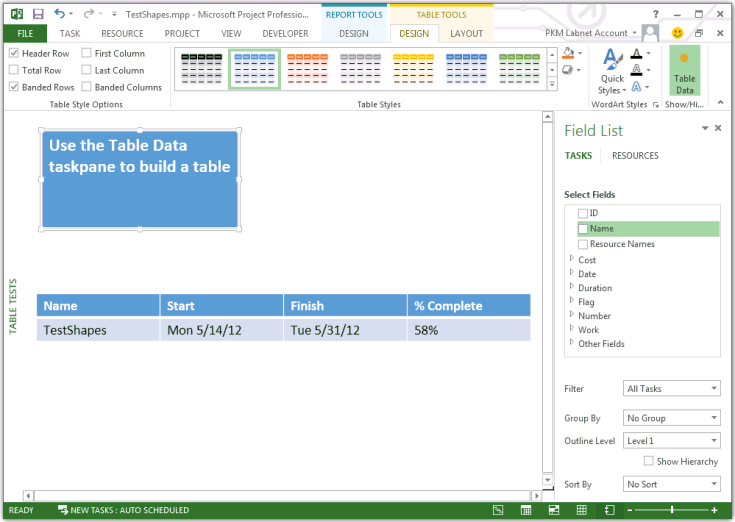 若要刪除 ReportTable 物件,請使用 Shape.Delete 方法,如下列巨集所示:
Sub DeleteTheReportTable()
    Dim theReport As Report
    Dim theShape As Shape
    Dim reportName As String
    Dim tableName As String

    reportName = "Table Tests"
    tableName = "Basic Project Data Table"

    Set theReport = ActiveProject.Reports(reportName)
    Set theShape = theReport.Shapes(tableName)

    theShape.Delete
End Sub
若要刪除在整個報表上,變更到其他檢視,如下列巨集所示:
Sub DeleteTheReport()
    Dim i As Integer
    Dim reportName As String

    reportName = "Table Tests"

    ' To delete the active report, change to another view.
    ViewApplyEx Name:="&Gantt Chart"

    ActiveProject.Reports(reportName).Delete
End Sub
方法
| 名稱 |
|---|
| GetCellText |
| UpdateTableData |
屬性
| 名稱 |
|---|
| ColumnsCount |
| RowsCount |
另請參閱
支援和意見反應
有關於 Office VBA 或這份文件的問題或意見反應嗎? 如需取得支援服務並提供意見反應的相關指導,請參閱 Office VBA 支援與意見反應。