備註
測試引擎已被棄用 ,未來版本將被移除。 使用 Power Platform Playwright 範例,用於 Power Platform 和 Dynamics 365 服務中的自動化測試功能。
Microsoft Power Fx 是一種強大的低程式碼語言,用於Power Apps,並可透過 C# 擴充以建立自訂測試函式。 本文介紹了如何創建 C# Power Fx test 函數,為製作者和開發人員提供無縫體驗。
Power Apps 測試引擎的「無懸崖」可擴充性模型確保使用者可以在不遇到任何障礙的情況下,擴展 Power Apps 測試引擎的功能。 該模型允許開發人員使用 C# 建立自定義函數,可以將其集成到 Power Fx 中以處理複雜的場景。
測試引擎模組
測試引擎內部的 Power Fx 測試引擎模組是使用可擴充性模型構建的。 您可以使用產品代碼作為如何擴展測試引擎的範例。
同意對話框示例
下面是一個函數範例 Power Fx ,該函數提供用於處理畫布應用程式 中的條件同意對話框的代碼大綱。
同意對話框 是向用戶顯示的提示,請求他們訪問某些資源或執行特定作的許可權。 此對話對於維護安全性並確保用戶瞭解並同意代表他們採取的作至關重要。
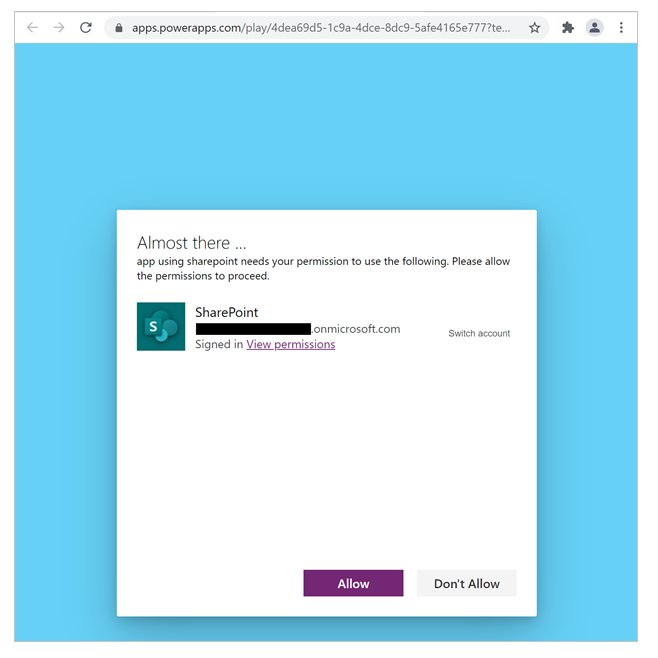
同意對話框很重要,因為它有助於防止未經授權的訪問和作。 它確保在執行任何敏感作之前通知使用者並提供明確同意。 這在應用程式需要訪問用戶數據或執行作並且這種條件行為可能會影響自動化測試的情況下非常重要。
測試中同意對話框的挑戰
同意對話的挑戰之一是它們可能使測試不確定。 提示可以根據各種因素 (例如用戶許可權或以前的交互) 有條件地出現。 這種條件外觀可能會使測試過程複雜化,因為測試引擎需要適當地處理這些對話框。
使用 Power Fx 抽象化複雜性
Power Fx 有助於抽象有條件地等待同意對話框並在需要時創建連接的複雜性。 開發者可以使用 Power Fx 來以更簡單、更直觀的方式定義和處理同意對話框的邏輯。
範例:使用 Power Fx 處理同意對話框
下面是用於 Power Fx 處理自訂頁面中的同意對話框的範例:
Preview.ConsentDialog(Table({Text: "Center of Excellence Setup Wizard"}))
在此範例中,該 ConsentDialog 函數檢查同意對話框是否可見。 如果是,則該函數可以回應確認同意測試帳戶的對話框。 處理對話后,將執行剩餘的測試步驟。
Table 參數允許同意對話框的等待過程在帶有提供文本的標籤可見時退出。
Power Fx 使用 C# 擴充測試函數
以下範例是一個範例大綱代碼,可用作完成此範例的起點:
// Copyright (c) Microsoft Corporation.
// Licensed under the MIT license.
using Microsoft.Extensions.Logging;
using Microsoft.Playwright;
using Microsoft.PowerApps.TestEngine.Config;
using Microsoft.PowerApps.TestEngine.TestInfra;
using Microsoft.PowerFx;
using Microsoft.PowerFx.Core.Utils;
using Microsoft.PowerFx.Types;

namespace testengine.module
{
    /// <summary>
    /// This will check the custom pages of a model driven app looking for a consent dialog
    /// </summary>
    public class ConsentDialogFunction : ReflectionFunction
    {
        private readonly ITestInfraFunctions _testInfraFunctions;
        private readonly ITestState _testState;
        private readonly ILogger _logger;
        private static TableType SearchType = TableType.Empty()
              .Add(new NamedFormulaType("Text", FormulaType.String, displayName: "Text"));

        /// <summary>
        /// Constructor: Initializes the function with necessary dependencies,
        /// including ITestInfraFunctions, ITestState, and ILogger.
        /// </summary>
        /// <param name="testInfraFunctions">The test infrastructure functions.</param>
        /// <param name="testState">The test state.</param>
        /// <param name="logger">The logger instance.</param>
        public ConsentDialogFunction(ITestInfraFunctions testInfraFunctions,
           ITestState testState,
           ILogger logger) : base(DPath.Root.Append(
               new DName("Preview")),
               "ConsentDialog",
               FormulaType.Blank,
               SearchType)
               {
                  _testInfraFunctions = testInfraFunctions;
                  _testState = testState;
                  _logger = logger;
               }

        /// <summary>
        /// Execute Method: Logs the execution and calls the ExecuteAsync
        /// method to handle the consent dialog.
        /// </summary>
        /// <param name="searchFor">The table value to search for.</param>
        /// <returns>A blank value.</returns>
        public BlankValue Execute(TableValue searchFor)
        {
            _logger.LogInformation("------------------------------\n\n" +
                "Executing ConsentDialog function.");

            ExecuteAsync(searchFor).Wait();

            return FormulaValue.NewBlank();
        }

        /// <summary>
        /// ExecuteAsync Method: Retrieves the page context and handles the consent dialog with a timeout.
        /// </summary>
        /// <param name="searchFor">The table value to search for.</param>
        /// <returns>A task representing the asynchronous operation.</returns>
        private async Task ExecuteAsync(TableValue searchFor)
        {
            var page = _testInfraFunctions
               .GetContext()
               .Pages
               .Where(p => p.Url.Contains("main.aspx"))
               .First();

            // ... IPage to handle consent dialog with timeout
        }
    }
}
ConsentDialogFunction 示例說明
-
命名空間和導入:導入必要的命名空間並定義
testengine.module命名空間。 -
類定義:該
ConsentDialogFunction類繼承自 ReflectionFunction 並定義自定義函數ConsentDialog。 -
構造函數:使用必要的依賴項初始化函數,包括
ITestInfraFunctions、ITestState和 ILogger。 -
執行方法:記錄執行並調用該
ExecuteAsync方法來處理同意對話方塊。 - ExecuteAsync 方法:檢索頁面上下文並在設定的超時時間內處理同意對話框。