Facet 提供一組用於篩選結果的連結,以啟用自我導向導覽。 在本教學中,分面導覽結構會放在頁面左側,並加上標籤和可點選的文字來篩選結果。
在本教學課程中,您將瞭解如何:
- 將模型屬性設定為 isFacetable
- 將 Facet 導覽新增至您的應用程式
概觀
Facet 是以搜尋索引中的欄位為基礎。 包含 facet=[string] 的查詢要求提供了分面依據的欄位。 通常會包含多個面向,例如 &facet=category&facet=amenities,每一個都以&符號(&)分隔。 實施分面導覽結構需要您同時指定分面和篩選條件。 點擊事件使用篩選器來縮小結果。 例如,按兩下 [預算] 會根據該準則篩選結果。
本教學課程會延伸 將分頁功能新增至搜尋結果 教學課程中建立的分頁專案。
您可以在下列專案中找到本教學課程中的最終版本程式碼:
先決條件
- 2a-add-paging (GitHub) 解決方案。 此專案可以是您自己從上一個教學課程建置的版本,或是從 GitHub 建立的複本。
將模型屬性設定為IsFacetable
為了讓模型屬性位於 Facet 搜尋中,必須使用 IsFacetable 標記它。
檢查 Hotel 類別。 例如,Category 和 Tags 會標記為 IsFacetable,但 HotelName 和 Description 則不是。
public partial class Hotel
{
    [SimpleField(IsFilterable = true, IsKey = true)]
    public string HotelId { get; set; }

    [SearchableField(IsSortable = true)]
    public string HotelName { get; set; }

    [SearchableField(AnalyzerName = LexicalAnalyzerName.Values.EnLucene)]
    public string Description { get; set; }

    [SearchableField(AnalyzerName = LexicalAnalyzerName.Values.FrLucene)]
    [JsonPropertyName("Description_fr")]
    public string DescriptionFr { get; set; }

    [SearchableField(IsFilterable = true, IsSortable = true, IsFacetable = true)]
    public string Category { get; set; }

    [SearchableField(IsFilterable = true, IsFacetable = true)]
    public string[] Tags { get; set; }

    [SimpleField(IsFilterable = true, IsSortable = true, IsFacetable = true)]
    public bool? ParkingIncluded { get; set; }

    [SimpleField(IsFilterable = true, IsSortable = true, IsFacetable = true)]
    public DateTimeOffset? LastRenovationDate { get; set; }

    [SimpleField(IsFilterable = true, IsSortable = true, IsFacetable = true)]
    public double? Rating { get; set; }

    public Address Address { get; set; }

    [SimpleField(IsFilterable = true, IsSortable = true)]
    public GeographyPoint Location { get; set; }

    public Room[] Rooms { get; set; }
}
我們不會在此教學課程中變更任何標籤,因此請關閉 hotel.cs 檔案並保持它未變更。
備註
如果搜尋中要求的欄位未適當標記,篩選搜尋會出現錯誤。
將 Facet 導覽新增至您的應用程式
在此範例中,我們將讓使用者從結果左邊顯示的連結清單中選取一個類別的旅館或一個服務。 使用者一開始會輸入一些搜尋文字,然後選取類別或設施來逐漸縮小搜尋結果的範圍。
這是控制器的工作,會將屬性清單傳遞至檢視。 為了在搜尋進行時保留使用者選擇,我們會使用暫存記憶體作為保存狀態的機制。
使用面向導航來縮小搜尋「池」的範圍
將篩選字串新增至 SearchData 模型
開啟SearchData.cs檔案,並將字串屬性新增至 SearchData 類別,以保存 Facet 篩選字串。
public string categoryFilter { get; set; }
public string amenityFilter { get; set; }
新增 Facet 動作方法
主控制器需要一個新的動作、 Facet,以及更新其現有的 Index 和 Page 動作,以及 RunQueryAsync 方法。
取代 Index(SearchData model) 動作方法。
public async Task<ActionResult> Index(SearchData model)
{
    try
    {
        // Ensure the search string is valid.
        if (model.searchText == null)
        {
            model.searchText = "";
        }

        // Make the search call for the first page.
        await RunQueryAsync(model, 0, 0, "", "").ConfigureAwait(false);
    }
    catch
    {
        return View("Error", new ErrorViewModel { RequestId = "1" });
    }

    return View(model);
}
取代 PageAsync(SearchData model) 動作方法。
public async Task<ActionResult> PageAsync(SearchData model)
{
    try
    {
        int page;

        // Calculate the page that should be displayed.
        switch (model.paging)
        {
            case "prev":
                page = (int)TempData["page"] - 1;
                break;

            case "next":
                page = (int)TempData["page"] + 1;
                break;

            default:
                page = int.Parse(model.paging);
                break;
        }

        // Recover the leftMostPage.
        int leftMostPage = (int)TempData["leftMostPage"];

        // Recover the filters.
        string catFilter = TempData["categoryFilter"].ToString();
        string ameFilter = TempData["amenityFilter"].ToString();

        // Recover the search text.
        model.searchText = TempData["searchfor"].ToString();

        // Search for the new page.
        await RunQueryAsync(model, page, leftMostPage, catFilter, ameFilter);
    }

    catch
    {
        return View("Error", new ErrorViewModel { RequestId = "2" });
    }
    return View("Index", model);
}
新增 FacetAsync(SearchData model) 動作方法,當用戶按兩下 Facet 連結時要啟動。 模型將包含類別或設施搜尋篩選條件。 將它新增到 PageAsync 動作之後。
public async Task<ActionResult> FacetAsync(SearchData model)
{
    try
    {
        // Filters set by the model override those stored in temporary data.
        string catFilter;
        string ameFilter;
        if (model.categoryFilter != null)
        {
            catFilter = model.categoryFilter;
        } else
        {
            catFilter = TempData["categoryFilter"].ToString();
        }

        if (model.amenityFilter != null)
        {
            ameFilter = model.amenityFilter;
        } else
        {
            ameFilter = TempData["amenityFilter"].ToString();
        }

        // Recover the search text.
        model.searchText = TempData["searchfor"].ToString();

        // Initiate a new search.
        await RunQueryAsync(model, 0, 0, catFilter, ameFilter).ConfigureAwait(false);
    }
    catch
    {
        return View("Error", new ErrorViewModel { RequestId = "2" });
    }

    return View("Index", model);
}
設定搜尋篩選條件
例如,當用戶選取某個特定屬性時,例如點擊 度假村和水療中心 類別,則結果中只會返回指定為此類別的旅館。 若要以這種方式縮小搜尋範圍,我們需要設定 篩選。
以下列程序代碼取代 RunQueryAsync 方法。 主要採用類別篩選字串和一般篩選字串,並設定 SearchOptions 的 Filter 參數。
private async Task<ActionResult> RunQueryAsync(SearchData model, int page, int leftMostPage, string catFilter, string ameFilter)
{
    InitSearch();

    string facetFilter = "";

    if (catFilter.Length > 0 && ameFilter.Length > 0)
    {
        // Both facets apply.
        facetFilter = $"{catFilter} and {ameFilter}";
    } else
    {
        // One, or zero, facets apply.
        facetFilter = $"{catFilter}{ameFilter}";
    }

    var options = new SearchOptions
    {
        Filter = facetFilter,

        SearchMode = SearchMode.All,

        // Skip past results that have already been returned.
        Skip = page * GlobalVariables.ResultsPerPage,

        // Take only the next page worth of results.
        Size = GlobalVariables.ResultsPerPage,

        // Include the total number of results.
        IncludeTotalCount = true,
    };

    // Return information on the text, and number, of facets in the data.
    options.Facets.Add("Category,count:20");
    options.Facets.Add("Tags,count:20");

    // Enter Hotel property names into this list, so only these values will be returned.
    options.Select.Add("HotelName");
    options.Select.Add("Description");
    options.Select.Add("Category");
    options.Select.Add("Tags");

    // For efficiency, the search call should be asynchronous, so use SearchAsync rather than Search.
    model.resultList = await _searchClient.SearchAsync<Hotel>(model.searchText, options).ConfigureAwait(false);

    // This variable communicates the total number of pages to the view.
    model.pageCount = ((int)model.resultList.TotalCount + GlobalVariables.ResultsPerPage - 1) / GlobalVariables.ResultsPerPage;

    // This variable communicates the page number being displayed to the view.
    model.currentPage = page;

    // Calculate the range of page numbers to display.
    if (page == 0)
    {
        leftMostPage = 0;
    }
    else if (page <= leftMostPage)
    {
        // Trigger a switch to a lower page range.
        leftMostPage = Math.Max(page - GlobalVariables.PageRangeDelta, 0);
    }
    else if (page >= leftMostPage + GlobalVariables.MaxPageRange - 1)
    {
        // Trigger a switch to a higher page range.
        leftMostPage = Math.Min(page - GlobalVariables.PageRangeDelta, model.pageCount - GlobalVariables.MaxPageRange);
    }
    model.leftMostPage = leftMostPage;

    // Calculate the number of page numbers to display.
    model.pageRange = Math.Min(model.pageCount - leftMostPage, GlobalVariables.MaxPageRange);

    // Ensure Temp data is stored for the next call.
    TempData["page"] = page;
    TempData["leftMostPage"] = model.leftMostPage;
    TempData["searchfor"] = model.searchText;
    TempData["categoryFilter"] = catFilter;
    TempData["amenityFilter"] = ameFilter;

    // Return the new view.
    return View("Index", model);
}
請注意, Category 和 Tags 屬性會新增至要傳回的 Select 項目清單。 此新增功能不需要多面向導覽才能運作,但我們會使用這項資訊來驗證篩選條件是否正常運作。
將 facet 連結列表新增至視圖
視角需要一些重大變更。
從開啟hotels.css檔案開始(在 wwwroot/css 資料夾中),然後新增下列類別。
.facetlist {
    list-style: none;
}

.facetchecks {
    width: 250px;
    display: normal;
    color: #666;
    margin: 10px;
    padding: 5px;
}

.facetheader {
    font-size: 10pt;
    font-weight: bold;
    color: darkgreen;
}
針對檢視,將輸出組織成一個表格,使左側的面向清單和右側的結果整齊對齊。 開啟 index.cshtml 檔案。 以下列程式代碼取代 HTML <主體> 標籤的整個內容。
<body> @using (Html.BeginForm("Index", "Home", FormMethod.Post)) { <table> <tr> <td></td> <td> <h1 class="sampleTitle"> <img src="~/images/azure-logo.png" width="80" /> Hotels Search - Facet Navigation </h1> </td> </tr> <tr> <td></td> <td> <!-- Display the search text box, with the search icon to the right of it.--> <div class="searchBoxForm"> @Html.TextBoxFor(m => m.searchText, new { @class = "searchBox" }) <input value="" class="searchBoxSubmit" type="submit"> </div> </td> </tr> <tr> <td valign="top"> <div id="facetplace" class="facetchecks"> @if (Model != null && Model.resultList != null) { List<string> categories = Model.resultList.Facets["Category"].Select(x => x.Value.ToString()).ToList(); if (categories.Count > 0) { <h5 class="facetheader">Category:</h5> <ul class="facetlist"> @for (var c = 0; c < categories.Count; c++) { var facetLink = $"{categories[c]} ({Model.resultList.Facets["Category"][c].Count})"; <li> @Html.ActionLink(facetLink, "FacetAsync", "Home", new { categoryFilter = $"Category eq '{categories[c]}'" }, null) </li> } </ul> } List<string> tags = Model.resultList.Facets["Tags"].Select(x => x.Value.ToString()).ToList(); if (tags.Count > 0) { <h5 class="facetheader">Amenities:</h5> <ul class="facetlist"> @for (var c = 0; c < tags.Count; c++) { var facetLink = $"{tags[c]} ({Model.resultList.Facets["Tags"][c].Count})"; <li> @Html.ActionLink(facetLink, "FacetAsync", "Home", new { amenityFilter = $"Tags/any(t: t eq '{tags[c]}')" }, null) </li> } </ul> } } </div> </td> <td valign="top"> <div id="resultsplace"> @if (Model != null && Model.resultList != null) { // Show the result count. <p class="sampleText"> @Model.resultList.TotalCount Results </p> var results = Model.resultList.GetResults().ToList(); @for (var i = 0; i < results.Count; i++) { string amenities = string.Join(", ", results[i].Document.Tags); string fullDescription = results[i].Document.Description; fullDescription += $"\nCategory: {results[i].Document.Category}"; fullDescription += $"\nAmenities: {amenities}"; // Display the hotel name and description. @Html.TextAreaFor(m => results[i].Document.HotelName, new { @class = "box1" }) @Html.TextArea($"desc{i}", fullDescription, new { @class = "box2" }) } } </div> </td> </tr> <tr> <td></td> <td valign="top"> @if (Model != null && Model.pageCount > 1) { // If there is more than one page of results, show the paging buttons. <table> <tr> <td class="tdPage"> @if (Model.currentPage > 0) { <p class="pageButton"> @Html.ActionLink("|<", "PageAsync", "Home", new { paging = "0" }, null) </p> } else { <p class="pageButtonDisabled">|<</p> } </td> <td class="tdPage"> @if (Model.currentPage > 0) { <p class="pageButton"> @Html.ActionLink("<", "PageAsync", "Home", new { paging = "prev" }, null) </p> } else { <p class="pageButtonDisabled"><</p> } </td> @for (var pn = Model.leftMostPage; pn < Model.leftMostPage + Model.pageRange; pn++) { <td class="tdPage"> @if (Model.currentPage == pn) { // Convert displayed page numbers to 1-based and not 0-based. <p class="pageSelected">@(pn + 1)</p> } else { <p class="pageButton"> @Html.ActionLink((pn + 1).ToString(), "PageAsync", "Home", new { paging = @pn }, null) </p> } </td> } <td class="tdPage"> @if (Model.currentPage < Model.pageCount - 1) { <p class="pageButton"> @Html.ActionLink(">", "PageAsync", "Home", new { paging = "next" }, null) </p> } else { <p class="pageButtonDisabled">></p> } </td> <td class="tdPage"> @if (Model.currentPage < Model.pageCount - 1) { <p class="pageButton"> @Html.ActionLink(">|", "PageAsync", "Home", new { paging = Model.pageCount - 1 }, null) </p> } else { <p class="pageButtonDisabled">>|</p> } </td> </tr> </table> } </td> </tr> </table> } </body>請注意使用 Html.ActionLink 呼叫。 當使用者按兩下 Facet 連結時,此呼叫會將有效的篩選字串傳達給控制器。
執行及測試應用程式
多面向流覽給用戶的優點是,他們可以透過單擊來縮小搜尋範圍,我們可以依下列順序顯示。
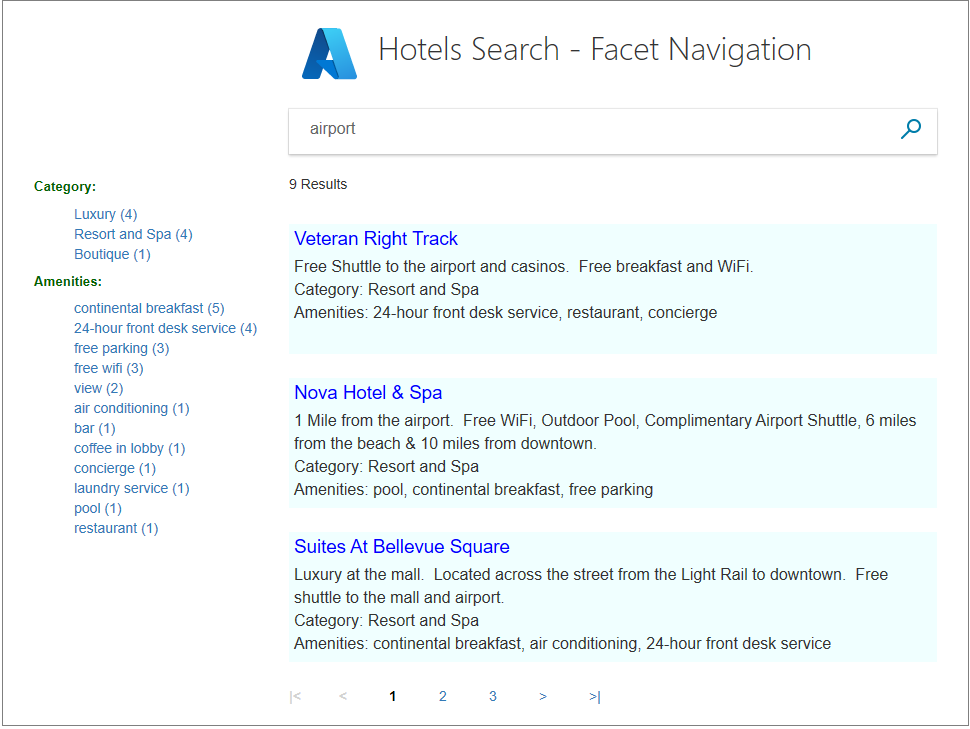
執行應用程式,輸入 「airport」 作為搜尋文字。 確認 Facet 清單會整齊地出現在左邊。 這些屬性全都適用於其文字數據中有「機場」的酒店,並計數其出現次數。
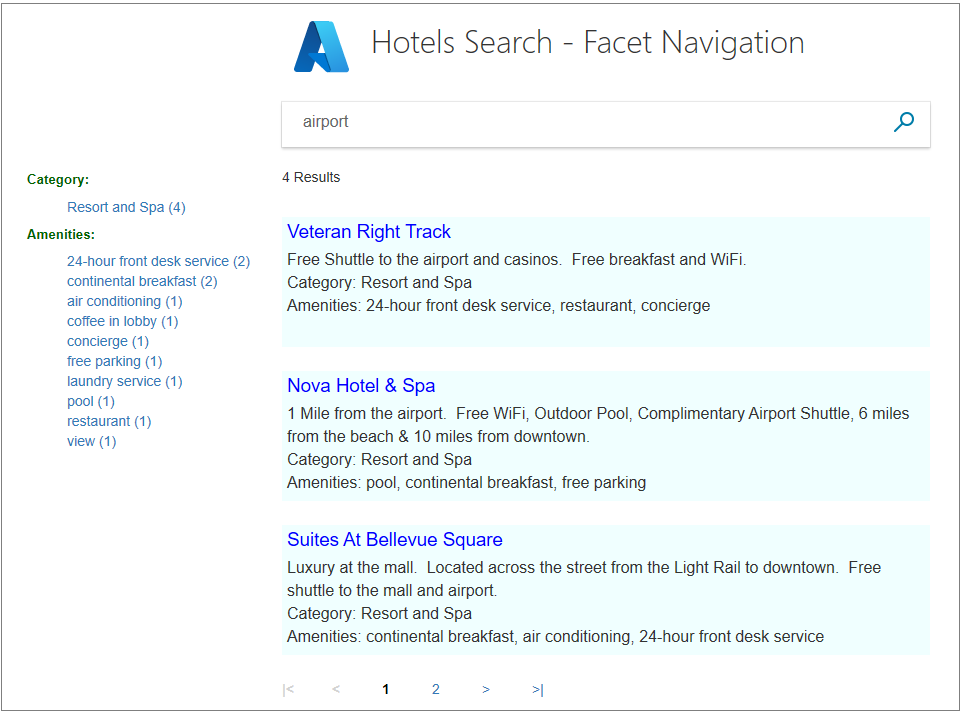
按一下 度假村和Spa 類別。 確認所有結果都在此類別中。
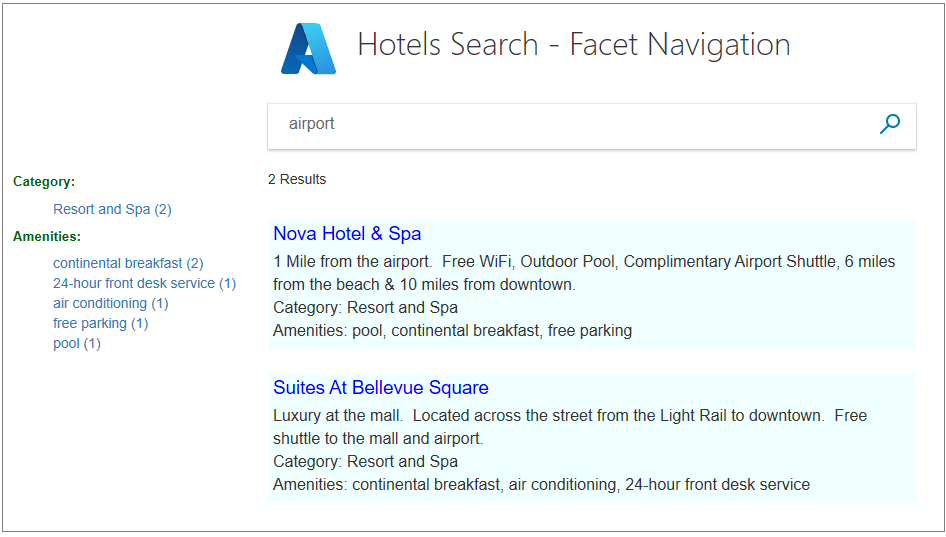
點擊 大陸早餐 設施。 確認所有結果仍屬於「度假村和 Spa」類別,並具備選取的設施。
請嘗試選取任何其他類別,然後選取一個設施,接著檢視縮小的結果。 然後嘗試另一種方式,一個設施,接著一個類別。 傳送空白搜尋以重設頁面。
備註
當在面向清單中進行選擇時,它會覆蓋類別清單中任何先前的選擇。
外賣
請考慮這個專案的下列要點:
- 請務必使用 IsFacetable 屬性來標記每個可 Facet 字段,以納入 Facet 導覽。
- Facet 會與篩選結合,以減少結果。
- 面向是累積的,每個選擇都基於上一次選擇,以進一步縮小結果。
後續步驟
在下一個教學課程中,我們將探討排序結果。 至此為止,結果會依照它們位於資料庫中的順序排序。