在所有先前的資料繫結範例中,Binding 類別的 Path 屬性 (或 Binding 標記延伸模組的 Path 屬性) 已設成單一屬性。 將 Path 設成「子屬性」(屬性的屬性) 或集合成員實際上是可行的。
例如,假設您的頁面包含 TimePicker:
<TimePicker x:Name="timePicker">
TimePicker 的 Time 屬性類別為 TimeSpan,但您可能想要建立資料繫結,參考該 TimeSpan 值的 TotalSeconds 屬性。 以下是資料繫結:
{Binding Source={x:Reference timePicker},
         Path=Time.TotalSeconds}
Time 屬性的類型為 TimeSpan,其具有 TotalSeconds 屬性。 Time 和 TotalSeconds 屬性只簡單使用句號連接。 Path 字串中的項目一律表示屬性,且不是這些屬性的類型。
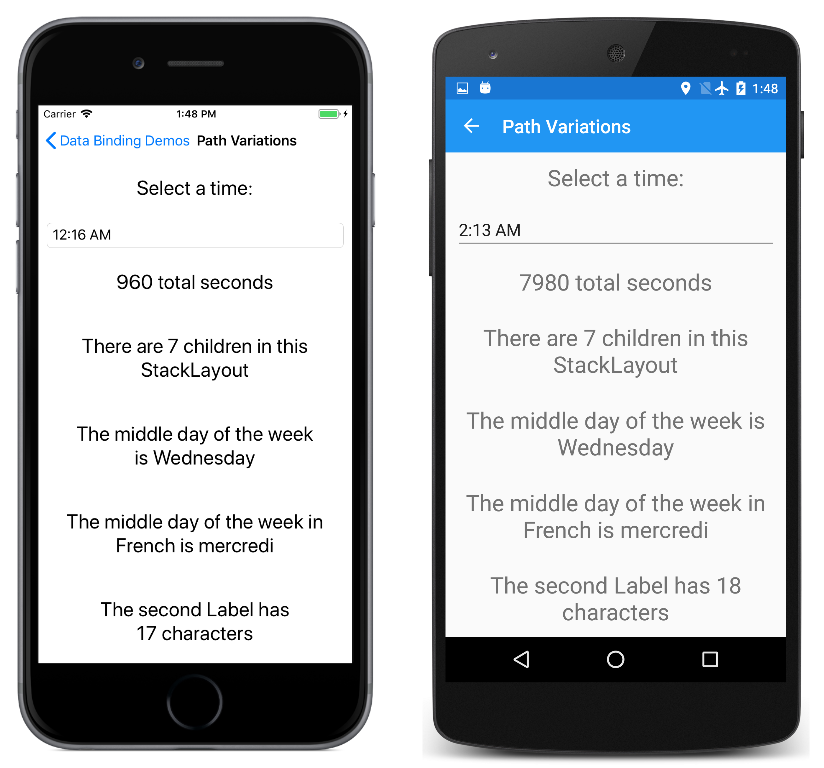
[Path Variations] \(路徑變化\) 頁面會顯示該範例及其他許多範例:
<ContentPage xmlns="http://xamarin.com/schemas/2014/forms"
             xmlns:x="http://schemas.microsoft.com/winfx/2009/xaml"
             xmlns:globe="clr-namespace:System.Globalization;assembly=netstandard"
             x:Class="DataBindingDemos.PathVariationsPage"
             Title="Path Variations"
             x:Name="page">
    <ContentPage.Resources>
        <ResourceDictionary>
            <Style TargetType="Label">
                <Setter Property="FontSize" Value="Large" />
                <Setter Property="HorizontalTextAlignment" Value="Center" />
                <Setter Property="VerticalOptions" Value="CenterAndExpand" />
            </Style>
        </ResourceDictionary>
    </ContentPage.Resources>

    <StackLayout Margin="10, 0">
        <TimePicker x:Name="timePicker" />

        <Label Text="{Binding Source={x:Reference timePicker},
                              Path=Time.TotalSeconds,
                              StringFormat='{0} total seconds'}" />

        <Label Text="{Binding Source={x:Reference page},
                              Path=Content.Children.Count,
                              StringFormat='There are {0} children in this StackLayout'}" />

        <Label Text="{Binding Source={x:Static globe:CultureInfo.CurrentCulture},
                              Path=DateTimeFormat.DayNames[3],
                              StringFormat='The middle day of the week is {0}'}" />

        <Label>
            <Label.Text>
                <Binding Path="DateTimeFormat.DayNames[3]"
                         StringFormat="The middle day of the week in France is {0}">
                    <Binding.Source>
                        <globe:CultureInfo>
                            <x:Arguments>
                                <x:String>fr-FR</x:String>
                            </x:Arguments>
                        </globe:CultureInfo>
                    </Binding.Source>
                </Binding>
            </Label.Text>
        </Label>

        <Label Text="{Binding Source={x:Reference page},
                              Path=Content.Children[1].Text.Length,
                              StringFormat='The second Label has {0} characters'}" />
    </StackLayout>
</ContentPage>
在第二個 Label 中,繫結來源是網頁本身。 Content 屬性的類型為 StackLayout,其 Children 屬性的類型為 IList<View>,它又包含指示子系數目的 Count 屬性。
具有索引子的路徑
[Path Variations] \(路徑變化\) 頁面中第三個 Label 的繫結會參考 System.Globalization 命名空間中的 CultureInfo 類別:
<Label Text="{Binding Source={x:Static globe:CultureInfo.CurrentCulture},
                      Path=DateTimeFormat.DayNames[3],
                      StringFormat='The middle day of the week is {0}'}" />
來源設為靜態的 CultureInfo.CurrentCulture 屬性,其為類型 CultureInfo 的物件。 類別定義的屬性名為 DateTimeFormat,其類型為包含 DayNames 集合的 DateTimeFormatInfo。 索引會選取第四個項目。
第四個 Label 作用類似,但適用於與法國建立關聯的文化特性。 繫結的 Source 屬性設為具有建構函式的 CultureInfo 物件:
<Label>
    <Label.Text>
        <Binding Path="DateTimeFormat.DayNames[3]"
                 StringFormat="The middle day of the week in France is {0}">
            <Binding.Source>
                <globe:CultureInfo>
                    <x:Arguments>
                        <x:String>fr-FR</x:String>
                    </x:Arguments>
                </globe:CultureInfo>
            </Binding.Source>
        </Binding>
    </Label.Text>
</Label>
如需在 XAML 中指定建構函式引數的詳細資料,請參閱傳遞建構函式引數。
最後,最後一個範例類似第二個,不同之處在於它參考的是 StackLayout 子系的其中之一:
<Label Text="{Binding Source={x:Reference page},
                      Path=Content.Children[1].Text.Length,
                      StringFormat='The first Label has {0} characters'}" />
該子系為 Label,其 Text 屬性的類型為包含 Length 屬性的 String。 第一個 Label 回報 TimePicker 中設定的 TimeSpan,所以當該文字變更時,最終的 Label 也跟著變更。
以下是程式執行情況:
偵錯複雜路徑
複雜的路徑定義建構困難:您需要知道每個子屬性的類型或集合項目的類型,才能正確新增下一個子屬性,但類型本身不會出現在路徑中。 一個良好技巧是以累加方式建置的路徑,並查看中繼結果。 至於最後一個範例,您完全可以從沒有 Path 定義開始:
<Label Text="{Binding Source={x:Reference page},
                      StringFormat='{0}'}" />
它會顯示繫結來源屬性類型或 DataBindingDemos.PathVariationsPage。 您知道 PathVariationsPage 衍生自 ContentPage,所以它有 Content 屬性:
<Label Text="{Binding Source={x:Reference page},
                      Path=Content,
                      StringFormat='{0}'}" />
Content 屬性的類型現顯示為 Xamarin.Forms.StackLayout。 將 Children 屬性新增至 Path ,而類型為 Xamarin.Forms.ElementCollection'1[Xamarin.Forms.View],這是內部的 Xamarin.Forms類別,但顯然是集合類型。 將索引新增至該範例,且類型為 Xamarin.Forms.Label。 繼續以這種方式進行。
當 Xamarin.Forms 處理系結路徑時,它會 PropertyChanged 在實 INotifyPropertyChanged 作 介面的路徑中的任何對象上安裝處理程式。 例如,因為 Text 屬性變更,所以最後一個繫結回應第一個 Label 中的變更。
如果繫結路徑中的屬性不實作 INotifyPropertyChanged,則忽略該屬性的所有變更。 某些變更可能會讓繫結路徑完全失效,所以您只有在屬性和子屬性的字串還未失效前,才使用這項技術。