簡介
若要使用 Fabric API,就像許多其他Microsoft服務一樣,您必須先取得 Fabric 服務的Microsoft Entra 令牌,然後在 API 呼叫的授權標頭中使用該令牌。
在本快速入門教學課程中,您將建立 C# 控制台應用程式,它會使用 MSAL.Net 連結庫取得 Entra ID 令牌,然後使用 C# HttpClient 呼叫清單工作區 API。
建立應用程式註冊
若要取得 Microsoft Entra 令牌,您必須先在 Microsoft Entra ID 註冊應用程式。
若要深入瞭解如何註冊應用程式和應用程式的不同屬性,以及它如何適用於您的案例,請參閱 在Microsoft身分識別平臺中註冊應用程式。
在本快速入門教學課程中,您將建立具有重新導向 URI = 的公用用戶端 http://localhost
以至少 雲端應用程式系統管理員 的身分登入 Microsoft Entra 系統管理中心。
瀏覽至應用程式 > 應用程式註冊。
按兩下 [新增註冊]。
輸入應用程式的顯示名稱,並新增公用用戶端重新導向 URI
http://localhost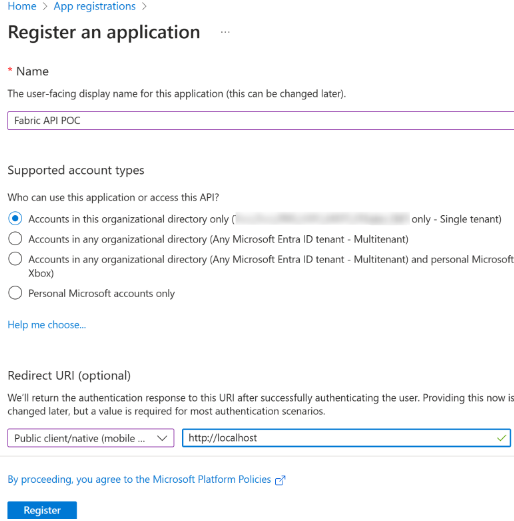
選取 註冊。
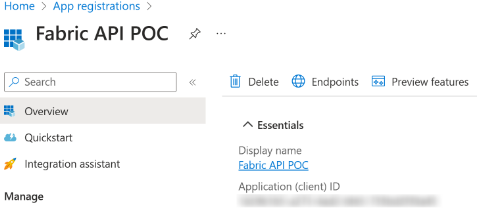
複製 應用程式 (用戶端) 識別碼 ,並將它貼到記事本中,以供稍後使用。
取得令牌
在本教學課程中,您將使用 MSAL.Net 取得用於 Fabric 服務的 Entra ID 驗證令牌,範圍包括:Workspace.ReadWrite.All 和 Item.ReadWrite.All。
如需有關使用 MSAL.Net 獲取令牌的更多資訊,請參閱 Token Acquisition - Microsoft Authentication Library for .NET。
請將您稍早複製的應用程式(用戶端)ID 貼上,並為 ClientId 變數貼上。
取得Microsoft Entra 存取令牌的 C# 程式代碼範例
#region parameters section
string ClientId = "YourApplicationId";
string Authority = "https://login.microsoftonline.com/organizations";
string RedirectURI = "http://localhost";
#endregion

#region Acquire a token for Fabric APIs
// In this sample we acquire a token for Fabric service with the scopes
// Workspace.ReadWrite.All and Item.ReadWrite.All
string[] scopes = new string[] { "https://api.fabric.microsoft.com/Workspace.ReadWrite.All https://api.fabric.microsoft.com/Item.ReadWrite.All" };

PublicClientApplicationBuilder PublicClientAppBuilder =
        PublicClientApplicationBuilder.Create(ClientId)
        .WithAuthority(Authority)
        .WithRedirectUri(RedirectURI);

IPublicClientApplication PublicClientApplication = PublicClientAppBuilder.Build();

AuthenticationResult result = await PublicClientApplication.AcquireTokenInteractive(scopes)
        .ExecuteAsync()
        .ConfigureAwait(false);

Console.WriteLine(result.AccessToken);
#endregion
通話清單工作區 API
在本節中,您將:
- 使用我們在上一節中取得的令牌來建立 C# HttpClient。
- 新增
https://api.fabric.microsoft.com/v1/為用戶端的基底 URL。 - 呼叫清單工作區 API,並將回應寫入主控台。
建立 HTTP 用戶端和呼叫清單工作區 API 的 C# 程式代碼範例
// Create client
HttpClient client = new HttpClient();
client.DefaultRequestHeaders.Authorization = new AuthenticationHeaderValue("Bearer", result.AccessToken);
string baseUrl = "https://api.fabric.microsoft.com/v1/";
client.BaseAddress = new Uri(baseUrl);

// Call list workspaces API
HttpResponseMessage response = await client.GetAsync("workspaces");
string responseBody = await response.Content.ReadAsStringAsync();
Console.WriteLine(responseBody);
完整 C# 主控台應用程式程式代碼範例
using Microsoft.Identity.Client;
using System.Net.Http.Headers;

#region parameters section
string ClientId = "YourApplicationId";
string Authority = "https://login.microsoftonline.com/organizations";
string RedirectURI = "http://localhost";
#endregion

#region Acquire a token for Fabric APIs
// In this sample we acquire a token for Fabric service with the scopes Workspace.ReadWrite.All and Item.ReadWrite.All
string[] scopes = new string[] { "https://api.fabric.microsoft.com/Workspace.ReadWrite.All https://api.fabric.microsoft.com/Item.ReadWrite.All" };

PublicClientApplicationBuilder PublicClientAppBuilder =
        PublicClientApplicationBuilder.Create(ClientId)
        .WithAuthority(Authority)
        .WithRedirectUri(RedirectURI);

IPublicClientApplication PublicClientApplication = PublicClientAppBuilder.Build();

AuthenticationResult result = await PublicClientApplication.AcquireTokenInteractive(scopes)
        .ExecuteAsync()
        .ConfigureAwait(false);

Console.WriteLine(result.AccessToken);
#endregion

#region Create an HTTP client and call the Fabric APIs
// Create client
HttpClient client = new HttpClient();
client.DefaultRequestHeaders.Authorization = new AuthenticationHeaderValue("Bearer", result.AccessToken);
string baseUrl = "https://api.fabric.microsoft.com/v1/";
client.BaseAddress = new Uri(baseUrl);

// Call list workspaces API
HttpResponseMessage response = await client.GetAsync("workspaces");
string responseBody = await response.Content.ReadAsStringAsync();
Console.WriteLine(responseBody);
#endregion