本主題說明如何取用 C++/WinRT API,無論是 Windows 的一部分、由第三方元件廠商實作,還是自行實作。
這很重要
因此,本主題中的程式碼範例簡短且容易讓您試用,您可以藉由建立新的 Windows 控制台應用程式 (C++/WinRT) 專案,以及複製貼上程式代碼來重現它們。 不過,您無法從這類未封裝的應用程式取用任意自定義 (第三方) Windows 執行時間類型。 您只能以這種方式使用 Windows 類型。
若要從主控台應用程式取用自訂(第三方)Windows 執行階段類型,您需要給應用程式一個 套件身分識別,才能解析取用的自訂類型註冊。 如需詳細資訊,請參閱 Windows 應用程式封裝專案。
或者,從 空白應用程式 (C++/WinRT)、核心應用程式 (C++/WinRT)或 Windows 運行時間元件 (C++/WinRT) 專案範本建立新專案。 這些應用程式類別已有套件身分識別 。
如果 API 位於 Windows 命名空間中
這是您將取用 Windows 運行時間 API 的最常見案例。 針對元數據中定義之 Windows 命名空間中的每個類型,C++/WinRT 會定義一個適合 C++ 的等效類型(稱為 投影類型)。 投影類型與 Windows 類型具有相同的完整名稱,但會使用 C++ 語法,將它放在 winrt 命名空間C++中。 例如,Windows::Foundation::Uri 映射為 C++/WinRT 中的 winrt::Windows::Foundation::Uri。
以下是簡單的程式代碼範例。 如果您想要將下列程式代碼範例直接複製到
// main.cpp
#include <winrt/Windows.Foundation.h>

using namespace winrt;
using namespace Windows::Foundation;

int main()
{
    winrt::init_apartment();
    Uri contosoUri{ L"http://www.contoso.com" };
    Uri combinedUri = contosoUri.CombineUri(L"products");
}
包含的標頭 winrt/Windows.Foundation.h 是 SDK 的一部分,位於資料夾內 %WindowsSdkDir%Include<WindowsTargetPlatformVersion>\cppwinrt\winrt\。 該資料夾中的標頭包含投影至 C++/WinRT 的 Windows 命名空間類型。 在此範例中,winrt/Windows.Foundation.h 包含 winrt::Windows::Foundation::Uri,這是執行期類別 Windows::Foundation::Uri的投射類型。
小提示
每當您想要從 Windows 命名空間使用類型時,請包含對應至該命名空間的 C++/WinRT 標頭。
using namespace 指令是選擇性的,但很方便。
在上述程式代碼範例中,在初始化 C++/WinRT 之後,我們會透過其中一個公開記載的建構函式 (
事實上,預測值是一個代理;它基本上只是指向後援對象的智能指標。 投影值的建構函式會呼叫 RoActivateInstance,以建立備份 Windows 運行時間類別的實例(在此案例中Windows.Foundation.Uri),並將該對象的預設介面儲存在新的投影值內。 如下所示,您對投影值成員的呼叫實際上會透過智慧指標委派給後援物件,這就是狀態變更發生的位置。
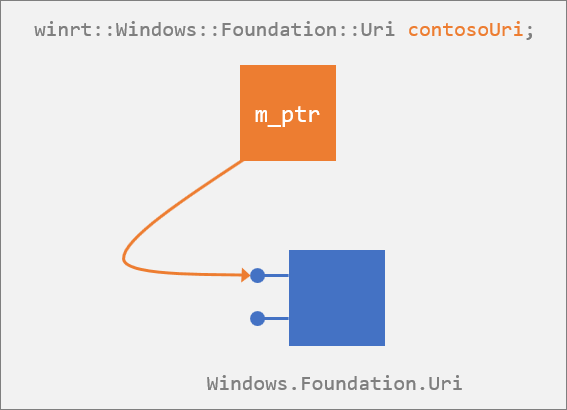
當 contosoUri 值超出範圍時,它會解構並釋放其對預設介面的引用。 如果該參考是基礎 Windows 執行階段 Windows.Foundation.Uri 物件的最後一個參考,則該基礎物件也會解構。
小提示
投影類型是 Windows 執行階段類型的一種包裝器,用於取用其 API。 例如,投影介面 是 Windows 執行階段介面的封裝。
C++/WinRT 投影標頭
若要從 C++/WinRT 取用 Windows 命名空間 API,您需要從 %WindowsSdkDir%Include<WindowsTargetPlatformVersion>\cppwinrt\winrt 資料夾包含標頭檔。 您必須包含對應至所使用之每個命名空間的標頭。
例如,針對 Windows::Security::Cryptography::Certificates 命名空間,對等C++/WinRT 類型定義位於 winrt/Windows.Security.Cryptography.Certificates.h中。 包含該標頭可讓您存取 Windows::Security::Cryptography::Certificates 命名空間中的所有類型。
有時候,一個命名空間標頭會包含相關命名空間標頭的一部分,但您不應該依賴此實作詳細數據。 明確包含您使用之命名空間的標頭。
例如, Certificate::GetCertificateBlob 方法會傳回 Windows::Storage::Streams::IBuffer 介面。
呼叫 Certificate::GetCertificateBlob 方法之前,您必須包含 winrt/Windows.Storage.Streams.h 命名空間頭檔,以確保可以接收和操作傳回的 Windows::Storage::Streams::IBuffer。
在使用該命名空間中的類型之前,忘記包含必要的命名空間標頭是建置錯誤的常見來源。
透過物件、透過介面或透過 ABI 存取成員
在 C++/WinRT 投影中,Windows 執行階段類別的執行階段表示不超過基礎的 ABI 介面。 但是,為了方便起見,您可以按照作者的意圖對類別進行編碼。 例如,您可以呼叫 Uri 的 ToString 方法,就像是該類別的方法一樣(其實,這是在獨立的 IStringable 介面上的方法)。
WINRT_ASSERT 是一個宏定義,它展開為 _ASSERTE。
Uri contosoUri{ L"http://www.contoso.com" };
WINRT_ASSERT(contosoUri.ToString() == L"http://www.contoso.com/"); // QueryInterface is called at this point.
這項便利性是透過查詢適當的介面來達成。 但是,控制權永遠在你手中。 您可以選擇放棄一點便利性,藉由自行擷取 IStringable 介面並直接使用它,來提升一點效能。 在下列程式碼範例中,您會在執行時透過一次查詢取得實際的 IStringable 介面的指標。 之後您可以直接呼叫 ToString,避免再呼叫 QueryInterface。
...
IStringable stringable = contosoUri; // One-off QueryInterface.
WINRT_ASSERT(stringable.ToString() == L"http://www.contoso.com/");
如果您知道您會在同一個介面上呼叫數個方法,則可以選擇這項技術。
順便說一句,如果您想要存取 ABI 層級的成員,則可以。 下列程式代碼範例說明了如何做到這一點,並且在 章節中有更多關於 C++/WinRT 與 ABI之間的互操作性的詳細資訊和程式代碼範例。
#include <Windows.Foundation.h>
#include <unknwn.h>
#include <winrt/Windows.Foundation.h>
using namespace winrt::Windows::Foundation;

int main()
{
    winrt::init_apartment();
    Uri contosoUri{ L"http://www.contoso.com" };

    int port{ contosoUri.Port() }; // Access the Port "property" accessor via C++/WinRT.

    winrt::com_ptr<ABI::Windows::Foundation::IUriRuntimeClass> abiUri{
        contosoUri.as<ABI::Windows::Foundation::IUriRuntimeClass>() };
    HRESULT hr = abiUri->get_Port(&port); // Access the get_Port ABI function.
}
延遲初始化
在 C++/WinRT 中,每個投影類型都有特殊的 C++/WinRT std::nullptr_t 建構函式。 除了那一個以外,所有投影類型的建構函式,包括預設建構函式,皆會建立一個 Windows 運行時間支援物件,並為您提供指向該物件的智慧指標。 因此,該規則會套用到使用預設建構函式的任何位置,例如未初始化的局部變數、未初始化的全域變數,以及未初始化的成員變數。
另一方面,如果您想要建構一個投影類型的變數,但不想立刻建構其相應的 Windows 運行時物件(以便可以將此工作延遲到稍後),則可以這麼做。 使用那個特殊的 C++/WinRT std::nullptr_t 建構函式(C++/WinRT 投影會注入到每個運行時類別中)來宣告您的變數或欄位。 我們在下列程式代碼範例中使用具有 m_gamerPicBuffer 的特殊建構函式。
#include <winrt/Windows.Storage.Streams.h>
using namespace winrt::Windows::Storage::Streams;

#define MAX_IMAGE_SIZE 1024

struct Sample
{
    void DelayedInit()
    {
        // Allocate the actual buffer.
        m_gamerPicBuffer = Buffer(MAX_IMAGE_SIZE);
    }

private:
    Buffer m_gamerPicBuffer{ nullptr };
};

int main()
{
    winrt::init_apartment();
    Sample s;
    // ...
    s.DelayedInit();
}
投影類型上的所有建構函式 除了std::nullptr_t 建構函式之外,都會建立備份 Windows 運行時間物件。 std::nullptr_t 建構函式基本上是 no-op。 它預期投影物件會在後續時間初始化。 因此,不論運行時間類別是否有預設建構函式,您都可以使用這項技術來有效率地延遲初始化。
此考慮會影響叫用預設建構函式的其他位置,例如向量和地圖。 請考慮此程式碼範例,您將需要 空白應用程式 (C++/WinRT) 專案。
std::map<int, TextBlock> lookup;
lookup[2] = value;
指派會先建立新的 TextBlock,然後立即用 value覆蓋它。 以下是補救措施。
std::map<int, TextBlock> lookup;
lookup.insert_or_assign(2, value);
另請參閱 預設建構函式如何影響集合。
不要不小心延遲初始化
以免誤用 std::nullptr_t 建構函式。 編譯器的衝突解決機制優於工廠建構子。 例如,請考慮這兩個運行時間類別定義。
// GiftBox.idl
runtimeclass GiftBox
{
    GiftBox();
}

// Gift.idl
runtimeclass Gift
{
    Gift(GiftBox giftBox); // You can create a gift inside a box.
}
假設我們想要建構不在盒子內的 Gift(以一個未初始化的 GiftBox建構的 Gift)。 首先,讓我們看看 錯誤的 方法來做到這一點。 我們知道有一個 Gift 建構函式會接受 GiftBox。 但是,如果我們想要透過統一初始化來傳遞 null GiftBox (叫用 Gift 建構函式,如以下所示),則 不會 取得我們想要的結果。
// These are *not* what you intended. Doing it in one of these two ways
// actually *doesn't* create the intended backing Windows Runtime Gift object;
// only an empty smart pointer.

Gift gift{ nullptr };
auto gift{ Gift(nullptr) };
您在這裡得到的是尚未初始化的 禮品。 您不會收到 Gift ,因為 GiftBox尚未初始化。 以下是 正確的 方式。
// Doing it in one of these two ways creates an initialized
// Gift with an uninitialized GiftBox.

Gift gift{ GiftBox{ nullptr } };
auto gift{ Gift(GiftBox{ nullptr }) };
在不正確的範例中,傳遞 nullptr 常值會偏向延遲初始化建構函式的解析。 若要解析支援處理站建構函式,參數的類型必須是 GiftBox。 您仍然可以選擇傳遞明確延遲初始化 GiftBox,如正確的範例所示。
下一個範例 也 正確,因為 參數的類型為 GiftBox,而不是 std::nullptr_t。
GiftBox giftBox{ nullptr };
Gift gift{ giftBox }; // Calls factory constructor.
只有當您傳遞 nullptr 字面值時,才會出現歧義。
不要錯誤地複製建構。
此警告與上文 不要因錯誤延遲初始化 一節中描述的情況類似。
除了延遲初始化建構函式之外,C++/WinRT 投影也會將複製建構函式插入每個執行階段類別中。 它是單一參數建構函式,可接受與所建構物件相同的類型。 產生的智慧指標指向與其建構函式參數所指向的相同底層 Windows 執行階段物件。 結果是兩個智慧指針對象指向相同的後端物件。
以下是我們將在程式代碼範例中使用的運行時間類別定義。
// GiftBox.idl
runtimeclass GiftBox
{
    GiftBox(GiftBox biggerBox); // You can place a box inside a bigger box.
}
假設我們想要在較大的 GiftBox內建構 GiftBox。
GiftBox bigBox{ ... };

// These are *not* what you intended. Doing it in one of these two ways
// copies bigBox's backing-object-pointer into smallBox.
// The result is that smallBox == bigBox.

GiftBox smallBox{ bigBox };
auto smallBox{ GiftBox(bigBox) };
正確的 方法是要明確呼叫啟動工廠。
GiftBox bigBox{ ... };

// These two ways call the activation factory explicitly.

GiftBox smallBox{
    winrt::get_activation_factory<GiftBox, IGiftBoxFactory>().CreateInstance(bigBox) };
auto smallBox{
    winrt::get_activation_factory<GiftBox, IGiftBoxFactory>().CreateInstance(bigBox) };
如果在 Windows 執行階段元件中實作 API
本節適用於無論您自己撰寫元件,或者是元件來自廠商。
備註
如需安裝和使用 C++/WinRT Visual Studio 延伸模組 (VSIX) 和 NuGet 套件的資訊(一起提供專案範本和建置支援),請參閱 Visual Studio 支援 C++/WinRT。
在您的應用程式專案中,參考 Windows 執行時間元件的 Windows 執行時間元資料 (.winmd) 檔案,並建置。 在建置期間,cppwinrt.exe 工具會產生標準的 C++ 程式庫,完整描述 API 介面——或 專案中的—— 的元件。 換句話說,產生的程式庫包含元件的預測類型。
接著,像 Windows 命名空間類型一樣,您會包含標頭檔,並透過其中一個建構函式來建構投影類型。 您的應用程式專案的啟動代碼會註冊執行時類別,而投影類型的建構函式會呼叫 RoActivateInstance,以從參考的元件激活執行時類別。
#include <winrt/ThermometerWRC.h>

struct App : implements<App, IFrameworkViewSource, IFrameworkView>
{
    ThermometerWRC::Thermometer thermometer;
    ...
};
如需在 Windows 執行時間元件中使用 C++/WinRT 的 API 的詳細資訊、程式碼和逐步解說,請參閱 Windows 執行時間元件與 C++/WinRT 和 在 C++/WinRT 中撰寫事件。
如果在取用項目中實作 API
本節中的程序代碼範例取自 XAML 控制件 主題;繫結至 C++/WinRT 屬性。 如需更多詳細資訊、程式碼,以及逐步解說如何在相同專案中實作並使用執行時類別,請參閱該主題。
從 XAML UI 取用的類型必須是運行時間類別,即使它位於與 XAML 相同的專案中也一樣。 在此案例中,您會從執行階段類別的 Windows 執行階段中繼資料產生預測類型(.winmd)。 同樣地,您會包含一個標頭,接著您可以選擇使用 C++/WinRT 1.0 版或 2.0 版的方法來建構執行階段類別的實例。 1.0 版方法使用 winrt::make;2.0 版方法稱為 統一建構。 讓我們逐一來看看每一個。
使用 winrt::make 建構
讓我們從預設 (C++/WinRT 1.0 版) 方法開始,因為這是至少熟悉該模式的好主意。 您可以透過其 std::nullptr_t 建構函式來建構投影類型。 該建構函式不會執行任何初始化,因此您必須透過 winrt::make 協助程式函式,傳遞任何必要的建構函式自變數,將值指派給實例。 在與取用程式代碼相同的專案中實作的執行階段類別不需要註冊,也不需要透過 Windows 執行階段/COM 啟用具現化。
請參閱 XAML 控制件;如需完整逐步解說,系結至C++/WinRT 屬性。 本節顯示該逐步解說的摘錄內容。
// MainPage.idl
import "BookstoreViewModel.idl";
namespace Bookstore
{
    runtimeclass MainPage : Windows.UI.Xaml.Controls.Page
    {
        BookstoreViewModel MainViewModel{ get; };
    }
}

// MainPage.h
...
struct MainPage : MainPageT<MainPage>
{
    ...
    private:
        Bookstore::BookstoreViewModel m_mainViewModel{ nullptr };
};
...

// MainPage.cpp
...
#include "BookstoreViewModel.h"

MainPage::MainPage()
{
    m_mainViewModel = winrt::make<Bookstore::implementation::BookstoreViewModel>();
    ...
}
統一建構
使用 C++/WinRT 2.0 版及其後續版本時,有一種優化的建構方式可供您使用,稱為 統一建構模式(請參閱 有關 C++/WinRT 2.0 的新聞與變更)。
請參閱 XAML 控制件;如需完整逐步解說,系結至C++/WinRT 屬性。 本節顯示該逐步解說的摘錄內容。
若要使用一致性建構,而不是 winrt::make,您需要啟動工廠。 產生物件的好方法是將建構函式新增至IDL中。
// MainPage.idl
import "BookstoreViewModel.idl";
namespace Bookstore
{
    runtimeclass MainPage : Windows.UI.Xaml.Controls.Page
    {
        MainPage();
        BookstoreViewModel MainViewModel{ get; };
    }
}
然後,在 MainPage.h 只需一步驟宣告和初始化 m_mainViewModel,如下所示。
// MainPage.h
...
struct MainPage : MainPageT<MainPage>
{
    ...
    private:
        Bookstore::BookstoreViewModel m_mainViewModel;
        ...
    };
}
...
然後,在 的 MainPage.cpp 建構函式中,不需要程式碼 m_mainViewModel = winrt::make<Bookstore::implementation::BookstoreViewModel>();。
如需統一建構和程式代碼範例的詳細資訊,請參閱 選擇加入統一建構,以及直接實作存取。
具現化和傳回投影類型和介面
這裡有一個範例,展示在您的應用專案中預期的類別與介面可能會是什麼樣子。 請記住,投射類型(如本範例中的類型)是由工具產生的,而不是您自己撰寫的。
struct MyRuntimeClass : MyProject::IMyRuntimeClass, impl::require<MyRuntimeClass,
    Windows::Foundation::IStringable, Windows::Foundation::IClosable>
MyRuntimeClass 是投影類型,投影介面包括 IMyRuntimeClass、IStringable,以及 IClosable。 本主題已示範您可以具現化投影類型的不同方式。 以下是使用 MyRuntimeClass 作為範例的提醒和摘要。
// The runtime class is implemented in another compilation unit (it's either a Windows API,
// or it's implemented in a second- or third-party component).
MyProject::MyRuntimeClass myrc1;

// The runtime class is implemented in the same compilation unit.
MyProject::MyRuntimeClass myrc2{ nullptr };
myrc2 = winrt::make<MyProject::implementation::MyRuntimeClass>();
- 您可以存取所有投影類型介面的成員。
- 您可以將投影類型傳回給呼叫端。
- 投影類型和介面衍生自 winrt::Windows::Foundation::IUnknown。 因此,您可以在投影類型或介面上呼叫 IUnknown::as,以查詢其他投影介面,並可以直接使用這些介面或將其返回給呼叫端。 作為 成員函式的運作方式,如同 QueryInterface。
void f(MyProject::MyRuntimeClass const& myrc)
{
    myrc.ToString();
    myrc.Close();
    IClosable iclosable = myrc.as<IClosable>();
    iclosable.Close();
}
啟用工廠
建立C++/WinRT 物件的便利、直接方式如下。
using namespace winrt::Windows::Globalization::NumberFormatting;
...
CurrencyFormatter currency{ L"USD" };
有的時候,您可能會想要自行建立啟用工廠,然後在您方便的時候從中創建物件。 以下是一些範例示範如何使用 winrt::get_activation_factory 函式範本。
using namespace winrt::Windows::Globalization::NumberFormatting;
...
auto factory = winrt::get_activation_factory<CurrencyFormatter, ICurrencyFormatterFactory>();
CurrencyFormatter currency = factory.CreateCurrencyFormatterCode(L"USD");
using namespace winrt::Windows::Foundation;
...
auto factory = winrt::get_activation_factory<Uri, IUriRuntimeClassFactory>();
Uri uri = factory.CreateUri(L"http://www.contoso.com");
上述兩個範例中的類別是來自 Windows 命名空間的類型。 在下一個範例中,溫度計WRC::Thermometer 是在 Windows 執行階段元件中實作的自訂類型。
auto factory = winrt::get_activation_factory<ThermometerWRC::Thermometer>();
ThermometerWRC::Thermometer thermometer = factory.ActivateInstance<ThermometerWRC::Thermometer>();
成員/類型模棱兩可
當成員函式的名稱與類型相同時,會有模棱兩可的情況。 C++在成員函式中的無資格名稱查找規則會導致在命名空間中搜尋之前先搜尋類別。 替代失敗不是 (SFINAE) 規則不適用的錯誤(在函式範本的多載解析期間適用)。 因此,如果類別內的名稱沒有意義,則編譯程式不會持續尋找較佳的相符專案,而只會報告錯誤。
struct MyPage : Page
{
    void DoWork()
    {
        // This doesn't compile. You get the error
        // "'winrt::Windows::Foundation::IUnknown::as':
        // no matching overloaded function found".
        auto style{ Application::Current().Resources().
            Lookup(L"MyStyle").as<Style>() };
    }
}
上述編譯器會認為您傳遞 FrameworkElement.Style()(在 C++/WinRT 中,是成員函式)作為模板參數給 IUnknown::as。 解決方案是強制將名稱 Style 解譯為類型 Windows::UI::Xaml::Style。
struct MyPage : Page
{
    void DoWork()
    {
        // One option is to fully-qualify it.
        auto style{ Application::Current().Resources().
            Lookup(L"MyStyle").as<Windows::UI::Xaml::Style>() };

        // Another is to force it to be interpreted as a struct name.
        auto style{ Application::Current().Resources().
            Lookup(L"MyStyle").as<struct Style>() };

        // If you have "using namespace Windows::UI;", then this is sufficient.
        auto style{ Application::Current().Resources().
            Lookup(L"MyStyle").as<Xaml::Style>() };

        // Or you can force it to be resolved in the global namespace (into which
        // you imported the Windows::UI::Xaml namespace when you did
        // "using namespace Windows::UI::Xaml;".
        auto style = Application::Current().Resources().
            Lookup(L"MyStyle").as<::Style>();
    }
}
在名稱後面接著 ::的情況下,未限定的名稱查閱有特殊例外狀況,在此情況下,它會忽略函式、變數和列舉值。 這可讓您執行類似的事情。
struct MyPage : Page
{
    void DoSomething()
    {
        Visibility(Visibility::Collapsed); // No ambiguity here (special exception).
    }
}
對 Visibility() 的呼叫會解析為 UIElement.Visibility 成員函式名稱。 但是,因為參數 Visibility::Collapsed 跟在具有 Visibility的 :: 字後面,所以方法名稱被忽略,而編譯器會定位枚舉類。
重要 API
- QueryInterface 函式
- RoActivateInstance 函式
- Windows::Foundation::Uri 類別
- winrt::get_activation_factory 函式範本
- winrt::make 函式範本
- winrt::Windows::Foundation::IUnknown 結構體