إشعار
يتطلب الوصول إلى هذه الصفحة تخويلاً. يمكنك محاولة تسجيل الدخول أو تغيير الدلائل.
يتطلب الوصول إلى هذه الصفحة تخويلاً. يمكنك محاولة تغيير الدلائل.
Use summary rules in Microsoft Sentinel to aggregate large sets of data in the background for a smoother security operations experience across all log tiers. يتم تحويل بيانات الملخص برمجيا مسبقا في جداول السجل المخصصة وتوفر أداء استعلام سريع، بما في ذلك الاستعلامات التي يتم تشغيلها على البيانات المشتقة من مستويات السجل منخفضة التكلفة. يمكن أن تساعد قواعد الملخص في تحسين بياناتك من أجل:
- التحليل والتقارير، خاصة عبر مجموعات البيانات الكبيرة والنطاقات الزمنية، كما هو مطلوب لتحليل الأمان والحوادث، وتقارير الأعمال الشهرية أو السنوية، وما إلى ذلك.
- Cost savings on verbose logs, which you can retain for as little or as long as you need in a less expensive log tier, and send as summarized data only to an Analytics table for analysis and reports.
- الأمان وخصوصية البيانات، عن طريق إزالة تفاصيل الخصوصية أو تعتيمها في البيانات القابلة للمشاركة الملخصة والحد من الوصول إلى الجداول التي تحتوي على بيانات أولية.
Microsoft Sentinel stores summary rule results in custom tables with the Analytics data plan. لمزيد من المعلومات حول خطط البيانات وتكاليف التخزين، راجع خطط جدول السجل.
تشرح هذه المقالة كيفية إنشاء قواعد الملخص أو نشر قوالب قواعد التلخيص التي تم إنشاؤها مسبقا في Microsoft Sentinel، وتوفر أمثلة على السيناريوهات الشائعة لاستخدام قواعد الملخص.
Important
Starting in July 2026, all customers using Microsoft Sentinel in the Azure portal will be redirected to the Defender portal and will use Microsoft Sentinel in the Defender portal only. Starting in July 2025, many new users are also automatically onboarded and redirected from the Azure portal to the Defender portal. إذا كنت لا تزال تستخدم Microsoft Sentinel في مدخل Microsoft Azure، نوصيك بالبدء في التخطيط للانتقال إلى مدخل Defender لضمان انتقال سلس والاستفادة الكاملة من تجربة عمليات الأمان الموحدة التي يقدمها Microsoft Defender. لمزيد من المعلومات، راجع حان الوقت للنقل: إيقاف مدخل Microsoft Sentinel Azure لمزيد من الأمان.
Prerequisites
لإنشاء قواعد الملخص في Microsoft Sentinel:
يجب تمكين Microsoft Sentinel في مساحة عمل واحدة على الأقل، واستهلاك السجلات بنشاط.
يجب أن تكون قادرا على الوصول إلى Microsoft Sentinel باستخدام أذونات Microsoft Sentinel Contributor . لمزيد من المعلومات، راجع الأدوار والأذونات في Microsoft Sentinel.
لإنشاء قواعد ملخص في مدخل Microsoft Defender، يجب أولا إلحاق مساحة العمل بمدخل Defender. لمزيد من المعلومات، راجع توصيل Microsoft Sentinel بمدخل Microsoft Defender.
نوصي بتجربة استعلام قاعدة الملخص في صفحة السجلات قبل إنشاء القاعدة. Verify that the query doesn't reach or near the query limit, and check that the query produces the intended schema and expected results. إذا كان الاستعلام قريبا من حدود الاستعلام، ففكر في استخدام أصغر binSize لمعالجة بيانات أقل لكل سلة. يمكنك أيضا تعديل الاستعلام لإرجاع عدد أقل من السجلات أو إزالة الحقول ذات الحجم الأعلى.
إنشاء قاعدة ملخص جديدة
إنشاء قاعدة ملخص جديدة لتجميع مجموعة كبيرة معينة من البيانات في جدول ديناميكي. قم بتكوين تكرار القاعدة لتحديد عدد المرات التي يتم فيها تحديث مجموعة البيانات المجمعة من البيانات الأولية.
افتح معالج قاعدة الملخص:
في مدخل Defender، حدد Microsoft Sentinel > Configuration > Summary rules.
In the Azure portal, from the Microsoft Sentinel navigation menu, under Configuration, select Summary rules. For example:
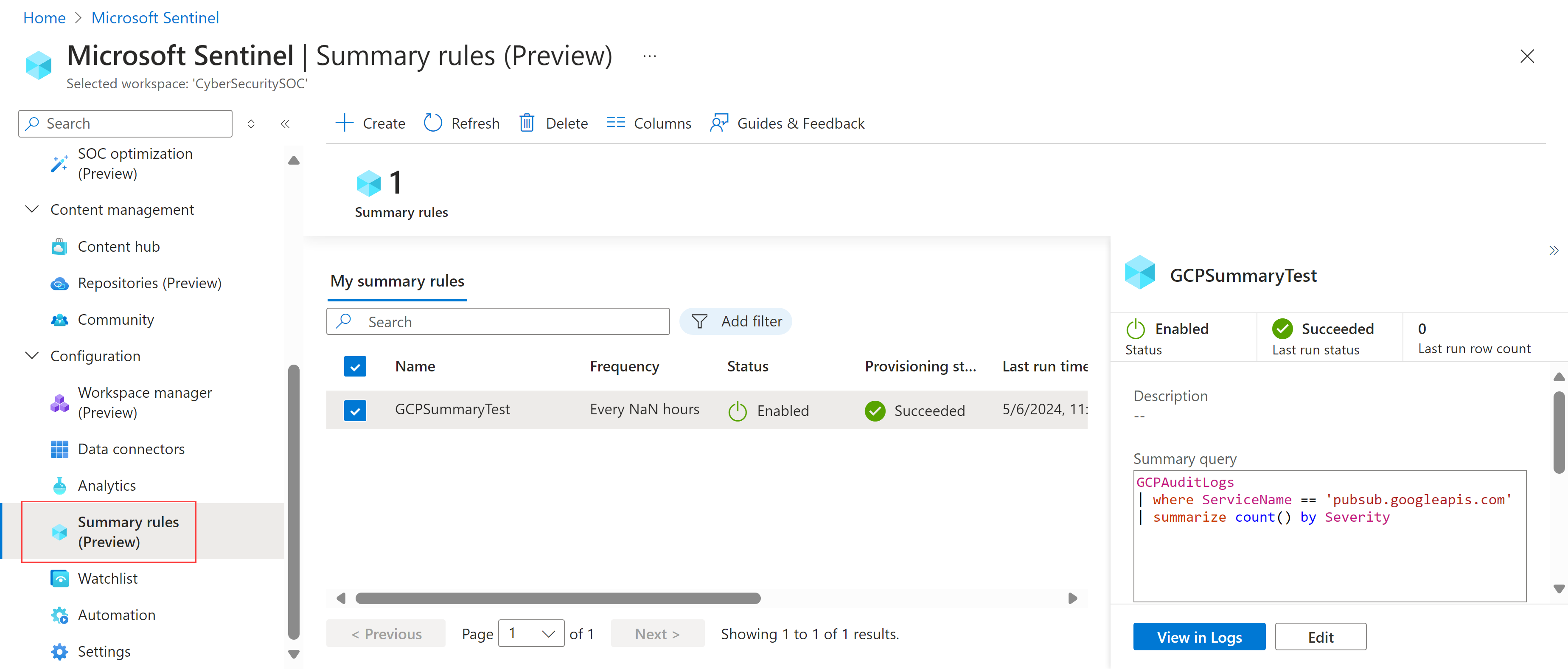
Select + Create and enter the following details:
Name. أدخل اسما ذا معنى للقاعدة الخاصة بك.
Description. أدخل وصفا اختياريا.
Destination table. حدد جدول السجل المخصص حيث يتم تجميع بياناتك:
إذا حددت جدول سجل مخصص موجود، فحدد الجدول الذي تريد استخدامه.
إذا قمت بتحديد جدول سجل مخصص جديد، أدخل اسما ذا معنى للجدول. يستخدم اسم الجدول الكامل بناء الجملة التالي:
<tableName>_CL.
We recommend that you enable SummaryLogs diagnostic settings on your workspace to get visibility for historical runes and failures. If SummaryLogs diagnostic settings aren't enabled, you're prompted to enable them in the Diagnostic settings area.
If SummaryLogs diagnostic settings are already enabled, but you want to modify the settings, select Configure advanced diagnostic settings. عند العودة إلى صفحة معالج قاعدة الملخص ، تأكد من تحديد تحديث لتحديث تفاصيل الإعداد.
Important
The SummaryLogs diagnostic setting has additional costs. لمزيد من المعلومات، راجع إعدادات التشخيص في Azure Monitor.
حدد Next: Set summary logic > للمتابعة.
في صفحة تعيين منطق الملخص ، أدخل استعلام الملخص. على سبيل المثال، لتلخيص البيانات من Google Cloud Platform، قد تحتاج إلى إدخال:
GCPAuditLogs
| where ServiceName == 'pubsub.googleapis.com'
| summarize count() by Severity
لمزيد من المعلومات، راجع نموذج سيناريوهات قاعدة الملخصولغة استعلام Kusto (KQL) في Azure Monitor.
Select Preview results to show an example of the data you'd collect with the configured query.
In the Query scheduling area, define the following details:
- كم مرة تريد تشغيل القاعدة
- ما إذا كنت تريد تشغيل القاعدة بأي نوع من التأخير، في دقائق
- عندما تريد بدء تشغيل القاعدة
تستند الأوقات المحددة في الجدولة إلى العمود الموجود
timegeneratedفي بياناتكحدد Next: Review + create >>Save لإكمال قاعدة الملخص.
Existing summary rules are listed on the Summary rules page, where you can review your rule status. لكل قاعدة، حدد قائمة الخيارات في نهاية الصف لاتخاذ أي من الإجراءات التالية:
- View the rule's current data in the Logs page, as if you were to run the query immediately
- عرض محفوظات التشغيل للقاعدة المحددة
- تعطيل القاعدة أو تمكينها.
- تحرير تكوين القاعدة
To delete a rule, select the rule row and then select Delete in the toolbar at the top of the page.
Note
يدعم Azure Monitor أيضا إنشاء قواعد ملخص عبر واجهة برمجة التطبيقات أو قالب Azure Resource Monitor (ARM). لمزيد من المعلومات، راجع إنشاء قاعدة ملخص أو تحديثها.
نشر قوالب قواعد التلخيص التي تم إنشاؤها مسبقا
قوالب قاعدة الملخص هي قواعد ملخص تم إنشاؤها مسبقا يمكنك نشرها as-is أو تخصيصها لاحتياجاتك.
لنشر قالب قاعدة ملخص:
Open the Content hub and filter Content type by Summary rules to view the available summary rule templates.
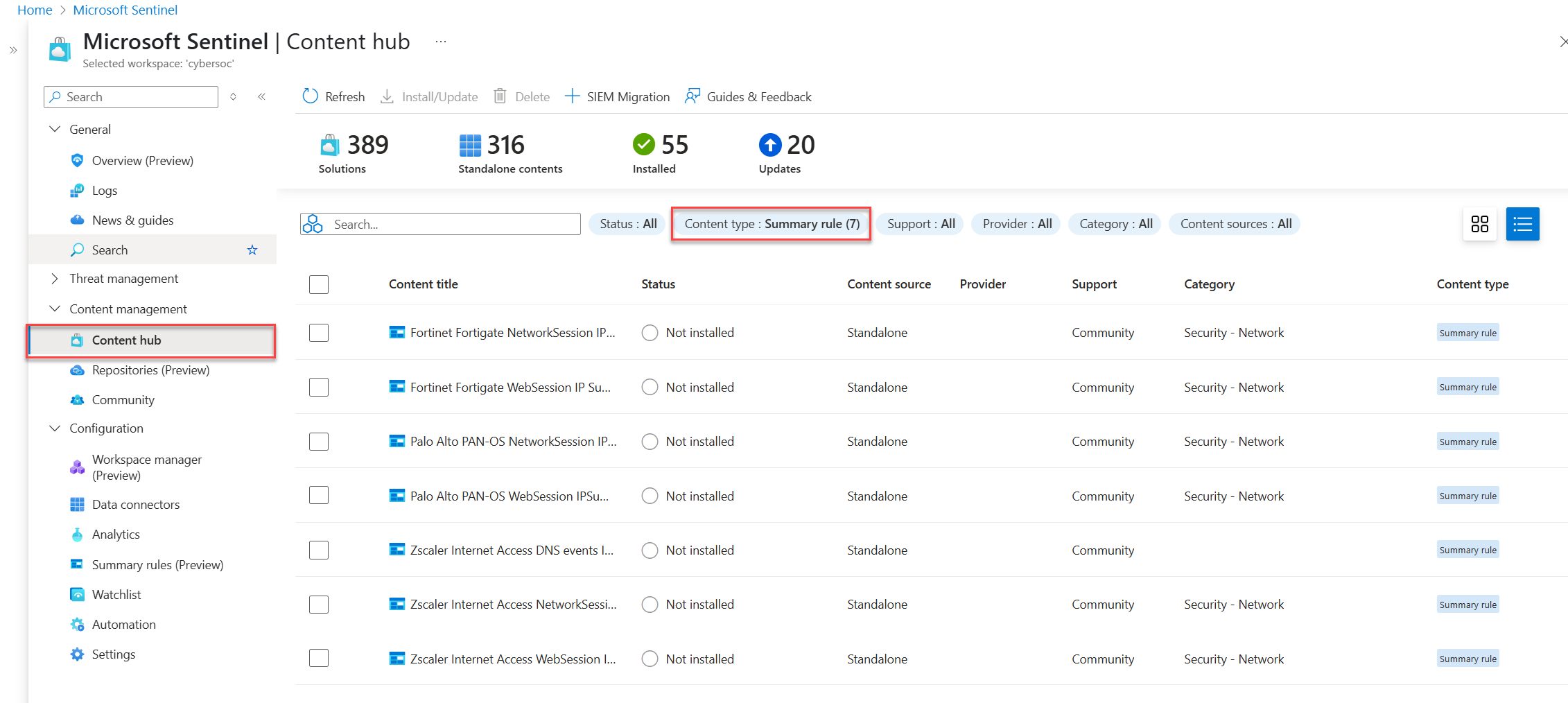
حدد قالب قاعدة ملخص.
يتم فتح لوحة تحتوي على معلومات حول قالب قاعدة الملخص، وتعرض حقولا مثل الوصف واستعلام الملخص وجدول الوجهة.
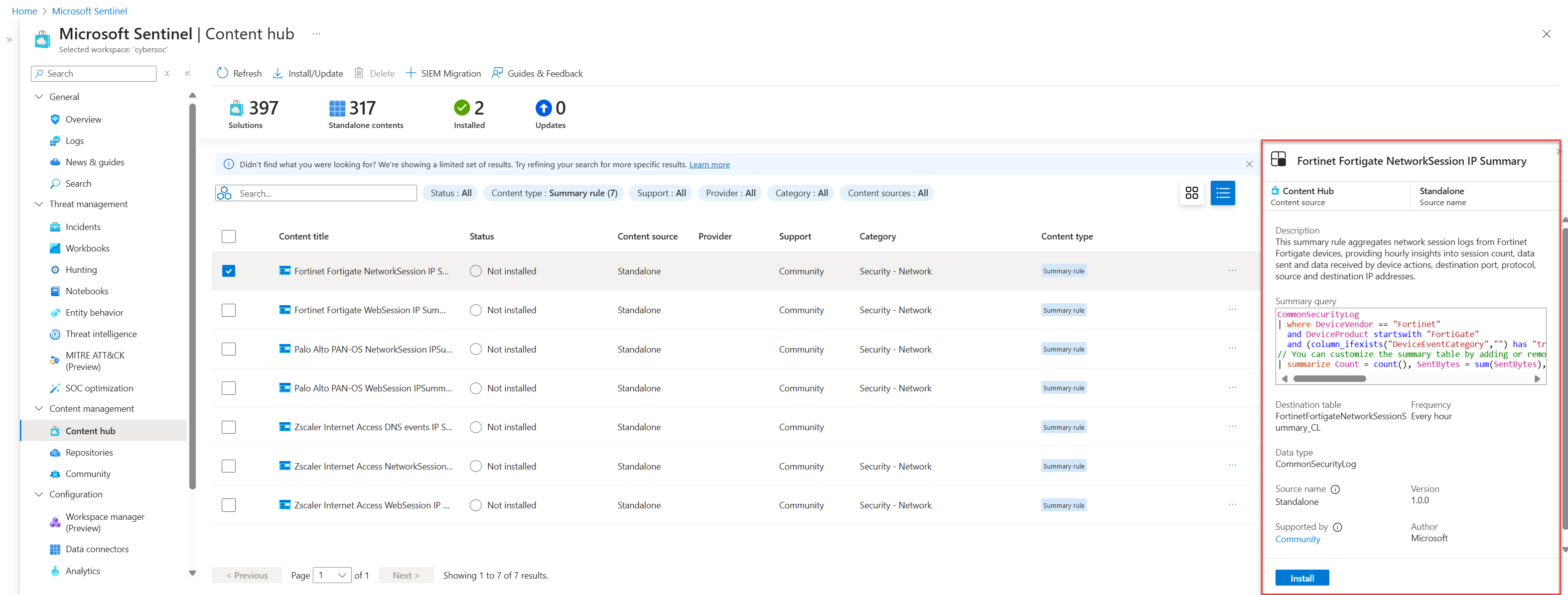
Select Install to install the template.
Select the Templates tab on the Summary rules page, and select the summary rule you installed.
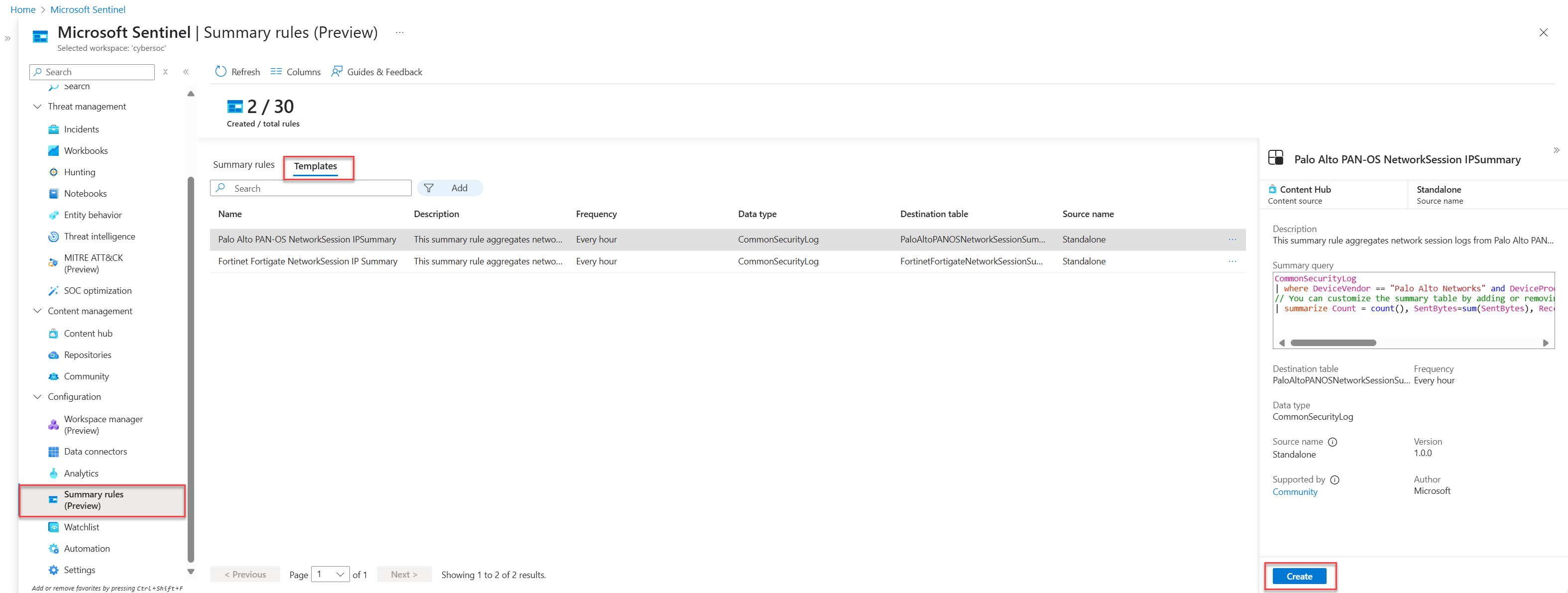
Select Create to open the Summary rule wizard, where all of the fields are prepopulated.
Go through the Summary rule wizard and select Save to deploy the summary rule.
لمزيد من المعلومات حول معالج قاعدة الملخص، راجع إنشاء قاعدة ملخص جديدة.
نموذج سيناريوهات قاعدة التلخيص في Microsoft Sentinel
يراجع هذا القسم السيناريوهات الشائعة لإنشاء قواعد الملخص في Microsoft Sentinel، وتوصياتنا حول كيفية تكوين كل قاعدة. لمزيد من المعلومات والأمثلة، راجع تلخيص نتائج التحليلات من البيانات الأولية في جدول مساعد إلى جدول تحليلات في Microsoft Sentinelومصادر السجل لاستخدامها في استيعاب السجلات المساعدة.
العثور بسرعة على عنوان IP ضار في حركة مرور الشبكة
Scenario: You're a threat hunter, and one of your team's goals is to identify all instances of when a malicious IP address interacted in the network traffic logs from an active incident, in the last 90 days.
Challenge: Microsoft Sentinel currently ingests multiple terabytes of network logs a day. تحتاج إلى التنقل عبرها بسرعة للعثور على تطابقات لعنوان IP الضار.
Solution: We recommend using summary rules to do the following:
قم بإنشاء مجموعة بيانات ملخصة لكل عنوان IP متعلق بالحادث، بما في
SourceIPذلك ،DestinationIPMaliciousIPو،RemoteIPو، و، و، و، و كل سمة مهمة، مثلIPType،FirstTimeSeenو، وLastTimeSeen.تمكنك مجموعة بيانات الملخص من البحث بسرعة عن عنوان IP محدد وتضييق النطاق الزمني حيث يتم العثور على عنوان IP. يمكنك القيام بذلك حتى عندما حدثت الأحداث التي تم البحث عنها منذ أكثر من 90 يوما، وهو ما يتجاوز فترة استبقاء مساحة العمل الخاصة بها.
في هذا المثال، قم بتكوين الملخص لتشغيله يوميا، بحيث يضيف الاستعلام سجلات ملخص جديدة كل يوم حتى تنتهي صلاحيته.
إنشاء قاعدة تحليلات تعمل لمدة أقل من دقيقتين مقابل مجموعة بيانات الملخص، والتعمق بسرعة في النطاق الزمني المحدد عندما تفاعل عنوان IP الضار مع شبكة الشركة.
تأكد من تكوين فواصل زمنية للتشغيل تصل إلى خمس دقائق كحد أدنى، لاستيعاب أحجام البيانات الأساسية الموجزة المختلفة. وهذا يضمن عدم وجود خسارة حتى عندما يكون هناك تأخير في استيعاب الحدث.
For example:
let csl_columnmatch=(column_name: string) {
summarized_CommonSecurityLog
| where isnotempty(column_name)
| extend
    Date = format_datetime(TimeGenerated, "yyyy-MM-dd"),
    IPaddress = column_ifexists(column_name, ""),
    FieldName = column_name
| extend IPType = iff(ipv4_is_private(IPaddress) == true, "Private", "Public")
| where isnotempty(IPaddress)
| project Date, TimeGenerated, IPaddress, FieldName, IPType, DeviceVendor
| summarize count(), FirstTimeSeen = min(TimeGenerated), LastTimeSeen = min(TimeGenerated) by Date, IPaddress, FieldName, IPType, DeviceVendor
};
union csl_columnmatch("SourceIP")
    , csl_columnmatch("DestinationIP")
    , csl_columnmatch("MaliciousIP")
    , csl_columnmatch("RemoteIP")
// Further summarization can be done per IPaddress to remove duplicates per day on larger timeframe for the first run
| summarize make_set(FieldName), make_set(DeviceVendor) by IPType, IPaddress
قم بتشغيل بحث لاحق أو ارتباط مع بيانات أخرى لإكمال قصة الهجوم.
إنشاء تنبيهات حول تطابقات التحليل الذكي للمخاطر مع بيانات الشبكة
إنشاء تنبيهات حول تطابقات التحليل الذكي للمخاطر مقابل بيانات الشبكة صاخبة وعالية الحجم وذات قيمة أمان منخفضة.
Scenario: You need to build an analytics rule for firewall logs to match domain names in the system that have been visited against a threat intelligence domain name list.
معظم مصادر البيانات هي سجلات أولية صاخبة ومرتفعة الحجم، ولكن لها قيمة أمان أقل، بما في ذلك عناوين IP وحركة مرور جدار حماية Azure وحركة مرور Fortigate وما إلى ذلك. هناك حجم إجمالي يبلغ حوالي 1 تيرابايت في اليوم.
Challenge: Creating separate rules requires multiple logic apps, requiring extra setup and maintenance overhead and costs.
Solution: We recommend using summary rules to do the following:
إنشاء قاعدة ملخص:
Extend your query to extract key fields, such as the source address, destination address, and destination port from the CommonSecurityLog_CL table, which is the CommonSecurityLog with the Auxiliary plan.
قم بإجراء بحث داخلي مقابل مؤشرات التحليل الذكي للمخاطر النشطة لتحديد أي تطابقات مع عنوان المصدر الخاص بنا. يتيح لك ذلك الرجوع إلى بياناتك مع التهديدات المعروفة.
عرض المعلومات ذات الصلة، بما في ذلك الوقت الذي تم إنشاؤه ونوع النشاط وأي عناوين IP مصدر ضارة، إلى جانب تفاصيل الوجهة. Set the frequency you want the query to run, and the destination table, such as MaliciousIPDetection . تكون النتائج في هذا الجدول في المستوى التحليلي ويتم تحصيل الرسوم وفقا لذلك.
إنشاء تنبيه:
Creating an analytics rule in Microsoft Sentinel that alerts based on results from the MaliciousIPDetection table. هذه الخطوة حاسمة للكشف الاستباقي عن التهديدات والاستجابة للحوادث.
نموذج قاعدة التلخيص:
CommonSecurityLog_CL
| extend sourceAddress = tostring(parse_json(Message).sourceAddress), destinationAddress = tostring(parse_json(Message).destinationAddress), destinationPort = tostring(parse_json(Message).destinationPort)
| lookup kind=inner (ThreatIntelligenceIndicator | where Active == true ) on $left.sourceAddress == $right.NetworkIP
| project TimeGenerated, Activity, Message, DeviceVendor, DeviceProduct, sourceMaliciousIP =sourceAddress, destinationAddress, destinationPort