Pen.MiterLimit Vlastnost
Definice
Důležité
Některé informace platí pro předběžně vydaný produkt, který se může zásadně změnit, než ho výrobce nebo autor vydá. Microsoft neposkytuje žádné záruky, výslovné ani předpokládané, týkající se zde uváděných informací.
Získá nebo nastaví limit poměr délky miter na polovinu tohoto pera Thickness.
public:
 property double MiterLimit { double get(); void set(double value); };
public double MiterLimit { get; set; }member this.MiterLimit : double with get, setPublic Property MiterLimit As DoubleHodnota vlastnosti
Limit poměru délky miteru na polovinu pera Thickness. Tato hodnota je vždy kladné číslo větší nebo rovno 1. Výchozí hodnota je 10,0.
Příklady
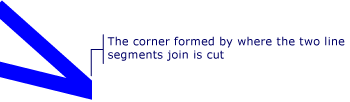
Následující příklad ukazuje, jak pomocí MiterLimit vlastnosti omezit velikost rohu vytvořeného dvěma segmenty čáry.
<Page
  xmlns="http://schemas.microsoft.com/winfx/2006/xaml/presentation"
  xmlns:x="http://schemas.microsoft.com/winfx/2006/xaml">
  <StackPanel Margin="20">

    <Canvas Margin="100"  Width="100" Height="100">
      <Canvas.Background>
        <DrawingBrush>
          <DrawingBrush.Drawing>
            <GeometryDrawing>
              <GeometryDrawing.Geometry>
                <PathGeometry>
                  <PathGeometry.Figures>
                    <PathFigureCollection>
                      <PathFigure StartPoint="100,50">
                        <PathFigure.Segments>
                          <PathSegmentCollection>
                            <LineSegment Point="200,70" />
                            <LineSegment Point="100,60" />
                          </PathSegmentCollection>
                        </PathFigure.Segments>
                      </PathFigure>
                    </PathFigureCollection>
                  </PathGeometry.Figures>
                </PathGeometry>
              </GeometryDrawing.Geometry>
              <GeometryDrawing.Pen>

                <!-- The MiterLimit is set to a value of 0 so the corner formed
                     by where the two line segments join is cut or blunted. A larger
                     value would allow for the corner to extend out even beyond
                     the thickness of the line. -->
                <Pen Brush="Blue" Thickness="4" MiterLimit="0"  />
              </GeometryDrawing.Pen>
            </GeometryDrawing>
          </DrawingBrush.Drawing>
        </DrawingBrush>
      </Canvas.Background>
    </Canvas>

  </StackPanel>

</Page>
Následující obrázek ukazuje, co tento příklad kódu vytvoří.
Poznámky
Miter je kloub zkosení každého ze dvou povrchů, které mají být spojeny a tvoří roh. Když se dva segmenty čáry setkávají v ostrém úhlu, může miter přesahovat tloušťku čáry, která tahá cestu.
Informace o vlastnosti závislosti
| Položka | Hodnota |
|---|---|
| Pole Identifikátor | MiterLimitProperty |
Vlastnosti metadat nastavené na true |
None |
