BackgroundWorker Třída
Definice
Důležité
Některé informace platí pro předběžně vydaný produkt, který se může zásadně změnit, než ho výrobce nebo autor vydá. Microsoft neposkytuje žádné záruky, výslovné ani předpokládané, týkající se zde uváděných informací.
Provede operaci na samostatném vlákně.
public ref class BackgroundWorker : IDisposablepublic ref class BackgroundWorker : System::ComponentModel::Componentpublic class BackgroundWorker : IDisposablepublic class BackgroundWorker : System.ComponentModel.Componenttype BackgroundWorker = class
interface IDisposabletype BackgroundWorker = class
inherit ComponentPublic Class BackgroundWorker
Implements IDisposablePublic Class BackgroundWorker
Inherits Component- Dědičnost
-
BackgroundWorker
- Dědičnost
- Implementuje
Příklady
Následující příklad kódu ukazuje základy BackgroundWorker třídy pro provádění časově náročné operace asynchronně. Následující obrázek ukazuje příklad výstupu.
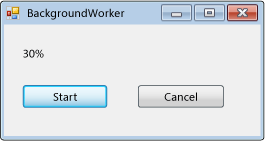
Pokud chcete tento kód vyzkoušet, vytvořte aplikaci Windows Forms.
Label Přidejte ovládací prvek s názvem resultLabel a přidejte dva Button ovládací prvky s názvem startAsyncButton a cancelAsyncButton. Vytvořte Click obslužné rutiny událostí pro obě tlačítka. Na kartě Součásti panelu nástrojů přidejte komponentu BackgroundWorker s názvem backgroundWorker1. Vytváření DoWorkobslužných ProgressChangedrutin událostí a RunWorkerCompleted objektů .BackgroundWorker V kódu formuláře nahraďte existující kód následujícím kódem.
using System;
using System.ComponentModel;
using System.Windows.Forms;

namespace BackgroundWorkerSimple;

public partial class Form1 : Form
{
    public Form1()
    {
        InitializeComponent();
        backgroundWorker1.WorkerReportsProgress = true;
        backgroundWorker1.WorkerSupportsCancellation = true;
    }

    void startAsyncButton_Click(object sender, EventArgs e)
    {
        if (!backgroundWorker1.IsBusy)
        {
            // Start the asynchronous operation.
            backgroundWorker1.RunWorkerAsync();
        }
    }

    void cancelAsyncButton_Click(object sender, EventArgs e)
    {
        if (backgroundWorker1.WorkerSupportsCancellation)
        {
            // Cancel the asynchronous operation.
            backgroundWorker1.CancelAsync();
        }
    }

    // This event handler is where the time-consuming work is done.
    void backgroundWorker1_DoWork(object sender, DoWorkEventArgs e)
    {
        BackgroundWorker worker = sender as BackgroundWorker;

        for (int i = 1; i <= 10; i++)
        {
            if (worker.CancellationPending)
            {
                e.Cancel = true;
                break;
            }
            else
            {
                // Perform a time consuming operation and report progress.
                System.Threading.Thread.Sleep(500);
                worker.ReportProgress(i * 10);
            }
        }
    }

    // This event handler updates the progress.
    void backgroundWorker1_ProgressChanged(object sender, ProgressChangedEventArgs e) =>
        resultLabel.Text = e.ProgressPercentage.ToString() + "%";

    // This event handler deals with the results of the background operation.
    void backgroundWorker1_RunWorkerCompleted(object sender, RunWorkerCompletedEventArgs e) =>
        resultLabel.Text = e.Cancelled ?
        "Canceled!"
        : e.Error != null ? "Error: " + e.Error.Message : "Done!";
}
Imports System.ComponentModel

Public Class Form1

    Public Sub New()
        InitializeComponent()
        backgroundWorker1.WorkerReportsProgress = True
        backgroundWorker1.WorkerSupportsCancellation = True
    End Sub

    Private Sub startAsyncButton_Click(ByVal sender As System.Object, _
    ByVal e As System.EventArgs) Handles startAsyncButton.Click
        If Not backgroundWorker1.IsBusy Then
            ' Start the asynchronous operation.
            backgroundWorker1.RunWorkerAsync()
        End If
    End Sub

    Private Sub cancelAsyncButton_Click(ByVal sender As System.Object, _
    ByVal e As System.EventArgs) Handles cancelAsyncButton.Click
        If backgroundWorker1.WorkerSupportsCancellation Then
            ' Cancel the asynchronous operation.
            backgroundWorker1.CancelAsync()
        End If
    End Sub

    ' This event handler is where the time-consuming work is done.
    Private Sub backgroundWorker1_DoWork(ByVal sender As System.Object, _
    ByVal e As DoWorkEventArgs) Handles backgroundWorker1.DoWork
        Dim worker As BackgroundWorker = CType(sender, BackgroundWorker)
        Dim i As Integer

        For i = 1 To 10
            If (worker.CancellationPending) Then
                e.Cancel = True
                Exit For
            Else
                ' Perform a time consuming operation and report progress.
                System.Threading.Thread.Sleep(500)
                worker.ReportProgress(i * 10)
            End If
        Next
    End Sub

    ' This event handler updates the progress.
    Private Sub backgroundWorker1_ProgressChanged(ByVal sender As System.Object, _
    ByVal e As ProgressChangedEventArgs) Handles backgroundWorker1.ProgressChanged
        resultLabel.Text = (e.ProgressPercentage.ToString() + "%")
    End Sub

    ' This event handler deals with the results of the background operation.
    Private Sub backgroundWorker1_RunWorkerCompleted(ByVal sender As System.Object, _
    ByVal e As RunWorkerCompletedEventArgs) Handles backgroundWorker1.RunWorkerCompleted
        If e.Cancelled Then
            resultLabel.Text = "Canceled!"
        ElseIf e.Error IsNot Nothing Then
            resultLabel.Text = "Error: " & e.Error.Message
        Else
            resultLabel.Text = "Done!"
        End If
    End Sub
End Class
Následující příklad kódu ukazuje použití BackgroundWorker třídy pro provádění časově náročné operace asynchronně. Následující obrázek ukazuje příklad výstupu.
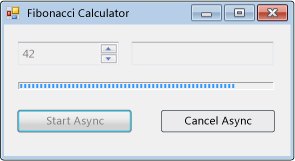
Operace vypočítá vybrané fibonacciho číslo, hlásí aktualizace průběhu při výpočtu a umožňuje zrušení čekajícího výpočtu.
#using <System.Drawing.dll>
#using <System.dll>
#using <System.Windows.Forms.dll>

using namespace System;
using namespace System::Collections;
using namespace System::ComponentModel;
using namespace System::Drawing;
using namespace System::Threading;
using namespace System::Windows::Forms;

public ref class FibonacciForm: public System::Windows::Forms::Form
{
private:

   int numberToCompute;
   int highestPercentageReached;

   System::Windows::Forms::NumericUpDown^ numericUpDown1;
   System::Windows::Forms::Button^ startAsyncButton;
   System::Windows::Forms::Button^ cancelAsyncButton;
   System::Windows::Forms::ProgressBar^ progressBar1;
   System::Windows::Forms::Label ^ resultLabel;
   System::ComponentModel::BackgroundWorker^ backgroundWorker1;

public:
   FibonacciForm()
   {
      InitializeComponent();
      numberToCompute = highestPercentageReached = 0;
      InitializeBackgoundWorker();
   }


private:

   // Set up the BackgroundWorker object by
   // attaching event handlers.
   void InitializeBackgoundWorker()
   {
      backgroundWorker1->DoWork += gcnew DoWorkEventHandler( this, &FibonacciForm::backgroundWorker1_DoWork );
      backgroundWorker1->RunWorkerCompleted += gcnew RunWorkerCompletedEventHandler( this, &FibonacciForm::backgroundWorker1_RunWorkerCompleted );
      backgroundWorker1->ProgressChanged += gcnew ProgressChangedEventHandler( this, &FibonacciForm::backgroundWorker1_ProgressChanged );
   }

   void startAsyncButton_Click( System::Object^ /*sender*/, System::EventArgs^ /*e*/ )
   {

      // Reset the text in the result label.
      resultLabel->Text = String::Empty;

      // Disable the UpDown control until
      // the asynchronous operation is done.
      this->numericUpDown1->Enabled = false;

      // Disable the Start button until
      // the asynchronous operation is done.
      this->startAsyncButton->Enabled = false;

      // Enable the Cancel button while
      // the asynchronous operation runs.
      this->cancelAsyncButton->Enabled = true;

      // Get the value from the UpDown control.
      numberToCompute = (int)numericUpDown1->Value;

      // Reset the variable for percentage tracking.
      highestPercentageReached = 0;

      // Start the asynchronous operation.
      backgroundWorker1->RunWorkerAsync( numberToCompute );
   }

   void cancelAsyncButton_Click( System::Object^ /*sender*/, System::EventArgs^ /*e*/ )
   {
      // Cancel the asynchronous operation.
      this->backgroundWorker1->CancelAsync();

      // Disable the Cancel button.
      cancelAsyncButton->Enabled = false;
   }

   // This event handler is where the actual,
   // potentially time-consuming work is done.
   void backgroundWorker1_DoWork( Object^ sender, DoWorkEventArgs^ e )
   {
      // Get the BackgroundWorker that raised this event.
      BackgroundWorker^ worker = dynamic_cast<BackgroundWorker^>(sender);

      // Assign the result of the computation
      // to the Result property of the DoWorkEventArgs
      // object. This is will be available to the
      // RunWorkerCompleted eventhandler.
      e->Result = ComputeFibonacci( safe_cast<Int32>(e->Argument), worker, e );
   }

   // This event handler deals with the results of the
   // background operation.
   void backgroundWorker1_RunWorkerCompleted( Object^ /*sender*/, RunWorkerCompletedEventArgs^ e )
   {
      // First, handle the case where an exception was thrown.
      if ( e->Error != nullptr )
      {
         MessageBox::Show( e->Error->Message );
      }
      else
      if ( e->Cancelled )
      {
         // Next, handle the case where the user cancelled
         // the operation.
         // Note that due to a race condition in
         // the DoWork event handler, the Cancelled
         // flag may not have been set, even though
         // CancelAsync was called.
         resultLabel->Text = "Cancelled";
      }
      else
      {
         // Finally, handle the case where the operation
         // succeeded.
         resultLabel->Text = e->Result->ToString();
      }

      // Enable the UpDown control.
      this->numericUpDown1->Enabled = true;

      // Enable the Start button.
      startAsyncButton->Enabled = true;

      // Disable the Cancel button.
      cancelAsyncButton->Enabled = false;
   }

   // This event handler updates the progress bar.
   void backgroundWorker1_ProgressChanged( Object^ /*sender*/, ProgressChangedEventArgs^ e )
   {
      this->progressBar1->Value = e->ProgressPercentage;
   }

   // This is the method that does the actual work. For this
   // example, it computes a Fibonacci number and
   // reports progress as it does its work.
   long ComputeFibonacci( int n, BackgroundWorker^ worker, DoWorkEventArgs ^ e )
   {
      // The parameter n must be >= 0 and <= 91.
      // Fib(n), with n > 91, overflows a long.
      if ( (n < 0) || (n > 91) )
      {
         throw gcnew ArgumentException( "value must be >= 0 and <= 91","n" );
      }

      long result = 0;

      // Abort the operation if the user has cancelled.
      // Note that a call to CancelAsync may have set
      // CancellationPending to true just after the
      // last invocation of this method exits, so this
      // code will not have the opportunity to set the
      // DoWorkEventArgs.Cancel flag to true. This means
      // that RunWorkerCompletedEventArgs.Cancelled will
      // not be set to true in your RunWorkerCompleted
      // event handler. This is a race condition.
      if ( worker->CancellationPending )
      {
         e->Cancel = true;
      }
      else
      {
         if ( n < 2 )
         {
            result = 1;
         }
         else
         {
            result = ComputeFibonacci( n - 1, worker, e ) + ComputeFibonacci( n - 2, worker, e );
         }

         // Report progress as a percentage of the total task.
         int percentComplete = (int)((float)n / (float)numberToCompute * 100);
         if ( percentComplete > highestPercentageReached )
         {
            highestPercentageReached = percentComplete;
            worker->ReportProgress( percentComplete );
         }
      }

      return result;
   }

   void InitializeComponent()
   {
      this->numericUpDown1 = gcnew System::Windows::Forms::NumericUpDown;
      this->startAsyncButton = gcnew System::Windows::Forms::Button;
      this->cancelAsyncButton = gcnew System::Windows::Forms::Button;
      this->resultLabel = gcnew System::Windows::Forms::Label;
      this->progressBar1 = gcnew System::Windows::Forms::ProgressBar;
      this->backgroundWorker1 = gcnew System::ComponentModel::BackgroundWorker;
      (dynamic_cast<System::ComponentModel::ISupportInitialize^>(this->numericUpDown1))->BeginInit();
      this->SuspendLayout();

      //
      // numericUpDown1
      //
      this->numericUpDown1->Location = System::Drawing::Point( 16, 16 );
      array<Int32>^temp0 = {91,0,0,0};
      this->numericUpDown1->Maximum = System::Decimal( temp0 );
      array<Int32>^temp1 = {1,0,0,0};
      this->numericUpDown1->Minimum = System::Decimal( temp1 );
      this->numericUpDown1->Name = "numericUpDown1";
      this->numericUpDown1->Size = System::Drawing::Size( 80, 20 );
      this->numericUpDown1->TabIndex = 0;
      array<Int32>^temp2 = {1,0,0,0};
      this->numericUpDown1->Value = System::Decimal( temp2 );

      //
      // startAsyncButton
      //
      this->startAsyncButton->Location = System::Drawing::Point( 16, 72 );
      this->startAsyncButton->Name = "startAsyncButton";
      this->startAsyncButton->Size = System::Drawing::Size( 120, 23 );
      this->startAsyncButton->TabIndex = 1;
      this->startAsyncButton->Text = "Start Async";
      this->startAsyncButton->Click += gcnew System::EventHandler( this, &FibonacciForm::startAsyncButton_Click );

      //
      // cancelAsyncButton
      //
      this->cancelAsyncButton->Enabled = false;
      this->cancelAsyncButton->Location = System::Drawing::Point( 153, 72 );
      this->cancelAsyncButton->Name = "cancelAsyncButton";
      this->cancelAsyncButton->Size = System::Drawing::Size( 119, 23 );
      this->cancelAsyncButton->TabIndex = 2;
      this->cancelAsyncButton->Text = "Cancel Async";
      this->cancelAsyncButton->Click += gcnew System::EventHandler( this, &FibonacciForm::cancelAsyncButton_Click );

      //
      // resultLabel
      //
      this->resultLabel->BorderStyle = System::Windows::Forms::BorderStyle::Fixed3D;
      this->resultLabel->Location = System::Drawing::Point( 112, 16 );
      this->resultLabel->Name = "resultLabel";
      this->resultLabel->Size = System::Drawing::Size( 160, 23 );
      this->resultLabel->TabIndex = 3;
      this->resultLabel->Text = "(no result)";
      this->resultLabel->TextAlign = System::Drawing::ContentAlignment::MiddleCenter;

      //
      // progressBar1
      //
      this->progressBar1->Location = System::Drawing::Point( 18, 48 );
      this->progressBar1->Name = "progressBar1";
      this->progressBar1->Size = System::Drawing::Size( 256, 8 );
      this->progressBar1->Step = 2;
      this->progressBar1->TabIndex = 4;

      //
      // backgroundWorker1
      //
      this->backgroundWorker1->WorkerReportsProgress = true;
      this->backgroundWorker1->WorkerSupportsCancellation = true;

      //
      // FibonacciForm
      //
      this->ClientSize = System::Drawing::Size( 292, 118 );
      this->Controls->Add( this->progressBar1 );
      this->Controls->Add( this->resultLabel );
      this->Controls->Add( this->cancelAsyncButton );
      this->Controls->Add( this->startAsyncButton );
      this->Controls->Add( this->numericUpDown1 );
      this->Name = "FibonacciForm";
      this->Text = "Fibonacci Calculator";
      (dynamic_cast<System::ComponentModel::ISupportInitialize^>(this->numericUpDown1))->EndInit();
      this->ResumeLayout( false );
   }
};

[STAThread]
int main()
{
   Application::Run( gcnew FibonacciForm );
}
using System;
using System.ComponentModel;
using System.Drawing;
using System.Windows.Forms;

namespace BackgroundWorkerExample;

public class FibonacciForm : Form
{
    int numberToCompute;
    int highestPercentageReached;

    NumericUpDown numericUpDown1;
    Button startAsyncButton;
    Button cancelAsyncButton;
    ProgressBar progressBar1;
    Label resultLabel;
    BackgroundWorker backgroundWorker1;

    public FibonacciForm()
    {
        InitializeComponent();

        InitializeBackgroundWorker();
    }

    // Set up the BackgroundWorker object by
    // attaching event handlers.
    void InitializeBackgroundWorker()
    {
        backgroundWorker1.DoWork +=
             backgroundWorker1_DoWork;
        backgroundWorker1.RunWorkerCompleted +=

        backgroundWorker1_RunWorkerCompleted;
        backgroundWorker1.ProgressChanged +=

        backgroundWorker1_ProgressChanged;
    }

    void startAsyncButton_Click(object sender,
        EventArgs e)
    {
        // Reset the text in the result label.
        resultLabel.Text = string.Empty;

        // Disable the UpDown control until
        // the asynchronous operation is done.
        numericUpDown1.Enabled = false;

        // Disable the Start button until
        // the asynchronous operation is done.
        startAsyncButton.Enabled = false;

        // Enable the Cancel button while
        // the asynchronous operation runs.
        cancelAsyncButton.Enabled = true;

        // Get the value from the UpDown control.
        numberToCompute = (int)numericUpDown1.Value;

        // Reset the variable for percentage tracking.
        highestPercentageReached = 0;

        // Start the asynchronous operation.
        backgroundWorker1.RunWorkerAsync(numberToCompute);
    }

    void cancelAsyncButton_Click(object sender,
        EventArgs e)
    {
        // Cancel the asynchronous operation.
        backgroundWorker1.CancelAsync();

        // Disable the Cancel button.
        cancelAsyncButton.Enabled = false;
    }

    // This event handler is where the actual,
    // potentially time-consuming work is done.
    void backgroundWorker1_DoWork(object sender,
        DoWorkEventArgs e)
    {
        // Get the BackgroundWorker that raised this event.
        BackgroundWorker worker = sender as BackgroundWorker;

        // Assign the result of the computation
        // to the Result property of the DoWorkEventArgs
        // object. This is will be available to the
        // RunWorkerCompleted eventhandler.
        e.Result = ComputeFibonacci((int)e.Argument, worker, e);
    }

    // This event handler deals with the results of the
    // background operation.
    void backgroundWorker1_RunWorkerCompleted(
        object sender, RunWorkerCompletedEventArgs e)
    {
        // First, handle the case where an exception was thrown.
        if (e.Error != null)
        {
            _ = MessageBox.Show(e.Error.Message);
        }
        else if (e.Cancelled)
        {
            // Next, handle the case where the user canceled
            // the operation.
            // Note that due to a race condition in
            // the DoWork event handler, the Cancelled
            // flag may not have been set, even though
            // CancelAsync was called.
            resultLabel.Text = "Canceled";
        }
        else
        {
            // Finally, handle the case where the operation
            // succeeded.
            resultLabel.Text = e.Result.ToString();
        }

        // Enable the UpDown control.
        numericUpDown1.Enabled = true;

        // Enable the Start button.
        startAsyncButton.Enabled = true;

        // Disable the Cancel button.
        cancelAsyncButton.Enabled = false;
    }

    // This event handler updates the progress bar.
    void backgroundWorker1_ProgressChanged(object sender,
        ProgressChangedEventArgs e) => progressBar1.Value = e.ProgressPercentage;

    // This is the method that does the actual work. For this
    // example, it computes a Fibonacci number and
    // reports progress as it does its work.
    long ComputeFibonacci(int n, BackgroundWorker worker, DoWorkEventArgs e)
    {
        // The parameter n must be >= 0 and <= 91.
        // Fib(n), with n > 91, overflows a long.
        if (n is < 0 or > 91)
        {
            throw new ArgumentException(
                "value must be >= 0 and <= 91", nameof(n));
        }

        long result = 0;

        // Abort the operation if the user has canceled.
        // Note that a call to CancelAsync may have set
        // CancellationPending to true just after the
        // last invocation of this method exits, so this
        // code will not have the opportunity to set the
        // DoWorkEventArgs.Cancel flag to true. This means
        // that RunWorkerCompletedEventArgs.Cancelled will
        // not be set to true in your RunWorkerCompleted
        // event handler. This is a race condition.

        if (worker.CancellationPending)
        {
            e.Cancel = true;
        }
        else
        {
            result = n < 2
                ? 1
                : ComputeFibonacci(n - 1, worker, e) +
                         ComputeFibonacci(n - 2, worker, e);

            // Report progress as a percentage of the total task.
            int percentComplete =
                (int)(n / (float)numberToCompute * 100);
            if (percentComplete > highestPercentageReached)
            {
                highestPercentageReached = percentComplete;
                worker.ReportProgress(percentComplete);
            }
        }

        return result;
    }

    #region Windows Form Designer generated code

    void InitializeComponent()
    {
        numericUpDown1 = new NumericUpDown();
        startAsyncButton = new Button();
        cancelAsyncButton = new Button();
        resultLabel = new Label();
        progressBar1 = new ProgressBar();
        backgroundWorker1 = new BackgroundWorker();
        ((ISupportInitialize)numericUpDown1).BeginInit();
        SuspendLayout();
        //
        // numericUpDown1
        //
        numericUpDown1.Location = new Point(16, 16);
        numericUpDown1.Maximum = new decimal(new int[] {
            91,
            0,
            0,
            0});
        numericUpDown1.Minimum = new decimal(new int[] {
            1,
            0,
            0,
            0});
        numericUpDown1.Name = "numericUpDown1";
        numericUpDown1.Size = new Size(80, 20);
        numericUpDown1.TabIndex = 0;
        numericUpDown1.Value = new decimal(new int[] {
            1,
            0,
            0,
            0});
        //
        // startAsyncButton
        //
        startAsyncButton.Location = new Point(16, 72);
        startAsyncButton.Name = "startAsyncButton";
        startAsyncButton.Size = new Size(120, 23);
        startAsyncButton.TabIndex = 1;
        startAsyncButton.Text = "Start Async";
        startAsyncButton.Click += startAsyncButton_Click;
        //
        // cancelAsyncButton
        //
        cancelAsyncButton.Enabled = false;
        cancelAsyncButton.Location = new Point(153, 72);
        cancelAsyncButton.Name = "cancelAsyncButton";
        cancelAsyncButton.Size = new Size(119, 23);
        cancelAsyncButton.TabIndex = 2;
        cancelAsyncButton.Text = "Cancel Async";
        cancelAsyncButton.Click += cancelAsyncButton_Click;
        //
        // resultLabel
        //
        resultLabel.BorderStyle = BorderStyle.Fixed3D;
        resultLabel.Location = new Point(112, 16);
        resultLabel.Name = "resultLabel";
        resultLabel.Size = new Size(160, 23);
        resultLabel.TabIndex = 3;
        resultLabel.Text = "(no result)";
        resultLabel.TextAlign = ContentAlignment.MiddleCenter;
        //
        // progressBar1
        //
        progressBar1.Location = new Point(18, 48);
        progressBar1.Name = "progressBar1";
        progressBar1.Size = new Size(256, 8);
        progressBar1.Step = 2;
        progressBar1.TabIndex = 4;
        //
        // backgroundWorker1
        //
        backgroundWorker1.WorkerReportsProgress = true;
        backgroundWorker1.WorkerSupportsCancellation = true;
        //
        // FibonacciForm
        //
        ClientSize = new Size(1794, 927);
        Controls.Add(progressBar1);
        Controls.Add(resultLabel);
        Controls.Add(cancelAsyncButton);
        Controls.Add(startAsyncButton);
        Controls.Add(numericUpDown1);
        Name = "FibonacciForm";
        Text = "Fibonacci Calculator";
        ((ISupportInitialize)numericUpDown1).EndInit();
        ResumeLayout(false);
    }
    #endregion

    [STAThread]
    static void Main() => Application.Run(new FibonacciForm());
}
Imports System.ComponentModel
Imports System.Windows.Forms

Public Class FibonacciForm
    Inherits Form

    Private numberToCompute As Integer = 0
    Private highestPercentageReached As Integer = 0

    Private numericUpDown1 As NumericUpDown
    Private WithEvents startAsyncButton As Button
    Private WithEvents cancelAsyncButton As Button
    Private progressBar1 As ProgressBar
    Private resultLabel As Label
    Private WithEvents backgroundWorker1 As System.ComponentModel.BackgroundWorker


    Public Sub New()
        InitializeComponent()
    End Sub

    Private Sub startAsyncButton_Click(ByVal sender As System.Object,
    ByVal e As System.EventArgs) _
    Handles startAsyncButton.Click

        ' Reset the text in the result label.
        resultLabel.Text = [String].Empty

        ' Disable the UpDown control until
        ' the asynchronous operation is done.
        numericUpDown1.Enabled = False

        ' Disable the Start button until
        ' the asynchronous operation is done.
        startAsyncButton.Enabled = False

        ' Enable the Cancel button while
        ' the asynchronous operation runs.
        cancelAsyncButton.Enabled = True

        ' Get the value from the UpDown control.
        numberToCompute = CInt(numericUpDown1.Value)

        ' Reset the variable for percentage tracking.
        highestPercentageReached = 0


        ' Start the asynchronous operation.
        backgroundWorker1.RunWorkerAsync(numberToCompute)
    End Sub

    Private Sub cancelAsyncButton_Click(
    ByVal sender As System.Object,
    ByVal e As System.EventArgs) _
    Handles cancelAsyncButton.Click

        ' Cancel the asynchronous operation.
        backgroundWorker1.CancelAsync()

        ' Disable the Cancel button.
        cancelAsyncButton.Enabled = False

    End Sub

    ' This event handler is where the actual work is done.
    Private Sub backgroundWorker1_DoWork(
    ByVal sender As Object,
    ByVal e As DoWorkEventArgs) _
    Handles backgroundWorker1.DoWork

        ' Get the BackgroundWorker object that raised this event.
        Dim worker As BackgroundWorker =
            CType(sender, BackgroundWorker)

        ' Assign the result of the computation
        ' to the Result property of the DoWorkEventArgs
        ' object. This is will be available to the
        ' RunWorkerCompleted eventhandler.
        e.Result = ComputeFibonacci(e.Argument, worker, e)
    End Sub

    ' This event handler deals with the results of the
    ' background operation.
    Private Sub backgroundWorker1_RunWorkerCompleted(
    ByVal sender As Object, ByVal e As RunWorkerCompletedEventArgs) _
    Handles backgroundWorker1.RunWorkerCompleted

        ' First, handle the case where an exception was thrown.
        If (e.Error IsNot Nothing) Then
            MessageBox.Show(e.Error.Message)
        ElseIf e.Cancelled Then
            ' Next, handle the case where the user canceled the
            ' operation.
            ' Note that due to a race condition in
            ' the DoWork event handler, the Cancelled
            ' flag may not have been set, even though
            ' CancelAsync was called.
            resultLabel.Text = "Canceled"
        Else
            ' Finally, handle the case where the operation succeeded.
            resultLabel.Text = e.Result.ToString()
        End If

        ' Enable the UpDown control.
        numericUpDown1.Enabled = True

        ' Enable the Start button.
        startAsyncButton.Enabled = True

        ' Disable the Cancel button.
        cancelAsyncButton.Enabled = False
    End Sub

    ' This event handler updates the progress bar.
    Private Sub backgroundWorker1_ProgressChanged(
    ByVal sender As Object, ByVal e As ProgressChangedEventArgs) _
    Handles backgroundWorker1.ProgressChanged

        progressBar1.Value = e.ProgressPercentage

    End Sub

    ' This is the method that does the actual work. For this
    ' example, it computes a Fibonacci number and
    ' reports progress as it does its work.
    Function ComputeFibonacci(
        ByVal n As Integer,
        ByVal worker As BackgroundWorker,
        ByVal e As DoWorkEventArgs) As Long

        ' The parameter n must be >= 0 and <= 91.
        ' Fib(n), with n > 91, overflows a long.
        If n < 0 OrElse n > 91 Then
            Throw New ArgumentException(
                "value must be >= 0 and <= 91", "n")
        End If

        Dim result As Long = 0

        ' Abort the operation if the user has canceled.
        ' Note that a call to CancelAsync may have set
        ' CancellationPending to true just after the
        ' last invocation of this method exits, so this
        ' code will not have the opportunity to set the
        ' DoWorkEventArgs.Cancel flag to true. This means
        ' that RunWorkerCompletedEventArgs.Cancelled will
        ' not be set to true in your RunWorkerCompleted
        ' event handler. This is a race condition.
        If worker.CancellationPending Then
            e.Cancel = True
        Else
            If n < 2 Then
                result = 1
            Else
                result = ComputeFibonacci(n - 1, worker, e) +
                         ComputeFibonacci(n - 2, worker, e)
            End If

            ' Report progress as a percentage of the total task.
            Dim percentComplete As Integer =
                CSng(n) / CSng(numberToCompute) * 100
            If percentComplete > highestPercentageReached Then
                highestPercentageReached = percentComplete
                worker.ReportProgress(percentComplete)
            End If

        End If

        Return result

    End Function


    Private Sub InitializeComponent()
        numericUpDown1 = New NumericUpDown
        startAsyncButton = New Button
        cancelAsyncButton = New Button
        resultLabel = New Label
        progressBar1 = New ProgressBar
        backgroundWorker1 = New System.ComponentModel.BackgroundWorker
        CType(numericUpDown1, System.ComponentModel.ISupportInitialize).BeginInit()
        SuspendLayout()
        '
        'numericUpDown1
        '
        numericUpDown1.Location = New System.Drawing.Point(16, 16)
        numericUpDown1.Maximum = New Decimal(New Integer() {91, 0, 0, 0})
        numericUpDown1.Minimum = New Decimal(New Integer() {1, 0, 0, 0})
        numericUpDown1.Name = "numericUpDown1"
        numericUpDown1.Size = New System.Drawing.Size(80, 20)
        numericUpDown1.TabIndex = 0
        numericUpDown1.Value = New Decimal(New Integer() {1, 0, 0, 0})
        '
        'startAsyncButton
        '
        startAsyncButton.Location = New System.Drawing.Point(16, 72)
        startAsyncButton.Name = "startAsyncButton"
        startAsyncButton.Size = New System.Drawing.Size(120, 23)
        startAsyncButton.TabIndex = 1
        startAsyncButton.Text = "Start Async"
        '
        'cancelAsyncButton
        '
        cancelAsyncButton.Enabled = False
        cancelAsyncButton.Location = New System.Drawing.Point(153, 72)
        cancelAsyncButton.Name = "cancelAsyncButton"
        cancelAsyncButton.Size = New System.Drawing.Size(119, 23)
        cancelAsyncButton.TabIndex = 2
        cancelAsyncButton.Text = "Cancel Async"
        '
        'resultLabel
        '
        resultLabel.BorderStyle = BorderStyle.Fixed3D
        resultLabel.Location = New System.Drawing.Point(112, 16)
        resultLabel.Name = "resultLabel"
        resultLabel.Size = New System.Drawing.Size(160, 23)
        resultLabel.TabIndex = 3
        resultLabel.Text = "(no result)"
        resultLabel.TextAlign = System.Drawing.ContentAlignment.MiddleCenter
        '
        'progressBar1
        '
        progressBar1.Location = New System.Drawing.Point(18, 48)
        progressBar1.Name = "progressBar1"
        progressBar1.Size = New System.Drawing.Size(256, 8)
        progressBar1.TabIndex = 4
        '
        'backgroundWorker1
        '
        backgroundWorker1.WorkerReportsProgress = True
        backgroundWorker1.WorkerSupportsCancellation = True
        '
        'FibonacciForm
        '
        ClientSize = New System.Drawing.Size(292, 118)
        Controls.Add(progressBar1)
        Controls.Add(resultLabel)
        Controls.Add(cancelAsyncButton)
        Controls.Add(startAsyncButton)
        Controls.Add(numericUpDown1)
        Name = "FibonacciForm"
        Text = "Fibonacci Calculator"
        CType(numericUpDown1, System.ComponentModel.ISupportInitialize).EndInit()
        ResumeLayout(False)

    End Sub

    <STAThread()> _
    Shared Sub Main()
        Application.Run(New FibonacciForm)
    End Sub
End Class
Poznámky
Třída BackgroundWorker umožňuje spustit operaci na samostatném vyhrazeném vlákně. Časově náročné operace, jako jsou stahování a databázové transakce, můžou způsobit, že uživatelské rozhraní (UI) přestalo reagovat během jejich spuštění. Pokud chcete responzivní uživatelské rozhraní a dochází k dlouhým zpožděním spojeným s těmito operacemi, BackgroundWorker třída poskytuje pohodlné řešení.
Pokud chcete na pozadí spustit časově náročnou operaci, vytvořte BackgroundWorker události, které hlásí průběh operace a signál po dokončení operace, a naslouchají událostem. Můžete vytvořit BackgroundWorker programově nebo ho můžete přetáhnout do formuláře z karty Součásti na panelu nástrojů. Pokud vytvoříte v nástroji BackgroundWorker Windows Forms Designer, zobrazí se v zásobníku komponent a jeho vlastnosti se zobrazí v okně Vlastnosti.
Pokud chcete nastavit operaci na pozadí, přidejte obslužnou rutinu DoWork události pro událost. Volání časově náročné operace v této obslužné rutině události. Chcete-li zahájit operaci, zavolejte RunWorkerAsync. Pokud chcete dostávat oznámení o probíhajících aktualizacích, zpracujte ProgressChanged událost. Pokud chcete obdržet oznámení po dokončení operace, zpracujte RunWorkerCompleted událost.
Poznámka:
Při manipulaci s objekty uživatelského rozhraní v DoWork obslužné rutině události musíte být opatrní. Místo toho komunikujte s uživatelským rozhraním prostřednictvím ProgressChanged událostí a RunWorkerCompleted událostí.
BackgroundWorker události nejsou zařazovány přes AppDomain hranice. Nepoužívejte komponentu BackgroundWorker k provádění vícevláknových operací ve více než jednom AppDomain.
Pokud operace na pozadí vyžaduje parametr, zavolejte RunWorkerAsync s parametrem. Uvnitř obslužné rutiny DoWork události můžete extrahovat parametr z DoWorkEventArgs.Argument vlastnosti.
Další informace o BackgroundWorkerviz Jak na to: Spuštění operace na pozadí.
Konstruktory
| Name | Description |
|---|---|
| BackgroundWorker() |
Inicializuje novou instanci BackgroundWorker třídy. |
Vlastnosti
| Name | Description |
|---|---|
| CancellationPending |
Získá hodnotu určující, zda aplikace požádala o zrušení operace na pozadí. |
| CanRaiseEvents |
Získá hodnotu určující, zda komponenta může vyvolat událost. (Zděděno od Component) |
| Container |
Získá ten IContainer , který obsahuje Component. (Zděděno od Component) |
| DesignMode |
Získá hodnotu, která označuje, zda Component je aktuálně v režimu návrhu. (Zděděno od Component) |
| Events |
Získá seznam obslužných rutin událostí, které jsou připojeny k tomuto Component. (Zděděno od Component) |
| IsBusy |
Získá hodnotu určující, zda BackgroundWorker je spuštěna asynchronní operace. |
| Site |
Získá nebo nastaví ISite .Component (Zděděno od Component) |
| WorkerReportsProgress |
Získá nebo nastaví hodnotu označující, zda BackgroundWorker může hlásit aktualizace průběhu. |
| WorkerSupportsCancellation |
Získá nebo nastaví hodnotu určující, zda BackgroundWorker podporuje asynchronní zrušení. |
Metody
| Name | Description |
|---|---|
| CancelAsync() |
Vyžaduje zrušení čekající operace na pozadí. |
| CreateObjRef(Type) |
Vytvoří objekt, který obsahuje všechny relevantní informace potřebné k vygenerování proxy serveru sloužícího ke komunikaci se vzdáleným objektem. (Zděděno od MarshalByRefObject) |
| Dispose() |
Provádí úlohy definované aplikací související s uvolněním, uvolněním nebo resetováním nespravovaných prostředků. |
| Dispose() |
Uvolní všechny prostředky používané nástrojem Component. (Zděděno od Component) |
| Dispose(Boolean) |
Tato metoda nic nedělá. |
| Dispose(Boolean) |
Uvolní nespravované prostředky používané Component a volitelně uvolní spravované prostředky. (Zděděno od Component) |
| Equals(Object) |
Určuje, zda je zadaný objekt roven aktuálnímu objektu. (Zděděno od Object) |
| GetHashCode() |
Slouží jako výchozí funkce hash. (Zděděno od Object) |
| GetLifetimeService() |
Zastaralé.
Načte objekt služby aktuální životnosti, který řídí zásady životnosti pro tuto instanci. (Zděděno od MarshalByRefObject) |
| GetService(Type) |
Vrátí objekt, který představuje službu poskytovanou objektem Component nebo jeho Container. (Zděděno od Component) |
| GetType() |
Získá Type aktuální instance. (Zděděno od Object) |
| InitializeLifetimeService() |
Zastaralé.
Získá objekt služby životnosti pro řízení zásad životnosti pro tuto instanci. (Zděděno od MarshalByRefObject) |
| MemberwiseClone() |
Vytvoří mělkou kopii aktuálního Object. (Zděděno od Object) |
| MemberwiseClone(Boolean) |
Vytvoří mělkou kopii aktuálního MarshalByRefObject objektu. (Zděděno od MarshalByRefObject) |
| OnDoWork(DoWorkEventArgs) |
DoWork Vyvolá událost. |
| OnProgressChanged(ProgressChangedEventArgs) |
ProgressChanged Vyvolá událost. |
| OnRunWorkerCompleted(RunWorkerCompletedEventArgs) |
RunWorkerCompleted Vyvolá událost. |
| ReportProgress(Int32, Object) |
ProgressChanged Vyvolá událost. |
| ReportProgress(Int32) |
ProgressChanged Vyvolá událost. |
| RunWorkerAsync() |
Spustí provádění operace na pozadí. |
| RunWorkerAsync(Object) |
Spustí provádění operace na pozadí. |
| ToString() |
Vrátí řetězec, který představuje aktuální objekt. (Zděděno od Object) |
| ToString() |
String Vrátí hodnotu obsahující název Component, pokud existuje. Tato metoda by neměla být přepsána. (Zděděno od Component) |
Událost
| Name | Description |
|---|---|
| Disposed |
Nastane, když komponenta je uvolněna voláním Dispose() metody. (Zděděno od Component) |
| DoWork |
Nastane, když RunWorkerAsync() je volána. |
| ProgressChanged |
Nastane, když ReportProgress(Int32) je volána. |
| RunWorkerCompleted |
Nastane, když je operace na pozadí dokončena, byla zrušena nebo vyvolala výjimku. |
