ContentControl.Content Vlastnost
Definice
Důležité
Některé informace platí pro předběžně vydaný produkt, který se může zásadně změnit, než ho výrobce nebo autor vydá. Microsoft neposkytuje žádné záruky, výslovné ani předpokládané, týkající se zde uváděných informací.
Získá nebo nastaví obsah ContentControl.
public:
 property System::Object ^ Content { System::Object ^ get(); void set(System::Object ^ value); };
[System.ComponentModel.Bindable(true)]
public object Content { get; set; }[<System.ComponentModel.Bindable(true)>]
member this.Content : obj with get, setPublic Property Content As ObjectHodnota vlastnosti
Objekt, který obsahuje obsah ovládacího prvku. Výchozí hodnota je null.
- Atributy
Příklady
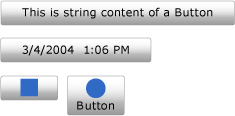
Následující příklad ukazuje, jak vytvořit čtyři Button ovládací prvky s Content nastavenou na jednu z následujících možností:
Řetězec.
Objekt DateTime .
Objekt UIElement .
Ovládací Panel prvek, který obsahuje další UIElement objekty.
Poznámka:
I když verze XAML (Extensible Application Markup Language) v příkladu může používat <Button.Content> značky kolem obsahu každého tlačítka, není to nutné. Další informace najdete v tématu Přehled XAML (WPF).
<!--Create a Button with a string as its content.-->
<Button>This is string content of a Button</Button>

<!--Create a Button with a DateTime object as its content.-->
<Button xmlns:sys="clr-namespace:System;assembly=mscorlib">
  <sys:DateTime>2004/3/4 13:6:55</sys:DateTime>
</Button>

<!--Create a Button with a single UIElement as its content.-->
<Button>
  <Rectangle Height="40" Width="40" Fill="Blue"/>
</Button>

<!--Create a Button with a panel that contains multiple objects
as its content.-->
<Button>
  <StackPanel>
    <Ellipse Height="40" Width="40" Fill="Blue"/>
    <TextBlock TextAlignment="Center">Button</TextBlock>
  </StackPanel>
</Button>
// Create a Button with a string as its content.
Button stringContent = new Button();
stringContent.Content = "This is string content of a Button";

// Create a Button with a DateTime object as its content.
Button objectContent = new Button();
DateTime dateTime1 = new DateTime(2004, 3, 4, 13, 6, 55);

objectContent.Content = dateTime1;

// Create a Button with a single UIElement as its content.
Button uiElementContent = new Button();

Rectangle rect1 = new Rectangle();
rect1.Width = 40;
rect1.Height = 40;
rect1.Fill = Brushes.Blue;
uiElementContent.Content = rect1;

// Create a Button with a panel that contains multiple objects
// as its content.
Button panelContent = new Button();
StackPanel stackPanel1 = new StackPanel();
Ellipse ellipse1 = new Ellipse();
TextBlock textBlock1 = new TextBlock();

ellipse1.Width = 40;
ellipse1.Height = 40;
ellipse1.Fill = Brushes.Blue;

textBlock1.TextAlignment = TextAlignment.Center;
textBlock1.Text = "Button";

stackPanel1.Children.Add(ellipse1);
stackPanel1.Children.Add(textBlock1);

panelContent.Content = stackPanel1;
' Add a string to a button.
Dim stringContent As New Button()
stringContent.Content = "This is string content of a Button"

' Add a DateTime object to a button.
Dim objectContent As New Button()
Dim dateTime1 As New DateTime(2004, 3, 4, 13, 6, 55)

objectContent.Content = dateTime1

' Add a single UIElement to a button.
Dim uiElementContent As New Button()

Dim rect1 As New Rectangle()
rect1.Width = 40
rect1.Height = 40
rect1.Fill = Brushes.Blue
uiElementContent.Content = rect1

' Add a panel that contains multpile objects to a button.
Dim panelContent As New Button()
Dim stackPanel1 As New StackPanel()
Dim ellipse1 As New Ellipse()
Dim textBlock1 As New TextBlock()

ellipse1.Width = 40
ellipse1.Height = 40
ellipse1.Fill = Brushes.Blue

textBlock1.TextAlignment = TextAlignment.Center
textBlock1.Text = "Button"

stackPanel1.Children.Add(ellipse1)
stackPanel1.Children.Add(textBlock1)

panelContent.Content = stackPanel1
Následující obrázek ukazuje čtyři tlačítka vytvořená v předchozím příkladu.
Poznámky
Vzhledem k tomu, že Content vlastnost je typu Object, neexistují žádná omezení týkající se toho, co lze vložit do ContentControl. Je Content zobrazen pomocí ContentPresenter, který je v ControlTemplateContentControl. Každý ContentControl typ v WPF má ContentPresenter ve svém výchozím nastavení ControlTemplate. Další informace o zobrazení ContentPresenterContentnaleznete v tématu ContentPresenter.
Informace o vlastnosti závislosti
| Položka | Hodnota |
|---|---|
| Pole Identifikátor | ContentProperty |
Vlastnosti metadat nastavené na true |
None |
Použití atributu XAML
<object Content="content"/>
Použití elementu vlastnosti XAML
<object> content</object>
Hodnoty XAML
Content Text nebo jeden objekt
