TextBlock.LineStackingStrategy Vlastnost
Definice
Důležité
Některé informace platí pro předběžně vydaný produkt, který se může zásadně změnit, než ho výrobce nebo autor vydá. Microsoft neposkytuje žádné záruky, výslovné ani předpokládané, týkající se zde uváděných informací.
Získá nebo nastaví mechanismus, kterým je řádkové pole určeno pro každý řádek textu v rámci TextBlock.
public:
 property System::Windows::LineStackingStrategy LineStackingStrategy { System::Windows::LineStackingStrategy get(); void set(System::Windows::LineStackingStrategy value); };
public System.Windows.LineStackingStrategy LineStackingStrategy { get; set; }member this.LineStackingStrategy : System.Windows.LineStackingStrategy with get, setPublic Property LineStackingStrategy As LineStackingStrategyHodnota vlastnosti
Mechanismus, kterým je pole řádku určeno pro každý řádek textu v rámci TextBlock. Výchozí hodnota je MaxHeight.
Příklady
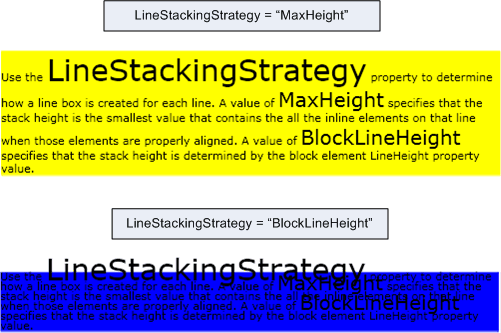
Následující příklad ukazuje, jak pomocí LineStackingStrategy vlastnosti určit, jak jsou řádková pole vytvořena pro textové řádky a TextBlock. První TextBlock má LineStackingStrategy hodnotu MaxHeight a druhá TextBlock má hodnotu BlockLineHeight.
<Page xmlns="http://schemas.microsoft.com/winfx/2006/xaml/presentation"
  xmlns:x="http://schemas.microsoft.com/winfx/2006/xaml">
  <StackPanel>

    <!-- This TextBlock has a LineStackingStrategy set to "MaxHeight". -->
    <TextBlock LineStackingStrategy="MaxHeight" LineHeight="10" Width="500" TextWrapping="Wrap"
     Background="Yellow">
      Use the <Span FontSize="30">LineStackingStrategy</Span> property to determine how a line box is
      created for each line. A value of <Span FontSize="20">MaxHeight</Span> specifies that the stack
      height is the smallest value that contains all the inline elements on that line when those
      elements are properly aligned. A value of <Span FontSize="20">BlockLineHeight</Span> specifies
      that the stack height is determined by the block element LineHeight property value.
    </TextBlock>

    <!-- Here is the same TextBlock but the LineStackingStrategy is set to "BlockLineHeight". -->
    <TextBlock LineStackingStrategy="BlockLineHeight" LineHeight="10" Width="500" TextWrapping="Wrap"
     Background="Blue" Margin="0,40,0,0">
      Use the <Span FontSize="30">LineStackingStrategy</Span> property to determine how a line box is
      created for each line. A value of <Span FontSize="20">MaxHeight</Span> specifies that the stack
      height is the smallest value that contains all the inline elements on that line when those
      elements are properly aligned. A value of <Span FontSize="20">BlockLineHeight</Span> specifies
      that the stack height is determined by the block element LineHeight property value.
    </TextBlock>

  </StackPanel>
</Page>
Následující obrázek znázorňuje výsledek předchozího kódu.
Poznámky
Tato vlastnost závislosti má také připojené použití vlastností. V JAZYCE XAML je <object TextBlock.LineStackingStrategy="value".../>použití , kde objekt je object element (obvykle flow element) obsažený v objektu TextBlock, a hodnota je řetězcová hodnota výčtu LineStackingStrategy . V kódu je použití připojené vlastnosti podporováno GetLineStackingStrategy a SetLineStackingStrategy. Použití připojené vlastnosti není běžné.
Informace o vlastnosti závislosti
| Položka | Hodnota |
|---|---|
| Pole Identifikátor | LineStackingStrategyProperty |
Vlastnosti metadat nastavené na true |
AffectsMeasure, AffectsRender |
