InlineUIContainer.Child Vlastnost
Definice
Důležité
Některé informace platí pro předběžně vydaný produkt, který se může zásadně změnit, než ho výrobce nebo autor vydá. Microsoft neposkytuje žádné záruky, výslovné ani předpokládané, týkající se zde uváděných informací.
Získá nebo nastaví UIElement hostovaný InlineUIContainer.
public:
 property System::Windows::UIElement ^ Child { System::Windows::UIElement ^ get(); void set(System::Windows::UIElement ^ value); };
public System.Windows.UIElement Child { get; set; }member this.Child : System.Windows.UIElement with get, setPublic Property Child As UIElementHodnota vlastnosti
Hostuje UIElement ho InlineUIContainer.
Příklady
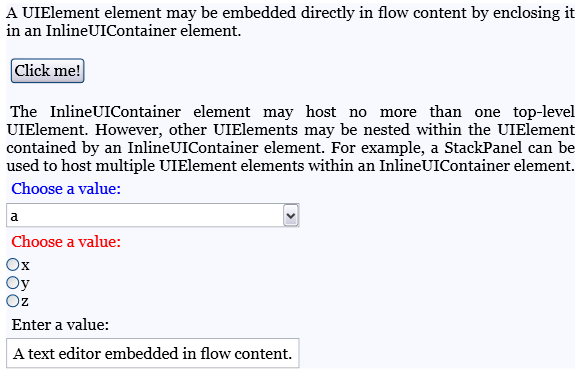
Následující příklad ukazuje, jak používat InlineUIContainer prvky k hostování UIElement prvků v obsahu toku.
<FlowDocument ColumnWidth="400">
  <Paragraph Background="GhostWhite">
    <Run>
      A UIElement element may be embedded directly in flow content
      by enclosing it in an InlineUIContainer element.
    </Run>
    <LineBreak/>
    <LineBreak/>
    <InlineUIContainer>
      <Button>Click me!</Button>
    </InlineUIContainer>
    <LineBreak/>
    <LineBreak/>
    <Run>
      The InlineUIContainer element may host no more than one top-level
      UIElement.  However, other UIElements may be nested within the
      UIElement contained by an InlineUIContainer element.  For example,
      a StackPanel can be used to host multiple UIElement elements within
      an InlineUIContainer element.
    </Run>
    <InlineUIContainer>
      <StackPanel>
        <Label Foreground="Blue">Choose a value:</Label>
        <ComboBox>
          <ComboBoxItem IsSelected="True">a</ComboBoxItem>
          <ComboBoxItem>b</ComboBoxItem>
          <ComboBoxItem>c</ComboBoxItem>
        </ComboBox>
        <Label Foreground ="Red">Choose a value:</Label>
        <StackPanel>
          <RadioButton>x</RadioButton>
          <RadioButton>y</RadioButton>
          <RadioButton>z</RadioButton>
        </StackPanel>
        <Label>Enter a value:</Label>
        <TextBox>
          A text editor embedded in flow content.
        </TextBox>
      </StackPanel>
    </InlineUIContainer>
  </Paragraph>
</FlowDocument>
Následující obrázek ukazuje, jak se tento příklad vykresluje.
Následující příklad ukazuje, jak používat Child vlastnost programově.
Paragraph parx = new Paragraph();
Run run1 = new Run(" Text to precede the button... ");
Run run2 = new Run(" Text to follow the button... ");

// Create a new button to be hosted in the paragraph.
Button buttonx = new Button();
buttonx.Content = "Click me!";

// Create a new InlineUIContainer, and assign the button
// as the UI container's child.
InlineUIContainer uiCont = new InlineUIContainer();
uiCont.Child = buttonx;

// Add the text runs and UI container to the paragraph, in order.
parx.Inlines.Add(run1);
parx.Inlines.Add(uiCont);
parx.Inlines.Add(run2);
Dim parx As New Paragraph()
Dim run1 As New Run(" Text to precede the button... ")
Dim run2 As New Run(" Text to follow the button... ")

' Create a new button to be hosted in the paragraph.
Dim buttonx As New Button()
buttonx.Content = "Click me!"

' Create a new InlineUIContainer, and assign the button
' as the UI container's child.
Dim uiCont As New InlineUIContainer()
uiCont.Child = buttonx

' Add the text runs and UI container to the paragraph, in order.
parx.Inlines.Add(run1)
parx.Inlines.Add(uiCont)
parx.Inlines.Add(run2)
Poznámky
Může InlineUIContainer přímo hostovat maximálně jedno UIElement dítě. Podřízený prvek hostovaný podřízeným prvkem InlineUIContainer však může hostovat vlastní podřízené položky.
Zabalení UIElement souboru do souboru InlineUIContainer XAML je ekvivalentní nastavení, které UIElement je hodnotou Child vlastnosti.
