GradientBrush.SpreadMethod Vlastnost
Definice
Důležité
Některé informace platí pro předběžně vydaný produkt, který se může zásadně změnit, než ho výrobce nebo autor vydá. Microsoft neposkytuje žádné záruky, výslovné ani předpokládané, týkající se zde uváděných informací.
Získá nebo nastaví typ rozprostřené metody, která určuje, jak nakreslit přechod, který začíná nebo končí uvnitř hranic objektu, který má být malován.
public:
 property System::Windows::Media::GradientSpreadMethod SpreadMethod { System::Windows::Media::GradientSpreadMethod get(); void set(System::Windows::Media::GradientSpreadMethod value); };
public System.Windows.Media.GradientSpreadMethod SpreadMethod { get; set; }member this.SpreadMethod : System.Windows.Media.GradientSpreadMethod with get, setPublic Property SpreadMethod As GradientSpreadMethodHodnota vlastnosti
Typ metody šíření použité k vykreslení přechodu. Výchozí hodnota je Pad.
Příklady
Následující příklad používá různá SpreadMethod nastavení pro několik LinearGradientBrush objektů a RadialGradientBrush objektů.
<Page
  xmlns="http://schemas.microsoft.com/winfx/2006/xaml/presentation"
  xmlns:x="http://schemas.microsoft.com/winfx/2006/xaml"
  Title="Gradient Spread Methods">
  <StackPanel>

    <!-- The following three examples show the different gradient spread methods
         applied to linear gradient brushes. -->
    <Rectangle Width="150" Height="75" Stroke="Black">
      <Rectangle.Fill>

        <!-- Pad -->
        <LinearGradientBrush StartPoint="0.3,0.5" EndPoint="0.7,0.5" SpreadMethod="Pad">
          <GradientStop Color="White" Offset="0" />
          <GradientStop Color="#333333" Offset="1" />
        </LinearGradientBrush>
      </Rectangle.Fill>
    </Rectangle>

    <Rectangle Width="150" Height="75" Stroke="Black">
      <Rectangle.Fill>

        <!-- Reflect -->
        <LinearGradientBrush StartPoint="0.3,0.5" EndPoint="0.7,0.5" SpreadMethod="Reflect">
          <GradientStop Color="White" Offset="0" />
          <GradientStop Color="#333333" Offset="1" />
        </LinearGradientBrush>
      </Rectangle.Fill>
    </Rectangle>

    <Rectangle Width="150" Height="75" Stroke="Black">
      <Rectangle.Fill>

        <!-- Repeat -->
        <LinearGradientBrush StartPoint="0.3,0.5" EndPoint="0.7,0.5" SpreadMethod="Repeat">
          <GradientStop Color="White" Offset="0" />
          <GradientStop Color="#333333" Offset="1" />
        </LinearGradientBrush>
      </Rectangle.Fill>
    </Rectangle>

    <!-- The following three examples show the different gradient spread methods
         applied to radial gradient brushes. -->
    <Rectangle Width="150" Height="75" Stroke="Black">
      <Rectangle.Fill>

        <!-- Pad -->
        <RadialGradientBrush Center="0.5,0.5" RadiusX="0.3" RadiusY="0.3" SpreadMethod="Pad">
          <GradientStop Color="White" Offset="0" />
          <GradientStop Color="#333333" Offset="1" />
        </RadialGradientBrush>
      </Rectangle.Fill>
    </Rectangle>

    <Rectangle Width="150" Height="75" Stroke="Black">
      <Rectangle.Fill>

        <!-- Reflect -->
        <RadialGradientBrush Center="0.5,0.5" RadiusX="0.3" RadiusY="0.3" SpreadMethod="Reflect">
          <GradientStop Color="White" Offset="0" />
          <GradientStop Color="#333333" Offset="1" />
        </RadialGradientBrush>
      </Rectangle.Fill>
    </Rectangle>

    <Rectangle Width="150" Height="75" Stroke="Black">
      <Rectangle.Fill>

        <!-- Repeat -->
        <RadialGradientBrush Center="0.5,0.5" RadiusX="0.3" RadiusY="0.3" SpreadMethod="Repeat">
          <GradientStop Color="White" Offset="0" />
          <GradientStop Color="#333333" Offset="1" />
        </RadialGradientBrush>
      </Rectangle.Fill>
    </Rectangle>

  </StackPanel>
</Page>
Poznámky
Následující obrázek ukazuje dostupné metody šíření a jejich účinek na LinearGradientBrush a RadialGradientBrush. Červená čára označuje přechodový prostor. A LinearGradientBrush definuje prostor přechodu s jeho StartPoint a EndPoint vlastnostmi. A RadialGradientBrush definuje svůj přechodový prostor s jeho Center, RadiusXa RadiusY vlastnosti.
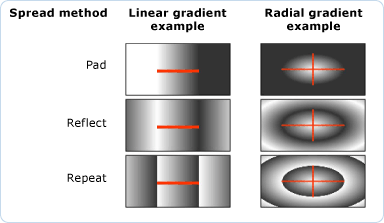 Metody šíření přechodu
Informace o vlastnosti závislosti
| Item | Hodnota |
|---|---|
| Pole Identifikátor | SpreadMethodProperty |
Vlastnosti metadat nastavené na true |
None |
