TaskbarItemInfo.ProgressState Vlastnost
Definice
Důležité
Některé informace platí pro předběžně vydaný produkt, který se může zásadně změnit, než ho výrobce nebo autor vydá. Microsoft neposkytuje žádné záruky, výslovné ani předpokládané, týkající se zde uváděných informací.
Získá nebo nastaví hodnotu, která označuje, jak se indikátor průběhu zobrazuje na hlavním panelu tlačítko.
public:
 property System::Windows::Shell::TaskbarItemProgressState ProgressState { System::Windows::Shell::TaskbarItemProgressState get(); void set(System::Windows::Shell::TaskbarItemProgressState value); };
public System.Windows.Shell.TaskbarItemProgressState ProgressState { get; set; }member this.ProgressState : System.Windows.Shell.TaskbarItemProgressState with get, setPublic Property ProgressState As TaskbarItemProgressStateHodnota vlastnosti
Hodnota výčtu, která označuje, jak se indikátor průběhu zobrazuje na tlačítku hlavního panelu. Výchozí hodnota je None.
Příklady
Následující příklad ukazuje, jak nastavit ProgressState vlastnost v kódu. Stav je nastaven v obslužné rutině BackgroundWorker.RunWorkerCompleted události, která označuje, jestli uživatel zastavil úlohu na pozadí, skončil s chybou nebo normálně dokončena. Tento příklad je součástí většího příkladu poskytnutého TaskbarItemInfo pro třídu.
void bw_RunWorkerCompleted(object sender, RunWorkerCompletedEventArgs e)
{
    // When the task ends, change the ProgressState and Overlay
    // of the taskbar item to indicate a stopped task.
    if (e.Cancelled)
    {
        // The task was stopped by the user. Show the progress indicator
        // in the paused state.
        this.taskBarItemInfo1.ProgressState = TaskbarItemProgressState.Paused;
    }
    else if (e.Error != null)
    {
        // The task ended with an error. Show the progress indicator
        // in the error state.
        this.taskBarItemInfo1.ProgressState = TaskbarItemProgressState.Error;
    }
    else
    {
        // The task completed normally. Remove the progress indicator.
        this.taskBarItemInfo1.ProgressState = TaskbarItemProgressState.None;
    }
    // In all cases, show the 'Stopped' overlay.
    this.taskBarItemInfo1.Overlay = (DrawingImage)this.FindResource("StopImage");
}
Private Sub bw_RunWorkerCompleted(ByVal sender As Object, ByVal e As RunWorkerCompletedEventArgs)
    ' When the task ends, change the ProgressState and Overlay
    ' of the taskbar item to indicate a stopped task.
    If e.Cancelled = True Then
        ' The task was stopped by the user. Show the progress indicator
        ' in the paused state.
        Me.taskBarItemInfo1.ProgressState = TaskbarItemProgressState.Paused
    ElseIf e.Error IsNot Nothing Then
        ' The task ended with an error. Show the progress indicator
        ' in the error state.
        Me.taskBarItemInfo1.ProgressState = TaskbarItemProgressState.Error
    Else
        ' The task completed normally. Remove the progress indicator.
        Me.taskBarItemInfo1.ProgressState = TaskbarItemProgressState.None
        ' In all cases, show the 'Stopped' overlay.
        Me.taskBarItemInfo1.Overlay = Me.FindResource("StopImage")
    End If
End Sub
Poznámky
Průběh dlouhotrvajících úkolů můžete sdělit zobrazením indikátoru průběhu na tlačítku hlavního panelu Windows 7. Barva ukazatele je určena ProgressState vlastností, která obsahuje jednu z hodnot výčtu TaskbarItemProgressState . Pokud je , ProgressStateNormalindikátor je zelený. Když Pausedje indikátor žlutý. Když Errorje indikátor červený. U těchto stavů ProgressValue vlastnost určuje, kolik tlačítka hlavního panelu je vyplněno indikátorem průběhu. ProgressValueje ignorována pro jiné hodnoty .ProgressState Indeterminate zobrazuje pulzující zelený indikátor na celém tlačítku hlavního panelu. Není zobrazen žádný ukazatel pro None.
Následující obrázek znázorňuje indikátor průběhu hlavního panelu Normal ve stavu.
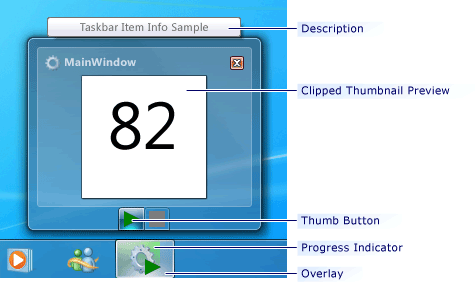 Indikátor průběhu hlavního panelu Windows
