TextDecoration.Location Vlastnost
Definice
Důležité
Některé informace platí pro předběžně vydaný produkt, který se může zásadně změnit, než ho výrobce nebo autor vydá. Microsoft neposkytuje žádné záruky, výslovné ani předpokládané, týkající se zde uváděných informací.
Získá nebo nastaví svislé umístění, ve kterém je text dekorace vykreslena.
public:
 property System::Windows::TextDecorationLocation Location { System::Windows::TextDecorationLocation get(); void set(System::Windows::TextDecorationLocation value); };
public System.Windows.TextDecorationLocation Location { get; set; }member this.Location : System.Windows.TextDecorationLocation with get, setPublic Property Location As TextDecorationLocationHodnota vlastnosti
Svislé umístění, na kterém je text dekorace nakreslena.
Příklady
V následujícím příkladu kódu se vytvoří přeškrtnuté textové dekorace s plným barevným štětcem pera. Vlastnost Location je nastavena na hodnotu Strikethrough.
// Use the default font values for the strikethrough text decoration.
private void SetDefaultStrikethrough()
{
    // Set the underline decoration directly to the text block.
    TextBlock1.TextDecorations = TextDecorations.Strikethrough;
}
' Use the default font values for the strikethrough text decoration.
Private Sub SetDefaultStrikethrough()
    ' Set the underline decoration directly to the text block.
    TextBlock1.TextDecorations = TextDecorations.Strikethrough
End Sub
<!-- Use the default font values for the strikethrough text decoration. -->
<TextBlock
  TextDecorations="Strikethrough"
  FontSize="36" >
  The quick red fox
</TextBlock>
Poznámky
Následující příklad ukazuje umístění text dekorace vzhledem k textu.
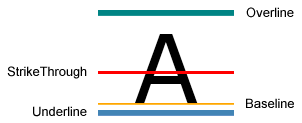 Příklad typů dekorací textu
Vlastnost PenOffset umožňuje odsazení textové dekorace ze zadaného Location.
Informace o vlastnosti závislosti
| Položka | Hodnota |
|---|---|
| Pole Identifikátor | LocationProperty |
Vlastnosti metadat nastavené na true |
None |
